
Backgrounnd
If your computer (include Linux, Mac or Windows system) doesn't have NVIDIA GPU, you can't run most popular AI models easily (GPU not supported), until I saw these open source projects
- Ollama & llama.cpp (text2text) — is focused on natural language processing tasks, such as text generation, question answering, and language understanding, using the LLaMA language model.
- stable-diffusion.cpp (text2image and image2image) — is designed for image generation tasks, specifically converting textual descriptions into corresponding images, using the Stable Diffusion model.
Notes: Given that AI is currently one of the most trending topics in the market, there is a lot of similar tools available for you to choose from. You're not limited to just those tools.
It's important to note that running large AI models locally can be resource-intensive, especially on a MacBook with limited computing CPU and RAM. You may need to adjust the model size or use techniques like quantization or pruning to reduce the resource requirements.
Let's put them together, I will share the simple way to generate images locally, with additional tools.
I am Mac user, the same solution is suitable for Linux or Windows as well
Steps to Generate Images with AI models
There are two steps
- Generate image prompts with text2text AI
- Generate image with text2image AI
Why we need generate image prompts first?
- When requesting an AI to generate an image, you may not always have a clear idea of what specific image you want. This is where the second AI, which generates image prompts, comes in handy. It helps refine your request by providing specific details or parameters that can guide the image-generating AI in producing the desired image.
- For example, if you want an AI to generate a picture of a cat, the image prompt AI might provide additional details such as the cat's breed, pose, background, style, art, or any other characteristics you desire. This helps the image-generating AI better understand your preferences and create a more accurate representation of what you have in mind.
- In essence, the image prompt AI acts as a translator between your vague request and the image-generating AI, helping to bridge the gap between your intention and the final result.
Implement detail with steps
Install below tools first
- Ollama — https://github.com/ollama/ollama
- Download ollama models
brxce/stable-diffusion-prompt-generatorfor prompt generate for image description. - SD command line— https://github.com/leejet/stable-diffusion.cpp
- Download Stable diffusion model which can run with CPU, for example,
stable-diffusion-2–1_768-ema-pruned.ckptat https://huggingface.co/stabilityai/stable-diffusion-2-1
Copy below script, for example, as image.sh
#!/usr/bin/env bash

# Set default model path
export model="models/stable-diffusion-2-1_768-ema-pruned.ckpt"

# Set default prompt or use provided prompt argument
export pr="${1:-a cat on a mat}"

# File to store generated images and details
collection="image.list"

# Generate prompt using brxce/stable-diffusion-prompt-generator
generated_prompt=$(ollama run brxce/stable-diffusion-prompt-generator "${pr}")

echo "${generated_prompt}"

# Array of types
# ("f32" "f16" "q4_0" "q4_1" "q5_0" "q5_1" "q8_0")
# the default is the type of the weight file.
# I didn't set it here

# Array of sampling methods
# "euler" "euler_a" "heun" "dpm2" "dpm++2s_a" "dpm++2m" "dpm++2mv2" "lcm"
# default is "euler_a"
sampling_method="euler_a"

# Generate a random seed between 5 and 10000
seed=$((RANDOM % 9996 + 5))

# Generate a random number of steps between 5 and 20
# default is 20
steps="20"

# Get formatted date for image and details
formatted_date=$(date +"%Y%m%d-%H%M%S")

# Print the selected type, sampling method, seed, and steps to collection
echo "date: ${formatted_date}" >> "${collection}"
echo "Sampling Method: ${sampling_method}" >> "${collection}"
echo "Random Seed: $seed" >> "${collection}"
echo "Random Steps: $steps" >> "${collection}"

# Run stable diffusion with selected parameters
set -x
build/bin/sd -m "${model}" -p "${generated_prompt}" --seed "${seed}" --sampling-method "${sampling_method}"

# Rename and move output image
mv output.png "output-${formatted_date}.png"
echo "output-${formatted_date}.png" >> "${collection}"
echo "===================" >> "${collection}"
Explanation
- The prompt can be input from command line or use the default, which is
a cat on mat - Generate the image file and put timestamp on it. So it will not be overrided from next job
- Save a record for each image.
Now let's run the script
$ chmod +x image.sh
$ ./image.sh "a cat on mat"

 a cat on a mat, 10 minutes, trending on artstation, beautiful, cinematic lighting, hyperrealistic, octane render, 8k resolution, high detail, unreal engine
+ build/bin/sd -m models/stable-diffusion-2-1_768-ema-pruned.ckpt -p ' a cat on a mat, 10 minutes, trending on artstation, beautiful, cinematic lighting, hyperrealistic, octane render, 8k resolution, high detail, unreal engine' --seed 5230 --sampling-method euler_a
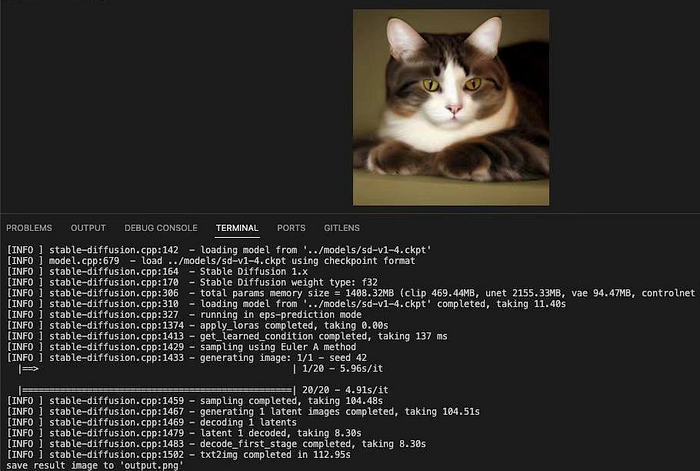
[INFO ] stable-diffusion.cpp:142  - loading model from 'models/stable-diffusion-2-1_768-ema-pruned.ckpt'
[INFO ] model.cpp:679  - load models/stable-diffusion-2-1_768-ema-pruned.ckpt using checkpoint format
[INFO ] stable-diffusion.cpp:164  - Stable Diffusion 2.x
[INFO ] stable-diffusion.cpp:170  - Stable Diffusion weight type: f32
[INFO ] stable-diffusion.cpp:306  - total params memory size = 4039.58MB (clip 1346.53MB, unet 2179.71MB, vae 94.47MB, controlnet 0.00MB)
[INFO ] stable-diffusion.cpp:310  - loading model from 'models/stable-diffusion-2-1_768-ema-pruned.ckpt' completed, taking 11.80s
[INFO ] stable-diffusion.cpp:325  - running in v-prediction mode
[INFO ] stable-diffusion.cpp:1374 - apply_loras completed, taking 0.00s
[INFO ] stable-diffusion.cpp:1413 - get_learned_condition completed, taking 488 ms
[INFO ] stable-diffusion.cpp:1429 - sampling using Euler A method
[INFO ] stable-diffusion.cpp:1433 - generating image: 1/1 - seed 5230
  |==================================================| 20/20 - 16.83s/it
[INFO ] stable-diffusion.cpp:1459 - sampling completed, taking 317.58s
[INFO ] stable-diffusion.cpp:1467 - generating 1 latent images completed, taking 317.81s
[INFO ] stable-diffusion.cpp:1469 - decoding 1 latents
[INFO ] stable-diffusion.cpp:1479 - latent 1 decoded, taking 33.35s
[INFO ] stable-diffusion.cpp:1483 - decode_first_stage completed, taking 33.35s
[INFO ] stable-diffusion.cpp:1502 - txt2img completed in 351.65s
save result image to 'output.png'
+ mv output.png output-20240325-202348.png
+ echo output-20240325-202348.png
+ echo ===================
After waiting for several minutes, you will get image file generated locally. You can view the image with any picure tools or browsers.
Learning is fun
# AI # ollama # llama.cpp # stable-diffusion.cpp # Prompt generator # mac users # LLM