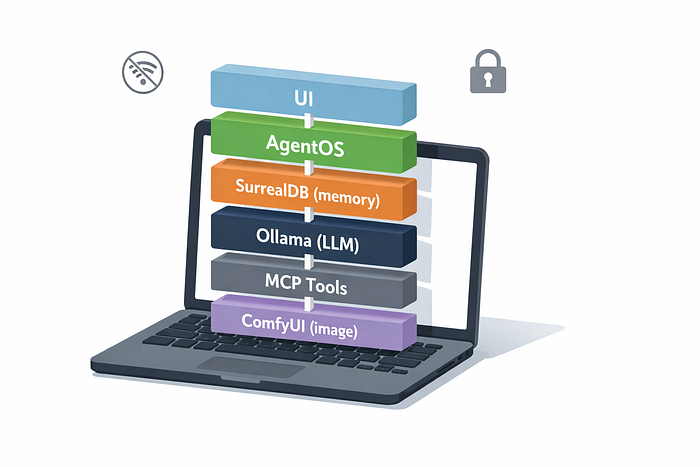


If you've ever tried to build an "agent" that helps with real work (not just a demo), you usually hit the same wall quickly: your data leaves the machine, costs become unpredictable, and the whole setup is hard to reproduce, even for yourself a week later.
This article is about the opposite approach.
The goal is a full-local agent stack: models run on your computer, memory persists across sessions, and tools live behind a clean boundary so the system stays debuggable instead of turning into a single tangled codebase. You can run it offline after setup, keep sensitive documents on disk, and get predictable performance and cost.
In practice, that means combining a few pieces that each do one job well: an orchestration layer (Agno), a database that can store both state and vectors (SurrealDB), a local inference endpoint (Ollama), and a tool protocol that keeps risky capabilities separate (MCP). If you also want image generation in the same "agent can call tools" model, ComfyUI fits naturally as another local tool.
This is a hands-on deep dive: you'll understand the architecture, the tradeoffs, and the patterns you can reuse in your own agent products, not just how to run one command and hope it works.
Note: This is a personal open-source project and an educational write-up.
TL;DR
A "full-local agent" is one where inference, memory, and tool execution happen on your machine. The upside is privacy, reproducibility, and predictable cost. The downside is operational reality: you trade cloud simplicity for disk size, RAM/VRAM pressure, and more moving parts, which is exactly why clear boundaries (especially for tools) matter.
What "full-local agents" actually mean
"Local agents" can mean anything from "the UI runs locally" to "everything is offline and air-gapped". In this post, I use a stricter definition: the model runs locally (via Ollama), state is durable and stored locally (via SurrealDB), and tools are separate local processes exposed through an explicit interface (via MCP), rather than being imported directly into the agent runtime.
That last part is easy to underestimate. In real systems, the risky capabilities aren't the model weights, they're the tools: reading files, writing PDFs, calling system binaries, or triggering image generation. Treating tools as their own boundary makes the whole stack easier to audit, constrain, and evolve.
One last practical detail: "offline-first" usually starts with an online step. The first setup will download models and checkpoints (often in the 15–20GB range), but once that's done you can unplug and still have a usable system.
Quick tour of the stack (Agno, SurrealDB, Ollama, ComfyUI, MCP)
Here is the short version of what each piece does, and why it is here.
Agno: agent orchestration. It is the layer where you define agents, teams, workflows, and how tools get called. It also fits well with a FastAPI runtime style, which is exactly what this repo uses for the backend.
SurrealDB: state and memory. It holds sessions, extracted "user memories", knowledge chunks, and embeddings for retrieval. SurrealDB is multi-model and supports vector search workflows (and even files storage in the future), which makes it a reasonable "single database" choice for agent apps.
Ollama: local LLM serving. It runs a small chat model (example in the repo docs: `ministral-3:3b`) and an embedding model (example: `nomic-embed-text`). It exposes an API at a predictable local endpoint.
ComfyUI: local image workflows. It is the diffusion side of the stack, and it is wired in as a tool the agent can invoke.
MCP servers: the tool interface. Each server is a local service that exposes "tools" (like "generate_chart" or "render_pdf") that the agent can call through a standard protocol.
System architecture: how the pieces talk to each other
The repo is structured like a small product, not a notebook demo:
- A Next.js UI on port 3000
- A Python backend (FastAPI) on port 7777
- SurrealDB on port 8000
- MCP tool servers (PDF, charts, ComfyUI bridge) on ports 3001–3003
- "Services host": Ollama on 11434, ComfyUI on 8188
A simplified data flow looks like this:
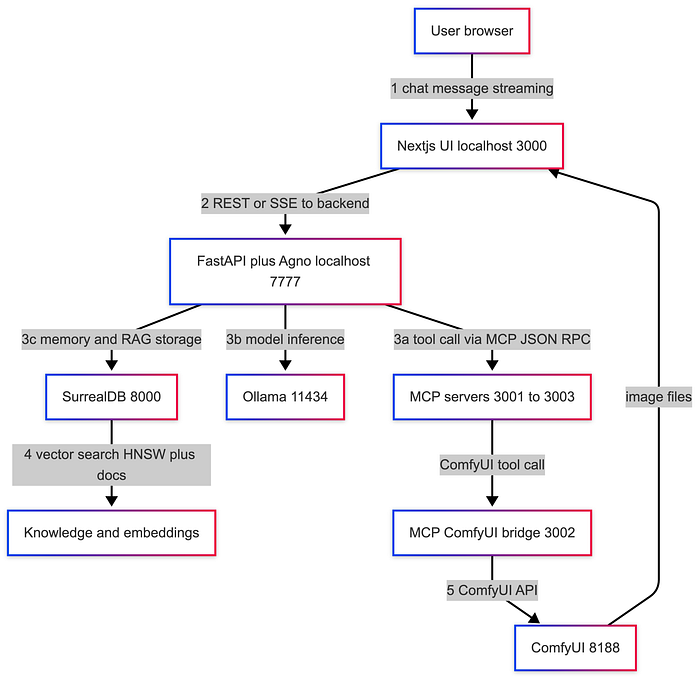
Where state lives: SurrealDB stores sessions, extracted user memories, and knowledge base data (chunks and vectors).
Where tools live: MCP servers are local processes. They are intentionally separate from the agent runtime.
Where models run: Ollama serves the chat model and embedding model locally. :contentReference
Insight: Put your "dangerous" abilities behind MCP. File access, PDF rendering, and image generation all touch the filesystem and external binaries. Keeping them in separate tool servers makes it easier to audit, sandbox, and replace them later.
Core workflows (examples you can try today)
This repo is useful because it is not just "chat". It demonstrates patterns you will reuse in real agent products.
I will walk through four workflows:
- persistent memory across sessions
- local RAG with SurrealDB
- tool-using agent via MCP (charts and PDF)
- multimodal flow via ComfyUI
- local deep-search team
Workflow 1: Persistent user memory across sessions
Input: A simple user statement you want the system to remember.
Steps:
- Start a chat.
- Tell the agent a stable fact (name, preference, role).
- End the session.
- Start a new session and ask what it remembers.
Output: The agent can recall extracted facts across sessions, scoped by `user_id`.
Insight: Memory is a product decision disguised as a database table. Decide what the agent is allowed to remember, how it updates facts, and how users can inspect or delete memory.
Workflow 2: Local RAG with SurrealDB (knowledge base + embeddings)
Input: An url of a downloadable PDF or document you want searchable, plus a question grounded in that document.
Steps:
- Ingest a document.
- Generate embeddings locally (example model: `nomic-embed-text` via Ollama).
- Store chunks and vectors in SurrealDB.
- At query time, embed the user question, run vector search, and inject top chunks into context.
Output: Grounded answers with citations back to retrieved chunks (depending on how the UI renders it).
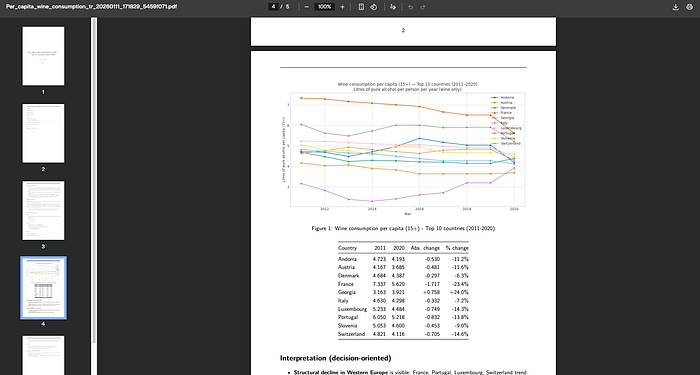
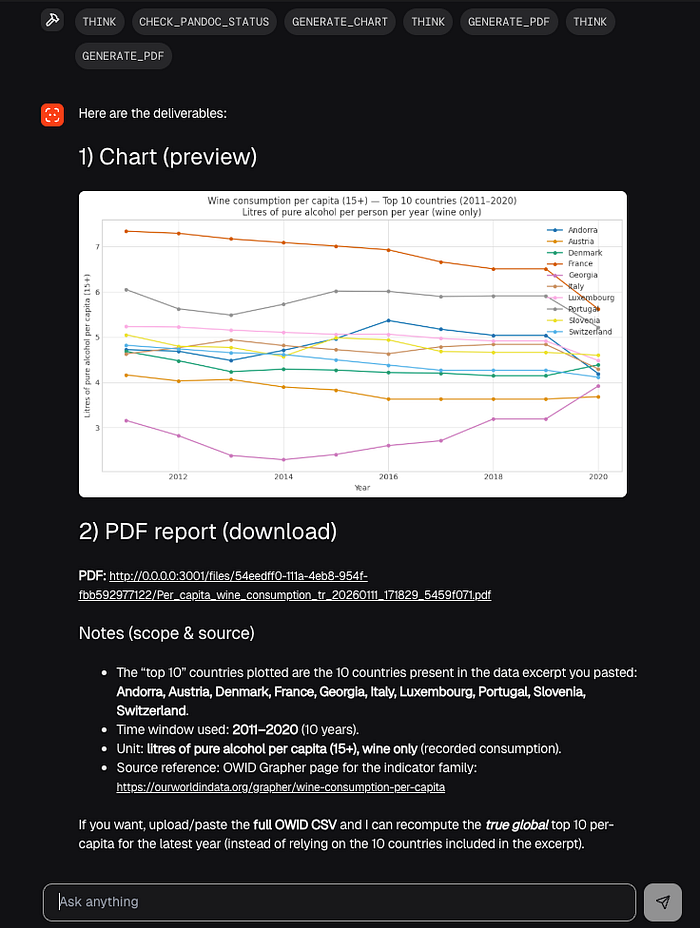
Workflow 3: Tool-using agent via MCP (charts and PDF)
Input A small dataset or a table (even pasted CSV content) and a request like "plot a histogram and write a 1-page summary as a PDF".
Steps:
- The agent decides it needs a chart.
- It calls the chart MCP server (matplotlib-based) with chart type and params.
- It gets back an image file path or URL.
- It calls the PDF MCP server, passing Markdown content plus the chart.
- It returns a final PDF artifact (local path or downloadable URL, depending on the UI).
Output: A chart and a PDF generated locally.
This is where MCP is doing real work: it gives a standardized way for "clients" (the agent runtime) to call "tools" hosted by separate servers.
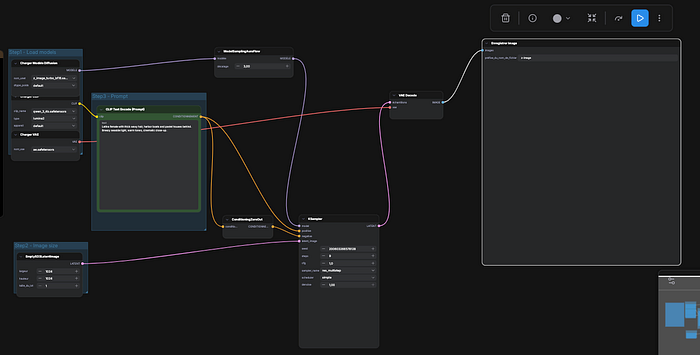
Workflow 4: Multimodal flow using ComfyUI as a tool
Input A text prompt plus parameters like aspect ratio, quality steps, and seed.
Steps:
- Agent calls the ComfyUI bridge MCP server.
- The bridge translates the request to a ComfyUI API call.
- ComfyUI queues the workflow, runs generation, and writes the image locally.
- The tool returns a file location or URL that the UI can render.
Output An image generated locally, with reproducibility knobs (seed, steps, ratio).
ComfyUI's documentation centers on node-based workflows and an installable local runtime, which is exactly why it fits the "agent calls an image tool" story.
Design decisions and tradeoffs (the deep part)
This stack is opinionated. That is a good thing, but it comes with real tradeoffs.
Why SurrealDB for memory and vectors
The pragmatic pitch is "one database for multiple shapes of data".
In an agent product, you end up storing:
- session records (append-only logs)
- user memory (structured facts that update)
- knowledge chunks (documents)
- embeddings (vectors)
- sometimes relationships (user owns sessions, sessions reference docs, etc)
- files, documents
SurrealDB positions itself as a multi-model database, including vector search capabilities. That makes it reasonable to avoid the typical "Postgres + Redis + vector DB" sprawl on day one.
Tradeoffs: Smaller ecosystem than Postgres for ops tooling. You need to learn SurrealQL. You need to be disciplined with schema and indexes if the project grows.
Why Agno for orchestration
Agno is built around agents, teams, workflows, tools, and a runtime model that fits a FastAPI backend. That matters because it keeps the backend from turning into a single 2,000-line "agent.py" file.
Tradeoffs: You are buying into a framework's abstractions. Debugging tool call chains still requires good tracing and logs.
Why Ollama for local serving
Ollama is straightforward: install it, pull a model, talk to a local HTTP API. That "predictable endpoint" is why it works well inside Docker-based stacks and local dev.
Tradeoffs: Model availability depends on what runs well in Ollama format. Performance varies heavily by hardware, quantization, and context length. CPU-only is possible, but latency becomes the bottleneck fast.
Why MCP for the tool boundary
Without a tool boundary, agent codebases collapse into unsafe coupling: the agent can "just import everything" and suddenly has filesystem, network, and secrets in the same process.
MCP pushes you toward a client-host-server model with explicit tools and schemas. That is not only cleaner. It is safer.
Tradeoffs: More processes to run and monitor. You need versioning for tool schemas. Tool servers need their own hardening.
What performance bottlenecks look like
Local-first performance is not one number. It is a set of ceilings:
CPU: token generation speed if you are not on GPU. RAM: model residency, plus database, plus UI, plus tool servers. VRAM: the limiting factor for both bigger LLMs and diffusion models. Disk I/O: model downloads, ComfyUI checkpoints, and database files.
Insight: Measure three latencies, not one. Time to first token, tokens per second, and tool round-trip time. They fail for different reasons, and you need all three to debug "it feels slow".
Security + privacy model (what you gain, what you still must do)
Running local gives you a huge privacy win by default: prompts and data do not need to leave your machine.
But "local" does not automatically mean "secure".
What you gain:
- You can keep sensitive documents on your own disk.
- You can run offline after setup.
- You control logs, retention, and backups.
What you still must do:
- Secrets: keep API keys out of `.env` in production; use OS keychains or secret managers.
- Sandboxing: MCP servers that touch filesystem or execute binaries should run with least privilege.
- Prompt injection: any tool that reads documents or web pages can be a carrier for malicious instructions.
- Filesystem access: an agent that can write files can also overwrite the wrong files unless you constrain it.
Practical hardening tips: Run tool servers with a restricted working directory (a "workspace" folder). Make tool servers validate input schemas strictly and reject unexpected fields. Disable network access for tool servers that do not need it. Log tool invocations with parameters and outputs, but be careful with sensitive payloads.
Insight: Tool servers are your real attack surface. The model is mostly a suggestion engine. The tools are what actually change the world.
Conclusion: what direction this signals for AI builders
If you build agents for real users, local-first stops being a niche preference. It becomes a practical option that solves privacy, reproducibility, and cost predictability in one move.
This repo's core idea is not "run a model locally". It is "run a product-like agent stack locally", with memory, tools, and multimodal workflows as first-class parts.
Three careful predictions (not promises):
- Tool standards like MCP will keep pushing agent systems toward explicit boundaries and away from framework-specific glue code.
- Databases that can store both app state and vectors will become the default for small teams shipping agent features quickly.
- The UX of local runtimes (setup, model management, observability) will matter as much as model quality for many developer-facing products.
References
- Agno documentation (Agents, AgentOS, tools, MCP integration).
- SurrealDB documentation (multi-model DB, vector search and modeling).
- Ollama documentation (local model serving API, default localhost endpoint).
- ComfyUI documentation (local node-based image workflows).
- Model Context Protocol: Anthropic announcement and spec (client-host-server architecture, tools).
- Full Code here on github