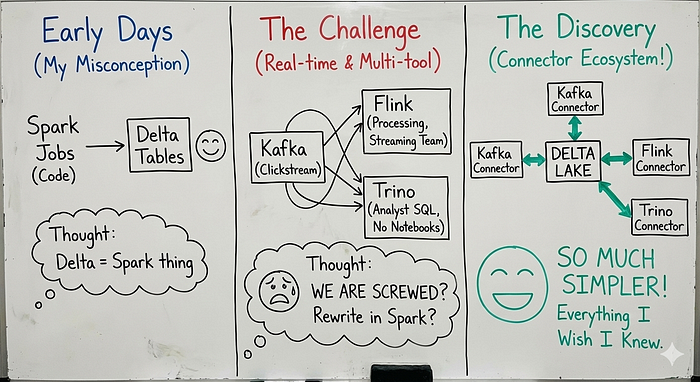

For the first two years of working with Delta Lake, I thought it was basically a Spark thing.
You write Spark jobs, you get Delta tables, life is good.
Then one day, our team needed to:
- Ingest real-time clickstream data from Kafka
- Process it with Flink because our streaming team already knew Flink
- Query it with Trino because our analysts loved SQL and hated notebooks
And I thought: Well, we are screwed and time to rewrite everything in Spark
Turns out, I was completely wrong.
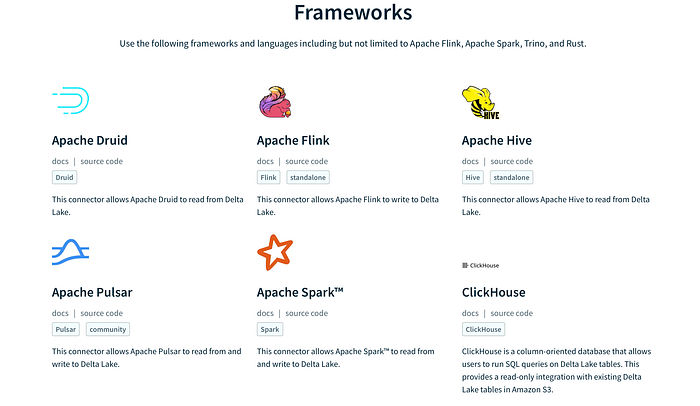
Delta Lake has an entire connector ecosystem I did not know existed and once I discovered it, our architecture became so much simpler.
This article is everything I wish someone had told me two years ago.
Delta Lake Without Spark
Delta Lake is not a Spark library, It's a protocol.
The Delta protocol defines how to:
- Store data in Parquet files
- Maintain a transaction log
- Handle concurrent writes
- Support time travel
Any system that can read and write according to this protocol can work with Delta tables, Spark is just one implementation.
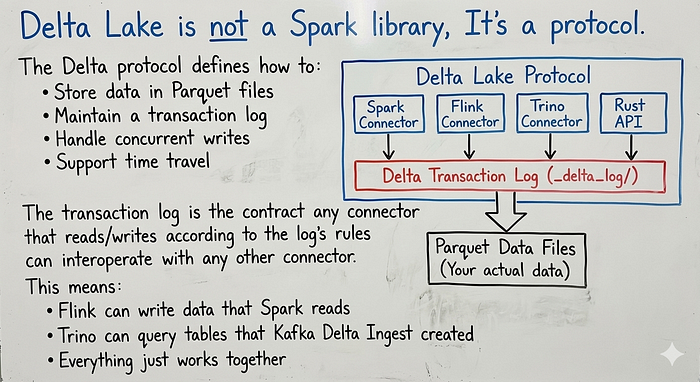
The transaction log is the contract any connector that reads/writes according to the log's rules can interoperate with any other connector.
This means:
- Flink can write data that Spark reads
- Trino can query tables that Kafka Delta Ingest created
- Everything just works together
Apache Flink + Delta Lake: Stream Processing Done Right
Why Flink?
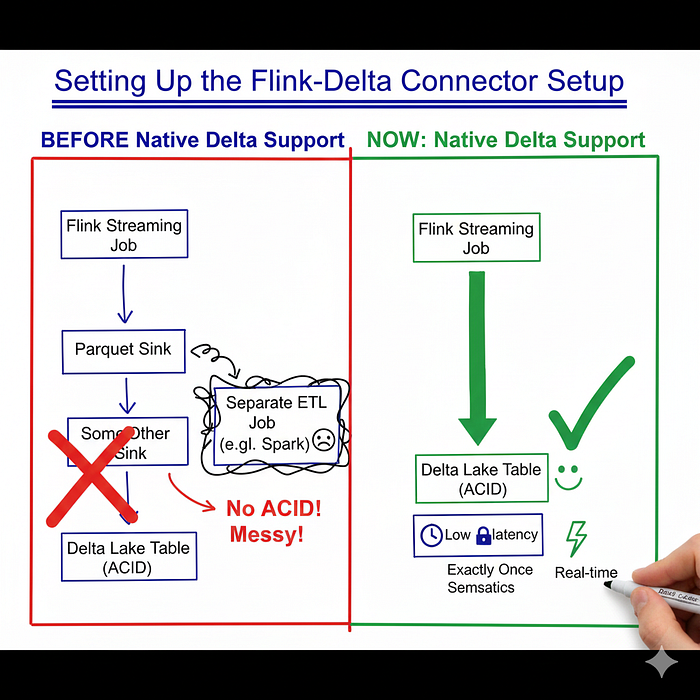
If you have not used Flink before, here's the elevator pitch: Flink is a stream first processing engine with true exactly once semantics.
While Spark Structured Streaming treats streams as micro batches, Flink processes events one at a time with lower latency and for real-time use cases fraud detection, live dashboards, IoT, Flink mostly wins.
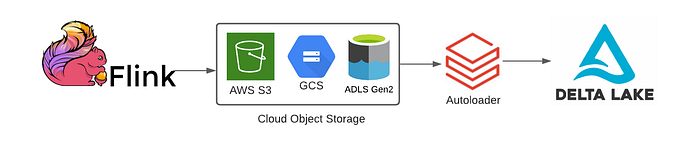
But until recently, Flink could not write to Delta Lake, You had to write to Parquet (no ACID), or to some other sink, then ETL into Delta. .
Now? Native Delta support.
Setting Up the Flink-Delta Connector
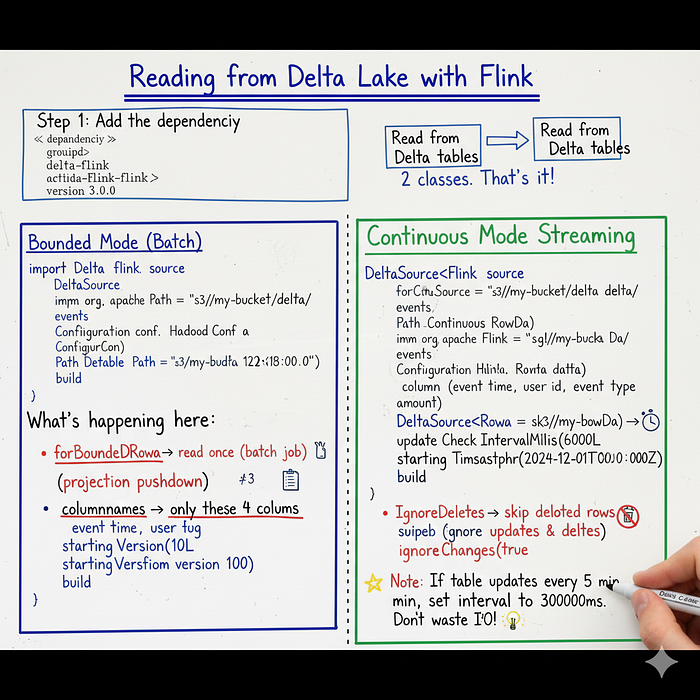
Step 1: Add the dependency
<!-- Maven -->
<dependency>
    <groupId>io.delta</groupId>
    <artifactId>delta-flink</artifactId>
    <version>3.0.0</version>
</dependency>
Step 2: Understand the two APIs
The connector gives you two main classes:
DeltaSourceRead from Delta tables bounded or continuous
DeltaSinkWrite to Delta tables
That's it and two classes
Reading from Delta Lake with Flink:
Bounded Mode (Batch)
When you want to read the entire table once like a batch job:
import io.delta.flink.source.DeltaSource;
import org.apache.flink.table.data.RowData;
import org.apache.hadoop.conf.Configuration;

// Point to your Delta table
Path deltaTablePath = new Path("s3://my-bucket/delta/events");
Configuration hadoopConf = new Configuration();

// Build the source
DeltaSource<RowData> source = DeltaSource
    .forBoundedRowData(deltaTablePath, hadoopConf)
    .columnNames("event_time", "user_id", "event_type", "amount")  // Only these columns
    .startingVersion(100L)  // Start from version 100
    .build();
What's happening here:
forBoundedRowData→ I want to read once, not continuouslycolumnNames→ Only give me these 4 columns (projection pushdown!)startingVersion→ Start from table version 100, not the beginning
Continuous Mode (Streaming)
When you want to continuously process new data as it arrives:
DeltaSource<RowData> source = DeltaSource
    .forContinuousRowData(deltaTablePath, hadoopConf)
    .columnNames("event_time", "user_id", "event_type", "amount")
    .updateCheckIntervalMillis(60000L)  // Check for new data every 60 seconds
    .startingTimestamp("2024-12-01T00:00:00Z")  // Start from this timestamp
    .ignoreDeletes(true)  // Don't care about deleted rows
    .build();
New options for streaming:
updateCheckIntervalMillis→ How often to poll for new dataignoreDeletes→ Skip delete events (useful for append-only processing)ignoreChanges→ Skip all modifications (updates, deletes)
Note: If your upstream table only updates every 5 minutes, set updateCheckIntervalMillis to 300000.
No point checking every second and wasting I/O.
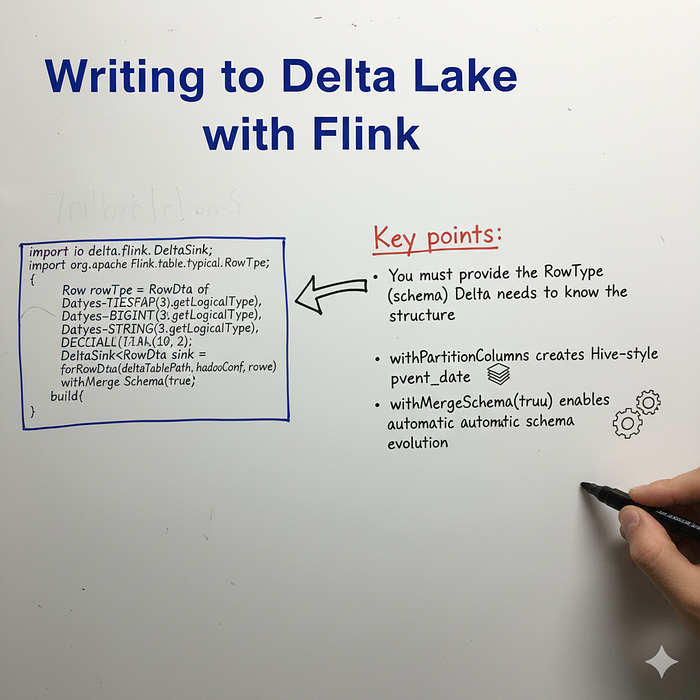
Writing to Delta Lake with Flink
import io.delta.flink.sink.DeltaSink;
import org.apache.flink.table.types.logical.RowType;

// Define the schema
RowType rowType = RowType.of(
    DataTypes.TIMESTAMP(3).getLogicalType(),
    DataTypes.BIGINT().getLogicalType(),
    DataTypes.STRING().getLogicalType(),
    DataTypes.DECIMAL(10, 2).getLogicalType()
);

// Build the sink
DeltaSink<RowData> sink = DeltaSink
    .forRowData(deltaTablePath, hadoopConf, rowType)
    .withPartitionColumns("event_date")  // Partition by date
    .withMergeSchema(true)  // Allow schema evolution
    .build();
Key points:
- You must provide the
RowType(schema) Delta needs to know the structure withPartitionColumnscreates Hive-style partitionswithMergeSchema(true)enables automatic schema evolution
End-to-End Example: Kafka → Flink → Delta
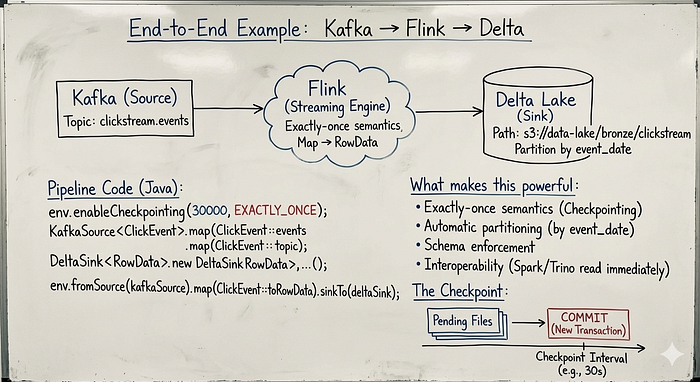
Here's a real pipeline that reads from Kafka and writes to Delta:
java
public class KafkaToDeltaPipeline {

    public static void main(String[] args) throws Exception {

        // 1. Set up the execution environment
        StreamExecutionEnvironment env = StreamExecutionEnvironment
            .getExecutionEnvironment();

        // Enable checkpointing for exactly-once semantics
        env.enableCheckpointing(30000, CheckpointingMode.EXACTLY_ONCE);

        // 2. Create Kafka source
        KafkaSource<ClickEvent> kafkaSource = KafkaSource.<ClickEvent>builder()
            .setBootstrapServers("kafka:9092")
            .setTopics("clickstream.events")
            .setGroupId("delta-writer-group")
            .setStartingOffsets(OffsetsInitializer.earliest())
            .setValueOnlyDeserializer(new ClickEventDeserializer())
            .build();

        // 3. Create Delta sink
        Path deltaPath = new Path("s3://data-lake/bronze/clickstream");
        Configuration hadoopConf = new Configuration();

        DeltaSink<RowData> deltaSink = DeltaSink
            .forRowData(deltaPath, hadoopConf, ClickEvent.ROW_TYPE)
            .withPartitionColumns("event_date")
            .build();

        // 4. Build the pipeline
        env.fromSource(kafkaSource, WatermarkStrategy.noWatermarks(), "kafka-source")
            .map(ClickEvent::toRowData)  // Convert to RowData
            .sinkTo(deltaSink)
            .name("delta-sink");

        // 5. Execute
        env.execute("kafka-to-delta-pipeline");
    }
}
What makes this powerful:
- Exactly-once semantics : Checkpointing ensures no duplicates
- Automatic partitioning : Data organized by
event_date - Schema enforcement : Delta validates every write
- Interoperability : Spark/Trino can read this table immediately
The Checkpoint :
Here's something that confused me at first:
Flink doesn't write to Delta immediately. Instead:
- Records accumulate in pending files
- At checkpoint interval, Flink commits the pending files
- The commit creates a new Delta transaction
This means your checkpointInterval controls your write frequency to Delta:
// Commit to Delta every 30 seconds
env.enableCheckpointing(30000, CheckpointingMode.EXACTLY_ONCE);
If you need lower latency, reduce the interval But remember: more frequent checkpoints = more small files = more maintenance later.
Kafka Delta Ingest: without code option
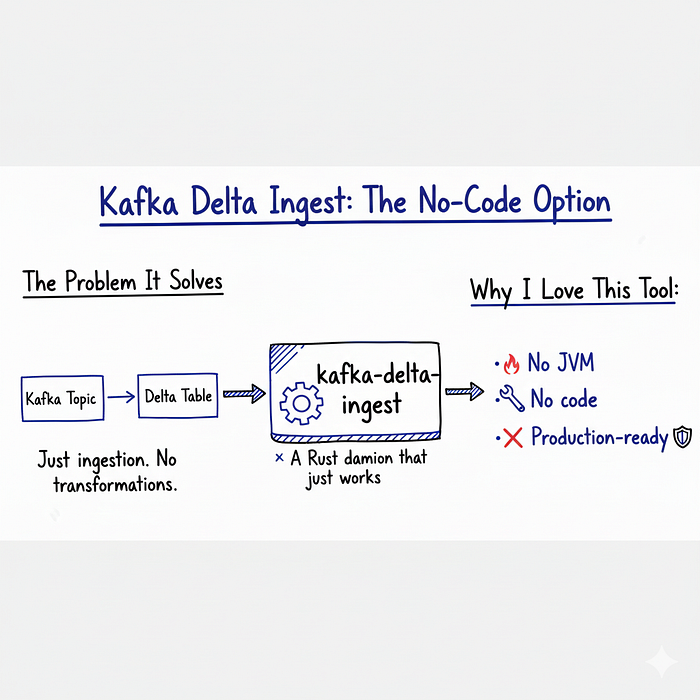
The Problem It Solves
Sometimes you don't need a full Flink application and you just need:
Kafka topic → Delta table
That's it, No transformations, No joins Just ingestion.
For this, there's kafka-delta-ingest a Rust-based daemon that does one thing really well.
Why I Love This Tool
- No JVM It's written in Rust Fast startup, low memory.
- No code : Just configuration.
- Production-ready : Handles failures, checkpoints, exactly-once.
Getting Started

Step 1: Install Rust
curl --proto '=https' --tlsv1.2 -sSf https://sh.rustup.rs | sh
rustup update
Step 2: Clone and build
git clone https://github.com/delta-io/kafka-delta-ingest.git
cd kafka-delta-ingest
cargo build --release
Step 3: Create your Delta table first
Unlike Spark, this tool won't create tables automatically, Create it first:
-- Using Spark or Trino
CREATE TABLE bronze.clickstream (
    event_time TIMESTAMP,
    event_type STRING,
    user_id BIGINT,
    product_id BIGINT,
    price DECIMAL(10,2),
    event_date DATE
)
USING DELTA
PARTITIONED BY (event_date)
LOCATION 's3://data-lake/bronze/clickstream';
Step 4: Run the ingest
cargo run ingest clickstream.events s3://data-lake/bronze/clickstream \
    --kafka 'kafka-broker:9092' \
    --consumer_group_id 'delta-ingest-clickstream' \
    --app_id 'clickstream-ingest' \
    --auto_offset_reset earliest \
    --allowed_latency 60 \
    --max_messages_per_batch 10000 \
    --min_bytes_per_file 64000000 \
    --checkpoints \
    --transform 'event_date: substr(event_time, `0`, `10`)'
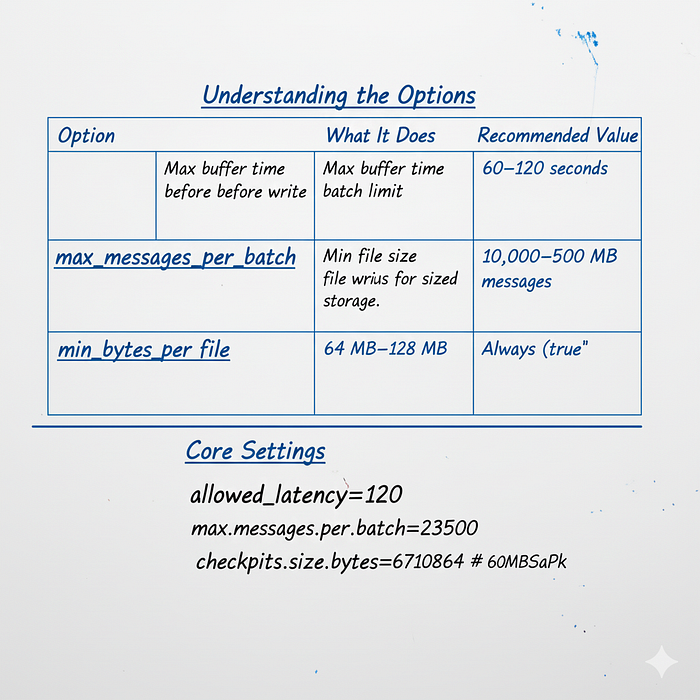
Understanding the Options
| Option | What It Does | Recommended Value |
|--------|--------------|-------------------|
| **`allowed_latency`** | Max buffer time before write | **60-120 seconds** |
| **`max_messages_per_batch`** | Message batch limit | **10k-50k messages** |
| **`min_bytes_per_file`** | Min file size for writing | **64-128 MB** |
| **`checkpoints`** | Enable exactly-once processing | **Always `true`** |
| **`transform`** | Apply data transformations | **For derived columns** |
# Core Settings
allowed_latency=120
max.messages.per.batch=25000
min.file.size.bytes=67108864  # 64MB
checkpoints.enabled=true
The Transform Magic
The --transform option is powerful. You can:
Extract date from timestamp:
--transform 'event_date: substr(event_time, `0`, `10`)'Add Kafka metadata:
--transform 'kafka_offset: kafka.offset' \
--transform 'kafka_partition: kafka.partition' \
--transform 'kafka_topic: kafka.topic'
Rename fields:
--transform 'user_identifier: user_id'When to Use Kafka Delta Ingest vs Flink:
| Scenario | Recommended Tool | Why |
|----------|-----------------|-----|
| **Simple Kafka → Delta ingestion** | `kafka-delta-ingest` | Zero-code, Databricks native |
| **Need joins, aggregations, windowing** | **Flink** | Stateful stream processing |
| **Need to merge multiple topics** | **Flink** | Multi-stream capabilities |
| **Want zero-code solution** | `kafka-delta-ingest` | Simple UI configuration |
| **Team already knows Flink** | **Flink** | Leverage existing expertise |
| **Need sub-second latency** | **Flink** | True streaming architecture |
Trino + Delta Lake: SQL Analytics at Scale
Why Trino?
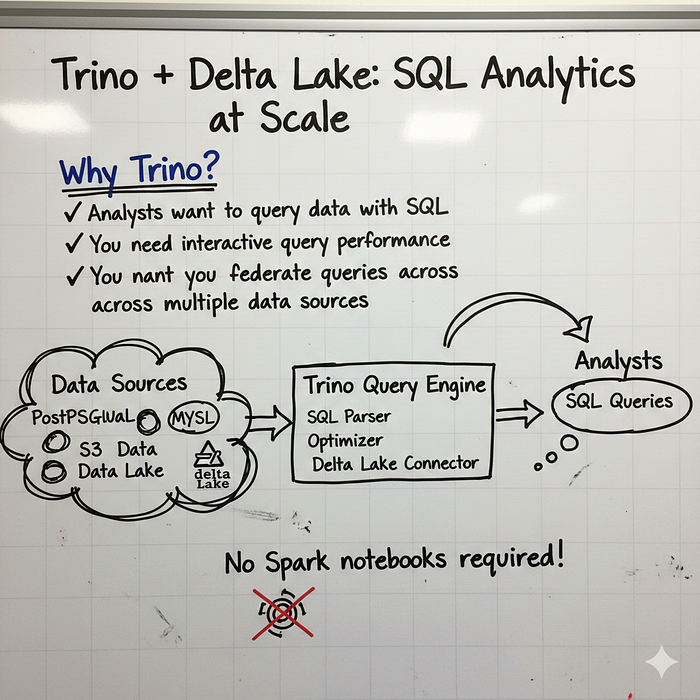
Trino (formerly PrestoSQL) is a distributed SQL query engine. It's what you use when:
- Analysts want to query data with SQL
- You need interactive query performance
- You want to federate queries across multiple data sources
The Delta Lake connector for Trino lets you query Delta tables with standard SQL no Spark notebooks required.
Setting Up the Connector
Step 1: Create the catalog file
Create delta.properties in /etc/trino/catalog/:
properties
connector.name=delta_lake
hive.metastore=thrift
hive.metastore.uri=thrift://metastore:9083

# Performance tuning
delta.enable-non-concurrent-writes=true
delta.target-max-file-size=512MB
delta.compression-codec=SNAPPY

# Safety settings
delta.vacuum.min-retention=7d
delta.unique-table-location=true
Step 2: Verify the catalog
trino> SHOW CATALOGS;
 Catalog
---------
 delta
 hive
 system
If you see delta, you are ready to go.
Creating Tables with Trino
-- Switch to the delta catalog
-- Switch to the delta catalog
USE delta.bronze;

-- Create a table
CREATE TABLE clickstream (
    event_time TIMESTAMP(3) WITH TIME ZONE,
    event_type VARCHAR,
    user_id BIGINT,
    product_id BIGINT,
    brand VARCHAR,
    price DECIMAL(10, 2),
    event_date DATE
)
WITH (
    partitioned_by = ARRAY['event_date'],
    checkpoint_interval = 30,
    change_data_feed_enabled = true
);
Table options explained:
| Option | What It Does | Why It Matters |
|--------|--------------|----------------|
| **`partitioned_by`** | Creates Hive-style partitions (folders) | **Critical for performance** - Enables partition pruning to skip irrelevant data during queries |
| **`checkpoint_interval`** | Controls Delta checkpoint frequency (how often to write Parquet) | Balances write performance vs.recovery time. Higher = faster writes but slower recovery |
| **`change_data_feed_enabled`** | Enables row-level change tracking | **Essential for CDC pipelines** - Lets you see which rows changed between versions |
| **`column_mapping_mode`** | Maps Parquet columns using 'name', 'id', or 'none' | Required for schema evolution - allows safe column rename operations |
Type Mapping Cheat Sheet
Delta and Trino have slightly different type systems. Here's the mapping:
| Delta Type | Trino Type |
|------------|------------|
| **STRING** | `VARCHAR` |
| **LONG** | `BIGINT` |
| **INTEGER** | `INTEGER` |
| **DOUBLE** | `DOUBLE` |
| **BOOLEAN** | `BOOLEAN` |
| **TIMESTAMP** | `TIMESTAMP(3) WITH TIME ZONE` |
| **TIMESTAMP_NTZ** | `TIMESTAMP(6)` |
| **DATE** | `DATE` |
| **DECIMAL(p,s)** | `DECIMAL(p,s)` |
| **ARRAY\<T>** | `ARRAY(T)` |
| **MAP\<K,V>** | `MAP(K,V)` |
| **STRUCT\<...>** | `ROW(...)` |
Querying Delta Tables
Standard SQL works exactly as you would expect:
-- Basic query
-- Basic query
SELECT event_date, COUNT(*) as events, COUNT(DISTINCT user_id) as users
FROM delta.bronze.clickstream
WHERE event_date >= DATE '2024-12-01'
GROUP BY event_date
ORDER BY event_date;

-- Join across tables
SELECT
    c.user_id,
    u.name,
    COUNT(*) as click_count
FROM delta.bronze.clickstream c
JOIN delta.silver.users u ON c.user_id = u.user_id
WHERE c.event_date = CURRENT_DATE
GROUP BY c.user_id, u.name;
Time Travel in Trino
Yes, you can query historical versions:
-- Query a specific version
SELECT * FROM delta.bronze.clickstream FOR VERSION AS OF 42;

-- Query at a specific timestamp
SELECT * FROM delta.bronze.clickstream
FOR TIMESTAMP AS OF TIMESTAMP '2024-12-15 10:00:00 UTC';
Viewing Table History
Every Delta table has a hidden history table:
sql
SELECT version, timestamp, operation, user_name
FROM delta.bronze."clickstream$history"
ORDER BY version DESC
LIMIT 10;
Output:
version |          timestamp          |  operation   | user_name
---------+-----------------------------+--------------+-----------
      15 | 2024-12-20 14:30:22.123 UTC | WRITE        | trino
      14 | 2024-12-20 14:00:18.456 UTC | WRITE        | flink
      13 | 2024-12-20 13:30:15.789 UTC | OPTIMIZE     | trino
      12 | 2024-12-20 13:00:12.012 UTC | WRITE        | flink
Notice how different systems (Trino, Flink) write to the same table? That's the power of the unified protocol.
Change Data Feed (CDC)
If you enabled change_data_feed_enabled, you can track row-level changes:
sql
SELECT
    user_id,
    event_type,
    _change_type,
    _commit_version,
    _commit_timestamp
FROM TABLE(
    delta.system.table_changes(
        schema_name => 'bronze',
        table_name => 'clickstream',
        since_version => 10
    )
)
WHERE _change_type IN ('insert', 'update_postimage');
Change types:
insert:New row addedupdate_preimage:Row before updateupdate_postimage:Row after updatedelete:Row removed
This is incredibly powerful for building incremental pipelines.
Table Maintenance
Optimize (compact small files)
-- Basic optimization
-- Basic optimization
ALTER TABLE delta.bronze.clickstream EXECUTE optimize;

-- Only files smaller than 10MB
ALTER TABLE delta.bronze.clickstream
EXECUTE optimize(file_size_threshold => '10MB');

-- Only specific partition
ALTER TABLE delta.bronze.clickstream
EXECUTE optimize
WHERE event_date = DATE '2024-12-20';
Vacuum (remove old files):
-- Remove files older than 7 days
CALL delta.system.vacuum('bronze', 'clickstream', '7d');
A Real Architecture example

Here's how I'd architect a modern data platform using all three connectors:
┌─────────────────────────────────────────────────────────────────────┐
│                         DATA SOURCES                                 │
├─────────────────────────────────────────────────────────────────────┤
│  Mobile App    │   Web Events    │   IoT Sensors   │   Databases   │
└───────┬────────┴────────┬────────┴────────┬────────┴───────┬───────┘
        │                 │                 │                │
        ▼                 ▼                 ▼                ▼
┌─────────────────────────────────────────────────────────────────────┐
│                          KAFKA CLUSTER                               │
│   (clickstream.events, iot.telemetry, db.changes, ...)             │
└───────────────────────────────┬─────────────────────────────────────┘
                                │
        ┌───────────────────────┼───────────────────────┐
        │                       │                       │
        ▼                       ▼                       ▼
┌───────────────┐     ┌─────────────────┐     ┌─────────────────┐
│ kafka-delta   │     │     FLINK       │     │     FLINK       │
│ -ingest       │     │   (Complex      │     │   (Real-time    │
│ (Simple       │     │    Processing)  │     │    Aggregates)  │
│  Ingestion)   │     │                 │     │                 │
└───────┬───────┘     └────────┬────────┘     └────────┬────────┘
        │                      │                       │
        ▼                      ▼                       ▼
┌─────────────────────────────────────────────────────────────────────┐
│                         DELTA LAKE (S3)                              │
├─────────────────┬─────────────────────┬─────────────────────────────┤
│   BRONZE        │      SILVER         │         GOLD                │
│   (Raw Data)    │   (Cleaned/Joined)  │   (Aggregated/Curated)     │
└─────────────────┴─────────────────────┴─────────────────────────────┘
                                │
                                ▼
┌─────────────────────────────────────────────────────────────────────┐
│                            TRINO                                     │
│               (Interactive SQL Analytics)                            │
└───────────────────────────────┬─────────────────────────────────────┘
                                │
        ┌───────────────────────┼───────────────────────┐
        ▼                       ▼                       ▼
┌───────────────┐     ┌─────────────────┐     ┌─────────────────┐
│   Tableau     │     │    Superset     │     │   Data Science  │
│  Dashboards   │     │    Notebooks    │     │    Workbench    │
└───────────────┘     └─────────────────┘     └─────────────────┘
The workflow:
Ingestion Layer
- Simple topics →
kafka-delta-ingest→ Bronze tables - Complex topics (need transformation) → Flink → Bronze tables
Processing Layer
- Flink reads Bronze, applies business logic → Silver tables
- Flink creates real-time aggregates → Gold tables
Query Layer
- Trino provides SQL interface to all tables
- BI tools connect via Trino
- Data scientists can also use Spark for heavy ML workloads
The beauty: All tools read and write the same Delta tables, No data silos, No format conversions, One source of truth.
Key Learning :
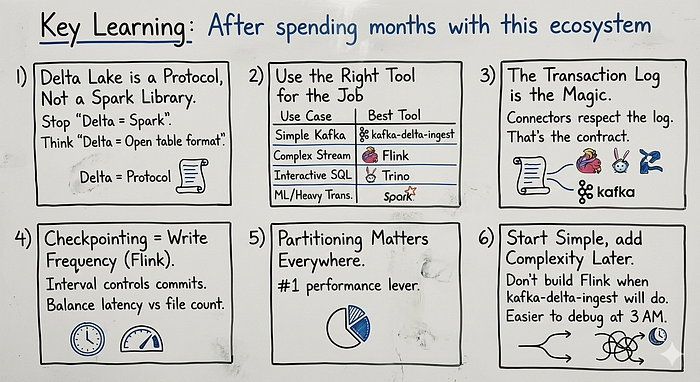
After spending months with this ecosystem, here's what I have learned:
1. Delta Lake is a Protocol, Not a Spark Library
Stop thinking "Delta = Spark." Think "Delta = Open table format that anything can use."
2. Use the Right Tool for the Job
Use CaseBest ToolSimple Kafka ingestionkafka-delta-ingest Complex stream processingFlink Interactive SQL analyticsTrinoML/heavy transformationsSpark
3. The Transaction Log is the Magic
All these connectors work together because they all respect the transaction log, That's the contract.
4. Checkpointing = Write Frequency
In Flink, your checkpoint interval controls how often data commits to Delta. Balance latency vs file count.
5. Partitioning Matters Everywhere
Whether you're using Flink, Trino, or kafka-delta-ingest partition your tables wisely. It's the number 1 performance lever.
6. Start Simple, add Complexity Later
Don't build a Flink application when kafka-delta-ingest will do, Simpler architectures are easier to debug at 3 AM.
What's Next?
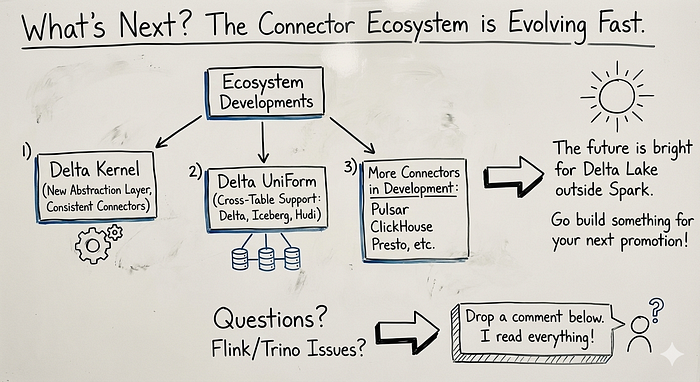
The connector ecosystem is evolving fast Keep an eye on:
- Delta Kernel: A new abstraction layer that will make connectors even more consistent
- Delta UniForm : Cross-table support for Delta, Iceberg, and Hudi
- More connectors : Pulsar, ClickHouse, Presto, and more are in active development
The future is bright for Delta Lake outside Spark and honestly? It's more fun than I expected.
Now go build something which can give you next promotion
Have questions about Delta Lake connectors? Running into issues with Flink or Trino integration? Drop a comment below I read everything.
Resources: