
In this post, we introduce Data Bridge — Netflix's unified control plane that simplifies and standardizes data movement across our diverse ecosystem of data stores. We'll outline the problems caused by prior tool fragmentation and explain how Data Bridge addresses these issues by separating user intent from implementation.
Background
In any large-scale, data-rich environment, engineers face a common and persistent challenge: the immense complexity of moving data between dozens of different systems. Here at Netflix, we're well-known for our historic culture of "Freedom and Responsibility"; this empowers teams to choose the best tool for the job, which has led to a diverse and robust ecosystem of purpose-built datastores. This same culture has led to several bespoke data movement solutions for the same use-cases. A new team looking to move their data to a new location might see that none of the existing solutions perfectly fit their use case, build yet another solution, and further contribute to an increasingly complex and fragmented data movement ecosystem.
A few years ago, the newly formed Data Movement Platform team was tasked with consolidating that fragmented landscape. Their goal was to develop a standardized platform that drastically simplified the process of moving data across systems and was easy to build upon, thereby reducing the risk of future fragmentation. Rather than forcing users to continue switching tools, the goal was to make the process much more convenient.
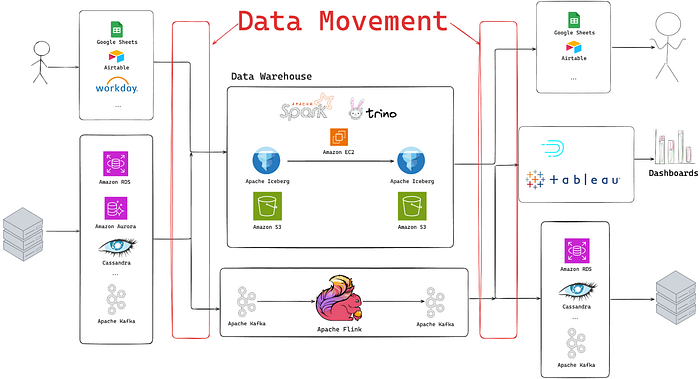
Today, the Netflix data ecosystem comprises dozens of datastores, including, but not limited to Cassandra, Key-Value Abstraction, Data Warehouse, and Google Sheets, which we use to power the Netflix experience that millions are familiar with. To move data between them, engineers had to navigate over a dozen different systems and platforms maintained by various teams across Netflix. This fragmentation created significant friction and overhead for both the users moving data and the teams supporting the underlying infrastructure.
The key problems caused by this fragmentation included:
- Cognitive Overload: Users needed to learn numerous different systems and interfaces to accomplish their data movement tasks.
- Operational Overload: Multiple platform teams were required to support many disparate, often overlapping, data movement solutions.
- Unreliable Governance: Security checks, lineage, and metadata gathering were implemented inconsistently across various tools, resulting in gaps in meeting our data governance standards.
- Poor Discoverability: It was difficult for users to identify the right tool for their specific data movement among the numerous available options.
- Poor Separation of Concerns: Often, users' intent was mixed with the implementation details of the underlying tool. This meant a user often wasn't just moving data from 'A' to B ', they were running complex commands to 'run a data movement job with these Spark parameters', making it extremely challenging for the data platform team to upgrade the underlying engine without breaking user workflows.
Ultimately, answering the simple question, "How do I move data between X and Y?" was far from simple and often depended on the specific systems involved.
Overview
Data Bridge was designed from the ground up to solve these challenges by creating a single, paved path for all data movement at Netflix. It is a unified, pluggable control plane for interacting with the various systems used to provision data movements. Crucially, Data Bridge is not a new data plane or execution engine; it is an abstraction layer that orchestrates all the existing, hardened systems that actually move data.
Our development was guided by a clear set of requirements for the new platform:
- Make it clear how to move data between any two points.
- Simplify the creation and management of data movement jobs.
- Decouple user intent from the underlying implementation.
- Simplify operational support by consolidating ownership of disparate solutions.
- Enforce all governance and security policies in a centralized manner.
- Support both batch and streaming technologies.
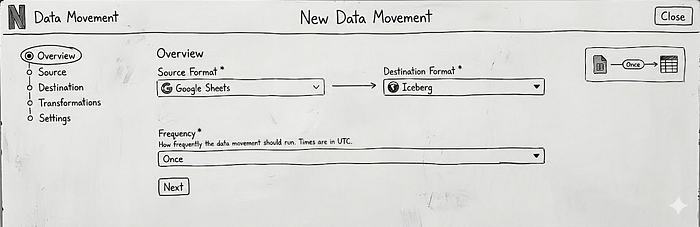
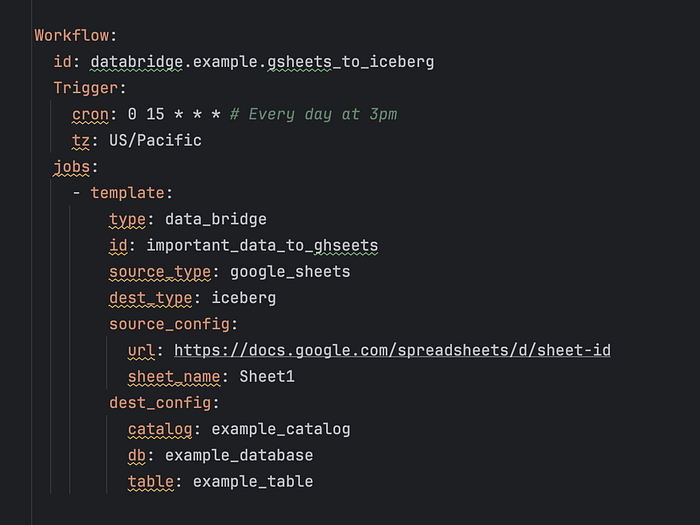
Data Bridge provides a no-code and low-code solution for simple Extract-Load operations with lightweight transformations (what we call 'EtL') for users to provision and manage data movements through three primary interfaces: a web UI for non-technical users, a GraphQL API for programmatic access, and configuration-as-code via Maestro Scheduler Templates (YAML files) for advanced users who need to embed data movement within larger workflows.
Implementation
Registry
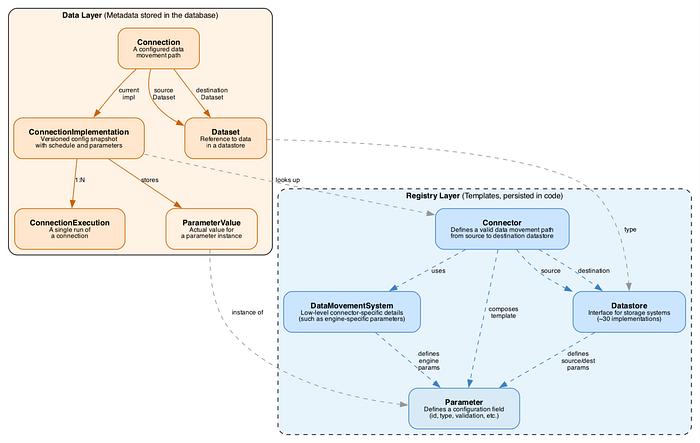
The diagram above represents a simplified entity model used by Data Bridge, which is split into two main parts: the data layer (showing what we actually store in our metadata database per data movement) and the registry layer. The Registry is a separate Spring Java module that contains all the logic that:
- Declares what the reusable "intent" pieces are supported
- Defines the current mapping between an intent and the underlying system that can fulfill it.
Whenever connector developers want to add a new connector (a combination of source and destination datastore types), they need to implement 1 to 4 interfaces:
- Datastore (source and destination). For example, we have separate classes for GoogleSheetsDatastore and IcebergDatastore that declare all datastore-specific logic (such as parameters required to identify a specific dataset, logic to check if a particular entity has access to the dataset, etc). The datastore classes are entirely independent of any particular connector implementations and are supposed to be reused across different connectors.
- Data movement system. Contains all logic related to low-level operational details of a specific connector.
- Connector. For example, we have a separate GoogleSheetsToIcebergBatchConnector class that looks something like this:
public class GoogleSheetsToIcebergBatchConnector implements Connector {

   @Getter
   private final GoogleSheetsDatastore sourceDatastore;

   @Getter
   private final IcebergDatastore destinationDatastore;

   @Getter
   private final MoveDataSystem dataMovementSystem;

   private List<Parameters> getConfigurationTemplate() {
       // returns a list of all the parameters that this connector supports
   }
}
As you can see, we also have a notion of a Configuration Template that utilizes a Parameter abstraction, treating every configuration field uniformly. A Parameter defines:
- Identity: A unique ID and human-readable label + description
- Type: String, integer, boolean, list, or map
- Constraints: Required or optional, with pluggable validation rules
- Behavior: Whether it can be modified after creation, whether it should be encrypted, etc.
Here's a simplified example of how we define the Google Sheet URL parameter with URL validation:
 Parameter.builder()
      .id(ParameterId.GOOGLE_SHEET_URL)
      .label("Google Sheet URL")
      .description("The URL in format <...>")
      .category(ParameterCategory.SOURCE)
      .dataType(ParameterDataType.STRING)
      .required(true)
      .validations(List.of(
          new RegexValidation(GOOGLE_SHEETS_URL_REGEX)
      ))
      .build()
How Parameters Compose
The real power emerges when parameters are composed. Each Datastore defines the parameters it needs:
Datastore.sourceDatastoreParameters() → List<Parameter>
Datastore.destinationDatastoreParameters() → List<Parameter>
DataMovementSystem.engineParameters() → List<Parameter>
A Connector.getConfigurationTemplate then assembles these into a complete configuration template by combining Source Datastore + Destination Datastore + Data Movement System + Connector-specific parameters or overrides into a complete Configuration Template.
Our UI then uses that configuration template to automatically render the correct fields when users create or edit data movements. Additionally, our internal documentation pages leverage the same API to ensure Connector and Parameter-specific documentation is automatically kept up to date. This also means that when a parameter is changed in one place (e.g., updating the parameter description or adding new validation), the change is automatically picked up by all Connectors.
Additionally, on the Parameter level, you can define how it is going to be "translated" into the value for an underlying engine per data movement system. For example, for the Google Sheets URL example, System A can expect a key-value pair of "google_sheets.url": value, and System B can expect a nested JSON that looks like:
{
    "google_sheets": {
        "url": value
    }
}
We do have the ability to provide different overrides for the same parameter, which allows us to keep all the low-level discrepancies hidden from the user.
This architecture provides us with a powerful abstraction layer that enables us to:
- Swap underlying implementation by changing the way we convert the intent into the underlying system configuration, without involving the user.
- Reuse components across different systems, reducing code duplication
- Run complex code-based validation at provision time instead of at runtime.
- Migrate, replace, and update Connector implementations without requiring user notice, communication, or input
Abstracting The Batch Data Movement Runtime
While Netflix already has Data Mesh — a mature system for streaming data movement and processing, Data Bridge started by abstracting all the different batch data movement tools. In this section, we will describe how the abstraction was achieved by explaining what happens during batch data movement at deployment and runtime.
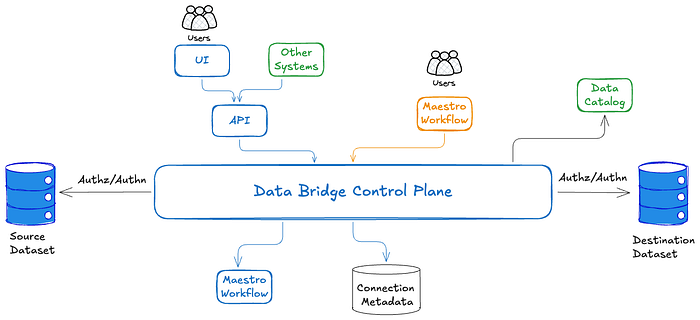
At data movement creation time, Data Bridge parses the data movement parameters, validates them, determines the source and/or destination datasets to be used, and carries out authorization checks to ensure that the user creating the data movement has access to the source and destination datasets. In the event of parameter validation or authentication failures, an appropriate error message is sent back to the caller immediately, rather than at runtime.
If everything is correct, the connection metadata entities are updated, and metadata about the created data movement (such as ownership information) is stored in the Data Catalog. This centralizes all identity, authorization, authentication, and data governance interactions for all batch data movement at Netflix.
After all the checks and validations, we deploy the underlying infrastructure. While we support multiple data planes, most Connectors rely on Maestro, Netflix's workflow orchestrator, to perform the actual data movement.
Data Bridge calls Maestro APIs and deploys a workflow per data movement. This workflow is owned by Data Bridge and is 'hidden' from the users. We elected to leverage Maestro for our data movement implementation, as it provides a scalable, battle-tested platform that allows for periodic job scheduling, integrates well with Netflix's identity and access control mechanisms, supports retries, and offers detailed error classification, notification, and logging capabilities. Many features would need to be rebuilt were Data Bridge were to build another in-house solution for orchestrating data movements.
Next, we cover what happens every time data movement is triggered.
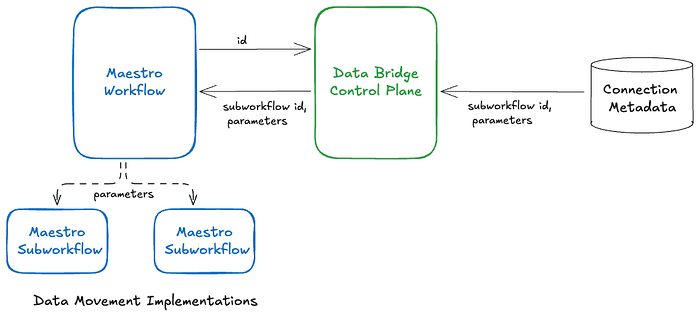
You can think of the system in two layers: the workflow that Data Bridge creates is responsible for data movement-specific scheduling (top layer). When triggered, it sends a request to the Data Bridge API to fetch the current parameter values and subworkflow identifier from Data Bridge, and then triggers and monitors that subworkflow (bottom layer). The subworkflow is what defines the actual connector logic.
This encapsulation of the actual data-movement step as a Maestro subworkflow enables us to switch implementations at runtime without redeploying the top-level Maestro workflow. For example, by incrementally updating the subworkflow identifier and parameters in the connection metadata, the actual data movement implementation can be rolled out without requiring any changes to the user-created data movements (both direct and inferred).
Since the Data Bridge control plane interposes on each data movement execution, it tracks the status of each execution and forwards it to paved path metrics and alerting systems, which can be leveraged to centralize metric and alert tracking across all diverse data movement implementations.
Buy vs Build
One question that readers might have is: why did you need to build your own platform instead of buying an existing solution?
During the planning phase, we performed an extensive analysis, and here are the main reasons:
- We had a suite of existing battle-tested connectors, and wanted to avoid unnecessary migrations.
- Netflix has quite a few home-grown datastores (such as our Key-Value Data Abstraction) that aren't supported externally. Existing industry-leading data movement platforms provide minimal support for custom connectors.
- At Netflix's scale, the cost of using external platforms was too high.
Impact and the Road Ahead
Data Bridge reached General Availability (GA) in March 2024 and has seen strong adoption. We have also migrated all data movement previously handled by the legacy batch data movement tools to Data Bridge.
As of January 2026, it facilitates ~20,000 distinct data movement jobs, supports more than three dozen source and destination pairs, and executes ~300,000 jobs per week. Data Bridge is considered the paved path for batch data movement at Netflix, while Data Mesh serves as the paved path for streaming data movement and processing. Migrating all data movement use cases to Data Bridge has also laid the groundwork for transparently easing future migrations to newer data movement implementations, without any user involvement. We will be discussing such seamless migrations in upcoming blog posts.
In addition, Data Bridge has introduced support for stateless SQL-based transformations, a feature that has achieved significant adoption in a short time. We are also considering introducing support for additional transformation types. We will also discuss support for SQL-based and other transformations in upcoming blog posts.
Looking ahead, we want to make it easy to contribute new connectors to Data Bridge. As mentioned earlier, Data Bridge supports more than two dozen source-destination pairs, but demand for many more is growing. Furthermore, many existing data movement tools are undergoing modernisation with newer implementations. We want to make it easy for users to contribute newer or improved connectors themselves, with minimal involvement from the core Data Bridge team. This requires investments towards simplifying the connector contribution steps, fine-grained testing, and gradual rollout of newer implementations.
Since Data Bridge already provides a simple intent-based API for creating data movement, we want to leverage that to embed data movement closer to the datastore control planes. This way, data movement can be initiated from the data store UI or API without requiring users to directly interact with a separate Data Bridge UI or API.
The Data Mesh platform is a powerful, configurable stream-processing and data-movement platform; however, we aim to extend Data Bridge's simple, intent-based API to also support straightforward streaming data-movement use cases.
We want to acknowledge and express our gratitude to the Data Movement Platform leadership team and our partner teams. Data Bridge would not have been possible without their unwavering support.