


1. Introduction
In Trendyol, as a part of the Data Warehouse team, we are responsible for the end-to-end journey of data — from ingesting it from various source systems to delivering actionable insights to business users. We manage the infrastructure that ensures reliable data flow, catering to the analytical needs of different stakeholders within the company.
Currently, our core architecture is built on Google BigQuery. While this setup is robust and serves our daily needs, the data landscape is constantly evolving. For the past six months, we have been working on a Proof of Concept (POC) to explore Apache Iceberg. This initiative aims to test a new architectural approach that could offer better cost optimization and flexibility compared to our existing standard.
In this article, we will share the details of this transition, the technologies we used, and the outcomes of building a Lakehouse architecture on Google Cloud.

2. Architecture Overview
Before diving into the specific components, it is essential to understand the structural shift we aimed to achieve with this POC.
The Goal: Decoupling Storage and Compute In our current production architecture, both storage and compute are tightly coupled within BigQuery. While this offers simplicity, it can lead to limitations in cost control and flexibility. With this POC, our primary aim was to decouple these two layers effectively. By moving the storage to Google Cloud Storage (GCS) and using Spark for compute, we can separate these concerns while still keeping BigQuery as the serving layer for our business users.
Current State vs. Future State (POC)
- Current State (BigQuery Native): A monolithic approach where BigQuery handles storage, metadata management, and query processing internally.
- Future State (The Iceberg Lakehouse): A modular architecture where each role is handled by a specialized component:
- Storage: Google Cloud Storage (GCS) holding Apache Iceberg files.
- Compute: Apache Spark (via Dataproc) for data processing.
- Metastore: BigLake Metastore to bridge the gap between GCS and BigQuery.
- Serving: BigQuery, acting as the interface for end-users to query the data stored in GCS.
This new structure allows us to build a Medallion Architecture (Bronze, Silver, Gold) that is both scalable and open, avoiding vendor lock-in at the storage level.
3. Component Deep Dive
To build this modern Lakehouse, we didn't just pick random tools; we carefully selected components that integrate seamlessly. Here is a deep dive into each layer of our stack.
3.1. Apache Iceberg Format
Iceberg is not just a file format; it is a table format that brings database-like reliability to the data lake. To understand how it works, we can break it down into five key elements:
- The Catalog: Everything starts here. The catalog is like a phonebook for your data. When a query asks for "Table A," the catalog points to the location of the current Metadata File. In our architecture, BigLake Metastore acts as this catalog.
- Metadata File (JSON — The Brain): This is the identity card of the table. It contains the schema (column types), partitioning config, and the table's history. It acts like a time machine, keeping track of previous snapshots so we can travel back in time.
- Manifest List (Avro — The Snapshot): The metadata file points to a Manifest List. This file represents a specific "snapshot" of the table at a moment in time. It holds a list of Manifest Files that make up the table.
- Manifest File (Avro — The Detective): This is where the intelligence lies. A Manifest File lists the actual data files but also keeps statistics (min/max values, null counts) for each column. The query engine uses this "detective" work to skip entire files that don't match the query filter (a process called pruning), drastically speeding up reads.
- The Data Files (Parquet — The Soldiers): These are the actual files containing the records, stored in GCS.
- Compression Power: Since we use Parquet, we benefit from high compression ratios. We typically use Snappy (for speed) or Zstd (for higher compression). This allows us to store massive datasets with 10x less space compared to JSON or CSV, directly reducing storage costs.

3.2. ACID Transactions in Iceberg
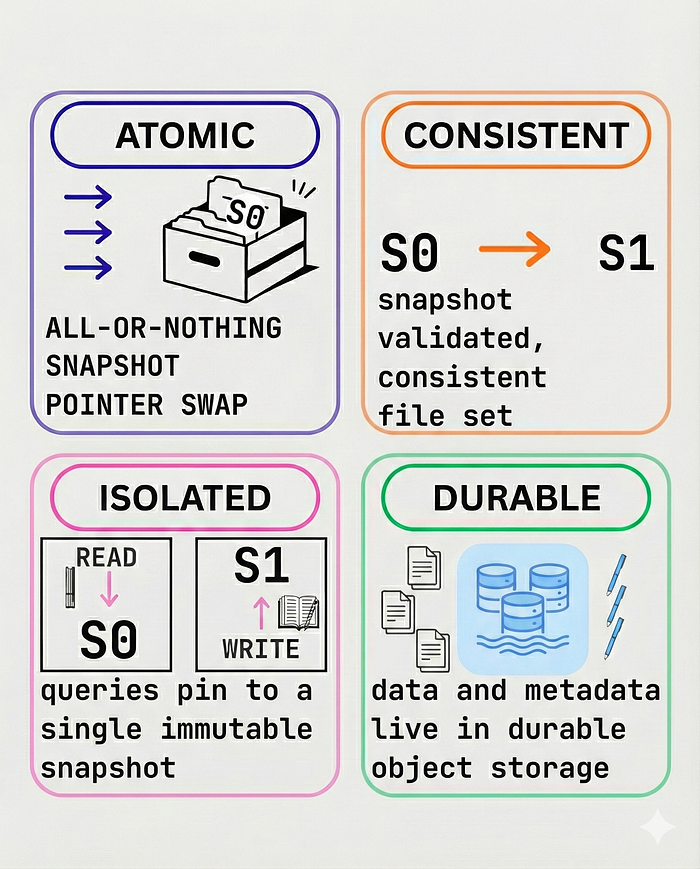
In a traditional data lake, managing concurrent reads and writes is a nightmare. Iceberg solves this by providing full ACID transactions. Here is how it works:
A — Atomicity
- Changes to the table are atomic.
- When we write data, a new metadata file is created pointing to the new snapshot. The commit happens instantly by swapping the metadata pointer.
- It either fully succeeds or fully fails; there are no partial writes.
C — Consistency
- Readers always see a consistent view of the database.
- If a job is writing data, readers will continue to see the previous valid snapshot until the new write is successfully committed.
I — Isolation
- Multiple writers can work at the same time (depending on the strategy), and writers do not block readers.
- We use Snapshot Isolation, ensuring that each query operates on a static snapshot of the data.
D — Durability
- Once a commit is successful and the metadata is written to GCS, the change is permanent.
- The data is safely stored in the underlying object storage.
3.3. Google Cloud Storage (GCS)
We use GCS as our physical storage layer because it is cost-effective, durable, and integrates natively with both Spark and BigQuery.
Bucket Structure
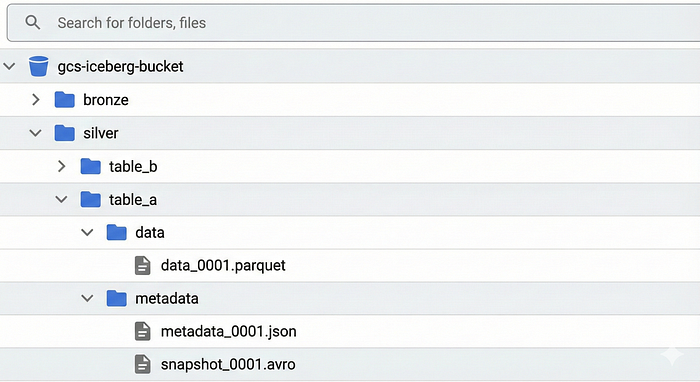
- We organized our buckets to mirror the Medallion architecture.
gs://our-data-lake/bronze/represents our Raw Dataset.gs://our-data-lake/silver/represents our Cleaned/Merged Dataset.- Each folder inside these paths acts as a separate table.
3.4. BigLake Metastore
BigLake metastore is a unified and serverless metastore that connects lakehouse data stored in Google Cloud to multiple runtimes, including Apache Spark and BigQuery. It provides the foundation that you need to build an open and managed lakehouse.
Why we chose it?
- It bridges the gap between open-source engines (Spark) and Google's native engine (BigQuery).
Integration
- We access it via REST API, allowing us to keep a single source of truth.
- Any table created by Spark via BigLake is immediately queryable by BigQuery without moving data.
3.5. Apache Spark on Dataproc
Spark is the industry standard for large-scale data processing. It handles the heavy lifting of merging, cleaning, and deduplicating data.
Dataproc Overview
- Dataproc is Google's managed Hadoop/Spark service. It allows us to spin up clusters in minutes.
Performance
- By tuning Spark executors and memory, we can optimize merge jobs to run efficiently, ensuring our Silver layer is always up to date.
3.6. Kafka Integration
We use source connectors and iceberg sink connector in Kafka to get data from actual source and put it into our lakehouse.
Our data originates from operational databases like Couchbase and Postgres. Using source connectors in kafka, we can consume from sources into kafka topics.
How Iceberg Sink Connector Works?
- We use Iceberg Sink Connector to get data from Kafka Topic into bronze layer in our lakehouse architecture.
- It reads directly from Kafka topics and commits data to our Bronze Iceberg tables in GCS.
- This creates a real-time stream of events, which are ingested into our lakehouse.
- This ensures that our Bronze layer is continuously updated with fresh data, acting as a near real-time landing zone.
4. Building the Medallion Architecture
We implemented a classic Medallion Architecture (Bronze, Silver, Gold) to organize our data flow. This ensures that we have a raw copy of data, a cleaned version, and a final business-ready layer.

4.1. Ingestion: The Bronze Layer
The journey of our data starts at the source. We have operational databases like Couchbase and Postgres. We use source connectors to stream changes from these databases into Kafka topics.
For the Bronze layer, our goal is to ingest this data as quickly as possible. We used the Iceberg Sink Connector for this. The connector reads the streaming data from the Kafka topic and writes it directly to the Bronze folder on GCS in Iceberg format.
Essentially, the Bronze layer acts as our landing zone. It contains the raw data coming from the sources, stored temporarily before we process it further.
4.2. Processing: The Silver Layer (The Merge Logic)
The Silver layer is where we keep our historic, unique, and clean data. To move data from Bronze to Silver, we created a PySpark job that runs on a Dataproc cluster.
Here is the logic we implemented in our Spark job:
Initialize Spark: We create a Spark Session that connects to the BigLake Metastore.
spark = SparkSession.builder.appName("<appName>") \
    .config("spark.jars.packages", "org.apache.iceberg:iceberg-spark-runtime-3.5_2.12:1.10.1,org.apache.iceberg:iceberg-gcp-bundle:1.10.1") \
    .config("spark.sql.catalog.<catalogName>", "org.apache.iceberg.spark.SparkCatalog") \
    .config("spark.sql.catalog.<catalogName>.type", "rest") \
    .config("spark.sql.catalog.<catalogName>.uri", "https://biglake.googleapis.com/iceberg/v1/restcatalog") \
    .config("spark.sql.catalog.<catalogName>.warehouse", "<gcsPath>") \
    .config("spark.sql.catalog.<catalogName>.header.x-goog-user-project", "<projectName>") \
    .config("spark.sql.catalog.<catalogName>.rest.auth.type", "org.apache.iceberg.gcp.auth.GoogleAuthManager") \
    .config("spark.sql.catalog.<catalogName>.io-impl", "org.apache.iceberg.gcp.gcs.GCSFileIO") \
    .config("spark.sql.catalog.<catalogName>.rest-metrics-reporting-enabled", "false") \
    .getOrCreate()
Get the Watermark: We check the Silver table to find the maximum timestamp of the data we already have.
max_ts = spark.sql("""
    SELECT COALESCE(
        MAX(event_ts) - INTERVAL 10 MINUTES,
        TIMESTAMP('1970-01-01')
    )
    FROM <catalogName>.silver.target_table
""").first()[0]
Filter New Data: We read the Bronze table and filter for records that are newer than that maximum timestamp.
spark.sql(f"""
    SELECT
        id,
        col1,
        col2,
        event_ts
    FROM <catalogName>.bronze.source_table
    WHERE event_ts >= '{max_ts}'
""").createOrReplaceTempView("bronze_view")
Deduplicate: Since we might have duplicate records in the stream, we use the row_number function to select only the latest version of each record.
spark.sql(f"""
    SELECT id, col1, col2, event_ts
    FROM (
        SELECT *,
               ROW_NUMBER() OVER (
                   PARTITION BY id
                   ORDER BY event_ts DESC
               ) AS rn
        FROM bronze_view
    )
    WHERE rn = 1
""").createOrReplaceTempView("changes_view")
Merge: Finally, we merge this clean dataframe into the Silver table.
spark.sql("""
    MERGE INTO <catalogName>.silver.target_table AS tgt
    USING changes_view AS src
    ON tgt.id = src.id

    WHEN MATCHED THEN UPDATE SET
        tgt.col1 = src.col1,
        tgt.col2 = src.col2,
        tgt.event_ts = src.event_ts

    WHEN NOT MATCHED THEN INSERT (
        id, col1, col2, event_ts
    )
    VALUES (
        src.id, src.col1, src.col2, src.event_ts
    )
""")
By doing this, we maintain a clean history in the Silver layer. Since we use BigLake Metastore, this Silver table is immediately visible in BigQuery as well.
4.3. Serving: The Gold Layer
The final step is making this data accessible to the business teams. Instead of moving data again, we used BigQuery Views as our Gold layer.
We created views on top of the Silver Iceberg tables. In some cases, these are simple SELECT * views. In other cases, we applied small transformations within the view, such as converting timestamps to UTC or renaming columns. We manage access permissions on these views, allowing business users to query the data using standard SQL without worrying about the underlying Iceberg files.
5. Key Architectural Decisions
5.1. Compute Strategy: Dataproc Serverless vs. Dedicated Cluster
We tested two approaches for running our Spark jobs:
- Dedicated Clusters: Best for high-frequency updates (e.g., real-time dashboards). Since the cluster is always on, jobs start immediately.
- Dataproc Serverless: Best for low-frequency updates (e.g., every 3 hours). We pay only for the seconds the job runs, avoiding idle costs.
- Decision: We adopt a hybrid model depending on the freshness requirement of the specific table.
5.2. Iceberg Configuration: Copy-on-Write (COW)
We had to choose between Copy-on-Write (COW) and Merge-on-Read (MOR).
- COW: Rewrites data files on update. Slower writes, but fastest reads.
- MOR: Appends changes to log files. Faster writes, but slower reads (requires merge on read).
- Decision: Since our primary goal is serving data to BigQuery for reporting (Read-Heavy), we chose COW to maximize query performance for end-users.
5.3. Partition Strategy
Iceberg tables in the Bronze layer are partitioned by a timestamp column. This strategy organizes raw data in a time-based manner, improving query performance and enabling efficient data lifecycle management.
To simulate BigQuery's partition expiration behavior, data older than 3 days is regularly deleted from the Bronze layer tables. After the deletion process, Iceberg's expire_snapshots procedure is executed on a scheduled basis. This procedure removes obsolete snapshots and unreferenced metadata files, helping to reduce storage costs and maintain a healthy table metadata structure.
With this approach, the Bronze layer remains lightweight and manageable by retaining only short-lived raw data, while still preserving the benefits of Iceberg's snapshot-based architecture.
6. Operational Realities: Maintenance and Optimization
One of the most critical lessons we learned during this POC is that Iceberg is not a "set it and forget it" system.
In a fully managed data warehouse like BigQuery (native tables), Google automatically handles file defragmentation, storage optimization, and metadata cleanup in the background. You never see it happening. However, in an open architecture like this, we are the caretakers of our own data.
If left unmaintained, an Iceberg table will accumulate thousands of small files and massive metadata history, leading to:
- Slower Queries: Engines spend too much time opening tiny files (IO overhead).
- Increased Storage Costs: Storing obsolete data and unreferenced files costs money.
- Metadata Bloat: Large metadata files slow down the planning phase of every query.
To combat this, we automated a maintenance pipeline using Iceberg's built-in Spark Procedures. Here is exactly what we implemented and why:
6.1. The "Small File" Problem & Compaction (rewrite_data_files)
Since we ingest data via streaming (Kafka -> Bronze), our Bronze table accumulates thousands of tiny data files every hour. Query engines like Spark and BigQuery hate small files; they prefer reading larger, continuous blocks of data (e.g., 128MB or 512MB).
- The Solution: We schedule a Spark job that runs the
rewrite_data_filesprocedure. - How it works: This procedure reads the existing small files and rewrites them into larger, optimized Parquet files without affecting the data content.
- Result: This drastically improves read performance for our "Gold" layer views in BigQuery.
spark.sql(f"""
CALL <catalogName>.system.rewrite_data_files(
  table => 'silver.target_table',
  options => map(
    'min-input-files', '10',
    'target-file-size-bytes', '134217728' -- Target ~128MB per file
  )
)
""")
6.2. Managing History (expire_snapshots)
Iceberg keeps a history of everything. Every time our merge job runs (updates/deletes), a new snapshot is created, but the old data files are kept to support Time Travel. Over months, keeping every single version of every record becomes incredibly expensive and unnecessary.
- The Solution: We use
expire_snapshots. - How it works: We configured this to keep snapshots only for the last 7 days. The procedure deletes the metadata entries for older snapshots and, crucially, physically deletes the old data files from GCS that are no longer needed by any valid snapshot.
- Result: Keeps our GCS bucket size under control.
spark.sql(f"""
CALL <catalogName>.system.expire_snapshots(
  table => 'silver.target_table',
  older_than => TIMESTAMP '{seven_days_ago}',
  retain_last => 10 -- Always keep at least the last 10 versions for safety
)
""")
6.3. Cleaning Up Ghosts (remove_orphan_files)
In a distributed system, failures happen. Sometimes a Spark write job might crash in the middle of writing to GCS. The actual data files might land in the storage bucket, but they are never committed to the Iceberg metadata. These are called "orphan files."
- The Solution: We periodically run
remove_orphan_files. - How it works: This procedure scans the GCS directory and compares the files there against the Iceberg metadata. Any file that exists in GCS but is not tracked by Iceberg is treated as garbage and deleted.
- Result: Prevents "ghost" data from silently increasing our storage bill.
spark.sql(f"""
CALL <catalogName>.system.remove_orphan_files(
  table => 'silver.target_table',
  older_than => TIMESTAMP '{two_days_ago}' -- Safety buffer to avoid deleting active job files
)
""")
7. Why Iceberg? Key Advantages over BigQuery Native
Switching to Iceberg provided us with "Superpowers" that are difficult or expensive to achieve with native BigQuery tables.
7.1. Schema Evolution
In a traditional data warehouse, changing a schema (e.g., renaming a column or changing a type) can be a headache, often requiring full table rewrites.
- Iceberg's Edge: Iceberg supports full schema evolution. We can add, drop, or rename columns — even inside nested structures (Arrays/Structs) — without rewriting a single data file. It is purely a metadata operation.
- Comparison: In BigQuery native, handling schema changes for complex nested fields often requires cumbersome
BQ UPDATEcommands or recreating tables.
7.2. Partition Evolution
Data patterns change. You might start partitioning by "Month," but later realize you need "Day" for better performance.
- Iceberg's Edge: With Partition Evolution, we can change the partitioning granularities for new data without rewriting the old data. Queries utilize both layouts automatically.
- Comparison: In most traditional systems, changing partition keys requires a complete migration (Insert Overwrite) of the entire dataset.
7.3. Advanced Capabilities
- Time Travel & Rollback: We can query the table as it existed at any point in the past using a timestamp or snapshot ID. If a bad merge happens, we can instantly rollback the table to the previous valid state.
- Direct Control: We have full control over physical file layout in GCS, unlike BigQuery's "black box" storage.
- Cross-Engine Compatibility: While we use BigQuery today, the same Iceberg data in GCS can be queried by Trino, Flink, or other engines tomorrow without moving data.
7.4. Decreasing Storage Costs
One of the biggest wins was reducing our storage bill. By moving the data to Google Cloud Storage (GCS), we decoupled storage from compute. Now:
- Lower Rates: We pay standard GCS object storage rates, which are significantly lower than BigQuery Storage rates.
- Cost-Effective Performance: While not identical to native storage speed, BigLake provides near-native performance that is significantly faster than traditional external tables. The slight latency trade-off is negligible compared to the massive savings in storage costs.

The table above illustrates the real-world impact of our migration using actual data from two of our largest tables, each containing over 1 billion rows. By moving from BigQuery's native storage to GCS, we achieved significant results in both efficiency and savings. Thanks to better file compression, the physical data size decreased by up to 66%, and when combined with the lower storage rates of GCS, our monthly costs dropped by nearly 73%. This clearly proves that separating storage from compute is not just a technical improvement, but a highly cost-effective strategy for our business.
Simply put: We now pay "Data Lake prices" for storage while keeping "Data Warehouse performance" for queries.
8. Conclusion
This POC successfully demonstrated that building a Medallion Architecture using Apache Iceberg, GCS, and Dataproc is a viable and powerful alternative to a monolithic BigQuery setup.
Key Wins:
- Decoupled Storage & Compute: We broke the vendor lock-in.
- Cost Efficiency: Storing compressed Parquet files in GCS is significantly cheaper than active BigQuery storage.
- Flexibility: Features like Schema and Partition Evolution give us agility.
While native BigQuery tables still offer the absolute peak performance for specific workloads, the Iceberg Lakehouse architecture provides the best balance of cost, control, and openness for our long-term data strategy.
Be Part of This Story
We're always looking for passionate engineers, product-minded problem solvers, and people who enjoy building impactful systems at scale.
👉 Take a look at our open positions: https://careers.trendyol.com/