

Every January, millions of people download productivity apps with the best intentions. Sadly, by February, most of those apps are forgotten, buried in folders labeled 'Self Improvement' that never got opened again.
I have spent years testing hundreds of productivity apps across the Apple ecosystem, and have wasted a lot of money on subscriptions I forgot to cancel. Through all of that experimentation, I have discovered something very important:
The problem isn't the app; it's that I am using too many of them.
Switching between five different apps to manage your goals, habits, schedule, reflections, and learning creates friction, which ultimately kills consistency.
Later in this post, I'll share how I solved this problem for myself with a single Craft template that combines all five systems into one seamless workspace.
But first, let me show you the best standalone app in each category and help you understand what makes each system work, as it is the first step to building a life that actually changes.
Here are the five apps you need to have on your iPhone to make 2026 your best year yet.
#1 Strides — Define What 'Best Year' Actually Means For You
One thing I learnt after reading an absurd amount of self-help books is that most people don't achieve their goals because they never properly define them in the first place.
'Get healthier' isn't a goal. 'Lose 15 pounds by June' is. 'Read more' isn't a goal. 'Read 24 books by December' is.
The difference between people who drift through another year and people who actually achieve their goals is having better clarity. When you know exactly what you're aiming for and see your progress in real-time, it makes a massive difference.
2026 can be the year you finally stop wishing and start tracking.
How Strides Helps You Get There
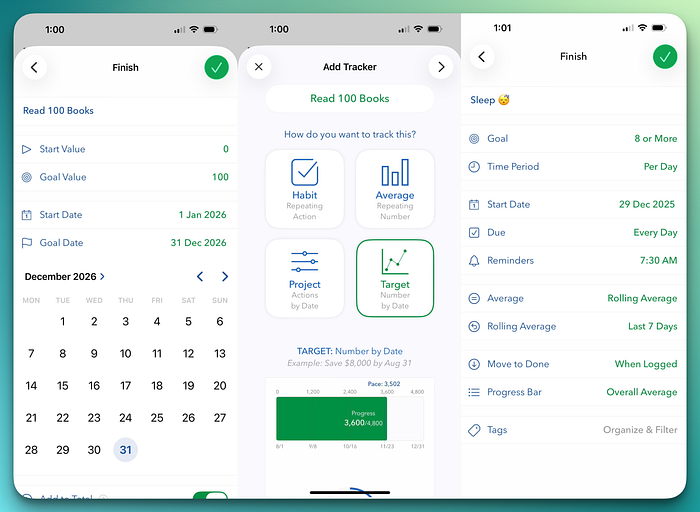
Strides is a unique app in the goal tracking space that is built with four different tracking systems in one place, so it can adapt to any kind of goal.
It has:
A Habit Tracker that handles your daily yes/no goals, like did you meditate today or not?
A Target Tracker shows you a pace line toward time-bound goals, so you know if you're ahead or behind on 'read 24 books this year.'
An Average Tracker that calculates rolling averages for things like daily calorie intake or weekly exercise hours.
A Project Tracker that breaks down complex goals into milestones you can check off.
To ensure you use Strides for Maximum Impact, start by defining 3–5 major goals for 2026, and for each goal, choose the right tracker type.
The key is checking in daily, and Strides helps you with this by sending smart reminders and letting you build the habit of opening the app every morning to set intentions and every evening to log progress.
#2 Streaks — Build the Daily Habits That Compound Into Transformation
I read over 70 books this year, and that doesn't mean I am some sort of superhuman; I just built a habit of reading for at least 30 minutes every day. (Well, except for when I was on vacation)
Having a consistent daily habit is the closest thing to a real-life cheat code that actually exists.
But unfortunately, our brains are terrible at tracking streaks, and most of the time, we don't realize that we forgot that we skipped yesterday, and end up losing momentum.
That's where a great habit tracker like Streaks becomes your accountability partner. Streaks is unlike most boring habit tracker apps out there. It's beautiful, focused, and deeply integrated with the Apple ecosystem.
The app limits you to 24 habits to force you to identify what truly matters rather than tracking 50 habits you'll abandon by February.
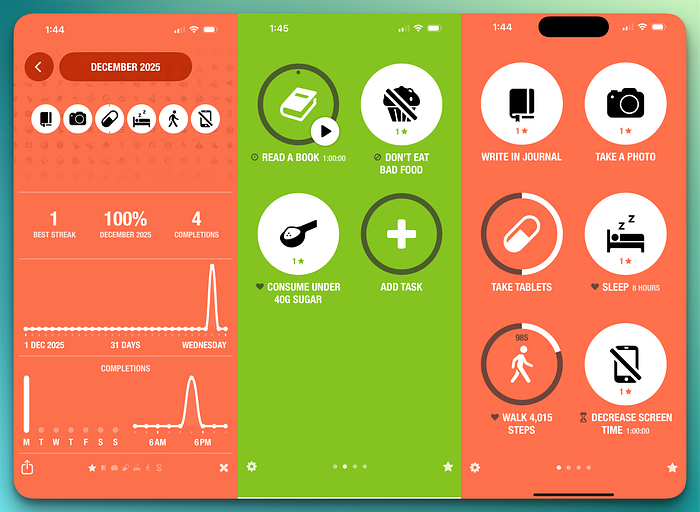
Streaks also supports Apple Health integration, so if you set a goal to walk 10,000 steps daily, it automatically marks it complete by pulling data from Apple Health.
You can also take advantage of the Shortcuts integration to trigger habits from Siri, like saying, 'Hey Siri, I just meditated.' It's also one of the few habit tracking apps that lets you log habits from your Apple Watch as well.
If you want to get the best results, choose habits that are:
- Specific: Not 'exercise' but 'do 20 pushups.'
- Timed: Assign morning, afternoon, or evening to each habit.
- Stackable: Link new habits to existing routines ('after I pour my coffee, I journal for 5 minutes')
As a self-proclaimed self-help enthusiast, my pro tip for you is to make your habits embarrassingly small at first. Set a habit to just 'Read one page' instead of 'read for 30 minutes' because you'll actually do it. The streak matters more than the intensity in the beginning.
#3 Structured — See Your Entire Day at a Glance
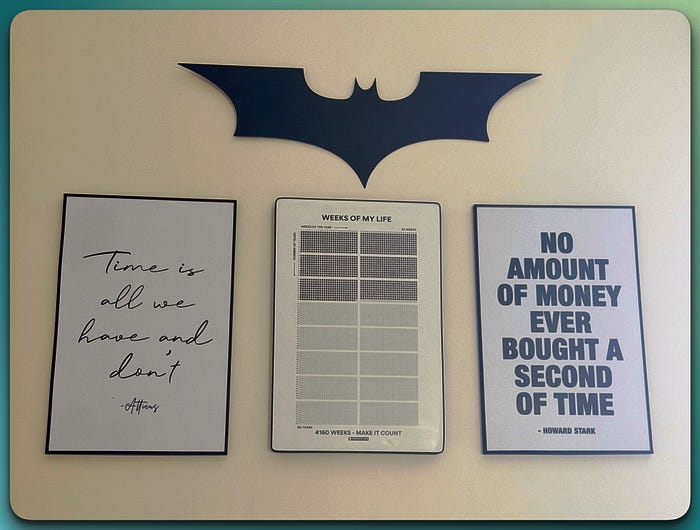
Most people have no idea where their time actually goes, despite it being the one resource you can never get back. I, for one, am obsessed with time tracking, as you can see from the wall in my room.
The difference between productive and busy people is that productive people decide in advance how they will spend their time, instead of reacting to whatever feels urgent.
A visual daily planner transforms abstract time into concrete blocks you can see, move, and protect. When you can see that you have exactly 90 minutes between meetings, you can use it differently than when time feels like a shapeless blob.
Structured is the visual planning app that can help you finally take control of your time in 2026. Instead of a boring list of tasks, you see your entire day as a timeline.
All your events, tasks, and reminders appear as color-coded blocks that show exactly when things happen and how long they will take. You can also see your conflicts and open time at a simple glance.
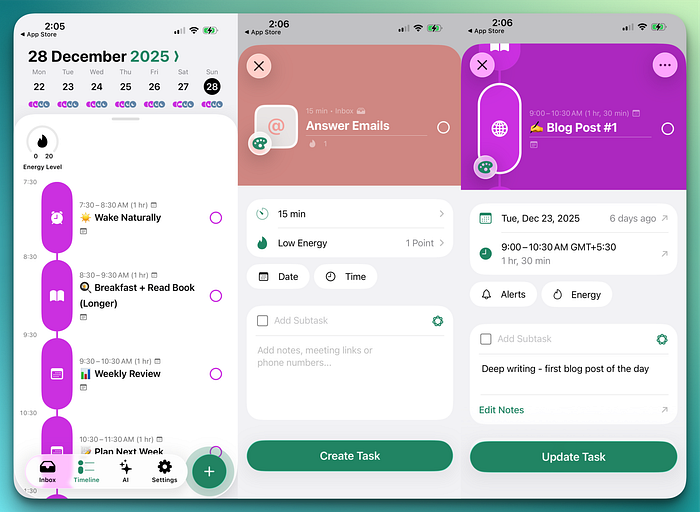
The app offers over 500 icons to customize how your tasks look to give them a personal feeling rather than a Severance-style corporate vibe. It also has an AI Day Drafting feature that can automatically schedule your tasks based on your preferences and availability.
To make the best use of the app, spend at least 10 minutes every day to build tomorrow's timeline. You can start by reviewing what's on your calendar, and then add your priority tasks as time blocks with realistic time frames, instead of pretending you will finish a 2-hour task in 30 minutes.
If you train your mind to think that if something is not on your timeline, it probably won't happen, then you can dramatically improve how you manage your time.
#4 Day One — Capture the Moments That Matter
If you can't remember what you did three Tuesdays ago, or you forget small joys and hard moments equally, and you find yourself repeatedly making the same mistakes because you never pause to reflect on what you've actually learned, then you need to start Journaling in 2026.
When you journal, you process your experiences instead of just living through them. You notice patterns you would otherwise miss, and you create a record of who you were and how far you have come.
Journaling is one of the highest-leverage habits you can build, and Day One is the app you can build it with.
Day One makes it effortless to capture moments and lets you add context to each entry with photos, voice recordings, weather, location, your activity level, and even what music you were listening to.
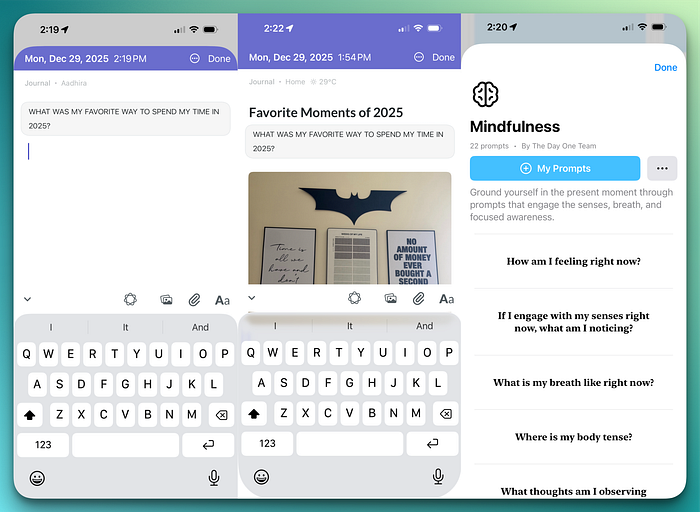
It has a feature similar to the memory feature in the Photos app called 'On This Day' that surfaces past entries from the same date in previous years. It gives you a surreal feeling of reading what you wrote exactly one year ago and realizing how much has changed (or hasn't).
If you want to start journaling in 2026, start with the lowest possible barrier and commit to writing one sentence per day. You can also use templates or prompts like 'What did I learn today?' to make it easier.
I have been journaling for a few months now and have been switching between different apps and notebooks, but I mostly use these three simple prompts:
- What happened today that I want to remember?
- What am I grateful for?
- What would I do differently?
This just takes about five minutes a day, but it has the potential to change everything over time.
#5 StoryGraph — Read More Books (and Remember What You Read)
I recently saw on an Instagram post that Bill Gates reads 50 books a year, and Barack Obama releases his favorite books, among other things, every year here on Medium. So, it's clear that successful people read a lot.
While most people get inspired by these facts and try to pick up the reading habit themselves, they end up just reading reactively, picking up whatever catches their attention in the moment. They don't track what they read, don't set any reading goal, and don't even have a system to get the most out of what they read.
If you want 2026 to be the year you finally become a reader, start by using an app called StoryGraph.
StoryGraph helps you find books you will actually love through mood-based recommendations. This means, instead of asking you what genres you like, it asks what moods you want, like adventurous, dark, emotional, or lighthearted. The algorithm then learns your preferences and suggests books that match how you want to feel.
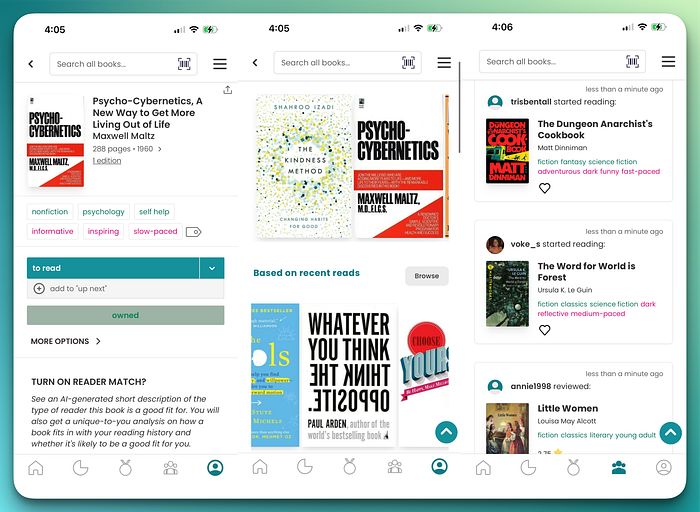
It also has great community-based inputs, helping you avoid triggers or find exactly the type of content you are looking for. Yes, it also comes with a beautiful stats page with aesthetically pleasing visualizations of your reading patterns, moods, page counts, formats, and genres, that you can show off online.
You can also join reading challenges if you struggle to keep up with a book and think some community accountability can help.
Set a realistic reading goal for 2026, and don't set your goal as 100 books if you have never read more than 10; you will get discouraged by March. StoryGraph makes it very easy to find books based on your mood rather than relying on a bestseller list or purchase history-based suggestions.
The All-in-One Solution — My 2026 Craft Life Planner
After years of using separate apps for goals, habits, planning, journaling, and reading, I realized that switching between five apps create friction which ends up killing consistency.
I would set a goal in one app, forget to check it because I was busy setting up a system in another app, lose momentun, and end up completely abandoning the goal. All my habits, plans, notes, and reflections lived in different places and weren't connected to my goals.
So, I built something different.
The 2026 Craft Life Planner is a comprehensive Craft template that brings all five systems into one beautiful, interconnected workspace.
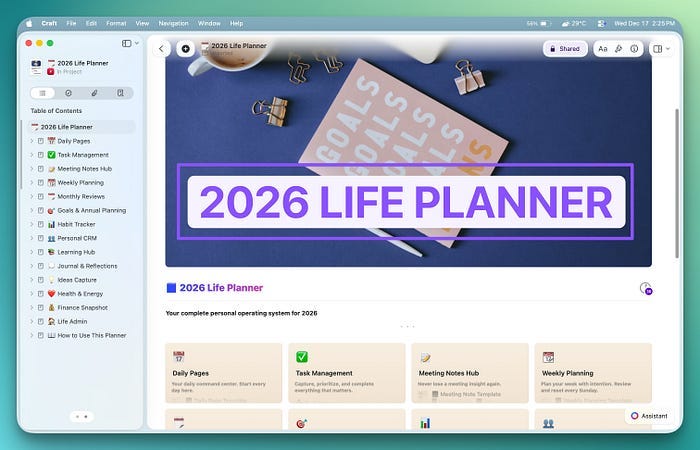
- It has a goal setting system with quarterly reviews and progress tracking.
- A habit tracking system with daily check-ins and streak visusalization.
- Daily and weekly planning with time blocking templates.
- Journaling prompts for morning intention-setting and evening reflection.
- Reading log to track books, capture highlight, and review what you've learned.
I have also included monthly review templates, a yearly reflection system, project planning spaces, and more. Basically, everything you need to run your entire life from one place to another
All your systems will now live inside Craft and your daily reflection can reference your goals, your weekly review can show your habit streaks alongside your accomplishments, your reading notes can connect to the themes you're exploring in journaling, and so on.
You no longer have to constantly switch between apps or forget which app has what because of all the context switching.
It's the system I personally use, and it's the system that finally made productivity feel sustainable rather than exhausting.
If you love the individual apps I mentioned and want to use them separately, do that. They are all excellent apps and serve their purpose well.
But, if you are tired of app-switching and want everything in one integrated system designed specifically for Apple users who want to make 2026 their best year yet, I have got something special for you.
Exclusive Discount for My Followers
I'm offering an exclusive discount on the 2026 Apple Life Planner until December 31st. This is my way of saying thank you for reading and supporting my work throughout the year.
Grab the 2026 Apple Life Planner at the exclusive discounted price here →
Start 2026 with a system that actually works.
Read more about the life planning system here: