While testing a web application in a Vulnerability Disclosure Program, I came across an interesting issue where a hidden endpoint inside a JavaScript file exposed a sensitive functionality. In this short write-up, I'll explain how simple reconnaissance using browser developer tools helped uncover the finding.
Initial Observation
The application had a very limited attack surface. When visiting the website, the only functionality available was a login page. There was no registration option, which suggested that user accounts were created internally by the company and shared only with authorized users.
At first glance, this made the application look difficult to test because there were very few visible features to interact with. However, instead of stopping there, I decided to explore the client-side JavaScript files.
Digging into JavaScript Files
Inspecting JavaScript files is a common technique in bug bounty hunting because developers often place API endpoints and internal routes inside them.
To start my recon, I opened the browser Developer Tools and checked:
- Page Source Code
- The Network Tab to view all loaded JavaScript files
While reviewing one of the JavaScript files, I noticed an interesting endpoint:
/Account/UpdatePwd?username=This immediately caught my attention because it appeared to be related to a password update function.
Testing the Endpoint
I visited the main website:
https://redacted.com/This redirected me to the login page.
Next, I tried to access the endpoint that I discovered in the JavaScript file:
https://redacted.com/Account/UpdatePwd?username=Surprisingly, the page found accessible without authentication.
This indicated that the application did not verify whether a user was logged in before allowing access to the password update functionality.
User Enumeration and Targeting Admin
Since the endpoint accepted a username parameter, I tested it using a commonly used account name:
https://redacted.com/Account/UpdatePwd?username=adminBased on the different error messages returned by the application, I was able to confirm the presence of valid usernames, which allowed user enumeration.
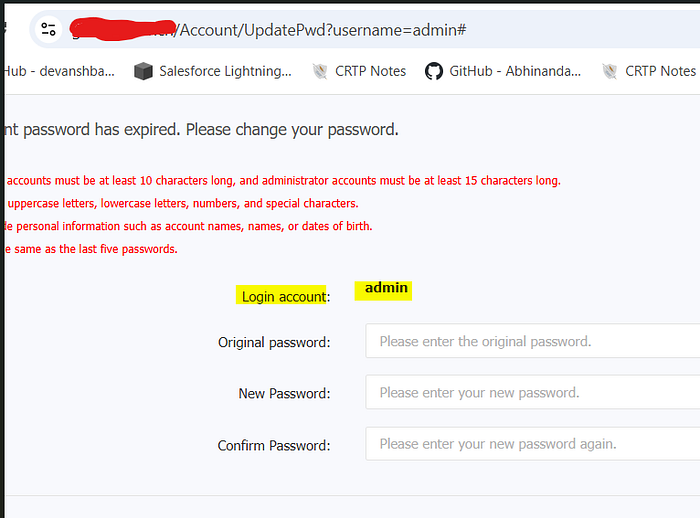
I then attempted to bypass the old password validation, but it appeared that the application properly validated this field and required the correct old password to proceed.
However, the main issue remained: the endpoint itself was exposed without any authentication requirement.
Potential Exploitation Scenario
An attacker could combine this exposed endpoint with other attack techniques such as:
- Brute-force attempts to guess the old password
- Credential stuffing using leaked credentials
- Username enumeration to identify valid accounts
If the attacker successfully guesses the old password, they could update the password and take over the account, including potentially the admin account.
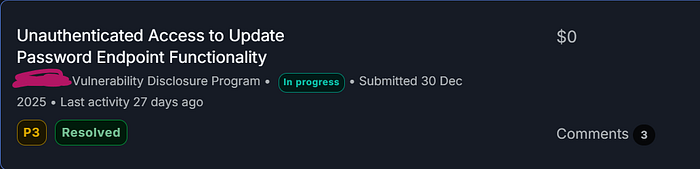
This vulnerability was accepted as P3 on Bugcrowd.
Business Impact
This issue creates multiple security risks.
- Unauthenticated access to password update functionality- An attacker can directly interact with the password update workflow without being logged in.
2. Broken Access Control- Administrative endpoints should never be reachable without authentication. Even if the application requires an old password, the endpoint itself must still enforce proper authentication and session validation.
3. Expanded Attack Surface- When combined with credential attacks or user enumeration, this vulnerability significantly increases the chances of account takeover.
Key Takeaway
Even when an application appears to have very limited functionality, JavaScript files can reveal hidden endpoints and internal application logic.
Simple reconnaissance techniques such as:
- Checking page source
- Inspecting the Network tab
- Reviewing JavaScript files
can help uncover critical vulnerabilities that are not visible through the user interface.
Sometimes, impactful security findings come from something as simple as carefully reading the JavaScript code.
Connect with me
#BugHunting #Cybersecurity #VDP #HallofFame