
Hey guys, so today I was solving an XSS lab and I got stuck for way longer than I expected But I learned something really important, so I'm writing this down before I forget.
Step 1: Understanding the code
I checked the page source and found this JavaScript:
function tracking(search){
    search = search.split('(')[0];
    document.getElementById('tracker').innerHTML = search;
}
So what this does is:
- It takes input from the
searchparameter - Removes everything after the first
(character - Then injects the result into the page using
innerHTML
That immediately tells me:
User input is going into innerHTML → possible XSS
Step 2: Initial payloads (failed)
I started with a basic payload:
<img src=x onerror=alert(1)>But the filter removed everything after (, so it became:
<img src=x onerror=alertSo yeah… blocked.
Then I tried removing parentheses:
<img src=x onerror=alert'1'>Didn't work. Later I realized why:
alert'1' is not valid JavaScript syntax
Step 3: Trying backticks
Then I remembered JavaScript backticks:
<img src=x onerror=alert`1`>Still didn't work.
After some research, I found that HTML attributes sometimes require quotes when using special characters. So I tried:
<img src=x onerror="alert`1`">This worked — I got an alert.
But the lab was still not solved.
Step 4: Understanding the requirement
I re-read the lab carefully.
It wasn't enough to trigger alert(1)
The goal was to access document.cookie
That's where the problem came in:
- Backticks work for simple calls
- But for something like
alert(document.cookie)→ you need parentheses
And parentheses were blocked.
Step 5: The breakthrough payload
After searching for a while, I found this payload:
<img src=x onerror=alert(document.cookie)>And it worked. Lab solved
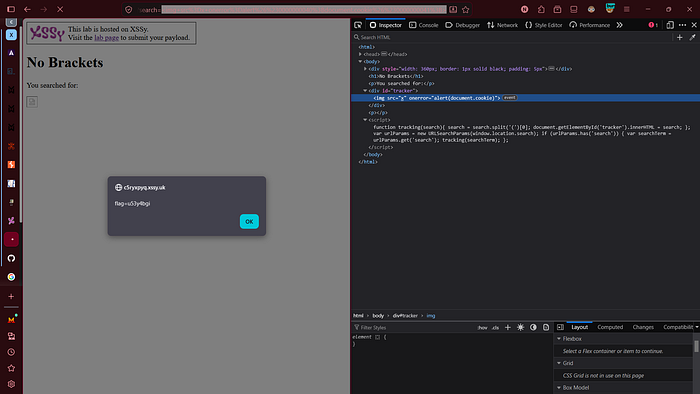
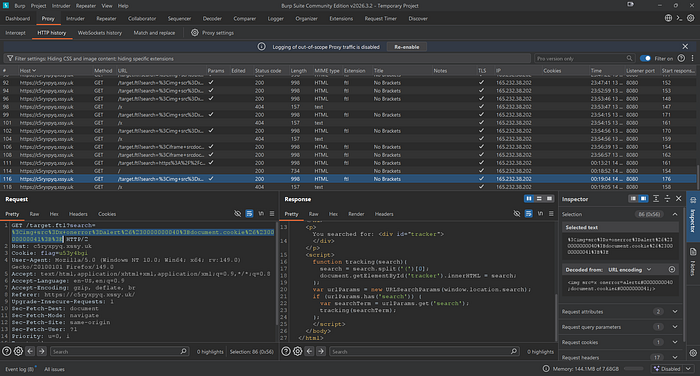
But I didn't want to just copy it — I needed to understand it.
Step 6: Why this works
The filter only removes the actual ( character.
But in this payload:
(represents()represents)
So:
- The filter sees no
(→ allows the payload - The browser decodes it later into real parentheses
So the final executed code becomes:
alert(document.cookie)That's the key idea:
Filters run before HTML entity decoding
Step 7: About zero-padding
You might notice:
(Instead of:
(Both are exactly the same.
The extra zeros don't change anything — they might be used to:
- Bypass weak filters
- Or just make payloads less obvious
Step 8: Key takeaways
What I learned from this lab:
- Blocking characters is not enough — encoding can bypass filters
- HTML entities are powerful for bypassing restrictions
- Backticks have limitations in real XSS scenarios
- Always understand the lab goal, not just trigger an alert
Final Payload
<img src=x onerror=alert(document.cookie)>That's it. If you're stuck on this lab, don't just try random payloads — understand how the filter works. That's where the real learning is.
Alright, that's all for today
see you in the next story