
INTRODUCTION: WHY PERSONAL DATA PROTECTION MATTERS
In modern society, personal data has become one of the most valuable digital assets. Every individual shares personal information daily through smartphones, social media, emails, online shopping websites, and cloud storage systems. Data breaches, identity theft, phishing attacks, and account compromises are increasing each year, often targeting ordinary users rather than large corporations. This article aims to provide a detailed and useful guide that can be implemented by anyone, regardless of technical background.
HOW PERSONAL DATA GETS EXPOSED
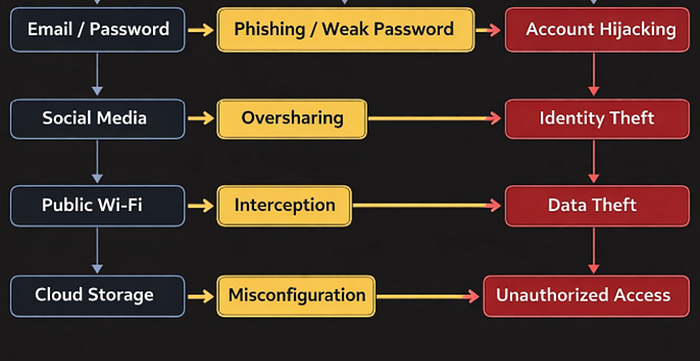
Even users who are careful can unintentionally expose their own sensitive information. The following are common methods of data leakage:
1. Public Wi-Fi Networks — Unsecured networks, such as those in airports, cafes, or any public setting, allow hackers to seize personal data transmitted over the internet.
2. Social Media Oversharing — Posting detailed personal information increases vulnerability to social engineering attacks.
3. Weak Passwords — Using simple combinations or reusing the same password across multiple platforms makes accounts easier to compromise.
4. Phishing Emails — Misleading messages that appear legitimate, trick users into revealing sensitive credentials. These attacks are commonly carried out through emails, a technique known as phishing.
5. Cloud storage Misconfiguration — incorrect security settings in cloud services can make files publicly accessible.
CORE METHODS FOR PROTECTING PERSONAL DATA
Personal data protection is not achieved through a single action or tool, but rather by a hierarchical approach, where multiple security measures work together to reduce risk. This section discusses four fundamental methods for protecting personal data, explaining why each method matters, how it works, and how individuals can realistically implement it in their daily digital lives.
1. STRONG AUTHENTICATION AND ACCESS CONTROL
Authentication refers to the process of verifying a user's identity before granting access to systems, applications, or data. Weak authentication mechanisms remain one of the most utilized vulnerabilities in personal and organizational cybersecurity.
WHY THIS IS CRITICAL
Cybercriminals commonly obtain login credentials through:
· Data breaches from third party services
· Phishing attacks
· Password reuse across multiple platforms
Once credentials are compromised, attackers can access emails, banking services, cloud storage, and social media accounts, often without the user's immediate knowledge.
Core protection techniques:
· Strong, unique passwords
· Multi factor authentication
· Secure credential storage
Advantages:
· Prevents unauthorized access even if one security layer fails.
· Limits lateral movement between accounts.
· Significantly reduces the success rate of automated attacks.
DETAILED IMPLEMENTATION GUIDE
STEP 1: create strong, unique passwords.
· Passwords should be at least 12–15 characters long.
· Avoid:
Names, birthdays, phone numbers.
· Use a combination of
Uppercase and lowercase letters, numbers, symbols.
Step 2: Use a password manager.
Instead of memorizing passwords,
· Install a reputable password manager.
· Allow it to generate, securely store, and auto-fill login details on trusted sites.
Step 3: Enable Multi-Factor Authentication (MFA).
MFA adds an additional verification step after entering a password. Common methods include:
· One time passwords (OTPs) via authentication apps
· SMS codes
· Biometric verification
2. ENCRYPTION OF PERSONAL DATA
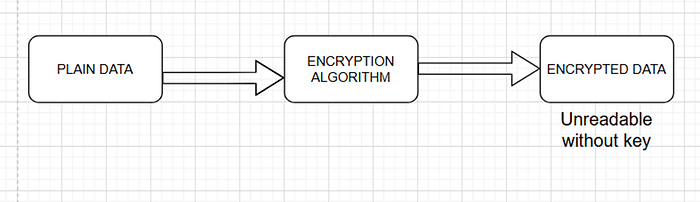
Encryption is a foundational cybersecurity mechanism that protects data by converting it into an unreadable format unless a valid decryption key is used.
Data breaches do not always occur through hacking alone, data breaches can be exposed through:
· Stolen or lost devices
· Unauthorized access to cloud storage
· Interception of data over unsecured networks
Without encryption, exposed data can be immediately read and misused.
Advantages:
· Maintains confidentiality even if data is stolen.
· Protects sensitive files.
· Reduces legal and privacy risks.
DETAILED IMPLEMENTATION GUIDE
Step 1: Enable Device-level encryption.
Most modern operating systems support full-disk encryption:
· Windows: Enable BitLocker
· macOS: Enable FileVault
· Android/iOS: Encryption is enabled by default when a device lock is set
This ensures that stored data cannot be accessed without authentication.
Step 2: Encrypt Cloud and Backup Data.
· Use cloud services that provide encryption at rest and in transit.
· Protect cloud accounts with strong authentication.
· Encrypt sensitive files before uploading when possible.
Step 3: Ensure secure data transmission.
Before entering personal data online:
· Check for HTTPS in the web address.
· Avoid public Wi-Fi for sensitive transactions.
· Use trusted networks or secure mobile data.
3. VIRUS GUARDS
While strong encryption or authentication protect accounts and data, devices remain a primary target for malware based attacks. Antivirus software, also referred to as virus guards, play a critical role in detecting, preventing, and removing malicious software
Why antivirus software is necessary
Modern malware does not only include traditional viruses, it also includes
· Spyware that monitors user activity.
· Ransomware that encrypts personal files.
· Trojans that provide attackers remote access.
· Keyloggers that capture passwords and sensitive input.
In most cases, many of these threats operate in the background and cannot be detected by the users, until its too late. Therefore, antivirus software provides continuous, automated protection.
Advantages:
· Virus guards detect and block malware.
· They scan downloads, USB devices, and email attachments.
· They provide alerts for suspicious activities.
DETAILED IMPLEMENTATION GUIDE
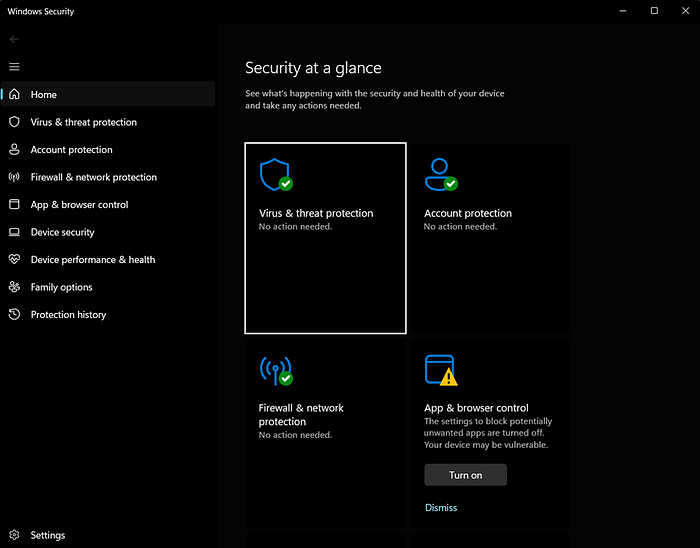
Selected tool: MICROSOFT DEFENDER ANTIVIRUS
Step 1: Access windows security.
1. Click the start menu on your PC.
2. Type windows security.
3. Open the application.
Step 2: Enable real time protection.
1. Click virus and threat protection.
2. Select manage settings.
3. Ensure real time protection is turned ON.
Step 3: Run a full system scan.
1. Go back to virus and threat protection.
2. Click scan options.
3. Select full scan.
4. Click scan now.
This checks the system files, installed applications, background processes, and connected storage devices.
4. THREAT AWARENESS AND PRIVACY CONTROL
In simple words, it is the practice of identifying, understanding, and staying vigilant to dangers in order to protect your data. Privacy control focuses on limiting how much personal information is exposed online.
Common threats include:
· Phishing emails
· Fake login pages
· Malware
· Spyware
· Fake links
· Insecure Wi-Fi networks
Why privacy control matters:
The more data shared:
· The larger the attack surface.
· The greater the impact.
· The harder it is to maintain privacy.
Advantages of Awareness and privacy control:
· Reduces risks of being scammed.
· Enables early detection of attacks.
· Strengthens overall personal security.
· Limits identity theft risks.
· Improves control over digital presence.
DETAILED IMPLEMENTATION GUIDE
Step 1: Identify suspicious communications.
· Be cautious of urgent/ threatening messages.
· Check sender email address/ contact details thoroughly.
· Do not click random links.
· Avoid downloading files from unknown sources.
Step 2: Review application permissions
· Remove unnecessary access to
Location, contacts, camera, microphone.
Step 3: Regularly audit accounts
· Delete unused accounts
· Change login credentials often
· Monitor account activity
· Use privacy settings on social platforms

WHAT YOU CAN DO IF YOUR DATA IS COMPROMISED.
How can you know?
A few early signs of a compromised account are as follows:
· Unexpected login alerts.
· Password reset alerts.
· Financial transaction alerts.
· Device behavior.
The first step after a suspected cyber incident is to determine what exactly has been compromised.
If it is account related,
1. Change your passwords/ login info immediately.
2. Enable 2FA
3. Sign out of all devices.
If it is related to a device,
1. Disconnect from the internet.
2. Run a full scan using an installed antivirus software.
3. Remove or quarantine any threats
4. Restart your device.
5. Monitor your accounts.
Once the risk is over, take time to strengthen your protection as stated in the previous sections.
CONCLUSION
Protecting personal data is no longer optional, it is a critical responsibility in our digitally connected world. From strong passwords, antivirus protection, MFA and safe browsing habits, the strategies outlined in this guide present a practical and layered approach to protecting personal data, for everyday users.
Regularly reviewing accounts, updating passwords and updating devices, all ensure that your data and digital identity remain safe.