Web application security is one of the most important areas of cybersecurity. Many modern applications rely on authentication systems to verify the identity of users. If these mechanisms are not implemented securely, attackers may exploit them to gain unauthorized access.
In this article, I demonstrate how a brute-force authentication attack works by performing a hands-on lab exercise using tools such as Burp Suite and ffuf. This walkthrough shows how weak authentication mechanisms can be exploited and why proper security controls are necessary.
What is Bug Bounty and Web Penetration Testing?
Bug bounty and web penetration testing involve testing websites and web applications to discover security vulnerabilities before malicious attackers do.
Organizations allow ethical hackers (security researchers) to test their systems and responsibly report discovered vulnerabilities. In return, researchers may receive:
- Monetary rewards
- Public recognition
- Security reputation
The main objective is to identify security weaknesses and help organizations fix them before they can be exploited by attackers.
In simple terms:
👉 Bug bounty hunting is like being a friendly hacker who helps make the internet safer.
Authentication vs Authorization
Two important security concepts in web applications are authentication and authorization.
Authentication Authentication verifies the identity of a user. For example, logging in with a username and password.
Authorization Authorization determines what actions a user is allowed to perform after authentication.
If either of these mechanisms is implemented incorrectly, attackers may gain unauthorized access to sensitive systems.
Understanding Brute-Force Attacks
A password brute-force attack is a technique where an attacker systematically tries multiple passwords until the correct one is found.
Attackers may use:
- Automated scripts
- Password wordlists
- Credential databases
- Intelligent guessing techniques
These attacks target login endpoints in web applications.
If the system lacks proper protections such as rate limiting, account lockout, or CAPTCHA, brute-force attacks can succeed.
When is Brute-Force Used in Penetration Testing?
Brute-force attacks are typically performed during the exploitation phase of a penetration test.
A tester may attempt brute-forcing when:
- A valid username has already been identified
- A login form or authentication API is available
- No strong rate-limiting protections exist
However, ethical hackers must always follow rules of engagement and avoid actions that could disrupt production systems.
Lab Objective
The goal of this lab is to:
Recover a valid user password by brute-forcing the authentication endpoint using a raw HTTP request and a password wordlist.
Lab Environment
The target application provides a login page.
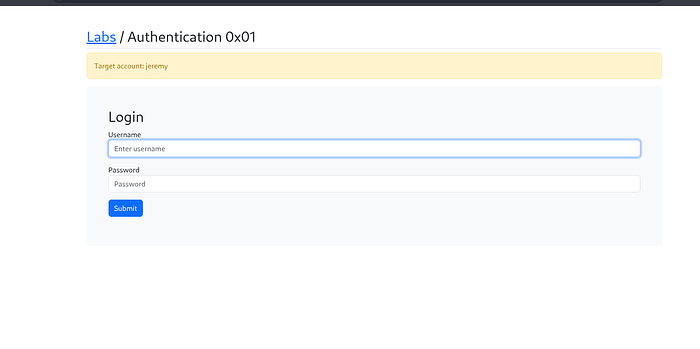
Required Tools
To perform this lab, the following tools are used:
- Burp Suite (Proxy and HTTP interception)
- ffuf (Web fuzzing tool)
- SecLists (Password wordlists)
- Terminal and text editor (vim, nano, mousepad)
Step 1 — Capture the Login Request Using Burp Suite
First, configure the browser to route traffic through Burp Suite Proxy.
- Enable Intercept ON in Burp Suite
- Attempt to log in using test credentials.
Example login attempt:
username = jeremy
password = jeremy
When the login request is sent, Burp Suite captures the HTTP POST request.
Step 2 — Analyze the Captured HTTP Request
The intercepted request reveals the authentication parameters used by the application.
Example request body:
username=jeremy&password=jeremy
This indicates that the application sends the username and password using a POST request.
Step 3 — Prepare a Raw Request for Fuzzing
Next, export the captured HTTP request.
In Burp Suite:
HTTP History → Right Click → Copy Request → Save as request.txt
Then open the request file in a text editor:
mousepad request.txtLocate the request body and replace the password value with FUZZ.
Original request:
username=jeremy&password=jeremy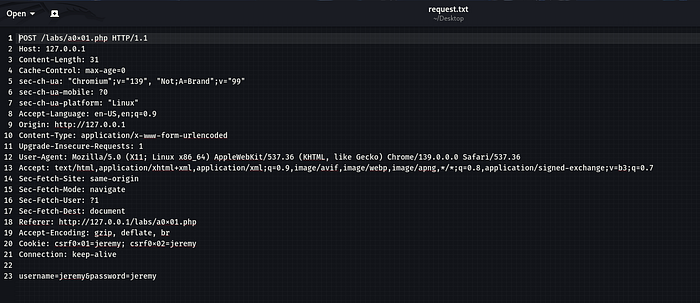
Modified request:
username=jeremy&password=FUZZ
This placeholder allows a fuzzing tool to automatically test multiple passwords.
Step 4 — Install Password Wordlists
If not already installed, install SecLists which contains commonly used password lists.
sudo apt install seclistsExample password list:
/usr/share/seclists/Passwords/xato-net-10-million-passwords-1000.txtStep 5 — Run the Brute-Force Attack Using ffuf
Now use ffuf to perform password fuzzing against the authentication endpoint.
Example command:
ffuf -request request.txt -request-proto http \
-w /usr/share/seclists/Passwords/xato-net-10-million-passwords-1000.txt \
-fw 495
Explanation of parameters:
ParameterDescription-requestUses the raw HTTP request-request-protoSpecifies HTTP or HTTPS-wPassword wordlist-fwFilters responses by word count
The FUZZ keyword is replaced with each password from the wordlist.
Step 6 — Analyze the Results
During fuzzing, ffuf sends hundreds or thousands of requests.
Most responses will look identical because the login fails.
However, when a valid password is found, the server response changes.
Indicators may include:
- Different response size
- Different status code
- Different word count
- Redirect to dashboard
Once identified, the valid password can be used to successfully log in to the account.
Security Impact
Brute-force vulnerabilities can allow attackers to:
- Gain unauthorized access to user accounts
- Compromise sensitive information
- Escalate privileges
- Take over systems
Prevention and Mitigation
Developers should implement strong protections against brute-force attacks.
Recommended security controls include:
- Account lockout after multiple failed attempts
- Rate limiting login requests
- CAPTCHA verification
- Multi-factor authentication (MFA)
- Monitoring suspicious login activity
Conclusion
This lab demonstrated how weak authentication protections can allow attackers to brute-force login credentials.
By intercepting login requests with Burp Suite and automating password attempts using ffuf, it is possible to identify valid credentials when proper security controls are missing.
Understanding these attack techniques helps security professionals design stronger authentication systems and protect applications against real-world threats.