Introduction
Hello everyone! My name is Felopater Fady, and I'm excited to share my very first technical write-up with you,
In this article, we'll dive deep into a Broken Access Control vulnerability I discovered in a major SaaS platform. We will explore how a restricted "Viewer" account was able to bypass server-side authorization to escalate its privileges to a "Member" role, effectively gaining unauthorized collaborative and administrative capabilities.
Summary
While testing a major SaaS platform, I discovered a Broken Access Control vulnerability that allowed a user with the most restricted role (Viewer) to escalate their privileges to a Member role. This bypass was possible because the application relied on client-side restrictions rather than enforcing strict server-side authorization checks.
The Vulnerability
The platform implements a Role-Based Access Control (RBAC) system. A "Viewer" is designed to be a read-only role with no administrative or collaborative permissions. In the UI, all options to invite or promote users were correctly disabled for this role.
- Vulnerability Type: CWE-285: Improper Authorization
- Impact: Privilege Escalation & Unauthorized Access
- Target: Redacted (SaaS Platform)
Exploitation Walkthrough
Step 1: Identifying the Client-Side Barrier
Upon logging in as a Viewer, I navigated to the "Invite" or "User Management" section. As expected, the "Member" and "Admin" roles were grayed out in the dropdown menu. A tooltip appeared stating: "You can't invite these roles with your current permissions."

Step 2: Intercepting the Request
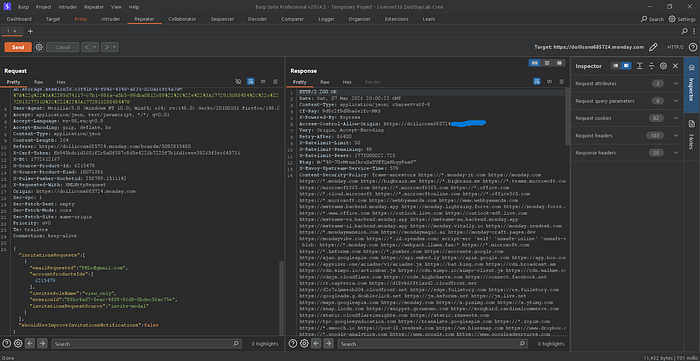
I fired up Burp Suite and enabled interception. I triggered a basic action that involved the invitation system and captured the outgoing POST request.
In the JSON payload, I noticed a specific parameter: "inviteeRoleName": "view_only"
Step 3: The Bypass
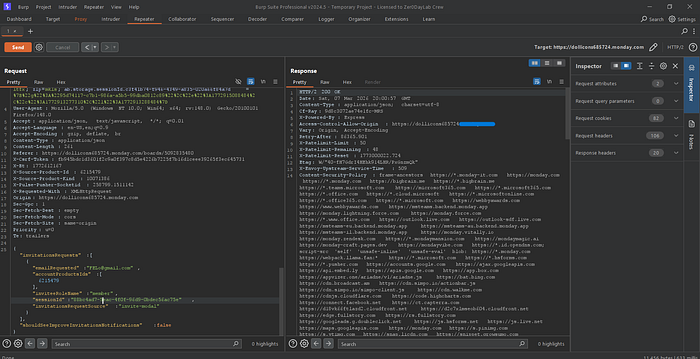
I decided to test if the server validated this role against my current permissions. I manually modified the value in the Burp Suite Repeater:
- From:
"inviteeRoleName": "view_only" - To:
"inviteeRoleName": "member"
Step 4: Confirmation
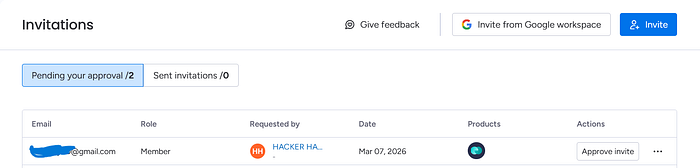
After forwarding the modified request, the server responded with a 200 OK. Checking the User Management dashboard, I confirmed that the invitation was sent/processed with the Member role instead of Viewer.
The Impact
This vulnerability allows a restricted user to bypass organizational hierarchy. The consequences include:
- Unauthorized Access: Gaining edit and delete permissions reserved for paid members.
- Billing Issues: Most SaaS platforms charge per "Member" seat; this bypass allows for adding paid seats without proper authorization.
- Data Integrity: Unauthorized users can now manipulate project data.
Closing Thoughts & Outcome
Every bug is a lesson, regardless of the bounty. Although I was excited about this find, the report was ultimately marked as a Duplicate as it had been submitted previously by another researcher.
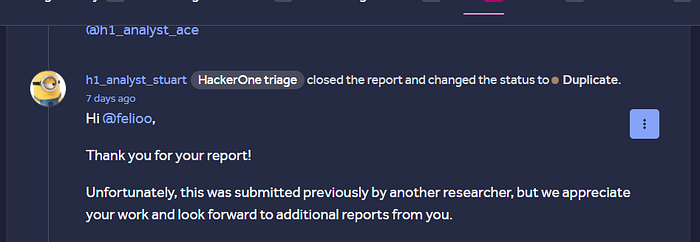
Despite the duplicate status, the process of identifying, exploiting, and documenting this Broken Access Control was incredibly rewarding. It's a reminder that no matter how secure a UI looks, the real security must be enforced on the server.
Let's Connect !
I'm always open to discussing security topics, sharing knowledge, or even just connecting with fellow researchers. If you have any questions or just want to say hi, feel free to reach out to me on LinkedIn. I'd love to hear from you!