While testing the email verification flow onn a large online platform that ultimately allowed full account takeover, I discovered a CSRF vulnerability that initially looked low severity. However, by abusing the verification and password recovery logic, it became possible to fully hijack victim accounts.
The vulnerability was eventually marked as duplicate even though the severity was considered high, and unfortunately the reported bounty of $1500 was not awarded because another researcher had submitted it earlier.
Still, the bug itself is a great example of why CSRF vulnerabilities should never be underestimated.What is CSRF?
Cross-Site Request Forgery (CSRF) is a web vulnerability that forces an authenticated user to perform unwanted actions on a web application without their consent.
In simple terms:
- The victim is already logged in.
- The attacker tricks them into visiting a malicious page or URL.
- The browser automatically sends the victim's authenticated session cookies.
- The server processes the request as if it came from the legitimate user.
If the targeted endpoint changes account state and lacks CSRF protection, the attacker may be able to:
- Change account settings
- Modify emails
- Trigger transactions
- Reset passwords
- Or even fully take over accounts
The Vulnerable Endpoint
During testing, I identified the following endpoint:
POST /api/VERIFICATION/email-verify HTTP/2The endpoint was responsible for sending verification emails after a user changed their email address.
The main issue was:
- No CSRF protection
- State-changing requests accepted without validation
- GET requests could also trigger the action
- No Origin/Referer validation
This opened the door to a full CSRF attack chain.
Vulnerability Overview
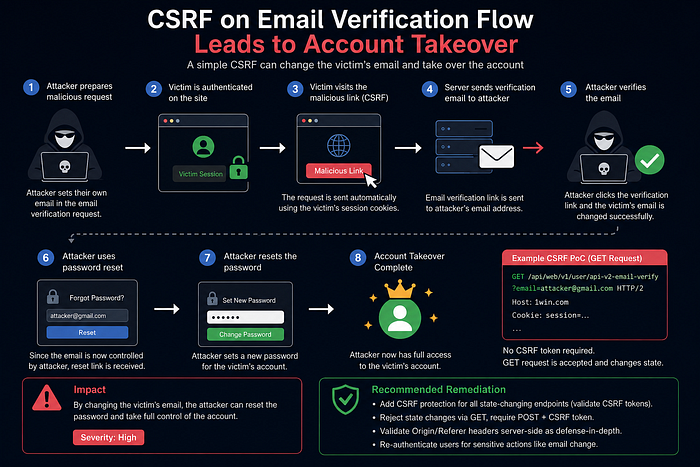
The attack flow worked like this:
- Victim is logged into their account.
- Attacker crafts a malicious CSRF request.
- Victim visits the malicious page.
- The request silently triggers email verification for an attacker-controlled email.
- The verification email arrives in the attacker's mailbox.
- Attacker confirms the verification.
- Victim's account email becomes controlled by the attacker.
- Attacker uses "Forgot Password".
- Full account takeover achieved.
This transformed a seemingly simple CSRF issue into a critical business-impact vulnerability.
Step-by-Step Reproduction
Step 1 — Prepare Two Accounts
Create:
- One attacker account
- One victim account
Both accounts should be authenticated in separate sessions.
Step 2 — Trigger Email Verification
Inside the attacker account:
- Go to Settings
- Edit the email field
- Enter another email address controlled by the attacker
- Click Resend Email
Capture the request using a proxy tool such as:
Step 3 — Modify the Request
The original request used JSON:
{
  "email":"attacker@gmail.com"
}
I converted it to:
Content-Type: application/x-www-form-urlencodedThen changed the body format into URL parameters.
After that, I switched the request method from POST to GET.
This allowed the attack to become a simple clickable URL.
CSRF Proof of Concept
<html>
  <body>
    <form method="GET" action="https://1win.com/api/web/v1/user/api-v2-email-verify">
      <input type="hidden" name="email" value="attacker@gmail.com"/>
      <input type="submit" value="Submit">
    </form>
  </body>
</html>
When the victim opened this page while authenticated, the platform processed the request using the victim's session cookies.
The verification email was then sent directly to the attacker-controlled mailbox.
Account Takeover
Once the verification link was opened:
- The victim account email changed successfully.
- The attacker gained ownership of the email associated with the account.
- Using the password reset functionality completed the account takeover.
At this point, the attacker had full control over the victim account.
Root Cause Analysis
The issue existed because multiple security controls were missing simultaneously:
1. Missing CSRF Tokens
The endpoint accepted authenticated state-changing requests without validating a per-session CSRF token.
2. Unsafe HTTP Method Usage
The application allowed GET requests to trigger state changes.
This violates secure web application design principles because GET requests should be idempotent and non-state-changing.
3. Missing Origin Validation
The server did not validate:
- Origin header
- Referer header
This made cross-site exploitation trivial.
Recommended Remediation
The following mitigations were recommended:
Enforce CSRF Protection
Use secure per-session CSRF tokens for all state-changing endpoints.
Reject GET Requests
Only allow POST requests for sensitive actions.
Never allow GET requests to:
- Change emails
- Modify settings
- Trigger verification workflows
Validate Origin and Referer
Implement strict server-side validation of trusted origins.
Re-Authenticate Sensitive Actions
Require password confirmation before changing critical account information such as email addresses.
Lessons Learned
This case demonstrates an important reality in bug bounty hunting:
A vulnerability that initially appears "medium" or "low" severity can become critical when chained with insecure business logic.
It also highlights why:
- Email change flows must be heavily protected
- Verification systems should never trust unauthenticated cross-site requests
- Security controls should be layered, not isolated
Final Thoughts
Even though this report was eventually marked as a duplicate, it was still a valuable learning experience.
Finding impactful vulnerabilities is not only about discovering bugs — it is also about understanding how different weaknesses interact together to create real-world exploitation paths.
In this case:
A single CSRF issue became a full account takeover vulnerability.
And that is exactly why modern applications must treat every state-changing endpoint as security-sensitive by default.
Thanks for reading 🙏 I'll keep sharing more from my bug bounty journey.
Feel free to connect or share your thoughts
Facebook: https://facebook.com/montasermohsen98 Twitter (X): https://x.com/Montaser_M98 LinkedIn: https://linkedin.com/in/montasermohsen98