
Frida. ADB. Dynamic hooks.
But during my attempt to solve AndroPseudoProtect: Ultimate Device Security from 8kSec, I discovered something far more powerful than any script or runtime trick.
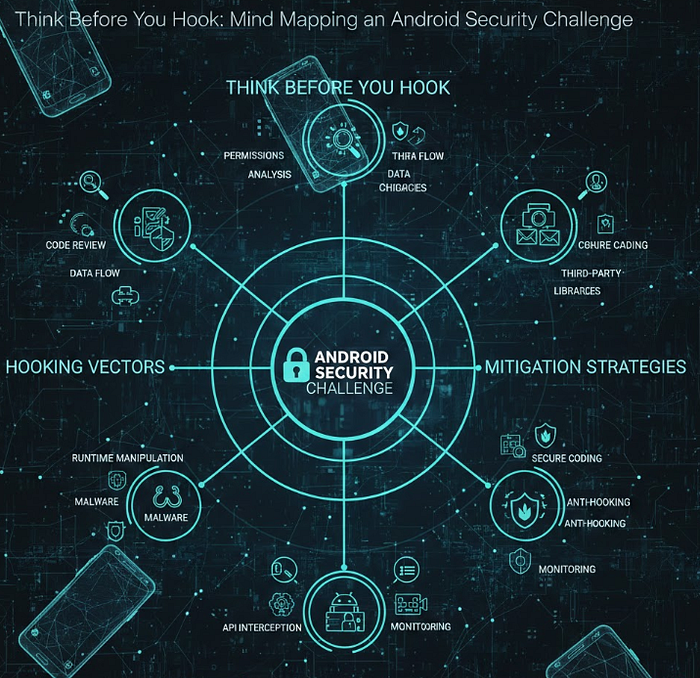
A mind map.
Instead of immediately trying to bypass protections, I forced myself to slow down, open the APK in JADX, and draw how the application actually worked.
- Who talks to whom? Where is the decision point? What input controls the security behavior? Where is the secret coming from?
And surprisingly…
The moment the logic became visible on paper, the vulnerability almost revealed itself.
In this article, I will walk you through how building a structured mental model of the application helped me identify the weak link in its IPC design and ultimately gain control over the protection mechanism.
In AndroPseudoProtect: Ultimate Device Security, the concept is straightforward.
The app asks for access to the device storage, and once granted, it offers two main buttons:
Start Security → encrypt user files
Stop Security → decrypt them back
From a user's perspective, this looks like a simple protection mechanism. Press a button, and your sensitive data becomes unreadable to other applications.
Press another button, and everything returns to normal.
Behind the scenes, however, things are rarely that simple.
Buttons in Android applications usually do not perform the heavy work themselves. They send messages to other components responsible for executing the real logic.
So the real question becomes:
- Who is actually performing the encryption? Who decides whether the request is valid? And can someone else send the same request?
These are the questions that started shaping my mind map.
This is where JADX entered the scene.
Instead of guessing, I wanted proof. So I opened the APK and started tracing what really happens when the user presses Stop Security.
The button itself wasn't stopping anything.
It was simply sending an Intent.
That intent was received by a BroadcastReceiver, and the receiver's job was to forward the request to a Service where the actual encryption or decryption logic lived.
So my mind map evolved:
Button → Intent → Receiver → Service → Action
So far, everything looked normal.
But then I noticed something that completely changed the game.
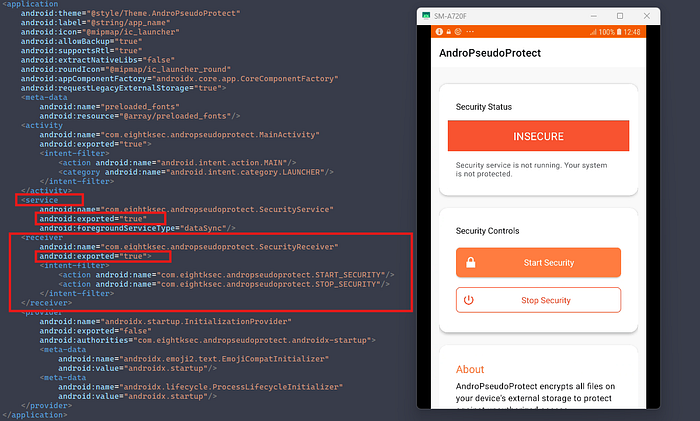
Both the Receiver and the Service were marked as:
android:exported="true"I paused.
Because this single line means something very powerful.
It means the application is not the only entity allowed to talk to those components.
Not just the button inside the app.
Not just the legitimate UI.
Any application on the device can send the same intent.
A different button. A background process. Malware. An attacker.
Anyone.
And at that exact moment, a light bulb went on in my head
For a moment, I was excited.
Exported components? Great.
That should mean I can simply craft the same intent and trigger the service myself.
Easy win… right?
Not really.
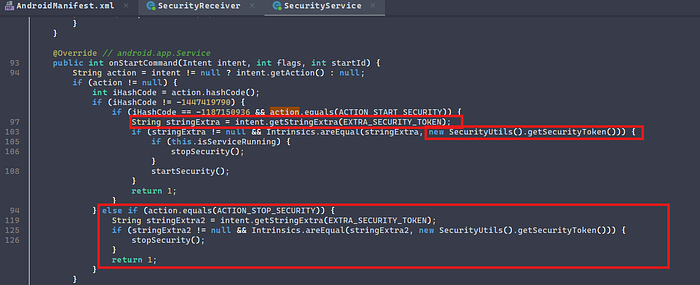
Once I dug deeper into the implementation of the Service, I realized the developers had added an additional protection layer.
The service wasn't blindly accepting requests.
It expected something extra inside the intent.
A token.
And not just any token.
The value provided by the caller had to match a secret generated internally by the application itself.
So now the situation changed completely.
Yes, the components were exported. Yes, anyone could send an intent.
But without the correct token, nothing would happen.
At this point, my mind map expanded.
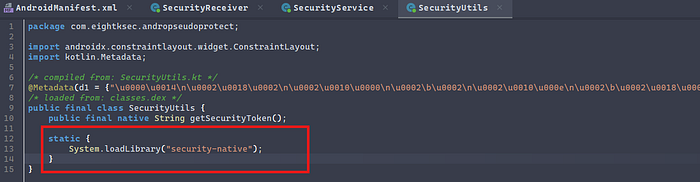
Tracing the code further led me to a utility class responsible for generating this value.
Inside it, I found something interesting.
The token was not hardcoded. It was not stored in a file. It was not received from a server.
It was produced by a native method at runtime.
Which meant one thing.
Static analysis would not reveal it.
If I wanted that secret…
I would have to watch the application while it was running.
And that's when I knew it was time to move from reading code to observing behavior.
At this stage, the mission was clear.
I didn't need to reverse the native library. I didn't need to decrypt anything manually.
The static analysis had already given me the most valuable clue:
the exact function responsible for generating the real token.
So instead of breaking the mechanism…
I decided to observe it.
And that's where Frida became the perfect partner.
Thanks to the static analysis, I already knew:
- the class name
- the method name
- and where it was called
So writing the hook became trivial.
My JavaScript didn't attack the application.
It simply stood at the door and waited for the Token.
Java.perform(function () {
  var SecurityUtils = Java.use("com.eightksec.andropseudoprotect.SecurityUtils");

  // Hook native method via Java wrapper
  SecurityUtils.getSecurityToken.implementation = function () {
    var t = this.getSecurityToken(); // calls the original native implementation
    console.log("[+] TOKEN => " + t);
    return t;
  };

  console.log("[*] Hook installed on SecurityUtils.getSecurityToken()");
});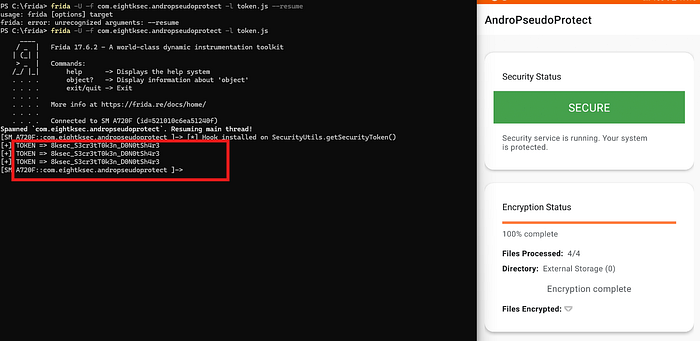
Now I had everything I needed.
At this point, the challenge was no longer about finding the vulnerability — the mind map already exposed the weak link.
It became a simple engineering task:
combine what I learned from static analysis with what I extracted at runtime.
From static analysis, I already had the blueprint:
- The receiver component that listens for security actions (via an intent-filter)
- The package name of the victim application
- The receiver class name (the exact target)
- The action string for STOP_SECURITY
- The exact extra key name expected by the service (the token parameter)
From dynamic analysis, I had the missing piece:
- The real runtime token value.
And that meant I could now craft the same message the app sends internally — but from the outside.
Because the intent-filter lives on a BroadcastReceiver, a broadcast was the correct delivery mechanism.
adb shell am broadcast -n com.eightksec.andropseudoprotect/.SecurityReceiver -a com.eightksec.andropseudoprotect.STOP_SECURITY --es security_token 8ksec_S3cr3tT0k3n_D0N0tSh4r3
Up until now, I used ADB to demonstrate the attack.
But let's pause for a second and think about something more realistic.
What if ADB wasn't involved at all?
What if another application, already installed on the same device, performed the exact same logic in the background?
No cables. No debugging. No technical interface.
Just software talking to software.
The user opens the application.
They press:
Start Security
They see the confirmation. They trust the protection. They walk away believing their files are safe.
Meanwhile…
A different application on the device — one that understands the protocol — can simply send the same request using the correct parameters.
The original security app will happily accept it.
Because from its point of view, everything looks legitimate.
Correct action. Correct structure. Correct token.
So it executes.