
A few months ago, I started to prepare for the most challenging certification I have taken so far, which was the OSCP. This was a journey of learning, curiosity, and perseverance. In this blog post, I will walk you through the lessons I personally learned during my OSCP journey and share some resources that may help you in your own journey as well.
Lesson n°1: Know Your Why
Before investing your time, energy, and money in the OSCP, take a moment to ask yourself why you want to pass this certification. Maybe you're looking for a promotion or trying to take your penetration testing skills to the next level. Whatever the reason, it must come from you.
Having a strong why will give you the inner strength to be undeterred when challenges and setbacks present themselves.
Personally, knowing my why helped me be more focused and resilient when things got harder.
Lesson n°2: Plan Your Journey
The OSCP is quite a long journey, and without a plan, it is easy to lose focus and interest in the process.
To start, you must first evaluate the time you need to complete the OSCP course material as well as the challenges from TJ Null or Lainkusanagi's OSCP list. This will generally depend on your agenda and the depth of your knowledge. For instance, if you have lots of time available and already meet the prerequisites to take the OSCP, your journey may be less long than someone who works in a full-time job and has a family to take care of.
Once this done, you can allocate a specific amount of hours every day or every two days to work on the course material and the OSCP machines list. One common mistake we make is that we generally tend to choose intensity over consistency, especially when we start doing something new. However, it is far better to work one hour every day than just trying to work 5 or 6 hours a day in a week. Working frequently facilitates the retention of information through repetition.
That said, OffSec created two study plans of 12 and 24 weeks for the OSCP that are interesting. For each week, you will find the learning topics, the labs, as well as the estimated time required to complete them. Feel free to cook it to your sauce.
Lesson n°3: Practice Makes Better
Now that you know why you're taking the OSCP and have a plan, it's time to get your hands dirty. Needless to tell you that this is a hands-on certification, and the more you practice properly, the better you become.
By practicing properly, I mean taking note of everything you learned in the course material and the labs, making sure you understand them, and tracking your progress.
Lesson n°4: Start With Proving Grounds
TJ Null and Lainkusanagi are two well-known resources that contain a list of machines to help you prepare for the OSCP. I personally started with TJ Null, then switched to Lainkusanagi because I noticed that he regularly updates his list.
If I had to restart working on those machines, I would have started with Proving Grounds Play/Practice machines instead of HackTheBox machines. I found that the techniques I learned while compromising Proving Ground machines were closer to what I learned in the OSCP course material. Nonetheless, once you have done with Proving Grounds, do some HackTheBox machines, especially the Active Directory ones, because you only have a few AD machines on Proving Grounds. Do not also hesitate to work on HackTheBox's Linux and Windows standalone machines. After completing a box on HackThebox, make sure to watch Ippsec's videos or read 0xdf's writeups. This will help you improve your methodology.
The bottom line in this section is to take note of everything you learned and track your progress. For instance, to track my progress on Proving Grounds, I used the following sheet of paper, and every time I completed a machine, I put a check mark before it or wrote KO 🥊:
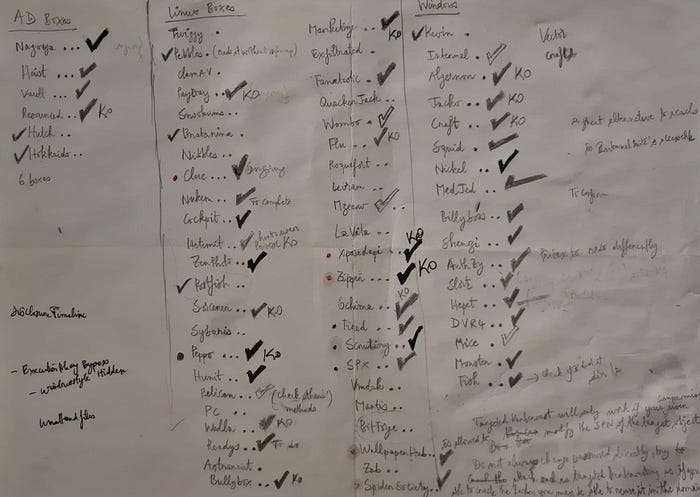
If you don't want to use my old school sheet of paper, you can use this OSCP study tracking, which is well done. Feel free to adapt it to your needs.
Lesson n°5: Create Your Own Cheatsheet
Taking notes is prominent in pentesting. Indeed, this will help you remember what you learned and build your own cheatsheet. There is nothing wrong in using public wikis like HackTricks, Exploit Notes, The Hacker Recipes, HackViser, etc. Nonetheless, in an exam like the OSCP, it may take you some time to search for an information in those wikis than using your own cheatsheet. Furthermore, the advantage of creating your own cheatsheet is that it forces you to explain the concepts you learned in your own words and organize your ideas in a way that is easy for you to understand. Last but not least, you won't be upset tomorrow, if you wake up and find out that your favorite public wiki is no longer available (:
Lesson n°6: Enumerate Harder
Enumeration is at the heart of the OSCP. Understanding what and why you're doing something is crucial as you cannot afford wasting your time on a dead-end. For instance, let's say that you found that a target is running MySQL on port tcp/3306. Before even trying to perform a dictionary attack using default credentials, you can start by quickly checking if the server allows authentication from external IP addresses. You can find that by just paying attention to the error message returned by MySQL when you try to authenticate to it:

As you can see on the image above, MySQL does not allow connection from external IP addresses. In such a scenario, it is useless to spend your time on this port as it will lead nowhere.
Moreover, enumeration is less about running multiple automated tools and expecting them to return a direct attack chain that will give us an initial access to the machine. It is more about understanding the output of our tools, combining those outputs with the outputs returned by other tools in order to create attack chains that may help us get a foothold or gain higher privileges on a target machine. Additionally, always start with low-hanging fruits before trying complex attack vectors. For instance, when you find a login page, try default credentials before trying an SQL injection. Remember, exploitation becomes easier when enumeration is properly done.
Lesson n°7: The Power of Flexibility
Being flexible is an important skill to have, especially when you bang your head against the wall. This can be as simple as taking a break, asking yourself questions, switching to another attack vector, or another standalone machine. It can also be reverting the machine or re-running your Nmap scan. It is easier said than done, but it may help you avoid digging into rabbit holes.
Lesson n°8: Know Your Circadian Clock
Put it simply, the circadian clock is knowing what time of the day makes you feel more energetic. For some people, it may be in the morning, and for others, at night. This will help you schedule your exam in a way that you can be productive and full of energy.
Lesson n°9: Your Mind Needs Rest
Trying harder doesn't mean working 24/7 without any break. This is the best recipe for mental fatigue. It's fine to work hard, but it is also good to listen to your mind and body, especially when you feel exhausted. Sometimes, taking a break or a rest is what you need to unlock a situation.
Lesson n°10: Time is free, but it's priceless
The OSCP exam lasts for 23 hours and 45 minutes. The first 15 minutes are used for the proctoring check. Therefore, managing your time properly is an essential skill. Knowing when to take breaks, when to keep trying harder, and when to move on to another machine are necessary to manage your time properly. This differs from one person to another. For instance, some people can work 2 hours without a break, whereas others may work longer or shorter. Find what is suitable for you and stick to it.
Final Tricks and Tips
Here are some quick tricks and tips that I found useful:
- Before your exam attempt, make sure to read and understand the proctoring requirements and the exam guide. You will find almost all the information you need for the exam using the two previous resources.
- Prepare your citizen ID card, create a snapshot of your virtual machines with all your tools installed, and make sure you have enough disk space on your machine.
- Do not hesitate to revert a machine and re-run your scans if necessary. However, keep in mind that reverting one of the machines in the AD set will revert the whole AD set.
- For the reporting part, I found SysReptor's OSCP template useful.
To connect the dots, I wish you all the best in your OSCP journey, and always try harder!