

Exploiting an OAuth Error Parameter
During bug bounty research, most researchers focus on core application functionality. However, some vulnerabilities appear in unexpected places such as error handling mechanisms. Authentication systems, especially OAuth-based login flows, often expose parameters that may become security risks if they are not properly sanitized.
In this article, we analyze a Reflected Cross-Site Scripting (XSS) vulnerability discovered in the training platforms of major technology companies including Facebook Blueprint, Twitter Flight School, and Google Training Academy.
The vulnerability occurs because an OAuth error parameter is reflected back to the user without proper sanitization.
Authentication Flow Analysis
During the initial reconnaissance phase, the login mechanisms of the target platforms were analyzed. It was observed that the platforms rely on Facebook OAuth authentication for user login.
When the authentication process starts, the user is redirected through the following endpoint:
GET /login.php?skip_api_login=1&api_key=... This request redirects the user to the Facebook authorization page where the user can grant or deny access to the application.
If the user denies the authentication request or cancels the login process, the application redirects the user back to the OAuth callback endpoint.
At this stage, you can include a screenshot showing the Facebook OAuth authorization screen.

OAuth Callback Endpoint Analysis
When the login attempt is rejected, the user is redirected to the following callback endpoint:
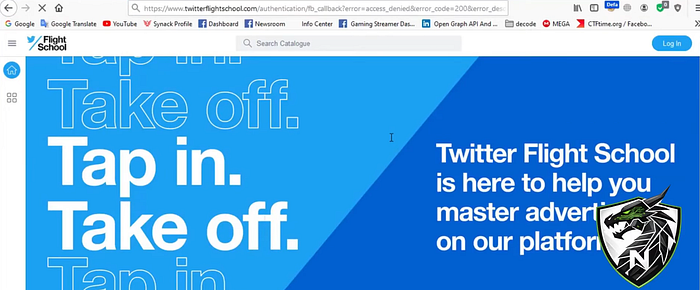
https://www.facebookblueprint.com/authentication/fb_callbackThe callback URL contains several parameters that describe the authentication failure.
https://www.facebookblueprint.com/authentication/fb_callback?
error=access_denied
&error_code=200
&error_description=Permissions+error
&error_reason=user_denied
Among these parameters, the error_description parameter immediately stands out because it contains the message displayed to the user.
At this point, you can add a screenshot displaying the callback URL and parameters.
Detecting Input Reflection
The first step in testing for XSS vulnerabilities is to check whether user input is reflected in the response.
To verify this, a simple test value was injected into the parameter.
error_description=test123After sending the request, the page source was inspected. The value appeared directly inside the HTML response without any encoding or sanitization.
Error: test123This confirmed that the application reflects user input directly into the page. At this stage, you can include a screenshot showing the reflected value inside the page source.
XSS Payload Testing
Once input reflection was confirmed, the next step was to test whether JavaScript execution was possible.
A basic XSS payload was used initially.
<script>alert(1)</script>Some applications block <script> tags, so alternative payloads were also tested. One of the payloads that successfully triggered execution was the following:
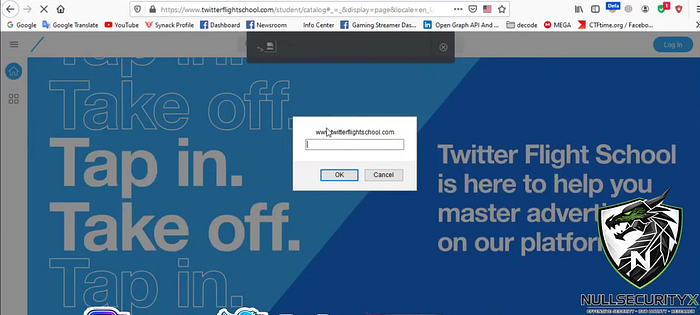
"><img src=x onerror=prompt(document.domain)>When this payload was injected into the error_description parameter, the browser executed the JavaScript code. An example exploit URL would look like this:
https://www.facebookblueprint.com/authentication/fb_callback?error_description=<PAYLOAD>Once executed, the payload triggers JavaScript alerts and can manipulate the DOM. At this point, the following screenshots can be included:

Affected Platforms
Further testing revealed that the same callback endpoint structure was used across multiple training platforms.
Several platforms were tested and found to be vulnerable:
https://www.facebookblueprint.com/authentication/fb_callback
https://training.wplearn.com/authentication/fb_callback
https://www.twitterflightschool.com/authentication/fb_callback
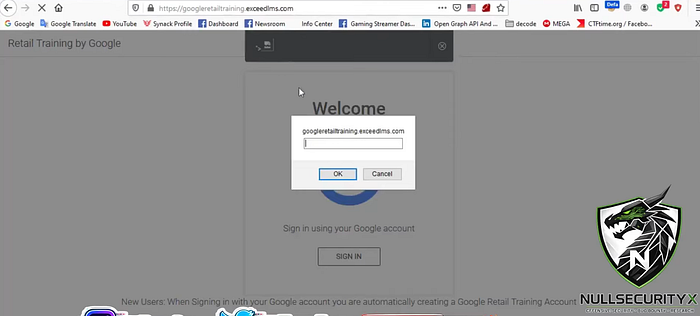
https://googleretailtraining.exceedlms.com/authentication/fb_callback
In all these endpoints, the error_description parameter could be used to trigger Reflected XSS. You can include screenshots showing the payload executing across multiple platforms.
Root Cause Analysis
The root cause of the vulnerability is the improper handling of user input within the error message rendering process.
The application likely generates the error message in a way similar to the following example:
<div class="error">
Error: {error_description}
</div>
If the parameter value is inserted into the page without HTML encoding, malicious scripts can execute within the user's browser. Proper output encoding should be applied to prevent this issue.
Conclusion
This case demonstrates how a seemingly harmless OAuth error parameter can lead to a Reflected XSS vulnerability if user input is not properly sanitized. In many real-world scenarios, critical vulnerabilities are not the result of complex exploitation techniques but rather small mistakes in input validation or output encoding.
Bug bounty researchers should always pay close attention to login flows, OAuth callbacks, and error message parameters during their testing process. Sometimes, a single parameter is all it takes to uncover a significant security issue.
Video Walkthrough
You can watch the full technical walkthrough of this vulnerability here:
It is worth mentioning that this vulnerability was originally discovered in 2020. In this article, we are not claiming the discovery of the bug. Instead, we are revisiting the case from a technical perspective and providing a detailed walkthrough of how the vulnerability works. Analyzing previously disclosed bug bounty reports is a great way for security researchers to understand real-world attack surfaces and improve their bug hunting methodology.
Connect With Me
If you enjoy write-ups like this or want to follow more offensive security content, tools, and real-world bug bounty case studies, feel free to connect with me:
YouTube: https://youtube.com/@NullSecurityX Twitter (X): https://x.com/NullSecurityX Whatsapp: https://whatsapp.com/channel/0029Vb6Q9I69RZAcE3O1ST2G Instagram: https://instagram.com/NullSecurityX Facebook: https://www.facebook.com/nullsecurityx/
More technical write-ups and labs will be coming soon.
Stay safe and happy hacking. 🚀