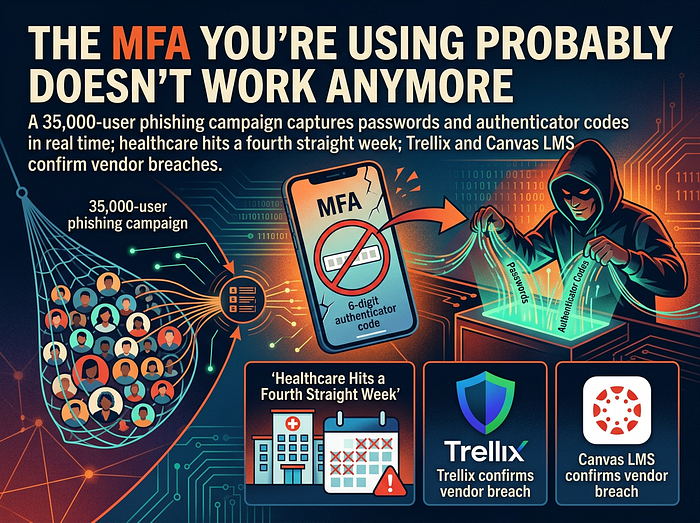
A 35,000-user phishing campaign just proved that text codes and authenticator apps are no longer enough. Here's what's actually happening — and the one $50 fix that still works.
Last week, an employee at a US healthcare company opened an email that appeared to be from their HR department. Subject line: "Reminder: employer opened a non-compliance case log."
They clicked the PDF. They cleared a CAPTCHA. They landed on a Microsoft login page — the real one, with the right URL behavior, the right branding, the right everything.
They typed their password. Their phone buzzed with the authenticator code. They entered it.
The page accepted it. Their inbox loaded. Everything looked normal.
It wasn't normal. By the time they sat down with their coffee, an attacker on the other side of the world was already reading their email, downloading their files, and sending invoices to their clients with new banking details.
The multi-factor authentication didn't fail. It worked exactly as designed. And it didn't matter.
What just happened
Microsoft's security team published the breakdown on May 4. The campaign hit 35,000 users across 13,000 organizations in 26 countries. Ninety-two percent of the targets were in the United States. Healthcare, financial services, and professional services took the brunt.
The technique has a name — adversary-in-the-middle, or AiTM — and it isn't new. What's new is the scale, the polish, and the boring inevitability of it. This is no longer a niche attack used against high-value targets. It's a commodity service running against small dental practices and regional law firms.
Here's how it works, in plain English:
The attacker doesn't build a fake Microsoft login page. They build a transparent proxy — a server that sits between you and the real Microsoft login page, copying every keystroke in both directions. You type your password; their server forwards it to Microsoft. Microsoft asks for your MFA code; their server forwards the request to you. You type the code; their server forwards it to Microsoft. Microsoft says "welcome back" and issues a session token.
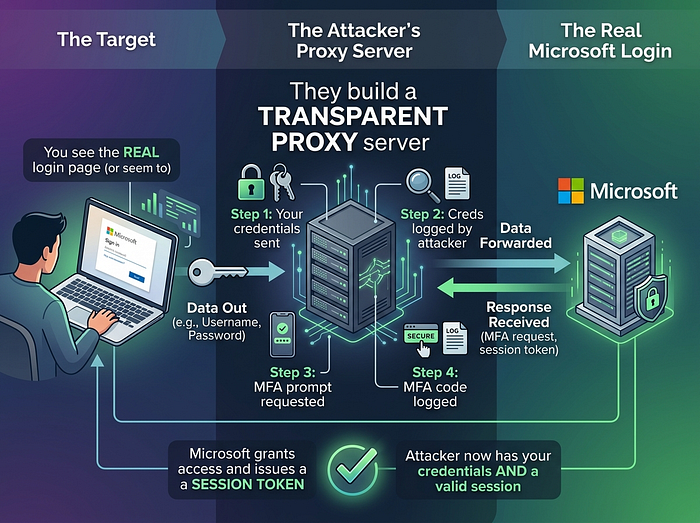
The session token is the prize. It's the cookie your browser uses to stay logged in for the next eight hours. The attacker's server intercepts it, and now the attacker is you — without your password, without your MFA, without anything you can change by resetting credentials.
Your phone never buzzed twice. Your authenticator never showed a second prompt. The attacker rode your real, valid login through the front door.
Why your MFA didn't help
There's a hierarchy of MFA strength most people don't know exists. From weakest to strongest:
SMS text codes. Defeated by SIM-swapping for years. AiTM also defeats them, but they were already broken.
Authenticator app codes (TOTP). The six-digit numbers from Google Authenticator, Microsoft Authenticator, Authy. AiTM defeats these completely — the code is just a string of digits, and the attacker's proxy passes it through like any other field.
Push notifications ("Approve this sign-in?"). Same vulnerability. You approve the prompt, the attacker's session is the one that gets approved.
Hardware security keys (FIDO2 / WebAuthn). These are the only ones still working.
The reason hardware keys work is that they don't pass codes back and forth. When you tap a YubiKey, the key performs a cryptographic handshake that's bound to the exact domain you're signing in to. If the URL in the browser is login.microsoftonline.com, the key signs for that domain. If the URL is login-microsoft-365-portal.com.attacker.example, the key refuses — silently, without any user decision required.
The cryptography binds the login to the physical device sitting on the desk. There is no code an attacker's proxy can forward, because there is no code at all.
What you can actually do this week
I'll keep this practical, because the reason this attack works is that defense has gotten complicated and most people don't have a security team to sort it out.
If you run a small business, the realistic priority list is short:
- Order FIDO2 hardware keys for every admin account. YubiKeys cost about $50 each. Get two per admin (one as a backup — you do not want to lock yourself out of your own Microsoft 365 tenant on a Saturday). For a five-admin business, that's $500 once. There is no other security purchase at this price that buys you this much risk reduction.
- Block sign-ins from countries where you don't operate. This takes fifteen minutes in Microsoft 365 or Google Workspace and costs nothing. The phishing infrastructure routes credentials through staging servers in countries most US businesses have no reason to log in from. A geographic block stops the chain before the credential prompt ever appears. Microsoft's Conditional Access guide walks through the steps.
- Train your team on one specific scenario. Not "phishing in general." This one: an email about an HR compliance issue, with a PDF attachment, that asks them to log in to confirm something. If they're not certain it's real — call IT before clicking. Single-scenario training sticks. Generic phishing training does not.
That's it. Those three steps put a small business in better shape than most organizations ten times its size.
The harder truth
The reason I write about this every week is that the attacks are no longer the story. The story is that the defensive playbook small businesses have been told to follow — enable MFA, use strong passwords, train your people — was state-of-the-art in 2018 and is now mostly theater.
The criminals adapted. The advice didn't.
A small medical practice in Texas, a title company in Louisiana, a regional construction firm in Iowa — these are not collateral damage in some bigger campaign. They are the campaign. Last week alone, ransomware groups posted 107 victims to leak sites; 12 of them were small healthcare practices, and 9 were construction firms. One actor, Qilin, hit five regional US contractors in a single week. That is a target list, not a coincidence.
The attackers have a market and they're working it. The question for every small business owner is whether the security work being done this month assumes the 2018 playbook or the 2026 one.
If this was useful
I write S6 Ransomware Signal — a free weekly newsletter for small and mid-size businesses without a dedicated security team. Each issue is built around the same idea as this article: take the week's actual ransomware activity, strip out the jargon, and tell you what to do about it in language that doesn't require a CISSP.
This week's issue covers the AiTM campaign in more depth, plus the Trellix source-code breach, the Canvas LMS breach (275 million records claimed), and a sector-by-sector breakdown of who got hit and which threat actors are running which playbooks.
If you'd rather find out about this kind of thing on Tuesday than read about it in the local paper after it happens to your business, the subscribe page is here. Free, weekly, no fluff.
The 2026 playbook is being written in real time. Might as well read along.