
XS-Leaks exploit something different.
They abuse how browsers behave
No XSS. SQL injection. No direct data access.
Instead, attackers infer secrets indirectly by observing how the browser reacts when it loads cross-origin resources.
This technique has been used to leak:
- Whether a user is logged in
- Private account data
- Email addresses
- CSRF tokens
- Internal page content
All without reading the response body.

🧠 What XS-Leaks Actually Are
XS-Leaks (Cross-Site Leaks) occur when:
- A website loads cross-origin resources
- The attacker cannot read the response
- But can observe side effects
These side effects include:
- Load success vs failure
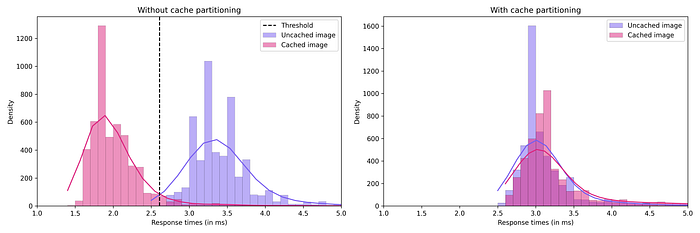
- Response timing
- Resource size
- Redirect behavior
- Error messages
That small signal can reveal sensitive information.
In simple terms:
You can't read the data… but you can detect what the data must be.
📹 Real Exploitation Flow (PoC Mindset)
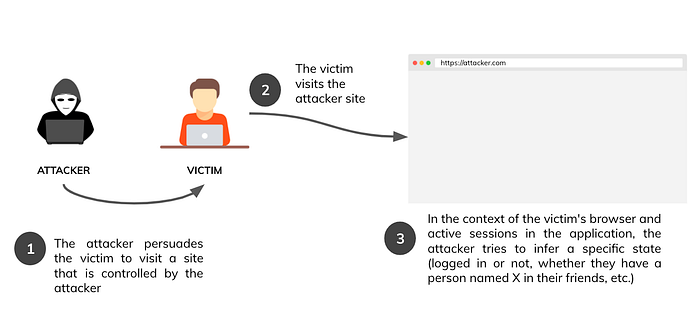
Victim logged into target.com
        |
        | visits attacker.com
        ↓
Attacker page loads hidden request
https://target.com/profile
        |
        ↓
Browser blocks response (same-origin policy)
        |
        ↓
But attacker measures:
- load success
- timing
- image dimensions
        |
        ↓
💥 Attacker learns private information
The key idea:
The browser hides the data but leaks the behavior.
🎯 Why XS-Leaks Matter
XS-Leaks can expose:
- Login status
- Private profile info
- Search results
- Internal account IDs
- Sensitive feature flags
And they often bypass protections like:
- Same-Origin Policy
- CSRF tokens
- Secure cookies
Because nothing is directly read.
🧪 Where to Look for XS-Leaks
XS-Leaks often occur on endpoints that behave differently depending on user state.
Examples:
/profile
/account
/billing
/dashboard
/admin
Or endpoints that return:
- Images
- Redirects
- Different response sizes
- Errors vs success
These variations become signals attackers can detect.
🧪 How to Find XS-Leaks (Step-by-Step)
Step 1 — Identify State-Dependent Endpoints
Look for pages where behavior changes when logged in.
Examples:
/account
/user/settings
/admin/dashboard
Test responses for:
- redirects
- status codes
- content size differences
Step 2 — Test Cross-Origin Loading
Create a simple HTML page:
<img src="https://target.com/account">If the image loads successfully only when logged in, you have a signal.
Even if the browser blocks reading the response.
Step 3 — Detect Login Status
Example attack page:
<script>
let img = new Image();
img.onload = () => {
  console.log("User is logged in");
};
img.onerror = () => {
  console.log("User is not logged in");
};
img.src = "https://target.com/account";
</script>
The attacker never reads the response.
But load vs error reveals authentication state.
Step 4 — Timing-Based Leaks
Some pages load slower depending on data.
Example:
let start = performance.now();
fetch("https://target.com/search?q=secret")
.catch(() => {
  let end = performance.now();
  console.log("Response time:", end-start);
});
Different timings reveal:
- result exists
- result doesn't exist
This becomes a side-channel attack.
🧰 Tools You'll Actually Use
🔧 Primary Tools
- Browser DevTools
- Simple HTML / JS pages
- Burp Suite (to inspect responses)
- timing measurements using JavaScript
Optional:
- Puppeteer scripts
- custom browser automation
XS-Leaks require manual experimentation.
🧪 Practical Payload Examples
Login Detection
<img src="https://target.com/profile">If authenticated page returns 200, image loads.
If unauthenticated page returns redirect, image fails.
Frame Counting Leak
<iframe src="https://target.com/search?q=test"></iframe>Then measure frame properties.
Page differences reveal data.
CSS-Based Leak
<link rel="stylesheet" href="https://target.com/admin">CSS loading behavior reveals if page exists.
🚩 Signals You Found a Real XS-Leak
Watch for:
- image loads only when logged in
- different redirect behavior
- timing differences between queries
- page dimensions changing
- error vs success signals
These tiny clues are the leak.
🧨 Turning This Into a High Impact Bug
XS-Leaks become serious when they reveal:
- login status
- account existence
- private search results
- sensitive user data
- internal system structure
Example impact:
An attacker can determine whether a victim is logged into the application and infer private account information using cross-site requests.
Combine with:
- phishing
- targeted attacks
- session abuse
Impact increases quickly.
📝 How to Report This (Report-Ready)
Title
XS-Leak Allows Detection of Authenticated User State
Impact
An attacker can determine whether a victim is logged into the application by observing cross-origin resource loading behavior. This information leak can be used for targeted attacks and user tracking.
Why This Matters
- breaks privacy guarantees
- exposes authentication state
- exploitable without victim interaction beyond visiting a page
🧠 Why Most Hunters Miss XS-Leaks
Because:
- scanners cannot detect them
- they look like "browser behavior"
- exploitation requires creativity
- signals are subtle
But large companies increasingly treat XS-Leaks seriously.
🚀 What You Should Do After Reading This
Next time you see:
- pages behaving differently when logged in
- redirect differences
- response size changes
Ask yourself:
"Can the browser leak this information cross-origin?"
If yes — test it.
XS-Leaks reward hunters who think beyond HTTP requests.
🐾 Coming Next in This Series
Next post:
"Second-order bugs that trigger long after input is stored"
The bugs that execute long after the payload is sent, making them some of the most overlooked vulnerabilities in bug bounty.
These are the bugs that hide in plain sight.