


When a user clicks "Delete Account," is their data really gone? A deep dive into Excessive Data Exposure, the illusion of "Soft Deletes," and the grueling process of proving a critical privacy flaw to a Bug Bounty triage team.
Introduction: The Illusion of the "Delete" Button
In the modern digital age, data privacy is paramount. Regulations like the European Union's GDPR and various state-level privacy acts have cemented the "Right to be Forgotten." This means that when a user clicks "Delete My Account," a company is legally obligated to wipe their Personally Identifiable Information (PII) from their servers.
But if you look under the hood of most large-scale web applications, deleting data is incredibly messy.
If you permanently delete a user from a database (a "Hard Delete"), you risk breaking relational database constraints. What happens to the messages they sent? What happens to their audit logs? To avoid the cascading errors of orphaned data, developers rely on a "Soft Delete." Instead of typing DELETE FROM users WHERE id=123, the developer types UPDATE users SET is_deleted=true WHERE id=123.
The user can no longer log in. Their profile disappears from the frontend UI. To the user, the account is gone. But to a hacker proxying traffic through Burp Suite, the data is still sitting right there, waiting for the API to make a mistake.
This is the story of how I found an Excessive Data Exposure / BOLA (Broken Object Level Authorization) vulnerability on a major real estate platform (RedactedProperty.com). It leaked the real names, photos, and metadata of permanently deleted users.
But finding the bug was only 10% of the work. The other 90% was a 60-day battle with the triage team to prove that the bug actually existed.
Phase 1: The Discovery & The API Flaw
I was hunting on a popular property and roommate-finding application. I always start by mapping the core business logic: creating accounts, messaging, and blocking users.
I was testing the "Block User" feature. When you block someone, the frontend sends a request to the backend API to update your blocklist.
The Request:
POST /blocks HTTP/1.1
Host: api.redactedproperty.com
Content-Type: application/json
Authorization: Bearer [My_Token]

{"member_id": 5942088}
Normally, an endpoint like this should return a simple 200 OK or {"status": "success"}.
The Vulnerable Response:
HTTP/1.1 200 OK
Content-Type: application/json

{
  "participant": {
    "id": 5942088,
    "name": "Victim Real Name",
    "full_name": "Victim Real Name",
    "profile_photo": "https://cdn.redacted.com/photo/12345.jpg",
    "mobile_verified": true,
    "last_online": "Today",
    "inactive": false
  }
}
The Root Cause: Excessive Data Exposure
The developers got lazy. Instead of writing a custom SQL query to just return a success message, they used a generic ORM (Object-Relational Mapping) function. The backend took the member_id, pulled the entire User Object from the database, serialized it into JSON, and sent it back to the client.
The frontend simply ignored the extra data, but Burp Suite catches everything.
Pushing the Impact: The "Ghost" Exploit
Leaking active user data is bad, but I wanted a Critical impact. I asked myself: If this API is blindly fetching objects, does it respect the "Soft Delete" flag?
To test this, I orchestrated a specific scenario:
- Account A (The Victim): I created a fresh account. I went deep into the account settings and clicked "Permanently Delete My Account." I waited for the confirmation email. I tried to log back in, and the server rejected me: "Account does not exist."
- Account B (The Attacker): I logged into my second account. I went to Burp Suite Repeater, pasted the
POST /blocksrequest, and inputted themember_idof the deleted Account A.
I hit send.
{
  "participant": {
    "id": 5942088,
    "name": "John Doe",
    "profile_photo": "https://cdn.redacted.com/photo/ghost.jpg",
    "inactive": true
  }
}
Boom. The API explicitly acknowledged that the account was "inactive": true, yet it still happily handed over the user's real name and profile photo.
The Threat Model: Mass Scraping
Because the member_id values were sequential integers (e.g., 1001, 1002, 1003), there was zero protection against enumeration. An attacker could load this request into Burp Intruder, iterate from 1 to 6,000,000, and scrape the PII of the entire user base—including thousands of people who thought they had legally erased their footprint from the internet.
I wrote up a highly detailed report, attached my proof, assigned it a High (P3) severity, and clicked submit.
I expected a quick payout. Instead, I got a 2-month headache.
Phase 2: The Triage War (Staging vs. Reality)
Bug Bounty triage is a difficult job. Analysts have to verify hundreds of bugs across completely different technology stacks. But sometimes, the testing environment itself lies to the analyst.
Here is a breakdown of the 60-day timeline and the hurdles I had to overcome to get this bug validated.
Hurdle 1: The WAF Geo-Block (Day 45)
After a month of silence and several nudges, the triage team finally tested my payload. Their response:
"Hi, when we tried to use the static request header, we are getting a 403 Forbidden error. Can you please check if you are able to access the domain?"
They attached a screenshot showing an AkamaiGHost block page.
The Reality: The target was an Australian real estate company. The staging environment (redacted.com) was configured behind a strict Web Application Firewall (WAF) that aggressively geo-blocked traffic originating from outside of Australia/New Zealand. The Bugcrowd triage analysts (likely located in the US or EU) were being blocked before their packets even touched the application code.
The Fix: I responded immediately. I explained the Geo-Location block and provided a cURL command proving that from an allowed IP, the headers returned a 200 OK. I asked them to route their proxy through an Australian VPN. They did, and they breached the WAF.
Hurdle 2: The "User #" Anonymization Mirage (Day 48)
Three days later, the triager returned with a new screenshot.
"This doesn't expose any sensitive information. Look at the response."
I looked at their screenshot. Where my payload had previously returned "name": "John Doe", the triager's response showed "name": "User #5942088".
I was stunned. Had the developers silently patched it?
I dug deep into the staging environment's behavior. I realized my original test account was now 45 days old. This staging server had an automated cron job that ran monthly to scrub aging database entries to save disk space and anonymize old test data.
The bug wasn't fixed; my test data had just aged out.
I created a fresh account, deleted it, and queried it immediately. The PII was still there. I replied:
"The privacy violation occurs immediately upon deletion and persists for ~30 days until your automated staging scrub runs. Please test on a freshly deleted account."
Hurdle 3: "Garbage Collection is not Security" (Day 50)
The triager tested a fresh ID, but ran into another environment quirk. The staging server was incredibly volatile. It wiped inactive users entirely every 24 hours to reset the environment for the QA team.
"If there is a cleanup script, there is no impact here. If I can't perform this on your provided ID tomorrow, there is no impact."
This is the most critical moment in any bug report. If you lose your cool here, your report gets closed as N/A. I had to clearly explain the difference between a staging environment maintenance script and a production security control.
I replied with logical, irrefutable steps:
"The cleanup script is simply 'Garbage Collection' for the staging server. It wipes EVERYONE — active and inactive. To prove this, create an Active account today and check it tomorrow; it will also be gone.
In the Production environment, there is no script that deletes users every 24 hours. The vulnerability is that the application code itself fails to filter PII when
inactive: true. In Production (where data persists), this PII would remain exposed indefinitely."
Hurdle 4: The Smoking Gun (Moving to Production) (Day 57)
To end the debate, the triage team asked the ultimate question:
"Could you confirm if you're able to replicate this in the production environment temporarily, just to ensure that this is not a staging issue?"
I logged into the live, production application. I searched for a historic account that had been deleted months ago (ID 5942001).
I fired the payload.
The API responded perfectly. It returned the Real Name of a user whose last_online status was "about 2 months ago." This was the smoking gun. It proved unequivocally that Production did not run the 24-hour staging wipe. The "anonymization" the triager saw was purely a staging artifact. In the real world, the data leak was permanent. I attached the screenshots and hit send.
Phase 3: The Resolution, The Lawyers, and The Payout ⚖️
With the production proof in hand, the triage team validated the bug immediately. The report was triaged and forwarded directly to the company's internal security and legal teams.
A few days later, I received the final update from the company's security engineer:
"Hi Zer0Figure, thanks for your submission! Apologies for the delay; we did have to consult our legal team internally to determine if we had to comply with GDPR. In summary, we are not required to be compliant as we are explicitly Australia-only. That being said, we will accept this issue as it is likely a small breach of our own privacy policies. Thanks again for your patience!"
The Final Result:
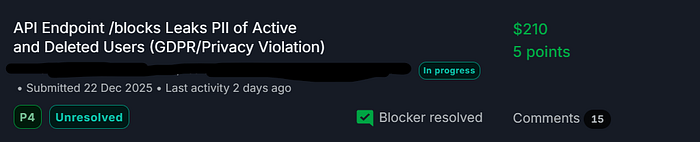
- Severity: P4 (Adjusted from P3 due to the legal distinction of local privacy laws vs. GDPR).
- Bounty: $210 + 5 Points.
- Status: Validated and entering the remediation queue.
The Masterclass: How to Handle Triage Disputes
This report is a perfect case study for Bug Bounty hunters. Finding the bug is fun, but getting it validated requires professionalism, patience, and logic.
Here are my top takeaways for surviving triage wars:
- Understand Environment Nuances: Staging servers lie. They have cron jobs, dummy data generators, auto-wipes, and strange WAF rules that don't exist in Production. If a bug behaves weirdly in staging, do a safe, non-destructive test in Prod to prove the real-world impact.
- Never Get Angry: When a triager says "I can't reproduce this" or "There is no impact," do not attack them. They are working with limited context. Investigate why they saw a different result. Re-read your own steps. Provide clear, logical proof explaining the discrepancy.
- Control the Variables: In my response, I gave the triager a "Control Test" (telling them to leave an account active to see if it also gets wiped). Providing scientific, step-by-step proofs removes opinion from the argument.
- Soft Deletes are Goldmines: Whenever you find a "Delete Account," "Deactivate," or "Archive" feature, immediately test if that user's ID/UUID can still be queried by other API endpoints. Developers almost always forget to filter out
inactiveusers in legacy API responses.
The internet never forgets. But sometimes, it takes a hacker, a proxy tool, and a 60-day argument to remind a company of exactly what they promised to erase.