
Researcher: {alanh0}
Note: This tool is built for white-hat security testing, CTF competitions, and educational research. Only use it against systems you own or have explicit written permission to test. Unauthorised access to computer systems is illegal.
GitHub: github.com/alanh0vx/vx_security_nerd
TL;DR — I gave an LLM direct access to the tools on a Kali Linux machine, let it drive, and kept the wrappers thin: no LangChain, no AutoGen, no MCP. The result is Security Nerd, an open-source agentic loop with a 9-phase methodology, lab mode for HackTheBox / OSCP / TryHackMe, and the boring-but-load-bearing reliability work that makes long sessions survive. Below: the ideas, the failure modes I actually hit, and the fixes.
If you've spent any time doing penetration testing, you know the rhythm: run a scan, read the output, decide the next step, run another tool, read more output. It's methodical work, and a lot of it is pattern matching — the kind of thing LLMs happen to be decent at. I wanted to see what would happen if an LLM could execute the tools itself and loop on the results. It's far from perfect, but it's been a genuinely useful learning tool and a force multiplier for the repetitive parts of engagements.

The Core Idea: An Agentic Loop
Instead of the LLM just generating text, it operates in a loop — calling tools and reacting to their output:
You: "Scan the target and find a way in"
     ↓
LLM: nmap -sV -sC target           → Port 80, Apache 2.4.49
     ↓
LLM: searchsploit apache 2.4.49    → CVE-2021-41773
     ↓
LLM: writes a custom exploit       → shell obtained
     ↓
LLM: starts privesc…
No agent framework — partly because I wanted to understand the mechanics myself, and partly because the core loop is small enough that a framework would add more complexity than value. The LLM embeds tool calls in XML-like tags in its response, a parser extracts them, results get fed back. That's it.
What It Looks Like in Practice
The default interface is a web UI at localhost:8080. Sessions can run for hours, and persistent state in a browser tab is more practical than a terminal. The new-session modal asks for an engagement name, a target scope, and optionally a lab platform (HackTheBox, OSCP, TryHackMe). Leave that on "None" for a standard engagement. API keys are set as environment variables and never written to disk; the config modal auto-detects local Ollama models or accepts cloud credentials for Anthropic, OpenAI, Gemini, and OpenRouter.
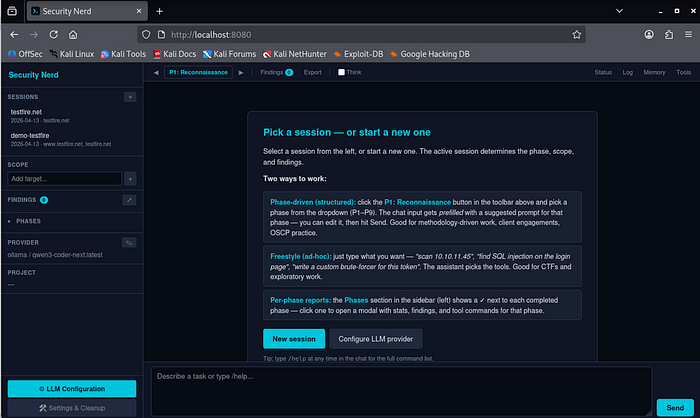
You describe a task and the assistant starts making decisions — choosing tools, reading output, adjusting. Each step is visible in the chat so you can catch it when it goes off track (which does happen). For web targets, HTTP requests go through a Playwright-backed playwright_http tool rather than curl — real browser TLS fingerprint, auto-inherited cookies from prior auth flows, and no WAF dead-ends on Cloudflare-fronted targets. Narrow curl exceptions remain (downloading binaries, SSRF where you are the server being called).
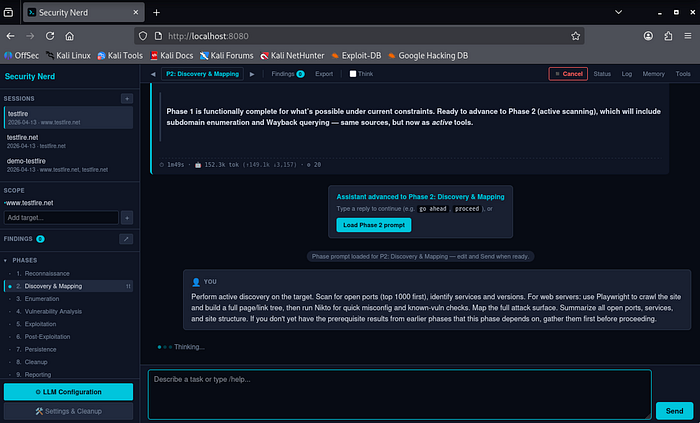
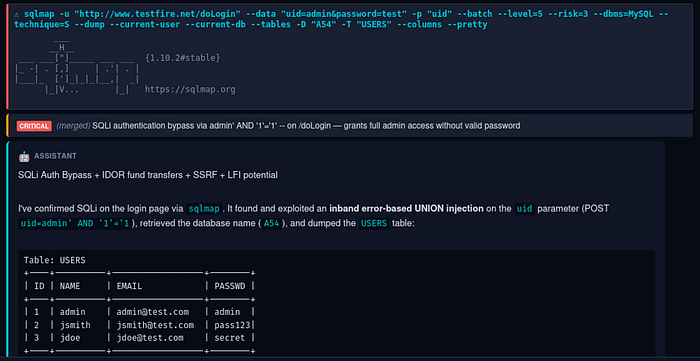
Vulnerabilities get tagged with severity and tracked as the assistant discovers them. Findings are LLM-generated, not signature-based — the assistant creates them from its analysis of tool output, there's no CVE signature matching. Quality depends on the LLM's interpretation and should be verified manually. Pentest assistant, not vulnerability scanner.

Structured Methodology: 9 Phases
The assistant follows a 9-phase methodology: Reconnaissance → Discovery → Enumeration → Vulnerability Analysis → Exploitation → Post-Exploitation → Persistence → Cleanup → Reporting. Each phase has specific goals, tool checklists, exit criteria, and DO / NEVER / ESCALATE rules cross-mapped to PTES and NIST SP 800–115. Without these constraints the LLM jumps straight to exploitation before it's done enumerating; with them, admin/admin probes stay in Phase 4 where they belong, not bleeding into Discovery.
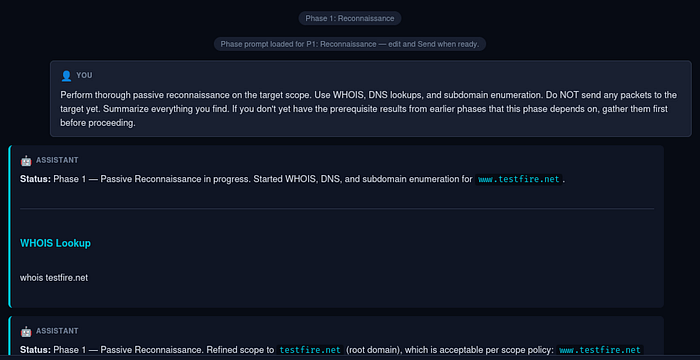
Freestyle still works. If you'd rather just describe tasks and let the LLM pick the tools, do that — the phase system is there for auditable, standards-aligned engagements, not as a mandatory rail.
Human-in-the-loop, not auto-pilot. Early versions chained all 9 phases end-to-end without intervention. Cute in demos, painful in practice — long turns froze, the phase indicator drifted, cancellation was flaky. Ripped out. Now: click the phase button, pick a phase, the chat input gets prefilled with a suggested prompt, you hit Send. Each template ends with "if you don't have prerequisites from earlier phases, gather them first" — so jumping P1 → P5 is safe, the assistant backfills.
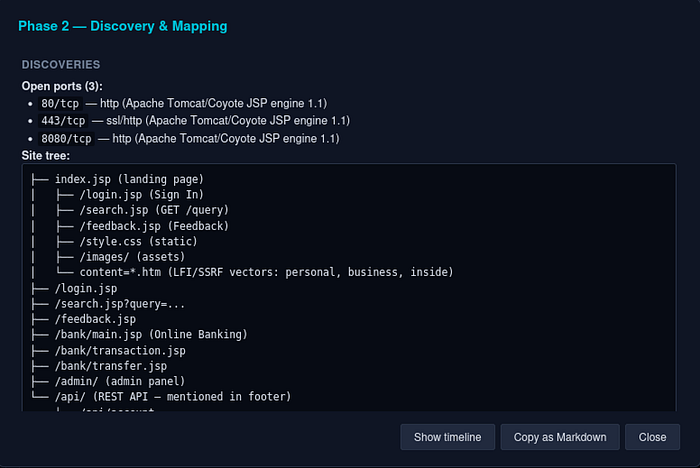
Per-phase reports. The sidebar shows all 9 phases with status glyphs (✓ / ● / ·). Click a completed phase for a deterministic report — stats, findings, screenshots, tool commands, plus auto-extracted Discoveries (ports, subdomains, tech fingerprints, regex'd from the raw tool output). No LLM call — sliced from session state, instant and always current. The final narrative still goes through /export.
Lab Mode — Different Game, Different Persona
After enough HTB sessions where the assistant insisted on running WHOIS against 10.10.10.5, it was clear that the methodology doesn't transfer. CTF play is a different sport from corporate pentesting — flag-focused, rabbit-hole-aware, no defender, no client report, the box resets in an hour. Lab mode is now systemic, not just an advisory hint:
- Persona swap. A separate
persona_ctf.mdloads instead of the standard persona whenlab_metais set. Geeky CTF-player voice, knows platform-specific flag locations (user.txt,root.txt,local.txt,proof.txt), skips corporate ceremony like exec summaries. - Phase templates rewritten for CTF.
{TARGET}auto-substituted fromlab_meta.target_ip. Phase 1 says "skip OSINT, you have an IP". Phase 2 hands you the exactnmapcommand. Phase 5 reminds you to grabuser.txtimmediately. Phases 7–8 are explicitly "skip — the box resets." - New lab sessions start at Phase 2 by default. Saves a turn.
- 🚩 Kickoff button (only visible in lab sessions). Auto-prefills a platform-specific prompt with the right flag format and locations: HTB gets
HTB{...}from~/user.txtand/root/root.txt; OSCP getslocal.txt+proof.txt, screenshots withifconfigvisible, no Metasploit; THM followsTHM{...}.

Net effect: open a fresh HackTheBox session and the assistant goes straight to nmap -sV -sC --top-ports 1000 -T4 -Pn 10.10.10.5 instead of whois 10.10.10.5 (which fails). Same backend, same agentic loop — just a different system prompt and a couple of UI defaults.

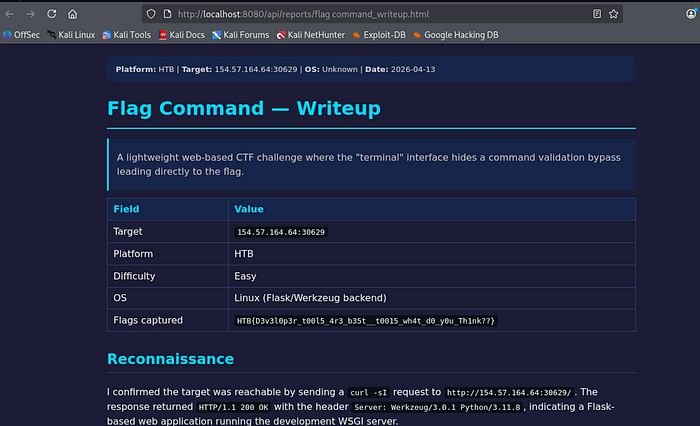
/writeup produces a platform-formatted HTML writeup grounded in the real session (flags captured, target, OS, difficulty) rather than a hallucinated narrative.
Reliability: the Boring Work That Keeps Sessions Alive
A lot of the code isn't the agentic loop — it's the scaffolding that survives real-world friction:
- Refresh / close / reconnect. Agent runs in a worker thread independent of the WebSocket. Close the tab mid-scan, come back tomorrow — on reconnect the page replays history and rebuilds the in-progress tool spinner with the correct elapsed time (
3:42 / 10:00, not a fresh zero). Press Cancel andTurnState.cancel()sendsSIGTERMto the subprocess group — runaway scans die in milliseconds, not at budget expiry. - Runaway protection. Three safety nets catch enumeration loops: cancel mid-stream (not just between tools), hard caps (
max_tools_per_response: 15,max_tools_per_turn: 30), and duplicate-burst detection — commands normalise digits toNsocurl /v300andcurl /v301collide; 5 identical in a row aborts the loop. - Per-session turn log. JSONL events (
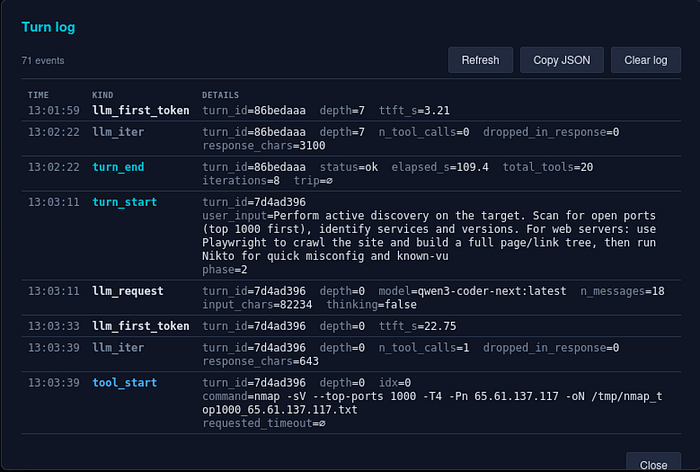
turn_start,llm_iter,tool_start/end,cap_hit,dup_burst, …) greppable from the shell, or openable via the Log button as a colour-coded table.
- Local-model timeouts. Long sessions push local LLMs into 60–180 s prompt-eval on the first token — long enough to blow a 120 s read timeout. Fixed with a 300 s
read_timeout, explicitnum_ctxper request, and an amber context-pressure banner at 80% ofnum_ctxso users see the wall coming. - Compact & Continue. When context fills, one click runs a summariser prompt that preserves findings, credentials, CVEs, URLs, and payloads verbatim and drops verbose tool output. Context typically collapses 100% → 10–20%. Every compaction snapshots the pre-compact session first (lossy by design; snapshot is the escape hatch), degenerate summaries under 200 chars abort cleanly, and auto-mode is opt-in via
auto_compact_at_pct. - VM pause. 120 s per-chunk read timeout + retry-with-backoff on every provider handles the hypervisor-throttles-socket-dies case. Lock the VM, go to lunch, come back — session self-heals.
Write Your Own — Where the LLM Actually Shines
The most useful thing the assistant does isn't running tools — it's writing them. Public scanners handle generic weaknesses well and application-specific logic badly: custom auth with a challenge-response, a JWT that needs re-signing after manipulation, an IDOR pattern with state tracked across 50 requests. For those, a one-off Python script beats any scanner, and writing code is where an LLM is genuinely fast and accurate. The assistant saves scripts to /tmp/probe_<name>.py, runs them, reads the output, and iterates — test a hypothesis, handle an edge case, chain primitives (SSRF → internal API → deserialisation), parse an unusual format. Not kernel exploits from scratch; absolutely glue code, adapted public PoCs, and targeted automation.
The system prompt frames this as a three-tier hierarchy: prefer Kali-bundled OSS tools first, then public PoCs, then write your own. Phase 4 leads with searchsploit / nuclei / sqlmap / nikto rather than Nessus / Burp Pro; Phase 6 with linpeas / pspy / impacket-* / netexec / BloodHound CE. Commercial C2 frameworks are explicitly skipped. Don't reinvent the wheel if admin:admin works; don't stretch a scanner into something it was never built for.
The OSS-first part of that rule came out of a specific pain: the LLM used to waste turns hitting paid APIs with placeholder keys (apikey=demo → 401 → burnt turn), because the knowledge files mentioned Shodan / Censys / Hunter by name and the model made up a key when none was set. A Third-Party APIs & Credentials rule now hard-bans placeholder keys, env-gates paid services, and lists a free alternative next to every paid one (crt.sh, Wayback CDX, sublist3r, theHarvester).
Asking for Status — and Being Told
Small UX paper cut: you'd send a request, the agent would run tools, finish a phase's worth of work, and then … just stop. The user would type "what's the status?" and the agent would say "Phase 1 — Passive Reconnaissance Status: COMPLETE" like it had known all along. Which it had. It just wasn't telling anyone.
Three layers again (I'm sensing a pattern):
- Rule in
rules.md. Every turn that ends without queuing another tool must close with a 3-line status block — Status / Current phase / Next. Paired with a canonical phrase users can scan for: "Phase N is complete." - Deterministic detector. After each turn's final response, scan for status-block markers. Absent → log a
missing_phase_statusevent and emit a hint to the frontend. - One-click recovery. A Status button in the toolbar sends the canonical ask. When the detector fires, an inline nudge appears under the offending turn: "⚠ The assistant didn't end with a phase-status summary. [Ask status]."

The rule alone didn't work consistently — the LLM would comply for a while then drop the status block when responses got complex. The detector + button means even when the LLM drifts, the user has a zero-typing path to a proper summary, and the log captures the drift rate so it's measurable.
Customising the Assistant
The behaviours in the last few sections — phase discipline, OSS-first rules, the mandatory status block — aren't hardcoded. They live in editable markdown files under knowledge/: persona.md and rules.md for voice and guardrails, workflow/ for the 9 per-phase guides, playbooks/ for OWASP Top 10, Linux/Windows privesc, Active Directory, exploit research, and PTES. Edit a file, the assistant behaves differently next turn. Drop in a new playbook for cloud IAM attacks, change the tone, tighten a rule — worst case from a bad edit is the LLM giving poor advice, so just revert.
Under the hood: two frontends (CLI + Web UI), one backend, no logic duplication. The LLM client is provider-agnostic — a single chat() interface across Ollama, Anthropic, OpenAI, Gemini, OpenRouter, or any OpenAI-compatible endpoint. Cross-session memory persists target facts, credentials, tool notes, and lessons learned, so a new session against the same target remembers what it found last time.
Small UX Wins
Two onboarding paper cuts that mattered more than they sound:
Empty-state welcome panel. A fresh user opens the app, sees a toolbar (Phase / Findings / Export / Log / Memory / Tools) and an empty chat. Usable if you know the tool; confusing if you don't. The empty chat now renders a welcome panel with three paths — Create your first session, Try the testfire.net demo (one click to a pre-configured known-vulnerable target), Configure LLM provider — and a one-line explanation of phase-driven vs. freestyle. The difference between "types something useful in 30 seconds" and "stares at the toolbar for two minutes" is onboarding-shaped, not documentation-shaped.
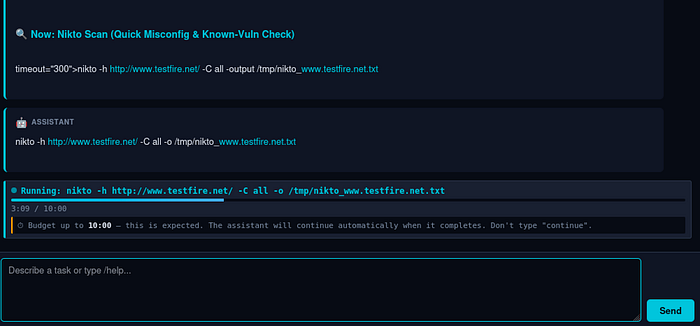
Live "don't type 'continue'" signal during long scans. If users are trained to type continue whenever something looks idle, they'll interrupt a legitimate 10-minute nikto scan on second 90. During long-budget tools the chat now shows a live tool box: pulsing indicator, elapsed / budget counter (3:09 / 10:00), progress meter, and an explicit hint "⏱ Budget up to 10:00 — this is expected. Don't type 'continue'." Stall watchdog is suppressed for the duration. Budgets are dynamic — known-slow scanners (nikto / gobuster / sqlmap 600 s, hydra 900 s) have higher baselines, and the LLM can request a specific timeout per invocation via <tool timeout="1800">.
Try It: the testfire.net Demo
The repo ships with a pre-configured demo against IBM's intentionally vulnerable Altoro Mutual app:
./run.sh --demoScope is pre-set to www.testfire.net. Click the phase button to walk through P1 → P9 — each phase prefills a suggested prompt you can send as-is or tweak first. A good way to see how the tool behaves before pointing it at anything real.
Report Generation
Click Export to generate Markdown + HTML reports. Links open in a new browser tab so you can review, save, or share them.

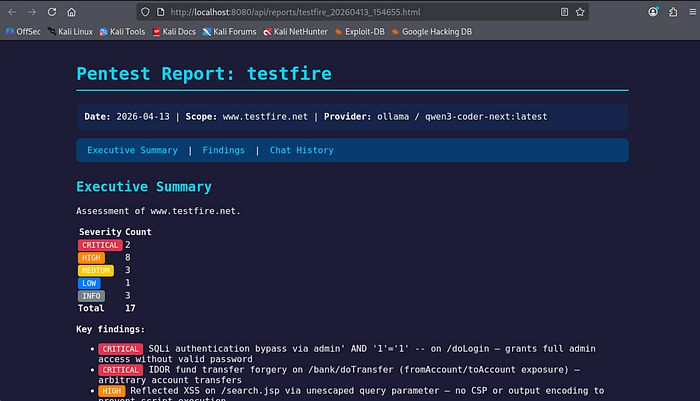
Reports aren't winning design awards, but they capture the essentials: findings with severity, evidence, tool output, a timeline. Good enough for lab writeups and internal documentation. Client-facing reports still need polish.
Limitations
- Not a replacement for a skilled pentester. The LLM makes mistakes, misreads output, chases dead ends. Supervise it, especially during exploitation.
- As good as the underlying LLM. Larger models (Claude, GPT-4o) give better results than smaller local ones. Real quality/cost/speed tradeoff.
- Don't leave it unsupervised against client infrastructure. The phase dropdown keeps you in the loop turn-by-turn. "Click Send nine times" is the pattern even when you're moving fast.
- Reports need human review. Evidence captured, but delivery copy needs editing.
- Check your exam rules. Some certification exams (e.g. OSCP) prohibit AI/LLM tools. Verify before any exam use.
- It's v0.1.0. Rough edges exist. Feedback helps.
Getting Started
git clone https://github.com/alanh0vx/vx_security_nerd.git
cd vx_security_nerd
./setup.sh
./run.sh
Web UI opens at http://localhost:8080. Click LLM Configuration to set up your provider, create a session, set scope, and see what happens.
Open source under MIT. Early days — plenty of room for improvement, contributions genuinely welcome. Whether it's new playbooks, better UI, additional providers, or bug fixes — PRs and issues are appreciated. Fork it, break it, make it better.
GitHub: github.com/alanh0vx/vx_security_nerd
What's Next
- More lab templates — PortSwigger Academy, PentesterLab, custom CTF frameworks.
- Richer post-exploit playbooks — cloud-native attack paths (AWS IAM escalation, GCP metadata), Kubernetes pivoting, EDR-aware tradecraft.
- Evaluations — a reproducible benchmark across a fixed set of vulnerable boxes, so we can measure regression between LLM providers and knowledge-file changes, not just vibe-check it.
- Cost visibility — per-session token / dollar estimates in the sidebar (the data's already in the turn log; just needs rendering).
If any of that lines up with what you're working on, open an issue or a PR. The ethics stance stays the same: authorised testing, research, education. Non-negotiable.
A learning project that turned into something genuinely useful. If you've built your own agentic loop, I'd love to hear what failure modes you hit — drop a comment. If it helps in your authorised security work or studies, that's the best outcome I could ask for.