

Sensitive data has a habit of ending up in places that it shouldn't. With engineering teams running workloads that generate and store large amounts of data in Amazon S3 bucket that hasn't been audited for months like files containing Personally Identifiable Information(PII), API keys, database exports or credentials buried in log files may be a hotspot for security compromise. This draws attention to the AWS Shared Responsibility Model where customers are responsible for security in the cloud.
In this guide, we explore what Amazon Macie is and how to evaluate data stored in S3 bucket and identify and take action based on any sensitive data to protect our S3 buckets from data security risk. The files for demonstration can be found on GitHub.
What is Amazon Macie?
Amazon Macie is a data security service that discovers sensitive data by using machine learning and pattern matching, provides visibility into data security risks, and enables automated protection against those risks. — AWS
Prerequisites
Ensure you have: - An active AWS Account
Overview
To follow along, we will simulate a scenario by creating an Amazon S3 bucket, uploading sample files containing sensitive information, and scanning the bucket using Amazon Macie to identify and classify sensitive data.
Let's get into action
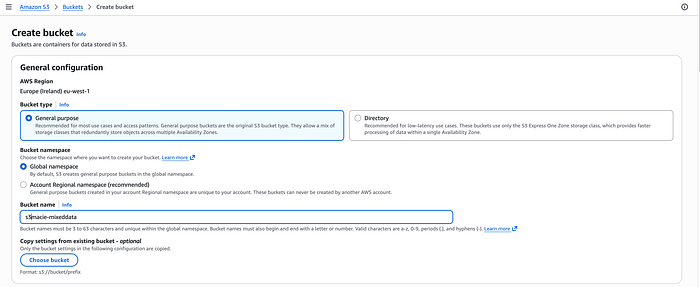
Step1: Create an S3 bucket and upload files into it
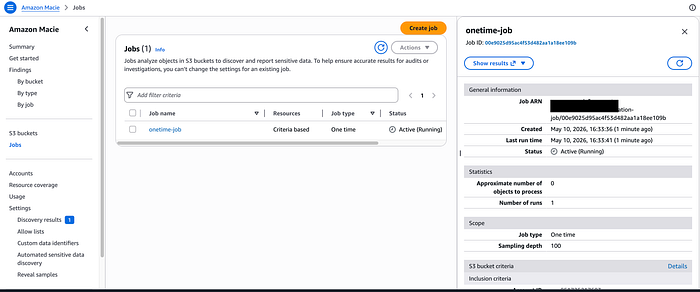
Step2: Enable Amazon Macie and start a one-time job
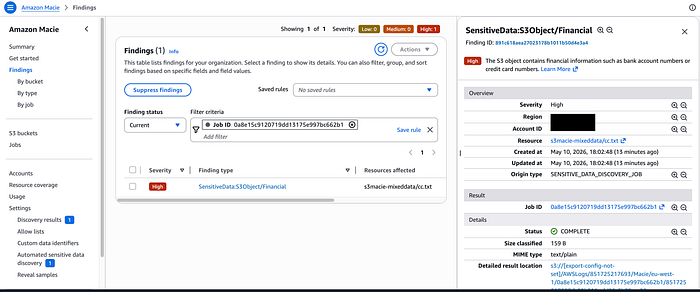
Step3: Click on the job, show results and show findings
Conclusion Maintaining visibility into data stored in Amazon S3 becomes important for security and compliance. With this, we can automate the discovery of sensitive data that would help reduce the potential risk of confidential files from being exposed.