
Day 6 of 10: Vulnerability Management — Finding Weakness Before Attackers Do
You locked down IAM. You segmented the network. You secured storage. You enabled logging.
Now here's the uncomfortable question:
When was the last time you checked if your servers are actually vulnerable?
Welcome to Day 6.
Today we talk about vulnerability management. Not theory. Not buzzwords. Actual weaknesses.
Because attackers don't break strong systems.
They look for outdated ones.
Quick Reality Check
If your EC2 instance is running:
- An old Apache version
- A vulnerable OpenSSL library
- Unpatched OS packages
Is your cloud secure?
No.
It's just exposed to the next CVE.
What Is Vulnerability Management, Really?
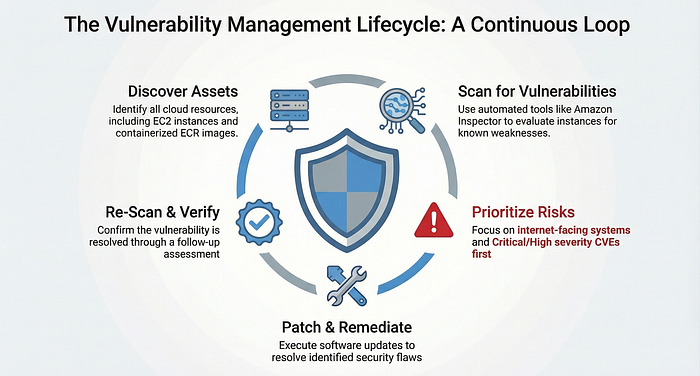
It's a continuous process of:
- Discovering assets
- Scanning for weaknesses
- Prioritizing risks
- Fixing them
- Re-scanning
In AWS, this can involve tools like:
- Amazon Inspector
Inspector scans EC2 and container images for known vulnerabilities.
It compares installed packages against CVE databases.
It tells you what attackers already know.
The Biggest Cloud Security Myth
"My cloud provider handles security."
Yes, they secure infrastructure.
No, they do not patch your EC2 instance.
If you run IaaS:
You manage:
- OS updates
- Installed software
- Application dependencies
Cloud doesn't remove responsibility.
It accelerates it.
Real-World Scenario
An engineer launches an EC2 instance.
Installs:
- Outdated web server
- Old PHP version
Never patches it.
Months later:
A new CVE drops. Bots scan the internet. The instance gets exploited.
No zero-day. No advanced attack.
Just unpatched software.
Practical Lab: Run a Vulnerability Scan
Let's make this real in Amazon Web Services.
Step 1: Enable Amazon Inspector
- Activate for EC2 scanning
- Enable ECR scanning if using containers
Step 2: Trigger a Scan
Inspector automatically evaluates instances.
Step 3: Review Findings
Look for:
- Critical severity
- High severity
- CVSS scores
Step 4: Patch
On your EC2 instance:
sudo yum update -yRe-scan.
Confirm vulnerability is resolved.
That's the loop.
Scan → Patch → Verify.
Prioritization Matters
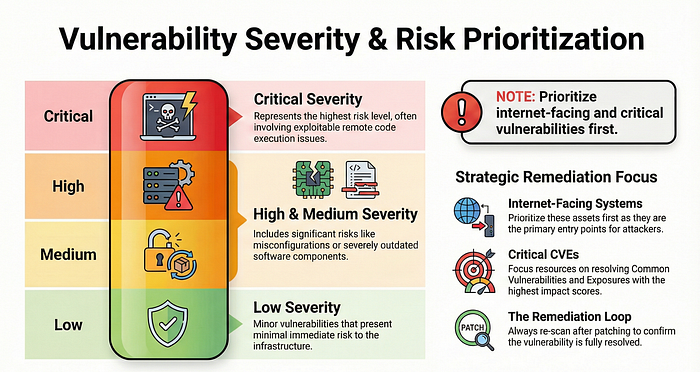
Not all vulnerabilities are equal.
Focus first on:
- Internet-facing systems
- Critical severity CVEs
- Exploitable remote code execution issues
Vulnerability management isn't panic.
It's prioritization.
Self-Assessment
Ask yourself:
- How often do we scan?
- Do we track remediation time?
- Are internet-facing systems prioritized?
- Do we re-scan after patching?
If you don't have answers, you don't have a process.
Final Thought
Attackers don't guess.
They scan.
If you scan first, you control the narrative.
If you don't, they will.
Comment "Day 7" if you're building this layer by layer.
Let's keep stacking security the right way.