June 4, 2026
Your Laptop Knows Everything About You. Do You Know Who’s Been Using It?
Less Than a Coffee a Month. That’s All It Costs to Know Every Time Your PC Is Touched.

Vishwas R
6 min read
You came home, put your bag down, and your laptop was exactly where you left it. Lid closed. Charger plugged in. Nothing out of place.
But here's the question you probably didn't ask: was it like that the whole time you were gone?
Most of us wouldn't know. And most of us, until this exact moment, haven't thought about it.
The Threat Isn't Who You Think It Is
When people hear "someone accessed my computer," the mind jumps to hackers. Hooded figures in dark rooms. Sophisticated attacks from countries you've never been to.
That's not how it actually happens. Not for most people.
It's your housemate who "just needed to print something quickly" and had to unlock your screen to do it. It's a family member who visited for the weekend and knows your birthday is your PIN. It's the colleague you lent your laptop to at a conference — "just for ten minutes" — while you grabbed lunch. It's the cleaning staff who come in when you're not there and, once, you noticed your mouse wasn't quite where you left it.
None of these people are hackers. Most of them probably had innocent intentions. But your laptop has your emails, your documents, your browser history, your saved passwords, your banking tabs still open in a background window. It has, in the most literal sense, everything about you.
And you have no idea who's been touching it.
Your Laptop Has Been Keeping a Diary. You Just Can't Read It.
Here's something Windows has been doing quietly this whole time: logging everything.
Every login. Every failed password attempt. Every time the screen was locked and unlocked. Every remote connection. Every unexpected restart. Every time the machine powered on while you were asleep.
The record exists. It has always existed. Windows writes it faithfully into its Event Log, a system journal that runs in the background whether you know about it or not.
The problem is that getting to it requires opening a deeply buried system tool, knowing which event IDs to filter for, and doing this manually every time you're curious — which means, in practice, nobody ever does it.
The information is there. But there's no one delivering it to you.
That's the gap Login AlertX fills.
23 Things Happening on Your PC That You Currently Know Nothing About
Login AlertX watches the Windows Event Log in real time and sends you an instant alert — on your phone, in your inbox, in WhatsApp — the moment any of 23 different events happen on your machine.
Twenty-three sounds like a lot. In practice, they fall into three clear buckets.
The Login Bucket
The obvious ones. Someone logged into your machine. The first login of the day. A login after the screen was manually locked. A failed password attempt. Multiple failed attempts in rapid succession — which Login AlertX automatically flags as a brute force alert, because that's not someone mistyping, that's someone trying.
The distinction between a Login and a Login via Lock is quietly important. If your screen goes dark from sitting idle, that's one thing. But if someone pressed Windows Key + L before walking away — intentionally securing it — and then someone else unlocked it, that's a different kind of event. Login AlertX tells you which one happened.
The Session Bucket
Everything that happens during a machine's active life: the screen locking, the screen unlocking, someone fully logging off, and — the one that most personal users never think about — Remote Desktop connections.
RDP is a feature built into Windows that lets someone connect to your machine over the internet as if they were sitting in front of it. Most people don't even know it exists on their personal PC. If it's enabled and someone connects to it, you currently have no idea. Login AlertX sends you an alert the moment a remote connection is established, along with where it came from.
The Power Bucket
This is the one people find most surprising once they see it in action.
Login AlertX can alert you when your machine powers on, when it shuts down, when it goes to sleep, when it hibernates, when it wakes up, and when it detects that the previous shutdown was unexpected — a crash, a pulled power cable, or a forced restart that didn't go through the normal shutdown sequence.
That last one — the Unexpected Reboot alert — is worth pausing on. One of the quieter signs that something unwanted has happened on a machine is a restart you didn't initiate. Malware installing itself. A remote session that needed to reboot the machine. A crash that the machine recovered from while you slept. You wouldn't know any of this happened. Login AlertX fires an alert the next time the machine boots and checks its own history.
What an Alert Actually Looks Like
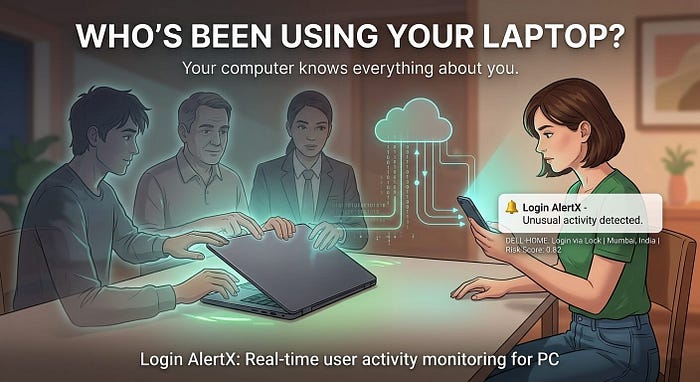
Here's the kind of message that lands on your phone:
🔔 Login AlertX
Event: Login
Machine: DELL-HOME
User: your-username
Time: 11:47 PM — Wednesday
IP: 103.xx.xx.xx | Location: Mumbai, India
Network: Home-WiFi
Risk Score: 0.82 — Unusual hour for this machine
🔔 Login AlertX
Event: Login
Machine: DELL-HOME
User: your-username
Time: 11:47 PM — Wednesday
IP: 103.xx.xx.xx | Location: Mumbai, India
Network: Home-WiFi
Risk Score: 0.82 — Unusual hour for this machineMost mornings, the alert reads like a quiet confirmation: your machine came online when you turned it on, at the time you always turn it on, from the location it's always at. You glance at it and move on.
But occasionally — and this is the whole point — it doesn't look like that.
An unfamiliar IP. A login at 2 AM when you were asleep. A location that isn't yours. An unexpected reboot that you definitely didn't initiate.
Those moments are rare. But they're exactly the moments that, without Login AlertX, you would never know about. Not until it was too late.
The AI That Learns What "Normal" Looks Like for You
One of the quieter features in Login AlertX's Premium plan is something called Smart Risk Detection.
Over time, it learns your patterns. What time you usually log in. Which network your machine typically sees. How often you lock and unlock the screen. It builds a picture of what "a normal day on this machine" looks like.
When something falls outside that picture — an unusual hour, an unfamiliar network, a login type that rarely happens on your machine — it assigns a risk score between 0 and 1 and flags the alert. You don't have to remember to check. The algorithm does the pattern-matching for you and surfaces the ones that deserve your attention.
You could think of it as having a very patient, very attentive assistant whose only job is to tell you when something on your machine seems off.
Now. About That Coffee.
You probably spent somewhere around $4 to $6 on the last coffee you bought. Maybe more, if it was a speciality place. Maybe a little less, if it was the office vending machine.
Login AlertX costs around $3 per month on its Premium plan — less than the price of that one coffee.
Per year, that's around $35. Less than most people spend on streaming services they barely use.
For that, you get real-time alerts for all 23 events on your machine. You get Smart Risk Detection learning your patterns. You get webcam capture at login — a silent photo of whoever is sitting at your keyboard at the moment they unlock it — so if someone does access your machine, you don't just know that it happened, you know who did it. You get audio recording for ambient context. You get screenshot capture showing exactly what was on screen at login. And you get alerts on WhatsApp, Telegram, Slack, Google Chat, Microsoft Teams, push notifications, or email — wherever you're most likely to actually see them.
If you want to start simpler, the Free plan gives you immediate email alerts for every login, right now, at no cost. No credit card. Download it, set up your email in thirty seconds, and you're covered for the basics.
The Premium trial runs for 30 days, free, with no payment required. You get every feature, every event type, every capture capability — and you decide at the end of the trial whether it's worth one coffee a month to keep it.
What Peace of Mind Actually Costs
Here's the honest version of what you're buying.
You're not buying certainty that nothing bad will ever happen to your machine. You're buying the certainty that if it does, you'll know about it — immediately, with enough detail to do something about it, before the damage compounds.
Most days, the alerts are background noise. Your machine coming online. Your screen locking. Your normal login at your normal time. You barely notice them.
But there's a different kind of value in that quiet stream of normal alerts that's harder to articulate. It's the value of having checked. Of knowing, with the same confidence you'd know if someone had broken into your home, that your laptop was untouched while you were away.
Your laptop has been keeping a diary for years. It knows every login, every failed attempt, every remote connection, every unexpected restart. It has, quietly and faithfully, recorded everything.
The only question is whether you want to read it.
Login AlertX is free to download for Windows 7 through 11. The 30-day Premium trial requires no credit card. Download it here.
All data stays on your machine. Nothing is uploaded to external servers. Your login history is yours.