
A Beginner Guide to Software Reverse Engineering
Reverse engineering sounds like a plot from a spy movie. In reality, it is a vital skill for cybersecurity. Malware analysis shows you what a program does. Reverse engineering shows you how it works internally. For beginners, this field feels difficult. Assembly code looks like a secret language. Decompiled code looks messy. Tools like Ghidra or IDA can seem scary. However, the process is simple. Reverse engineering is the study of a compiled program to understand its logic. You do this task without seeing the original source code.
What Is Reverse Engineering?
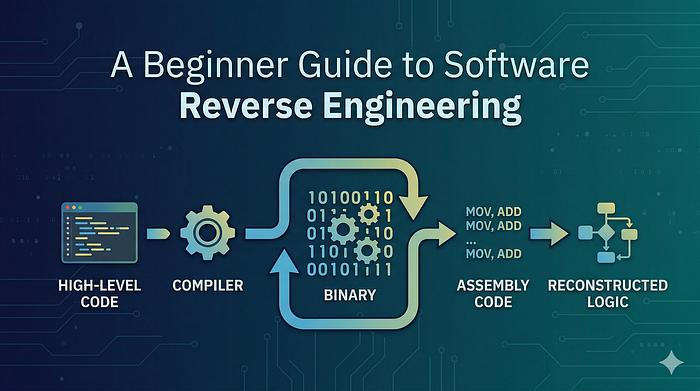
Developers write software using high-level languages like C, Python, or Java. A compiler turns this code into machine code. The result is a series of binary instructions for the CPU. Reverse engineering moves in the opposite direction. You start with the compiled binary and turn it into assembly code. Finally, you reconstruct the logic.
You use this process to find: * Specific functions. * Conditions that control the program. * The flow of data. * Encryption methods. * Malicious behavior.
Why It Matters in Cybersecurity
This skill is a foundation for ethical hacking. It is critical for: * Malware analysis. * Finding vulnerabilities. * Creating exploits. * Auditing software security. * Incident response.
Without reverse engineering, you are guessing. With it, you are certain.
The Layers of a Program
A program has a specific internal structure. When it is compiled, it contains different sections:
Text section (.text): This segment holds the executable instructions. Data section (.data): This stores initialized variables. BSS section: This stores uninitialized variables. Import table: This section lists functions from external files. Entry point: This location is where the program starts running.
Static vs Dynamic Analysis
There are two main ways to reverse engineer a program.
1. Static Reverse Engineering You analyze the program without running it. You look at disassembled instructions and strings. This method is safe but requires a lot of patience. Common tools: Ghidra, IDA Free, and Radare2.
2. Dynamic Reverse Engineering You run the program in a safe environment. You use a debugger to watch the memory and stop execution at specific points. This is helpful when the code is hidden or encrypted. Common tools: x64dbg and GDB.
Understanding Assembly Basics
Assembly is just a set of low-level instructions for the CPU. It is not as challenging as it looks.
Example code:
mov eax, 5 add eax, 3 cmp eax, 8 je success
The logic: 1. Put the number 5 into a storage area called EAX. 2. Add 3 to that number. 3. Compare the total to 8. 4. If the numbers match, go to the "success" section.
In a high-level language, the code is just a simple "if" statement.
Key Concepts to Learn
Registers Registers are tiny storage spots inside the CPU. They hold values while the CPU works. Common registers include EAX, EBX, and ECX.
The Stack The stack is a temporary memory area. It manages function calls and local variables. Understanding the stack is vital for debugging.
Control Flow Programs use jumps to make decisions. Instructions like JE (Jump if Equal) represent the logic of the code. Mapping these jumps helps you see the "if-else" structure.
A Simple Workflow for Beginners
1. Identify the File: Check if it is for Windows or Linux. 2. Check for Packing: Some programs are compressed to hide their logic. 3. Locate the Entry Point: Start your analysis where the code begins. 4. Look for Strings: Search for URLs, IP addresses, or error messages. 5. Analyze Functions: Look for network or file activity. Rename functions as you learn their purpose.
Final Thoughts
Reverse engineering is structured reasoning. It is not magic. At first, you will see confusing patterns. With practice, those patterns become clear logic. Start with simple challenges. Learn basic assembly. Practice every day. Soon, you will not just run programs. You will truly understand them.