A non-technical guide to IDS, EDR, and the humans who keep the internet safe.
By Miha Stele
Imagine you install a high-tech security system in your home. It has sensors on the windows, motion detectors in the hall, and cameras pointing at the driveway. Its only job is to let you know if someone tries to break in.
Cybersecurity works the same way.
Organizations don't just build walls around their data; they install digital "alarm systems" to monitor for intruders. But unlike a home alarm that just rings a bell, cybersecurity tools have evolved to do everything from sending notifications to automatically locking down doors.
If you've ever wondered how companies know they are being hacked, or who exactly is on the other end fixing the problem, this guide is for you. We're breaking down the tools, the alerts, and the teams that make up the modern Security Operations Center.
The Toolbox: IDS, IPS, and EDR
As a security analyst, you aren't fighting hackers with a sword. You're fighting them with software. There are three main categories of detection tools you need to know.
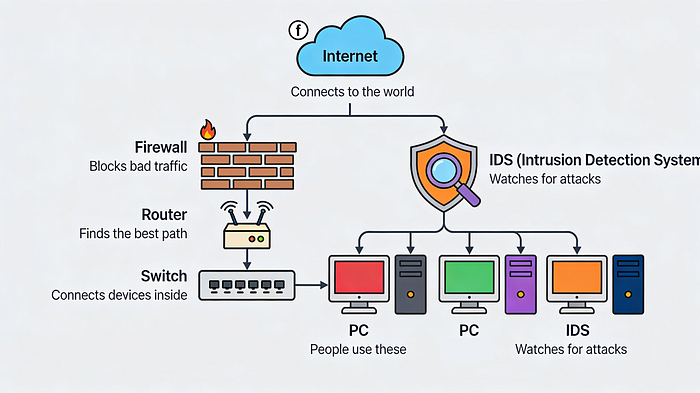
1. Intrusion Detection System (IDS)
The "Watchdog" Think of an IDS as a barking dog. It patrols the network, looking for suspicious activity. If it sees something weird — like an unknown IP address trying to log in at 3 AM — it barks (sends an alert).
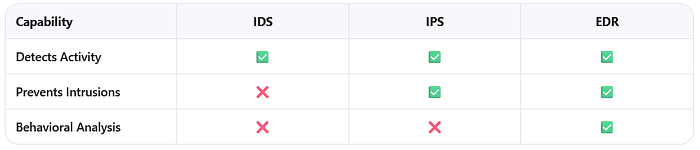
- What it does: Monitors and alerts.
- What it doesn't do: It cannot stop the attack. A human has to hear the bark and intervene.
- Examples: Snort, Suricata, Zeek.
2. Intrusion Prevention System (IPS)
The "Security Guard" An IPS is like an IDS that carries handcuffs. It monitors the network just like the IDS, but if it detects an intrusion, it takes action immediately. It might block the suspicious IP address or cut off traffic to a specific server.
- What it does: Monitors, alerts, and blocks.
- Key Difference: IDS tells you there's a problem; IPS tries to fix it automatically.
3. Endpoint Detection and Response (EDR)
The "Bodyguard" While IDS and IPS watch the network, EDR watches the device (the endpoint). Whether it's a laptop, a phone, or a server, EDR software is installed directly on it.
- What it does: It uses Artificial Intelligence (AI) and behavioral analysis. Instead of just looking for known viruses, it asks, "Is this program acting normally?" If a calculator app suddenly tries to access your email contacts, the EDR blocks it.
- Key Difference: EDR is smarter. It uses automation to stop attacks without waiting for a human to click a button.
The Truth About Alerts: Why Analysts Drink So Much Coffee
Detection tools generate thousands of alerts. But not every alert is a real hack. Understanding the difference is critical for security teams.
- True Positive: The alarm rings, and there is actually a burglar. (Good detection).
- True Negative: The alarm stays silent, and no one is breaking in. (Normal operations).
- False Positive: The alarm rings, but it was just the cat. (Wasted time investigating a non-threat).
- False Negative: The burglar breaks in, and the alarm stays silent. (The most dangerous scenario).
Why does this matter? False positives cause "alert fatigue." If analysts chase every false alarm, they might miss a real one. False negatives are the nightmares of the industry — attacks that happen without anyone knowing.
The Human Element: Who Is Actually Defending You?
Tools are useless without people. When an incident occurs, organizations rely on specialized teams. You'll often hear two acronyms: CSIRT and SOC.
CSIRT (Computer Security Incident Response Team)
Think of the CSIRT as the SWAT Team. They are a specialized group trained specifically for incident management. When a major breach happens, the CSIRT takes command.
- Command: Leadership to oversee the response.
- Control: Managing technical resources and tasks.
- Communication: Keeping stakeholders (like legal, HR, and management) informed.
Key Roles in a CSIRT:
- Security Analyst: The eyes on the ground. They triage alerts and investigate root causes.
- Technical Lead: The strategist. They decide how to contain the threat and recover systems.
- Incident Coordinator: The communicator. They ensure HR, Legal, and PR are all on the same page.
SOC (Security Operations Center)
Think of the SOC as the 24/7 Monitoring Hub. While the CSIRT might assemble during a crisis, the SOC is always watching. They are the "Blue Team," responsible for continuous defense.
The SOC Career Ladder:
- Tier 1 (L1): The front line. They monitor alerts, prioritize them, and close out the obvious false alarms.
- Tier 2 (L2): The investigators. They take escalated tickets from L1 and dig deeper into complex threats.
- Tier 3 (L3): The experts. They handle advanced forensics, malware analysis, and threat hunting.
- SOC Manager: The leader. They hire, train, and report to executive management.
The Game Plan: The NIST Lifecycle
When an attack happens, teams don't panic. They follow a framework, usually based on guidelines from the National Institute of Standards and Technology (NIST).
- Preparation: Getting tools and teams ready before an attack.
- Detection & Analysis: Finding the threat and figuring out what it is.
- Containment, Eradication, & Recovery: Stopping the spread, removing the hacker, and restoring systems.
- Post-Incident Activity: Learning from the mistake to prevent it from happening again.
The Bottom Line
Cybersecurity isn't just about code; it's about awareness and collaboration.
Detection tools like IDS, IPS, and EDR provide the visibility needed to see threats. But it takes the human expertise of SOC analysts and CSIRT members to interpret those alerts, manage the chaos, and protect the organization.
Whether you are looking to start a career in security or just want to understand how your data is protected, remember this: The goal isn't just to build a higher wall. It's to build a smarter system of detection, response, and recovery.
Credits
I would like to give credit to the Google Cybersecurity Professional Certificate on Coursera (specifcially the course Sound the Alarm: Detection and Response Module 1). There you can learn in more details if you are interested in this kind of material, but to master the concepts, I recommend also platforms like HackTheBox (https://www.hackthebox.com/) and others.
Until next time :)