Introduction
During a recent CTF hosted by Securinets & Ift, I encountered a mobile challenge called ADBRUTE. The goal was to unlock a 3-digit PIN in an Android application to retrieve the flag. The challenge description was short but telling: "ADB is full of wonders!"
1. Initial Reconnaissance
Upon installing and opening the APK, I was presented with a simple interface:
Challenge: ADBRUTE
Author: 0xjio
Category: Mobile / Security
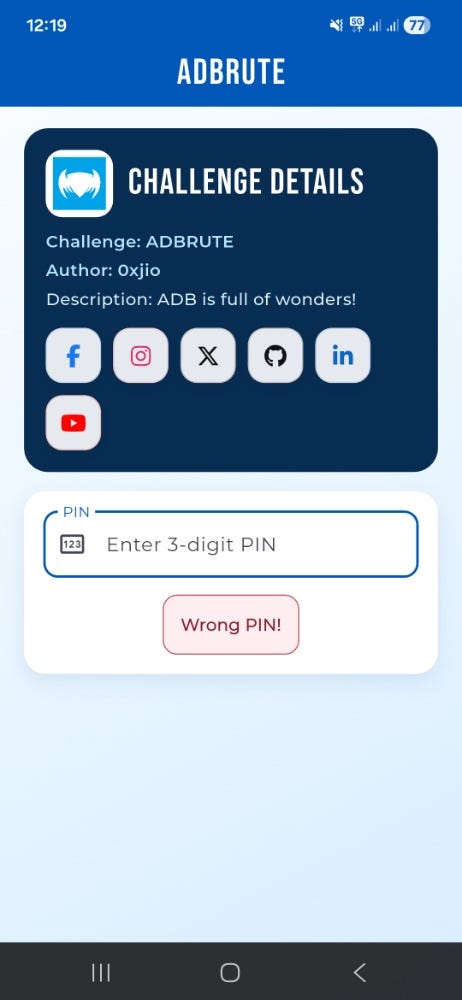
Response: A "Wrong PIN!" message appeared after every failed attempt.
Testing 1,000 combinations (000–999) manually is time-consuming and prone to human error. The name "ADBRUTE" clearly hinted at using ADB (Android Debug Bridge) to automate the process.
2. Setting Up the Environment
To communicate with the app from my PC, I performed the following steps:
- Developer Options: Enabled "USB Debugging" on my Android device.
2. Connection Check: Verified the device was recognized by running:
= > adb devices
3. Manual Testing: I verified I could inject text into the app's input field using:
- Bash
adb shell input text 1233. The Exploitation Strategy:
Since the PIN was only 3 digits, a simple loop could solve the challenge in minutes. I used a Windows CMD loop to automate three actions:
1.Clear the field: Using Keyevent 67 (Backspace).
2. Input the PIN: Sending the current loop number.
3.Submit: Using Keyevent 66 (Enter).
4.The Payload:
DOS
for /L %i in (100,1,999) do (
   adb shell input keyevent 67 67 67
   adb shell input text %i
   adb shell input keyevent 66
   echo Testing PIN: %i
)
4. Capturing the Flag :
I ran the script and watched the screen. After a few moments, the "Wrong PIN!" message disappeared, and the flag was revealed on the screen.
Flag: Securinets{adb_is_full_of_wonders}