
This is the second entry in our Secure Coding for Developers series. After exploring how attackers exploit SQL Injection, we now shift focus to one of the most fundamental and often misunderstood security practices in software development: input validation.
At its core, input validation is about control. Every application accepts data from users, other systems, or external services. If that data is not validated correctly, it becomes a direct entry point for bugs, security vulnerabilities, and system failures.
In this post, we'll break down what input validation really means, why it matters, and how to apply it correctly using Java (backend) and Angular (frontend) examples drawn from real-world project patterns.
What Is Input Validation (and What It Is Not)
Input validation is the process of verifying that incoming data:
- Is expected
- Is well-formed
- Falls within acceptable boundaries
What input validation is not:
- It is not about trusting frontend checks alone
- It is not about cleaning data after damage is done
- It is not optional
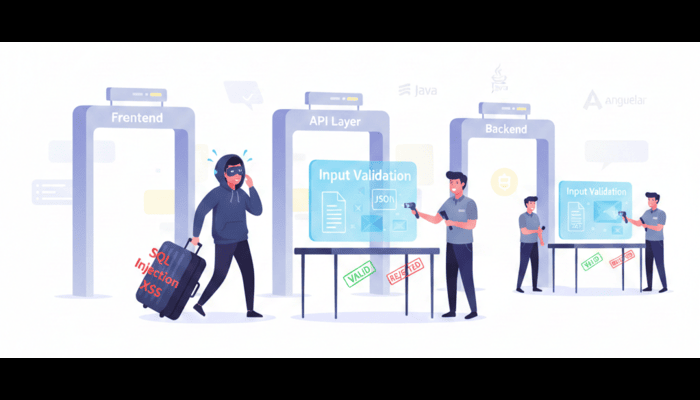
Think of input validation like airport security:
- Boarding pass checked at the entrance (frontend)
- Identity verified at immigration (backend)
- Final security screening before boarding (business logic)
Skipping any step weakens the entire system.
The Golden Rule: Never Trust User Input
This rule applies to:
- Form fields
- URL parameters
- HTTP headers
- JSON payloads
- File uploads
- API-to-API communication
Why?
Because users are not the only ones sending requests. Attackers, bots, scripts, and misconfigured systems interact with your application just as easily.
Even well-meaning users can accidentally submit malformed data.
Common Real-World Failures Caused by Poor Validation
- SQL Injection
- Cross-Site Scripting (XSS)
- Broken authentication
- Application crashes
- Financial calculation errors
- Data corruption
Input validation is not just a security concern — it is a reliability and correctness concern.
Scenario 1: Backend Input Validation in Java (Real Project Pattern)
The Problem: Trusting Raw Request Data
Consider a Java REST API that receives a user ID:
@GetMapping("/users")
public User getUser(@RequestParam String userId) {
  return userService.findUser(userId);
}
What's wrong here?
- No type validation
- No length limits
- No format checks
An attacker (or broken client) could send:
userId=1 OR 1=1
Even if SQL injection is mitigated elsewhere, this value may:
- Break business logic
- Cause unexpected behavior
- Leak information through error messages
The Correct Approach: Validate Early and Explicitly
@GetMapping("/users")
public User getUser(@RequestParam @NotNull @Pattern(regexp = "\\d+") String userId) {
  return userService.findUser(userId);
}
Or better — use strong typing:
@GetMapping("/users")
  public User getUser(@RequestParam Long userId) {
  return userService.findUser(userId);
}
Why this works:
- Invalid input is rejected automatically
- Errors are predictable
- Business logic receives clean data
Scenario 2: Using Bean Validation (JSR 380)
A real-world DTO example:
public class CreateUserRequest {
  @NotBlank
  @Size(min = 3, max = 30)
  private String username;

  @Email
  private String email;

  @NotNull
  @Min(18)
  private Integer age;
}
Controller usage:
@PostMapping("/users")
public ResponseEntity<?> createUser(@Valid @RequestBody CreateUserRequest request) {
  userService.createUser(request);
  return ResponseEntity.ok().build();
}
Benefits:
- Centralized validation
- Clean controllers
- Automatic error responses
- Industry-standard approach
Scenario 3: Frontend Validation with Angular (First Line, Not the Last)
The Mistake: Relying Only on the Backend
Frontend validation improves:
- User experience
- Performance
- Data quality
But it does not replace backend validation.
Angular Reactive Forms Example
this.userForm = this.fb.group({
  username: ['', [
    Validators.required,
    Validators.minLength(3),
    Validators.maxLength(30)
  ]],
  email: ['', [
    Validators.required,
    Validators.email
  ]],
  age: ['', [
    Validators.required,
    Validators.min(18)
  ]]
});
Template feedback:
<div *ngIf="userForm.get('email')?.invalid && userForm.get('email')?.touched">
  Please enter a valid email address.
</div>
What this achieves:
- Immediate feedback
- Fewer bad requests
- Better UX
But remember: Attackers don't use your UI.
Defense-in-Depth: Where Validation Belongs
Frontend User experience and early rejection of invalid input
API Layer Type checking and format validation
Business Logic Enforcement of domain and business rules
Database Constraints and data integrity enforcement
Each layer reinforces the next.
Input Validation DON'Ts
- Don't trust frontend validation alone Client-side checks improve user experience, but they are trivial to bypass and must never be your only line of defense.
- Don't rely on blacklist-based validation Blocking "bad" patterns is fragile. Always prefer whitelisting known-safe formats and values.
- Don't return detailed stack traces or error messages to users Internal errors can reveal sensitive information about your application's structure and dependencies.
- Don't allow unbounded or excessively large inputs Enforce strict length and size limits to prevent abuse, performance issues, and denial-of-service risks.
- Don't ignore validation failures Every validation error is a signal. Log it, handle it gracefully, and fail safely.
Secure Coding Takeaways
- Validate all input — always
- Prefer whitelisting over blacklisting
- Fail fast and fail clearly
- Use strong typing wherever possible
- Layer your defenses
Input validation is not about paranoia — it's about professional engineering.
Final Thought
Secure applications are not built by accident. They are built by developers who assume input will be wrong, hostile, or unexpected — and design systems that remain safe anyway.
In the next post, we'll look at how output encoding and context-aware escaping protect your users from Cross-Site Scripting (XSS) attacks.