
1 — Introduction
n8n is an open-source workflow automation platform designed to visually connect applications and services for task automation. Users build workflows composed of nodes, with each node representing an action such as making an API request, processing data, or sending an email. n8n is frequently used to automate repetitive operational tasks and to integrate security tools and SaaS platforms. Below is a simple example workflow that allows us to schedule an HTTP GET request to the NVD CVE API, format the output using JavaScript, and then send the report via email and to a Slack channel.
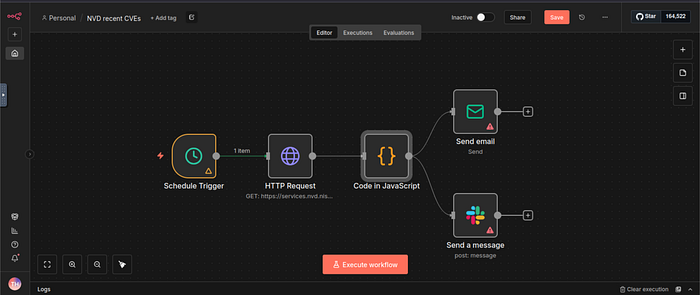
The n8n platform is commonly deployed in three primary configurations:
- Self-hosted instances: Organizations deploy n8n on-premises or in private cloud environments for full control and data sovereignty
- Cloud-hosted (n8n.cloud): Managed service offering with shared infrastructure
- Internal automation tools: Deployed within corporate networks to automate business processes between internal and external systems
Versions 0.211.0 through 1.120.3 contain a critical Remote Code Execution (RCE) vulnerability within the workflow expression evaluation system. If exploited, this flaw enables an authenticated attacker to execute system-level commands, potentially leading to data breaches, service disruptions, or full system compromise, all with the privileges assigned to the n8n process.
In this room, we will discuss the technical aspects of this vulnerability, demonstrate exploitation via web browser, and explore detection strategies.
This vulnerability has been addressed in versions 1.120.4, 1.121.1, and 1.122.0. To ensure system security, it is essential to update to one of these patched versions.
2 — Technical Background
The vulnerability resides in n8n's workflow expression evaluation system, where expressions supplied by authenticated users during workflow configuration are evaluated in an insecure execution context. The core security flaw is an expression injection vulnerability that enables authenticated attackers to execute arbitrary JavaScript code with the privileges of the n8n process. Specifically:
- n8n processes user input wrapped in double curly braces
{{ }}as JavaScript code without adequate sandboxing or input validation. - The expression evaluator lacks proper context isolation, allowing attackers to escape the intended evaluation sandbox.
- Authentication provides no meaningful protection against this vulnerability, as any authenticated user can exploit it.
Consider the following working payload from wioui.
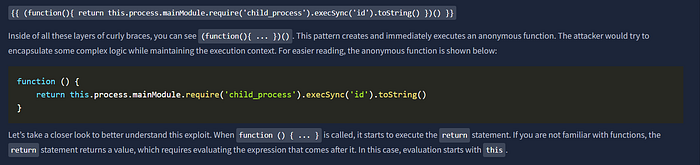
The exploit uses this.process.mainModule. Let's break this down:
thisrefers to the global object in the Node.js execution contextprocessis a Node.js global object providing access to system processesmainModulereferences the root module of the Node.js application
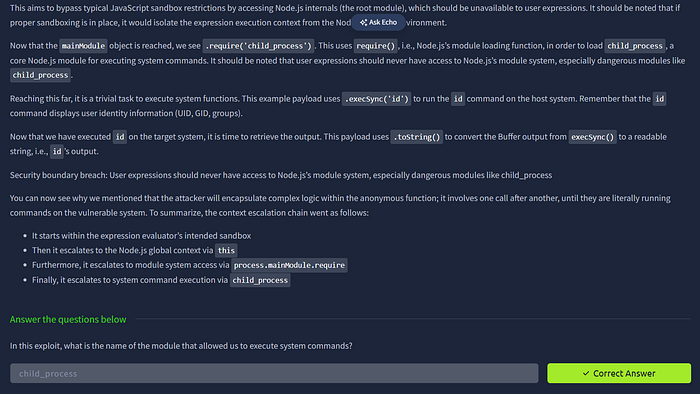
3 — Exploitation
On the AttackBox, use the Firefox web browser to access the vulnerable application by visiting http://MACHINE_IP:5678. To access n8n, please use the following credentials:
- Email:
.........@thm.local - Password:
........!
Now, it is time to exploit it. We will be using the "friendly" exploit from within your browser payload available here.
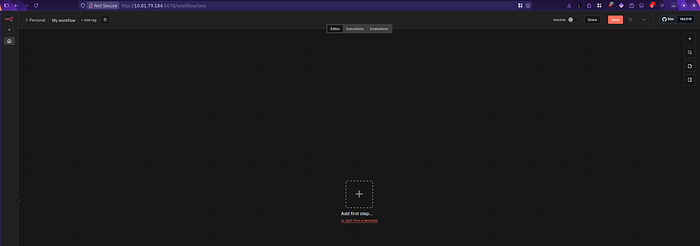
First, you need to start a new workflow. Depending on what you see after logging in, you may need to click "Start from scratch".
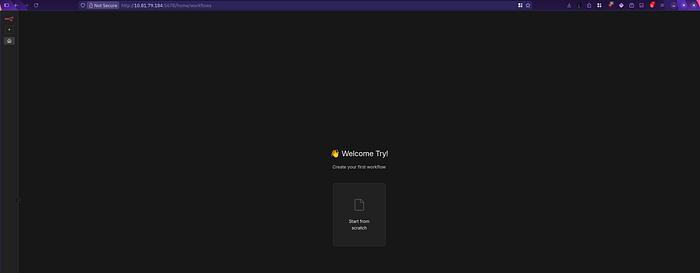
To carry out the outlined instructions in the original PoC, click "Add first step".
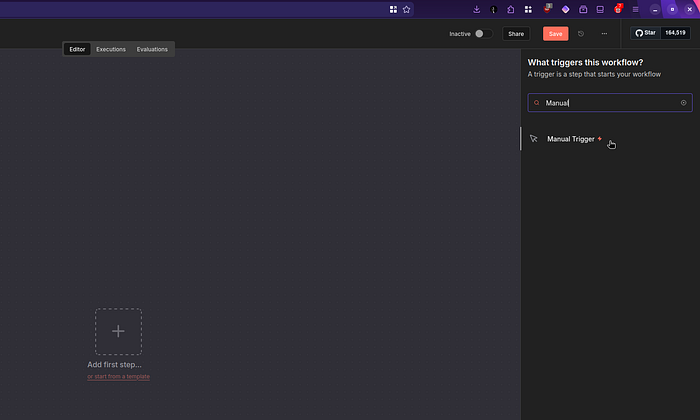
And search for and add Manual Trigger.
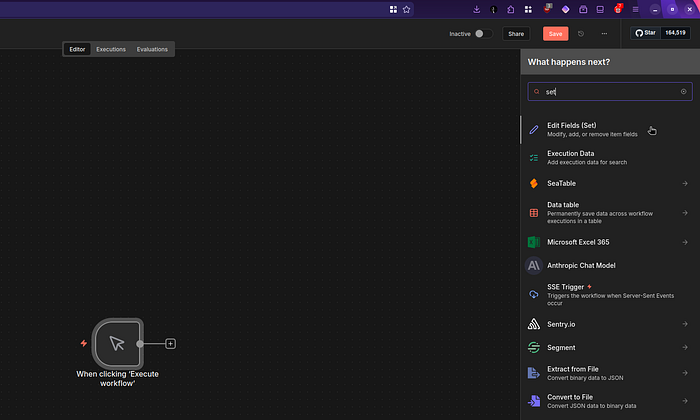
Attached to the Manual Trigger that we just added, add an "Edit Fields (Set)" option.
For the final step, click "Add Field," which will allow you to add a name and a value. Write something like "result" or "exploit" as the name; furthermore, paste the exploit code in the value field. Once you click "Execute step", you will see your command getting executed. In the screenshot below, we can see the output of the id command.
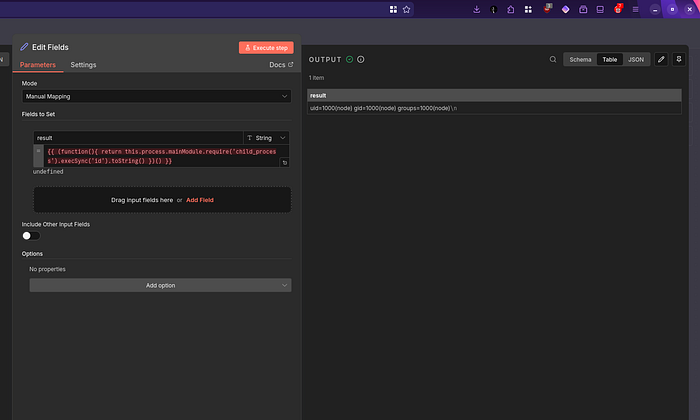
As explained in the previous task, you can replace id with any command of your choice. Identify uid=1000(node) gid=1000(node) groups=1000(node)\n Substitute id by ls and click Execute step . cat flag.txt after you've identified the flag.txt file and click Execute step

4 — Detection
This portion of the room will provide details on how to detect the n8n Expression Injection Remote Code Execution (CVE-2025–68613) within your SIEM or any other detection solution.
Unfortunately, the n8n solution doesn't provide a detailed level of logging to use its logs and detect this attack. If you want to explore their logs further, here is their official log documentation reference.
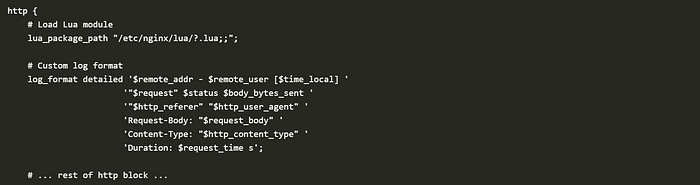
Considering that, the best way to detect this attack is by setting up a proxy solution to manage the requests coming to the n8n application. With that approach, you only need to send these proxy logs to your detection solution and then use the body content of the web requests to spot this exploitation.
Below you can see a sample configuration for nginx to log body content with 'Request-Body: "$request_body" '. Note that this may vary depending on your chosen proxy solution:
Sigma Rule
To detect this vulnerability using Sigma, we can use the following rule:
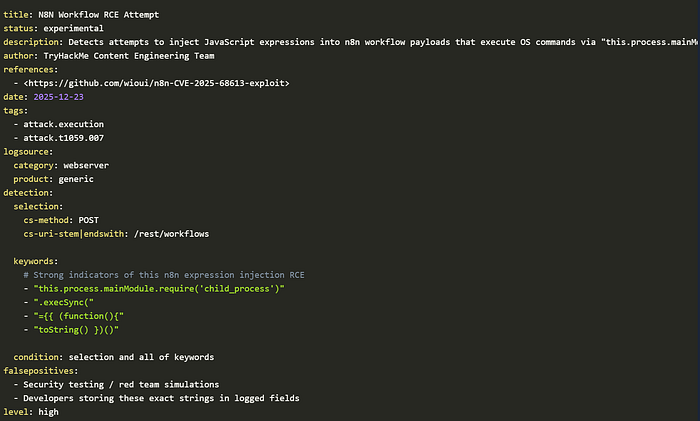
In summary, this Sigma rule does:
- Select only requests to the
/rest/workflowsURI path with the methodPOST. - Search for keywords in the body content related to the CVE-2025–68613 exploitation.
Monitoring Suspicious Command Executions
Beyond the previous Sigma rule, it's critical to continue monitoring process creation events to uncover attacker activity after exploitation.
This is critical, since an attacker who only has a valid n8n credentials can fully abuse this RCE to carry out a wide range of malicious actions, such as:
- Establishing a reverse shell to gain interactive access to the system. (example Sigma rule)
- Downloading and executing malicious payloads to maintain persistence or escalate impact. (example Sigma rule)
- Running reconnaissance commands to enumerate the environment hosting the n8n application. (example Sigma rule)
For this reason, detection should not rely on a single signal. Instead, correlate the web log detection with other process-creation rules to reliably identify post-exploitation behavior associated with this CVE and increase overall detection confidence.
5 — Conclusion
This payload exemplifies why expression evaluation features require extreme caution in application design. The vulnerability isn't just about improper input validation; it's about fundamentally flawed trust boundaries between user-provided code and the application runtime environment.
From a purple team perspective, understanding this exploitation chain helps both offensive teams test for similar vulnerabilities and defensive teams develop more effective detection strategies that focus on context escalation patterns rather than just specific payload signatures.
Finally, remember to upgrade your servers to a patched version.