

Not every bug bounty story starts with a wild hack or some high-stakes drama. Most days, it's a lot more boring than that — just poking around, looking for things that shouldn't be out in the open. Sometimes, it's as simple as a forgotten directory or an endpoint that slipped through the cracks. And every so often, you stumble onto a tiny misconfiguration that's quietly leaking way more than anybody realizes. That's what happened here when a basic recon step turned up an Apache server-status page, completely open and streaming live server data for anyone who cared to look. Honestly, this stuff is way riskier than it seems.
I wasn't doing anything special. Just the usual recon stuff: Check subdomains.
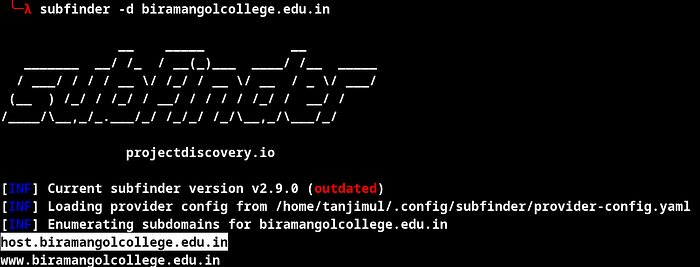
Run some directory scans. Hunt for obvious misconfigurations. No wild exploits, no hammering the server — just slow and steady, eyes open, the kind of digging that brings up the things everyone else misses.
The Discovery
So, I'm clicking through directories, doing my thing, and I spot something familiar: /server-status/

Normally, servers keep this locked down. But I figured, why not check? /server-status?auto
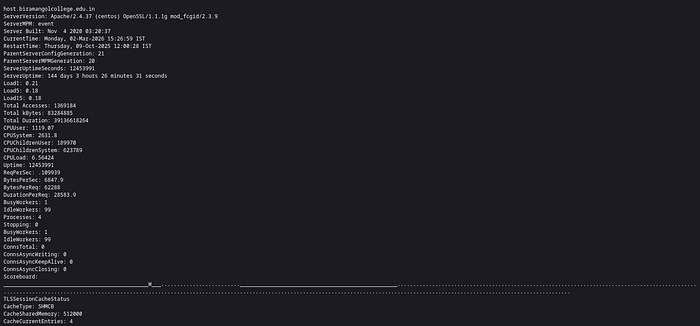
Boom. The whole page loads. No login. No IP filter. Just wide open.
What's Apache Server-Status, Anyway?
It's built for sysadmins. Lets you see what's happening on your server in real time — who's connected, which requests are coming in, how busy each worker is, and even the client IPs. Super useful if you're troubleshooting. But if you leave it open to the internet, you've got a problem.
What Was Exposed — A Closer Look
This public status page was basically an open book, spilling all sorts of sensitive details about the server and what it was up to. Here's what anybody could see:
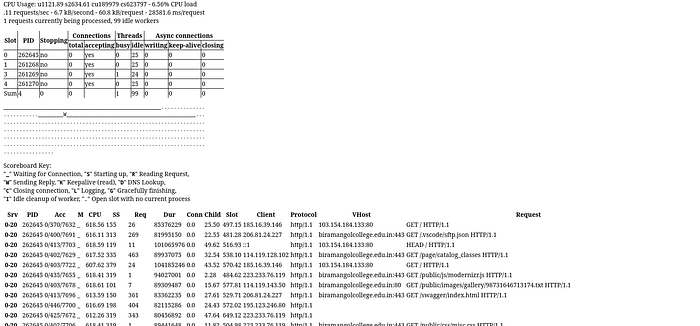
- Full Apache version info, plus client IPs - Exactly which OpenSSL version was in use - All the build settings and server configuration details - A list of every loaded module, including third-party stuff So yeah, this wasn't just a few technical tidbits leaking out. It was a full window into how the server and application ran, who was using it, and what was happening under the hood. Stuff like this makes an attacker's job way easier — now they know exactly what they're working with, and how to hit it.
Same Misconfiguration in Hackerone Program Report Links: https://hackerone.com/reports/1398270
How to Fix It
This is an easy one: lock down the server-status endpoint. Do it like this in Apache:
<Location /server-status> SetHandler server-status Require local </Location>
Or, if you need remote access, allow only specific IPs. And honestly, if you're in production, just turn off mod_status completely. Don't just hope nobody finds it — actually secure it.
Wrapping Up

The biggest bugs aren't always the flashy ones. Sometimes, it's that ancient setting nobody thought about that leaves the biggest hole. Server-status pages get missed all the time. Easy to overlook, quick to fix, but if someone else finds it before you do, you're in trouble.
If you're defending a server, check those default modules. Don't assume they're safe just because they came that way. If you're bug hunting, here's your proof that basic recon still gets results. The basics always work.
So keep digging. Stick to your process. And never ignore the "simple" stuff — because that's where the real trouble hides. If you're into practical bug bounty stories and real-world techniques, stick around. I've got more coming soon. Thanks for reading!