While analyzing the source code, I discovered a hard-coded credential. These credential was used to obtain an access token (token1) from endpoint1. According to the source code flow, token1 was then used to fetch another token (token2) from endpoint2. With token2, it was possible to call third-party API endpoints and retrieve Firebase configuration secrets (token, API key, etc.). From there, I achieved several impacts. One of them was combining the Firebase token with the API key to call Firebase API endpoints and perform authenticated operations.
After deep diving into the Firebase documentation, I found that this combination could be used with the "signInWithCustomToken" operation to obtain an idToken. This idToken could then be leveraged to perform privileged operations, such as deleting Firebase account, updating account settings, and more. Lets walk through the steps :)
Steps
First, While analyzing the source code of a subdomain from the target subdomains, I found a hard-coded credential:
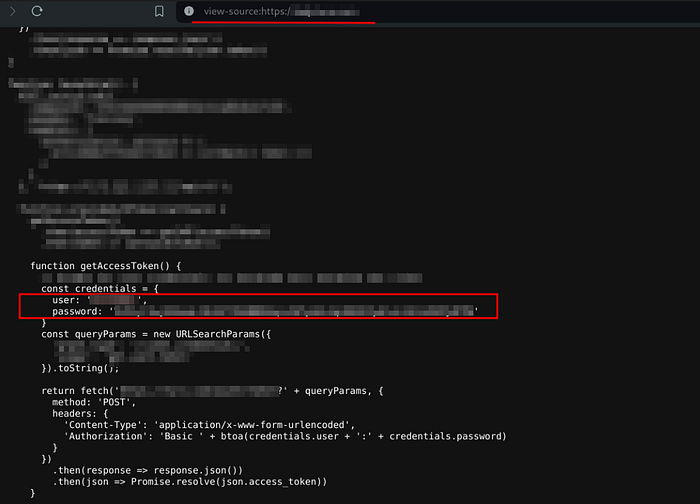
By reviewing the code, I understood how this credential is used with specific parameters to call an API endpoint. Credential was base-64 encoded I then place in Authorization header as mentioned in the code. Like:
Authorization: Basic Base-64-encoded-credential
The final request to access the API endpoint was:
POST /path/to/api/endpoint?param1=param1_value¶m2=param2_value HTTP/2
Host: example.com
Cookie: <allCookiesHere>
User-Agent: Mozilla/5.0 (X11; Linux x86_64; rv:128.0) Gecko/20100101 Firefox/128.0
Accept-Language: en-US,en;q=0.5
Authorization: Basic <Base-64-encoded-credential>I sent the request using Burp Repeater. It returned:
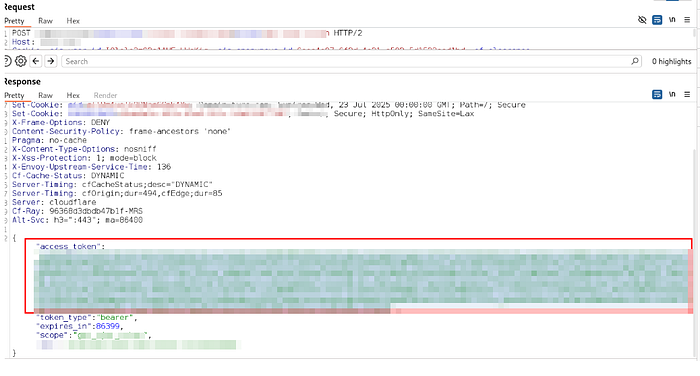
After analyzing the response, it contains an access_token (token1) and the API name that token1 used to call. It's an API of a third party. I searched for how I call that API, and as a result, this token is used to sign in to the third-party API. I prepared the request to sign in and set an access_token in the Authorization header and then sent the request. It returned:

The response contains a token (token2). This token used to do authenticated operations on the API. I used that token to call an interesting API endpoint that contains secrets and configurations. This time, I called the endpoint on a different subdomain, and it still belongs to the same third party. This third party (by the doc), when a customer registers, gives him a subdomain to do authenticated API operations on. I understood how the subdomain was created and guessed it correctly by a format, mentioned in the doc. The format was : "target.api.thirdPatyName.co"
I prepared a request to the interesting endpoint then sent it. It returned:
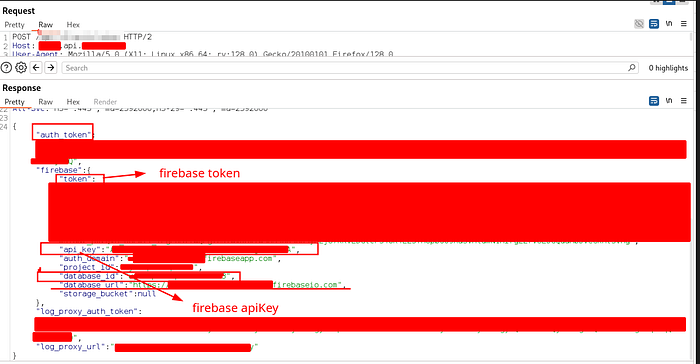
Amazing response, really!! The response contains secrets, including Firebase secrets. After deep research in Firebase docs and trying to access exposed URLs, I realized that I can access Firebase API endpoints using the Firebase token and the API key (together). lets hack more and see what we can achieve!
Exploiting Firebase API Secrets
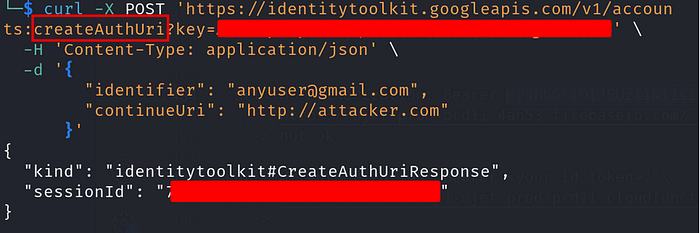
I used the Firebase API key and token to access Firebase API endpoints (identitytoolkit.googleapis.com endpoints). I could do the following operations: lookup/update/createAuthUrl/signInWithCustomToken. There are other operations I didn't test for the program policy, like 'delete' operation, which would delete the Firebase account associated with that idToken. (idToken obtained by token and apikey).
Performing createAuthUri operation:
Some Firebase API operations (like update/delete) required idToken to call them. That idToken obtained by performing an operation (signInWithCustomToken) using a combination of the api_key and the token. I sent the following curl request to obtain idToken:
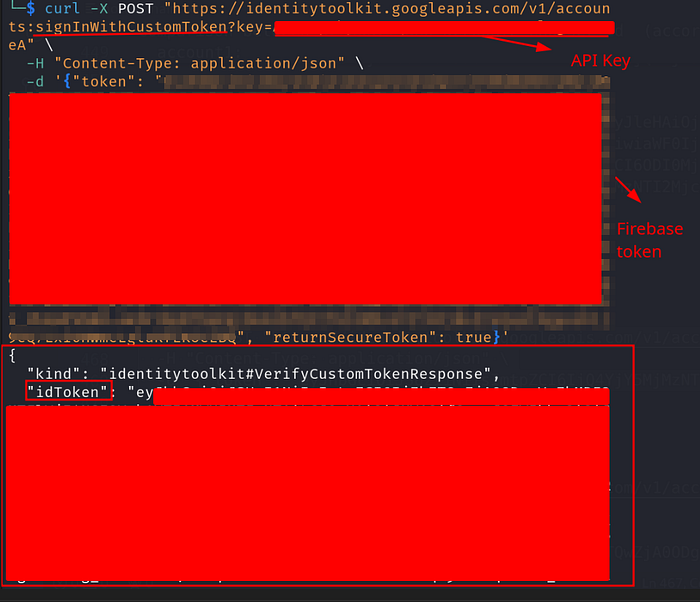
Now, we obtained idToken. Using that idToken, we can do very interesting authenticated operations on Firebase API. This idToken could then be leveraged to perform privileged operations, such as deleting Firebase account, updating account settings, and more.
I used idToken to update the account setting using "update" operation without changing important data, just as a PoC:
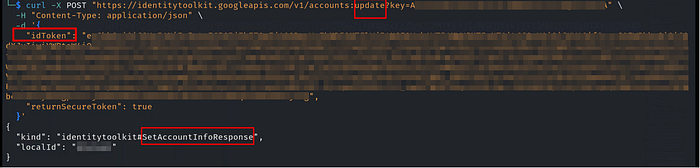
This response confirms that Update operation is working. So, we can do authenticated operations on Firebase API.
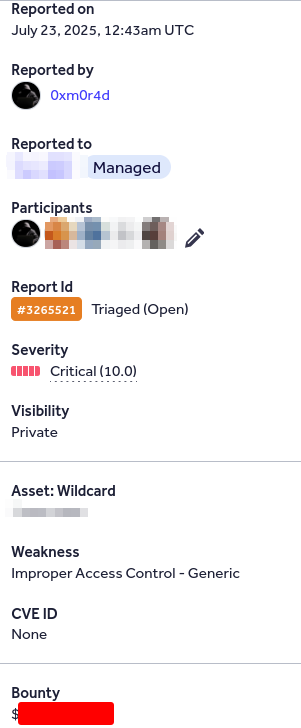
Delete Operation On Firebase API. Delete operation can be used to permanently delete a Firebase user account. If exploited by an attacker, it could permanently disrupt the Firebase project, including its database service (Here, The project includes a database service) and lead to loss of critical data linked to the account. I did not perform this action as a PoC to avoid impacting the project's availability. This is the most valuable impact point
Impact
- An attacker can permanently disrupt the Firebase project by deleting the associated Firebase account. If exploited by an attacker, it could permanently disrupt the Firebase project, including its database service and lead to loss of critical data linked to the account.
- Unauthorized API Interaction: An attacker can call Firebase API endpoints using the exposed API key or token to perform unauthorized operations, such as
Update,lookup, andcreateAuthUri - Account Metadata Manipulation: An attacker can access or modify sensitive user account metadata, including display names and profile information.
I hope you enjoyed this article and found it helpful!
Happy hacking :)
My linkedIn profile: https://www.linkedin.com/in/mohamed-m-mourad/