

As you can see below this challenge is an easy web challenge with 620 solves and 100 points as a reward for solving this challenge

This Challenge wants us to find the (hidden) admin dashboard
Once you enter the given website you will see this page:
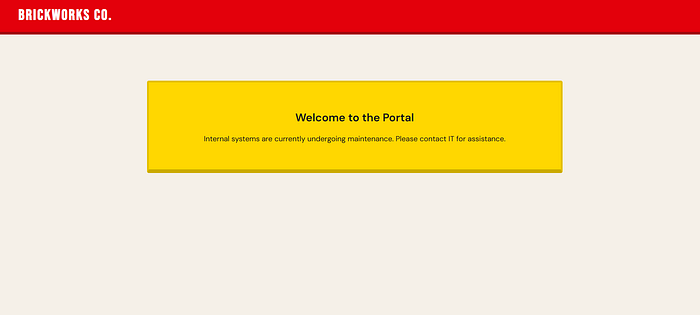
To Save your time there is not anything in the source code
So, We will head to one of the most common files attackers look in which is robots.txt
But first, what is robots.txt:
- robots.txt is a simple text file which tells the bots or search engines which pages or sections they are allowed to visit and which they shouldn't
- It is placed in the root directory of the website so bots or search engines can find it fast
Second ,What is its use:
- robots.txt is used to prevent search engines and bots from crawling to specified pages
Third,What is written inside it:
- User-agent → Which specify for whom these instructions are (*) for everyone
- Allow → Which tells the bots or search engines (that specified by the user agent line) what pages they are allowed to crawl or visit
- Disallow → Which tells the bots or search engines what pages they are not allowed to crawl or visit
But, Why do attackers targets it:
Althought this file is made for bots ,Attackers target it because it may contain:
- Direct acces to high value Pages : Pages that contain Dissallow acts as an hit list for attackers because it may contain the 'admin dashboard'
- Discovery of sensitive data : Admins often mistakenly use the file to hide sensitive assets. Attackers look for directives like
Disallow: /backup/orDisallow: /config/to find database dumps, or configuration files that might contain API keys and credentials
Now after adding the /robots.txt to the URL you will get this page:
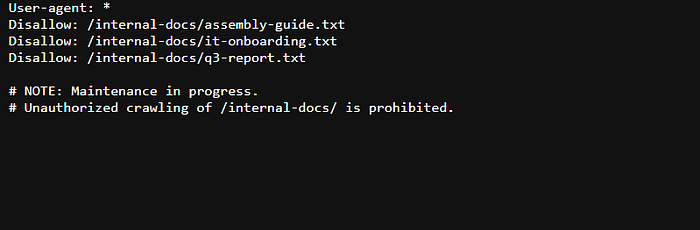
To save your time ,The really useful line was that one (you can check the other pages but this was the most useful):
Disallow: /internal-docs/it-onboarding.txtAfter removing /robots.txt and then adding "/internal-docs/it-onboarding.txt" To the URL you will see this page:
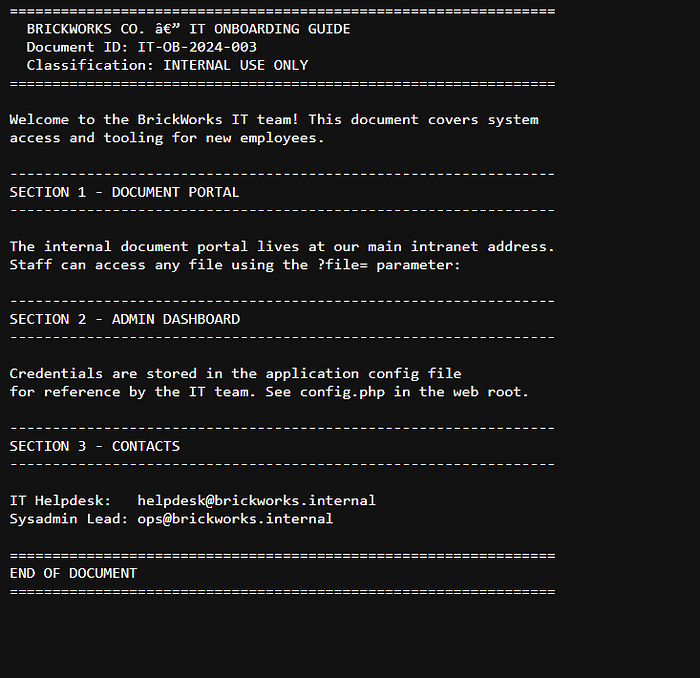
The two section that got my eye were:
----------------------------------------------------------------
SECTION 1 - DOCUMENT PORTAL
----------------------------------------------------------------

The internal document portal lives at our main intranet address.
Staff can access any file using the ?file= parameter:

----------------------------------------------------------------
SECTION 2 - ADMIN DASHBOARD
----------------------------------------------------------------

Credentials are stored in the application config file
for reference by the IT team. See config.php in the web root.
Lets analyze them:
- Important lines in Section 1:
?file= parameter → its like getting a higher privileges (as i think about it)
2. Important things in Section 2:
- Credentials are stored in the application config file for reference by the IT team. See config.php in the web root.
This is the most important one ;Which tells us where are the Credentials and where to write the file given which is the ' / '
If you tried to enter the /config.php file you will get a null page
Instead,you should append to the URL :
"/?file=/config.php" This displays the page(grants you higher privileges as i think) You would see this page :
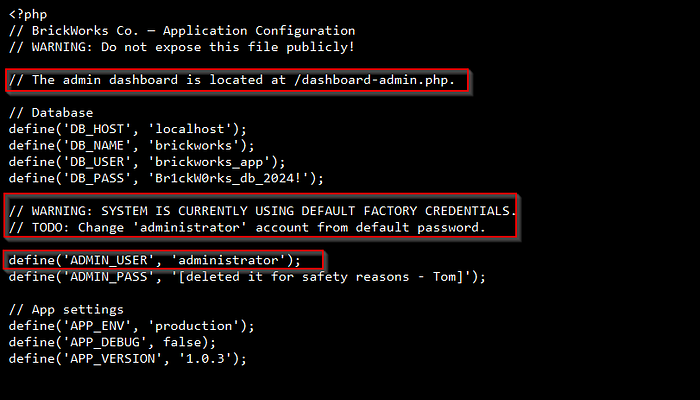
The most important lines that caught my eyes were:
- "// The admin dashboard is located at /dashboard-admin.php."(Which tells us the exact location for the admin dashboard)
- "// WARNING: SYSTEM IS CURRENTLY USING DEFAULT FACTORY CREDENTIALS " (which means that the password is the as same as the username as i thought about it)
- "// TODO: Change 'administrator' account from default password." (Which means that the administrator account uses the default password)
- "define('ADMIN_USER', 'administrator');" (which confirms the admin username)
Now you can get the flag by two ways .
First way :
By adding "/?file=dashboard-admin.php"(you would see this image)
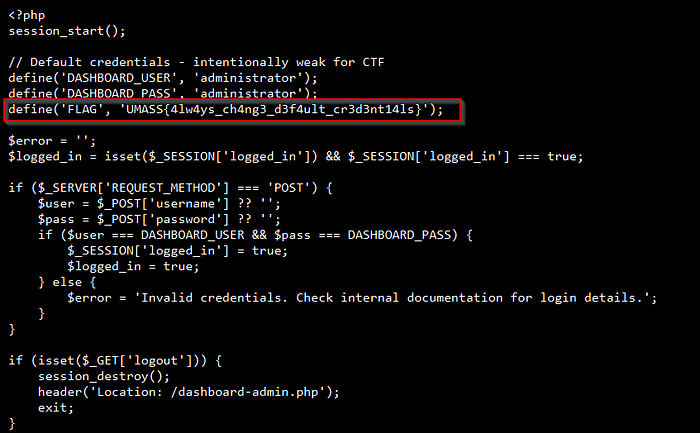
And Congrats 🎉 You have got the flag which is "UMASS{4lw4ys_ch4ng3_d3f4ult_cr3d3nt14ls}"
Second way:
By adding "/dashboard-admin.php" Directly to the URL , You would see This page:
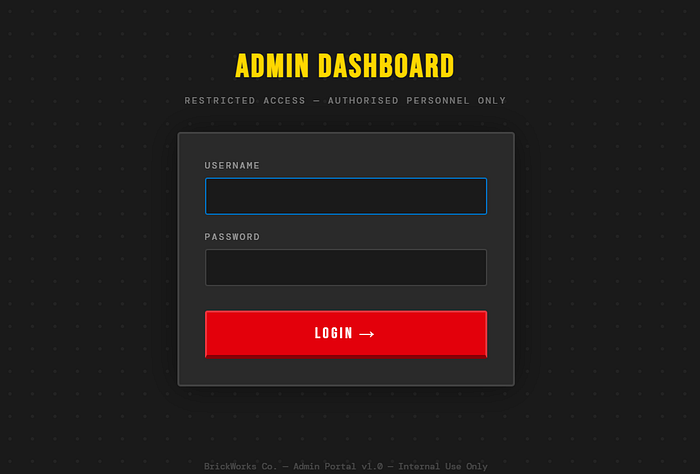
now write the credentials you had which is:
- User → administrator
- Password → administrator
You would get this page:
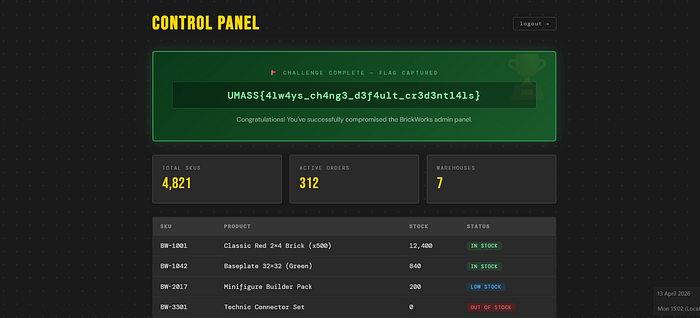
And Congrats 🥳 You have got the flag which is "UMASS{4lw4ys_ch4ng3_d3f4ult_cr3d3nt14ls}"
What i learned:
- Never put sensitive information in the robots.txt like the 'admin dashboard'
- Always use strong password to protect yourself and change the factory default password
What is the impact of that:
- People can easily modify orders or even exploit these websites
- Anyone could modify the web settings and look at the orders and stocks and modify them as he want (which could lead to big loss for the company)
This was all Wish you all understood.
This write-up is made by: 0xC0MPL3X
(From Team N!ghtM4re)