
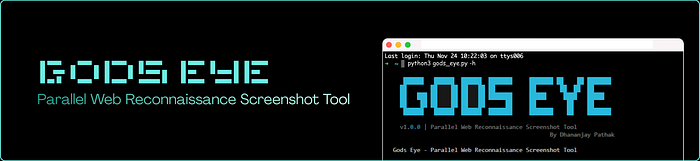
Description:
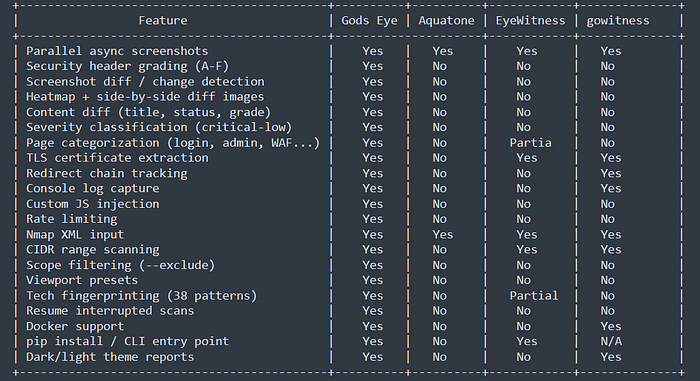
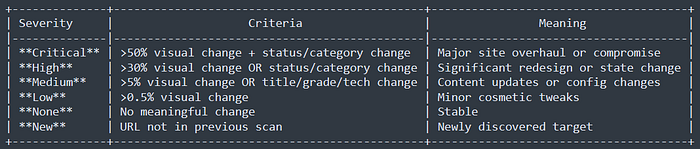
In the world of bug bounty hunting and penetration testing, reconnaissance is everything. Tools like Aquatone, EyeWitness, and gowitness help capture screenshots of subdomains — but that's where they stop. Gods Eye picks up where they leave off. It's a single-file Python tool that captures parallel screenshots using a headless browser, while simultaneously grading security headers (A-F), extracting TLS certificates, tracking full redirect chains, categorizing pages (login panels, admin pages, WAFs, APIs, error pages), capturing cookies and console logs, and even injecting custom JavaScript. Need to detect if a target has changed since your last scan? Gods Eye's built-in screenshot diff engine generates heatmap overlays and side-by-side comparisons with severity classification (critical/high/medium/low). Everything is packaged into a stunning dark-themed interactive HTML report with search, filtering, sorting, lightbox zoom, and per-target info popups. One file. 21 features. Zero dependencies beyond three Python packages. Built by Dhananjay Pathak for the security community.
What It Does
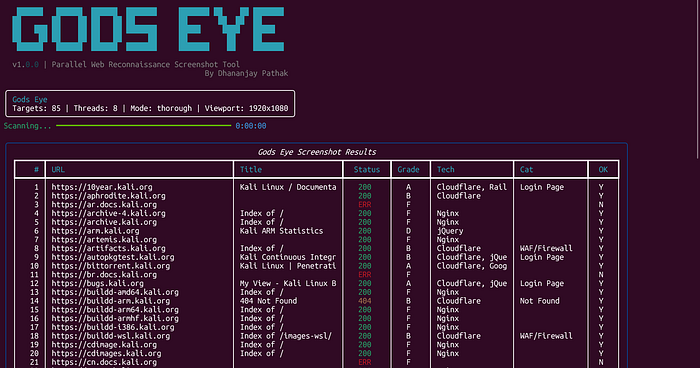
Gods Eye takes a list of URLs/subdomains and captures screenshots in parallel using a headless browser, while collecting deep reconnaissance data — security headers, TLS certificates, redirect chains, page categorization, cookies, console logs, and more. It generates a beautiful dark-themed interactive HTML report.
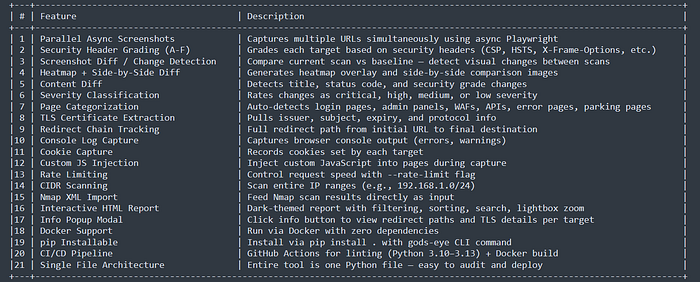
Key Features
Comparison Table
Installation
- pip install
git clone https://github.com/recon-pro/gods_eye.git
cd gods_eye
pip install .
gods-eye --help
2. Direct run
pip install playwright rich Pillow
playwright install chromium
python gods_eye.py --help
3. Docker
docker build -t gods-eye .
docker run -v $(pwd)/output:/output gods-eye -f /output/urls.txt -o /output/scan
Usage Examples
# Basic scan from file
gods-eye -f subdomains.txt -o scan_results

# Single URL
gods-eye -u https://example.com -o scan_results

# With rate limiting
gods-eye -f urls.txt -o results --rate-limit 0.5

# Screenshot diff against baseline
gods-eye -f urls.txt -o results --diff baseline_scan/

# Custom JS injection
gods-eye -f urls.txt -o results --js "document.body.style.background='red'"

# CIDR range scan
gods-eye -u 192.168.1.0/24 -o results

# Nmap XML input
gods-eye --nmap scan.xml -o results
Tech Stack
Playwright - Headless Chromium browser automation
Rich - Beautiful terminal output (progress bars, tables, panels)
Pillow (PIL) - Screenshot diff engine (block-based comparison, heatmap generation)
asyncio - Parallel async execution
Python 3.10+ - Modern Python with type hints
Output Structure
scan_results/
├── screenshots/          # PNG screenshots per URL
├── diffs/                # Diff images (heatmap + side-by-side)
├── report.html           # Interactive HTML report
├── results.json          # Machine-readable JSON data
└── console_logs.json     # Browser console output
Diff Severity Levels
Disclaimer
This tool is for authorized security testing and educational purposes only. The developers assume no liability and are not responsible for any misuse or damage caused by this program. Always obtain proper authorization before scanning systems you don't own.
If you enjoyed this write-up and found it useful, don't forget to follow me on Twitter! You can reach out to me anytime; just drop me a DM. 😊
Thanks for reading! 🙌 Stay safe, and keep hacking ethically! 💻