Authentication systems are designed to protect user accounts. However, small implementation mistakes can unintentionally reveal sensitive information that attackers can exploit.
While practicing a hands-on lab on the PortSwigger Web Security Academy, I encountered a scenario that demonstrated how a simple difference in login error messages can expose valid usernames and eventually lead to account compromise.
Using Burp Suite, I was able to identify a valid username and successfully brute-force the correct password by analyzing how the application responded to login attempts.
This article explains how the vulnerability works, how the lab was solved, and what developers can do to prevent it.
The Problem: Information Disclosure During Login
Many web applications return different error messages depending on what went wrong during authentication.
For example:
- Invalid username — when the username does not exist
- Incorrect password — when the username exists, but the password is wrong
At first glance, this might seem helpful for users trying to log in. However, from a security perspective, this behavior creates a vulnerability known as username enumeration.
When attackers can determine which usernames exist in the system, they can narrow their focus and launch targeted password attacks against those accounts.
Lab Environment
The lab simulated a typical login form with a backend authentication system. My objective was to gain access to a user account by analyzing the login mechanism.
The primary tool used in this exercise was:
- Burp Suite — a web security testing platform used to intercept and manipulate HTTP requests.
Burp Suite allows testers to inspect how applications process input and how servers respond to various requests.
Step 1: Intercepting the Login Request
The first step was to attempt a login using invalid credentials while the traffic was being intercepted through Burp Suite.
After submitting the login form, I navigated to the HTTP History tab and located the captured request:
POST /login
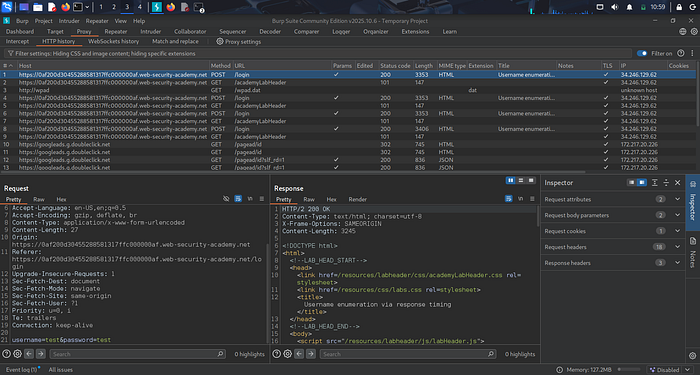
The request contained parameters similar to:
username=invalid-user
password=test
This request was then sent to Burp Intruder, which is used to automate attacks by sending multiple payloads to a target parameter.
Step 2: Enumerating a Valid Username
In Burp Intruder, I configured a Sniper attack targeting the username parameter.
The request looked like this:
username=§candidate-username§
password=test
Next, I loaded a list of potential usernames and launched the attack.
Once the requests were completed, I analyzed the responses. Most responses returned the message:
Invalid username
However, one response returned:
Incorrect password
This difference revealed that the username in that request actually existed in the system.
The application had unintentionally disclosed a valid account.
Step 3: Brute-Forcing the Password
After identifying the valid username, I modified the attack to target the password parameter.
The request structure was updated to:
username=identified-user
password=§candidate-password§
I then loaded a list of possible passwords and started the attack.
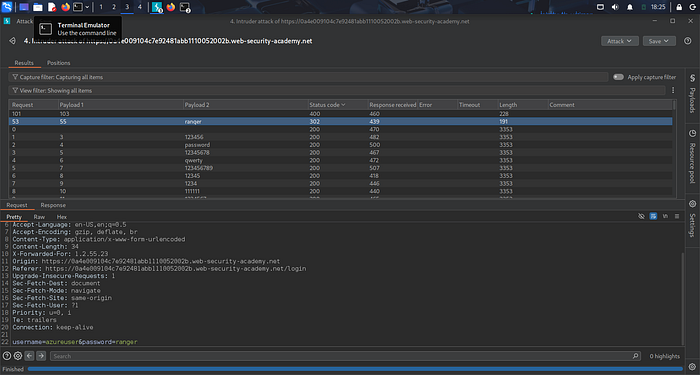
When reviewing the responses, I focused on the HTTP status codes.
Most responses returned:
200 OK
But one request returned:
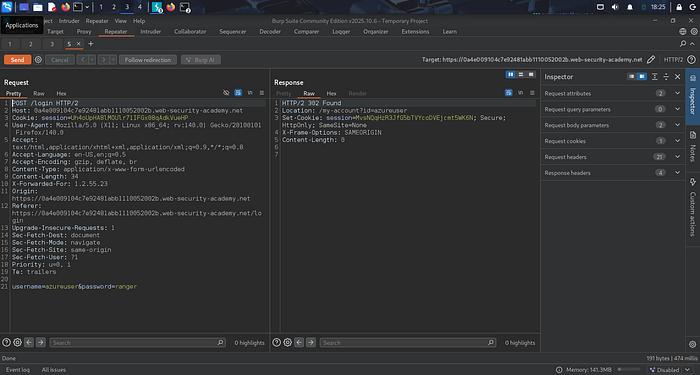
302 Redirect
This redirect indicated that the authentication was successful.
Using the discovered credentials, I logged in and accessed the user account page, successfully completing the lab.
Why This Vulnerability Matters
Username enumeration significantly reduces the effort required to compromise accounts.
Instead of guessing both usernames and passwords simultaneously, attackers can first identify valid usernames and then perform password attacks against those specific accounts.
This dramatically increases the likelihood of successful account takeover attacks.
Security Recommendations
Developers can mitigate this vulnerability by implementing several security best practices.
1. Use Generic Authentication Responses
Applications should avoid revealing whether a username exists.
Instead of returning different messages, such as:
- Invalid username
- Incorrect password
The application should respond with a generic message such as:
Invalid username or password
This prevents attackers from determining whether an account exists.
2. Implement Rate Limiting
Rate limiting restricts the number of login attempts that can be made within a specific period, making automated attacks more difficult.
3. Add Account Lockout Mechanisms
After multiple failed login attempts, accounts should be temporarily locked to prevent brute-force attacks.
4. Enable Multi-Factor Authentication (MFA)
Even if an attacker successfully guesses the correct credentials, MFA provides an additional security layer that helps prevent unauthorized access.
Key Takeaway
Some of the most impactful vulnerabilities are not advanced exploits but small design flaws in authentication systems.
Through hands-on labs and security testing, it becomes clear how seemingly minor implementation choices can create real security risks.
Understanding these weaknesses is essential for both security professionals and developers who want to build resilient and secure applications.