1. What it is (very simple definition)
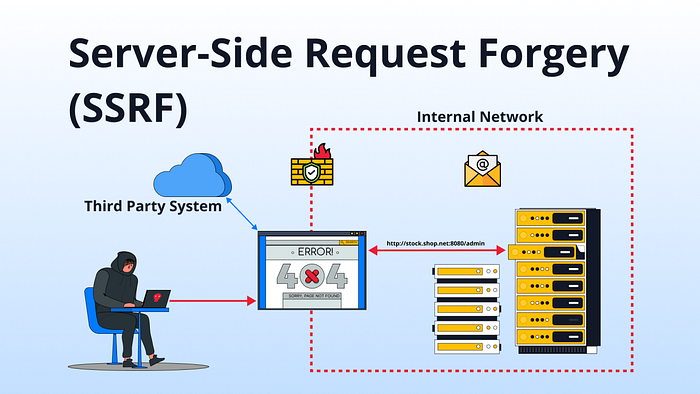
SSRF is a flaw where a website's server is tricked into making a request on behalf of an attacker.
Instead of your browser contacting a server, the server itself becomes the attacker's browser.
2. Why it exists (what problem it was created to solve)
SSRF exists because modern applications need servers to fetch data from other locations.
Common legitimate use cases:
- Load an image from a URL
- Fetch a webhook
- Preview a link
- Call an internal microservice
- Pull cloud metadata
- Validate external APIs
SSRF is not intentional — it appears when developers trust user-supplied URLs too much.
3. How it works (step-by-step)
- You open a website in your browser
- You submit a URL (image, webhook, callback)
- The server fetches that URL
- The server sends you the result
SSRF Flow
- You submit a crafted URL instead of a normal one
- The server does not validate it properly
- The server makes a request to:
- Internal services
- Localhost
- Cloud metadata
- Private network IPs
4. The response leaks back to you (directly or indirectly)
Key shift: 👉 The attacker never touches the internal network 👉 The server attacks itself
4. Simple examples (easy to imagine)
Example 1: Image Fetcher
A website allows:
https://site.com/fetch?url=https://example.com/image.pngAttacker changes it to:
http://localhost:8080/adminResult:
- The server loads its own admin panel
- You see internal data you should never access
Example 2: URL Preview Feature
A chat app previews links.
Normal:
https://news.com/articleAttacker sends:
http://127.0.0.1:3306Result:
- The server probes its own database port
- You learn which services are running internally
5. Real-world example (modern app / API)
Cloud Metadata Theft (Very Common)
Many cloud providers expose metadata services at:
http://169.254.169.254/If an app allows:
POST /fetch
{ "url": "http://example.com" }
Attacker sends:
http://169.254.169.254/latest/meta-data/iam/security-credentials/Result:
- The server fetches cloud credentials
- An attacker steals API keys
- Full cloud compromise possible
This is one of the most severe SSRF outcomes.
6. What can go wrong (misconfigurations)
SSRF happens when developers:
- Trust user input URLs
- Allow arbitrary protocols (
http,file,gopher) - Fail to block private IP ranges
- Don't restrict redirects
- Use URL fetchers without allowlists
- Expose internal services without authentication
SSRF is almost always a validation failure, not a logic failure.
7. How attackers abuse it (basic → advanced)
Basic Abuse
- Access
localhost - Scan open internal ports
- Read internal admin panels
Intermediate Abuse
- Access cloud metadata
- Enumerate internal APIs
- Bypass firewalls
- Pivot into microservices
Advanced Abuse
- Extract cloud IAM credentials
- Chain SSRF → RCE
- Abuse
gopher://for raw socket payloads - Use DNS rebinding
- Blind SSRF with out-of-band callbacks
- SSRF → internal auth bypass
At advanced levels, SSRF becomes an internal network foothold.
8. Where and how to test it manually in VAPT
Where to Look
Focus on inputs that accept:
- URLs
- IPs
- Domains
- Webhooks
- Callback URLs
- File import/export
- Image loaders
- PDF generators
- API integrations
Typical parameters:
url=
link=
redirect=
callback=
next=
webhook=
How to Test (Manual)
- Replace the URL
2. Test internal IP ranges
10.x.x.x172.16.x.x192.168.x.x
3. Test cloud metadata
4. Observe behavior
- Response changes
- Time delays
- Error messages
- DNS callbacks (blind SSRF)
5. Check redirects
- External URL → internal redirect
Never assume SSRF must return data directly. Blind SSRF is extremely common.
9. Common beginner misunderstandings & false positives
❌ Misunderstanding 1: "No response = no SSRF"
False. SSRF is often blind.
❌ Misunderstanding 2: "Only URL parameters matter."
False. SSRF appears in:
- Headers
- JSON bodies
- XML
- File uploads
- Redirect logic
❌ Misunderstanding 3: "403 means blocked."
Not always. The request may still hit the internal service.
❌ False Positive Example
If:
- The request never leaves your browser
- The server never makes an outbound call. then it is not SSRF, just client-side behavior.
SSRF always involves a server-side request.
Executive Summary (Mental Model)
- SSRF = The server becomes the attacker
- Root cause = Untrusted URL input
- Impact = Internal network exposure
- Severity = High → Critical
- Skill ceiling = Extremely high
If you want, next we can go deep dive into the following:
- Blind SSRF detection techniques
- SSRF → RCE chains
- SSRF in modern cloud & Kubernetes
- SSRF bypass techniques used in real bug bounties
Just say the direction.
Useful Links:
learn = https://owasp.org/www-community/attacks/Server_Side_Request_Forgery
lab = https://portswigger.net/web-security/ssrf
scripts = https://hacking-tools-scripts.binaryshield.in/#ssrf-scanner