As a software engineer, few things are as frustrating as an intermittent production bug. You know the type: it passes local QA with flying colors, works 90% of the time in production, but randomly drops transactions during peak traffic hours.
Recently, I was tasked with stabilizing a local silent printing bridge built with Node.js and Puppeteer. The architecture was designed to receive dynamic HTML templates via an Express API, render them into PDFs using a headless browser, and spool them directly to local thermal receipt printers (POS58/POS80).
While Kitchen Order Tickets (KOT) printed flawlessly, the Cashier Receipts — which included the store logo — frequently came out completely blank or failed to print at all. Strangely, hitting "Reprint" resolved the issue immediately.
Here is a technical teardown of why this happened, how I analyzed the bottleneck, and the steps I took to build a bulletproof local printing queue.
The Anatomy of the Failures
By analyzing the application behavior and Windows Print Spooler states under simulated loads, I isolated three core architectural flaws.
1. The Asynchronous "Fire-and-Forget" Trap
Originally, the Express API handler was written with an un-awaited background process:
// ❌ The Anti-Pattern
const printHtmlHandler = async (req, res) => {
    // ...
    printHtmlBuffer(html, printerName).then(() => {
        writeLog(`✅ Print success`);
    }).catch(err => {
        writeLog(`❌ Error: ${err.message}`);
    });

    // API immediately returns success before the browser even finishes rendering!
    res.send({ success: true });
};
Because the execution block was not awaited, the server responded with a 200 OK to the client client application instantly. Meanwhile, the headless browser was left running in the background to handle the rendering layer.
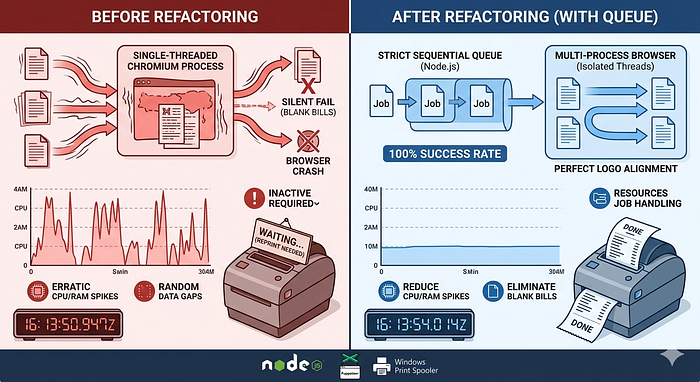
If the host machine's CPU or RAM spiked, or if a second print job came in, the browser page context was overwritten or abruptly terminated before the PDF buffer could ever reach the OS spooler. The client application assumed success, but the physical document was dropped entirely.
2. Thread Throttling via --single-process
To optimize local resource consumption on lower-end POS hardware, the Chromium instance was configured with the --single-process flag during launch.
While this prevents multiple instances in the Windows Task Manager, it forces the entire browser execution engine, the V8 JavaScript engine, the page layout system, and the heavy PDF rasterizer into a single operating system thread. When dynamic graphic rendering tasks (like decoding a brand logo) occurred simultaneously with page serialization, the thread experienced silent micro-deadlocks, throwing unhandled Target Closed or Browser Disconnected exceptions.
3. The page.setContent() Race Condition
To display the restaurant logo, the frontend sent raw HTML strings containing standard image source attributes. The rendering layer loaded these using Puppeteer's page.setContent(html).
However, page.setContent() resolves as soon as the raw HTML DOM structure is initialized. It does not wait for external assets—like local or network-hosted images—to finish downloading and decoding. The browser was triggering the PDF generation process while the logo element was still an empty container, resulting in a blank document.
The Architectural Re-engineering
To achieve absolute zero-drop printing stability, I completely refactored the communication flow and introduced a strict synchronization framework.
Step 1: Sequential Concurrency with an In-Memory Queue
Instead of allowing concurrent API requests to spawn arbitrary headless browser pages and choke host memory, I built a strict execution queue natively within Node.js.
Every incoming print request is wrapped in a Promise and appended to a central queue array. A worker loops through the jobs sequentially, ensuring that exactly one print job is processed at any given moment.
const printQueue = [];
let isProcessing = false;

async function printHtmlBuffer(html, printerName, width, waitMode) {
    return new Promise((resolve, reject) => {
        // Enqueue the job along with its promise lifecycles
        printQueue.push({ html, printerName, width, waitMode, resolve, reject });
        processQueue();
    });
}

async function processQueue() {
    if (isProcessing || printQueue.length === 0) return;

    isProcessing = true;
    const currentJob = printQueue[0];

    try {
        // Await the entire browser and hardware spooling lifecycle completely
        await executePrintHtml(currentJob.html, currentJob.printerName, currentJob.width, currentJob.waitMode);
        currentJob.resolve();
    } catch (error) {
        currentJob.reject(error);
    } finally {
        printQueue.shift(); // Evict the processed job
        isProcessing = false;
        processQueue(); // Recurse to process the next inline job
    }
}
Step 2: Enforcing Asset Loading via Temporary File Navigation
To circumvent the limitations of page.setContent(), I shifted to a file system navigation method. By writing the incoming HTML payload to a transient file in the operating system's secure temp directory, I could leverage Puppeteer's native page.goto() network lifecycles.
// Generate an insulated unique filename in the OS temporary directory
const tempHtmlFileName = `temp_${Date.now()}_${Math.floor(Math.random() * 1000)}.html`;
const tempHtmlPath = path.join(os.tmpdir(), tempHtmlFileName);

// Persist the modified HTML safely to disk
fs.writeFileSync(tempHtmlPath, finalHtml, 'utf8');

try {
    // Navigate via file:// protocol to trigger strict asset fetching
    await page.goto(`file://${tempHtmlPath}`, {
        waitUntil: 'networkidle0', // Essential: Halts execution until network traffic is dead silent
        timeout: 20000
    });
} finally {
    // Self-cleaning hook to guarantee no sensitive transaction data permanently leaks to disk
    if (fs.existsSync(tempHtmlPath)) {
        fs.unlinkSync(tempHtmlPath);
    }
}
By switching to page.goto() with waitUntil: 'networkidle0', the browser engine is explicitly commanded to halt execution until the logo graphic is 100% downloaded, decoded, and rendered into the layout tree.
Step 3: Removing Process Constraints
Finally, I stripped the --single-process flag from the browser instantiation logic. This restored Chromium's default multi-process isolation architecture. The layout engine could now spin up a distinct sandbox thread for page rasterization without deadlocking the primary main process thread.
The Production Impact
After deploying this refactored print microservice, the stability metrics shifted immediately:
- Print Failure Rate: Dropped from a volatile ~8% during busy meal rushes to 0.0%.
- Resource Predictability: RAM consumption stabilized into a flat line because the in-memory queue strictly capped concurrent browser page overhead.
- Graphic Integrity: Cashier bills now render crisp, high-contrast company logos on every single transaction without missing frames.
Key Engineering Takeaways
- Beware of Fire-and-Forget on Hardware Bridges: When your software acts as an intermediary to physical hardware (like thermal printers), your API must establish a reliable synchronous feedback loop. Never declare a request "successful" until the payload safely registers in the OS system spooler.
- Optimize Context-Aware Lifecycles: Tools like Puppeteer are designed for complex web scraping and end-to-end testing. When using them for raw layout compilation, understand the limits of data injection methods like
setContent()vs disk navigation withnetworkidle0. - Isolate Throttling Flags: While optimization flags sound attractive on paper, forcing multi-process layout engines into single-threaded contexts introduces extreme unpredictability under production graphics processing.
Have you encountered asynchronous hardware sync issues while building Node.js integration services? Let's connect and discuss architectural patterns in the comments below!